
Introduction
This manual provides essential information for the safe and efficient operation of your Altera Maresca Foldable Electric Treadmill. Please read it thoroughly before assembly and first use, and keep it for future reference. Proper use and maintenance will ensure the longevity and optimal performance of your equipment.
Important Safety Information
To reduce the risk of serious injury, always follow basic precautions when using this treadmill. Read all instructions before use.
- Consult a physician before starting any exercise program, especially if you have pre-existing health conditions.
- Keep children and pets away from the treadmill during operation.
- Place the treadmill on a solid, level surface with at least 2 meters (6.5 feet) of clear space behind it and 0.6 meters (2 feet) on each side.
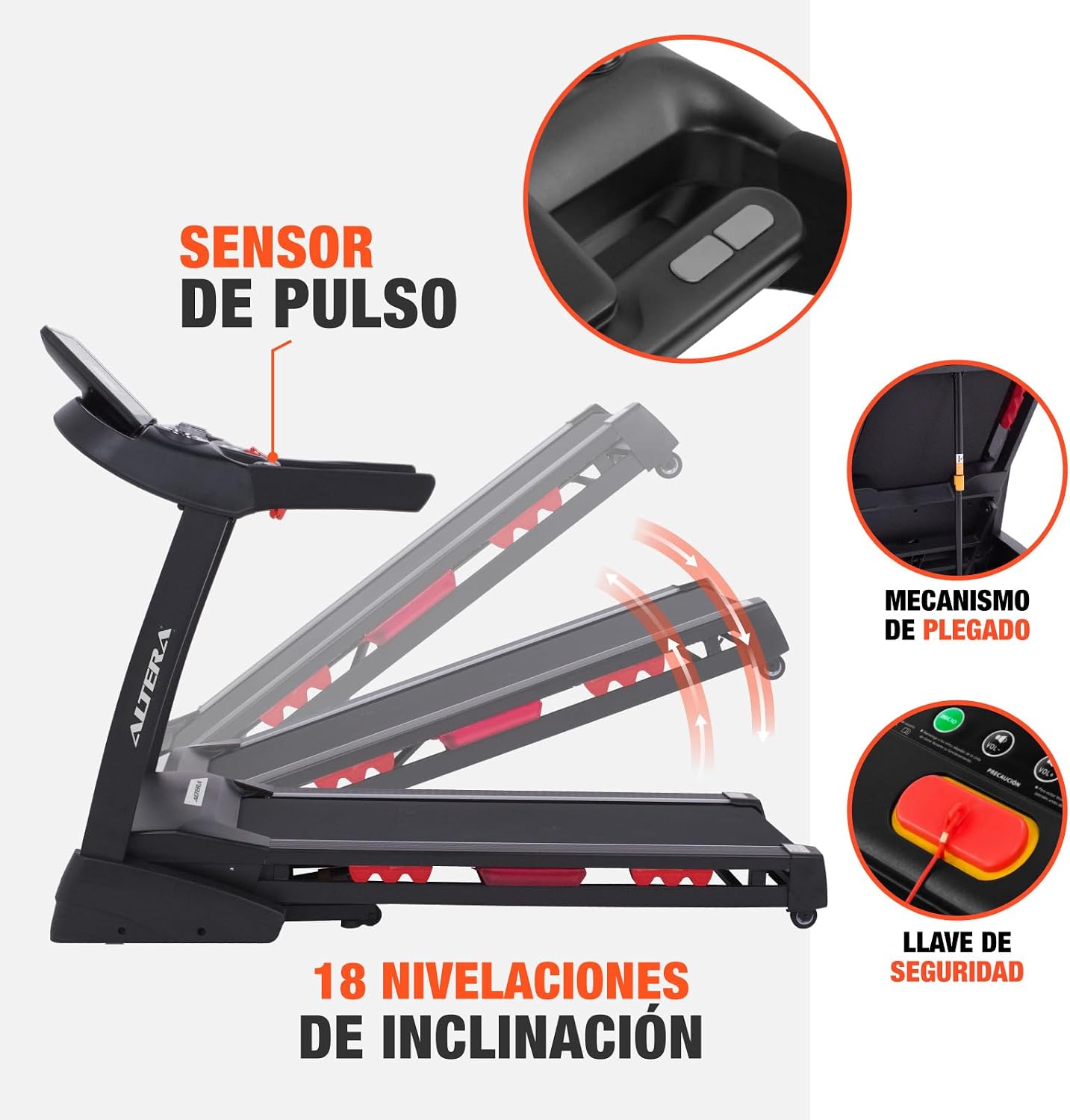
- Ensure the safety key is properly attached to both the console and your clothing before starting. The treadmill will stop if the safety key is disengaged.
- Do not exceed the maximum user weight capacity of 150 kg (330 lbs).
- Wear appropriate athletic footwear and clothing. Avoid loose clothing that could get caught in moving parts.
- Do not operate the treadmill if it has a damaged cord or plug, or if it is not working properly.
- Unplug the treadmill from the power outlet when not in use, before cleaning, and before performing any maintenance.
- This treadmill is designed for indoor use only. Do not expose it to water or excessive humidity.
Package Contents
Before beginning assembly, carefully unpack all components and verify that all parts are present and undamaged. Refer to the assembly diagrams in the separate assembly guide (if provided) or the included components list. If any parts are missing or damaged, please contact customer service immediately.
Setup and Assembly
The Altera Maresca Treadmill requires assembly. Follow these general steps. For detailed instructions, please refer to the dedicated assembly manual.
- Unpack Components: Carefully remove all parts from the packaging and lay them out on a clean, flat surface.
- Attach Uprights: Secure the upright support frames to the base of the treadmill using the provided hardware.
- Install Console: Mount the control console onto the top of the uprights, ensuring all electrical cables are properly connected and secured.
- Secure All Fasteners: Double-check that all bolts, screws, and nuts are tightened securely.
- Position Treadmill: Move the assembled treadmill to its intended location, ensuring adequate clearance around the unit.


Operating Instructions
Control Panel Overview

The control panel features an LCD display and various buttons for controlling your workout:
- LCD Display: Shows time, distance, calories burned, heart rate, speed, and incline level.
- START/PAUSE Button: Initiates or temporarily pauses the workout.
- STOP Button: Ends the workout and brings the belt to a complete stop.
- SPEED +/- Buttons: Adjusts the running belt speed (1-20 km/h).
- INCLINE +/- Buttons: Adjusts the incline level (18 levels, 2°-4°).
- PROGRAM Button: Selects from 12 pre-set workout programs.
- MODE Button: Cycles through display modes or settings.
- AUX/USB Ports: For connecting external audio devices or charging.
- Bluetooth: For connecting to compatible mobile devices and apps.
Starting a Workout
- Ensure the treadmill is plugged into a grounded 110V outlet.
- Attach the safety key clip to your clothing and insert the safety key into its designated slot on the console. The treadmill will not operate without the safety key.
- Step onto the side rails of the treadmill. Do not stand on the running belt when starting.
- Press the START button. The belt will begin moving at a low speed after a short countdown.
- Carefully step onto the moving belt and begin walking or running.
Adjusting Speed and Incline
- Use the SPEED +/- buttons to increase or decrease the belt speed.
- Use the INCLINE +/- buttons to adjust the incline level. The treadmill offers 18 levels of incline, ranging from 2° to 4°.
Using Pre-set Programs
Press the PROGRAM button to cycle through the 12 pre-set workout programs. Each program has varying speed and incline profiles designed for different fitness goals. Follow the on-screen prompts to select and start a program.
Monitoring Heart Rate
Grasp the pulse sensors on the handlebars with both hands to monitor your heart rate. Your heart rate will be displayed on the LCD screen.
Bluetooth Connectivity
The treadmill supports Bluetooth connectivity. Pair your mobile device to stream music or connect to compatible fitness applications for enhanced workout tracking and control. Use the AUX or USB ports for direct audio connection or charging.
Stopping a Workout
To stop the treadmill, press the STOP button. The belt will gradually slow down and come to a complete stop. Alternatively, pulling the safety key will immediately stop the treadmill for emergency situations.


Maintenance
Regular maintenance is crucial for the performance and lifespan of your treadmill. Always unplug the treadmill before cleaning or performing any maintenance.
- Cleaning: Wipe down the console and other surfaces with a damp cloth after each use to remove sweat and dust. Do not use abrasive cleaners.
- Running Belt Lubrication: Periodically check the running belt for proper lubrication. Refer to the separate maintenance guide for instructions on how to lubricate the belt, typically every few months depending on usage.
- Belt Tension and Alignment: Inspect the running belt regularly for proper tension and alignment. Adjust if necessary according to the instructions in the maintenance guide.
- General Inspection: Routinely check all bolts and fasteners to ensure they are tight.
Troubleshooting
If you encounter any issues with your Altera Maresca Treadmill, refer to the following common problems and solutions:
- Treadmill Does Not Start:
- Ensure the power cord is securely plugged into a functional 110V outlet.
- Verify that the safety key is correctly inserted into its slot on the console.
- Check the circuit breaker in your home.
- Running Belt Slips or Stops:
- The running belt may require lubrication. Refer to the maintenance section.
- The running belt may be too loose. Adjust the belt tension according to the maintenance guide.
- Unusual Noises:
- Check for loose parts and tighten any fasteners.
- Ensure the treadmill is on a level surface.
- Display Not Working:
- Check all cable connections to the console.
- Ensure the treadmill is powered on.
If problems persist after attempting these solutions, please contact customer support.
Specifications
| Brand | Altera |
| Model | MARESCA |
| Motor Power | 3.5 HP |
| Speed Range | 1 - 20 km/h (0.6 - 12.4 mph) |
| Maximum User Weight | 150 kg (330 lbs) |
| Incline Levels | 18 levels (2° - 4° adjustable) |
| Workout Programs | 12 pre-set programs |
| Display Type | LCD |
| Display Metrics | Calories burned, Distance, Heart Rate, Incline, Time |
| Connectivity | Bluetooth, Auxiliary (AUX), USB |
| Product Dimensions (L x W x H) | 182 cm x 88 cm x 140 cm (71.7 in x 34.6 in x 55.1 in) |
| Product Weight | 88 kg (194 lbs) |
| Power Supply | 110V (Electric Cable) |
| Material | Plastic |
| Assembly Required | Yes |

Warranty and Support
Warranty: This product comes with a 3-month warranty, applicable only for manufacturing defects.
For technical support, troubleshooting assistance, or warranty claims, please refer to your purchase documentation for seller contact information. Ensure you have your product model (MARESCA) and proof of purchase available when contacting support.
