
Select Sound Rave Dj
Select Sound Minicomponente Rave DJ User Manual
Model: Rave Dj
Product Overview
The Select Sound Rave DJ Mini Component Speaker is a versatile and powerful audio system designed to let you enjoy your favorite music anywhere. Its dual Bluetooth connectivity offers the convenience of wirelessly streaming music from your mobile device, allowing you to mix channels or audio tracks. This compact DJ system is perfect for parties, events, or simply filling your home with immersive sound. With its high-quality speakers and powerful output, you can enjoy crisp, immersive audio. Whether you're an amateur DJ or simply love music, this Select Sound Rave DJ Mini Component Speaker is an excellent choice to take your audio experience to the next level.

Figure 1: Select Sound Rave DJ Mini Component Speaker with its retail box.
Package Contents
Upon opening the box, you will find the following items:
- Select Sound Rave DJ Mini Component Speaker
- User Manual
- Remote Control
- Auxiliary Cable (3.5mm)
- Power Cable

Figure 2: The Select Sound Rave DJ Mini Component Speaker and its included accessories.
Setup Guide
- Power Connection: Locate the power input port on the back of the speaker. Connect the provided power cable to the speaker and then plug the other end into a standard electrical outlet.
Video 1: Demonstrating the power connection for the Rave DJ speaker.
- Initial Power On: Press the power button, usually located on the top panel, to turn on the speaker. The display will light up, indicating it's ready for use.
Operating Instructions
Bluetooth Connectivity (Dual Connection)
The Rave DJ speaker features dual Bluetooth connectivity, allowing you to connect two devices simultaneously and mix audio tracks. This is ideal for seamless transitions between songs or for collaborative DJing.
- Pairing Device A:
- Ensure Bluetooth is enabled on your first mobile device (e.g., smartphone, tablet).
- On the Rave DJ speaker, select "Bluetooth A" mode.
- Search for "Rave DJ A" in your device's Bluetooth settings and pair.
- Pairing Device B:
- Ensure Bluetooth is enabled on your second mobile device.
- On the Rave DJ speaker, select "Bluetooth B" mode.
- Search for "Rave DJ B" in your device's Bluetooth settings and pair.
- Mixing Audio: Use the dedicated faders and volume controls on the speaker's top panel to seamlessly mix audio between Device A and Device B. You can gradually increase the volume of one track while decreasing the other for smooth transitions.
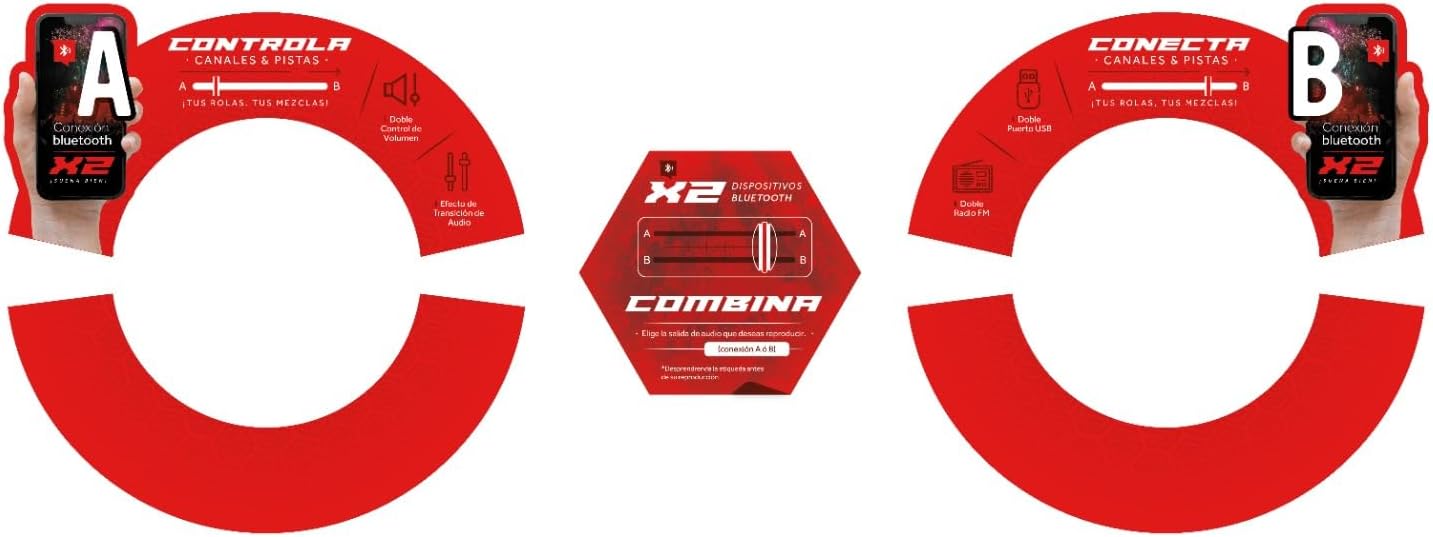
Figure 3: Visual representation of dual Bluetooth connectivity.
Video 2: Short demonstration of the Rave DJ speaker's features and lights.
Input Options
The Rave DJ speaker offers multiple input options for diverse audio sources:
- USB/SD Card: Insert a USB drive or SD card into the respective ports. The speaker will automatically detect and play compatible audio files (MP3, AAC, WMA, WAV). There are two USB ports and two SD card slots.
- Auxiliary Input (3.5mm): Connect external audio devices (e.g., MP3 players, laptops) using a 3.5mm auxiliary cable. There are two Aux 3.5mm ports.
- FM Radio: Switch to FM radio mode. Use the tuning controls to scan for available radio stations.
- Microphone Input: Connect a microphone to the dedicated input for karaoke or announcements. Independent volume control for microphones is available.

Figure 4: Overview of connectivity options on the Rave DJ speaker.
Controls and Features
The top panel of the Rave DJ speaker provides comprehensive controls for your audio experience:
- Volume Controls: Independent volume knobs for each channel (A and B) and a master volume control.
- Faders: Crossfaders allow smooth transitions between audio sources A and B.
- Equalizer: Adjust bass and treble levels to customize your sound.
- LED Lights: The speakers feature dynamic RGB LED lights that synchronize with the music, enhancing the party atmosphere.
- Remote Control: Use the included remote control for convenient operation from a distance, including volume adjustment, track skipping, and mode selection.

Figure 5: Detailed view of the mixer controls and inputs.
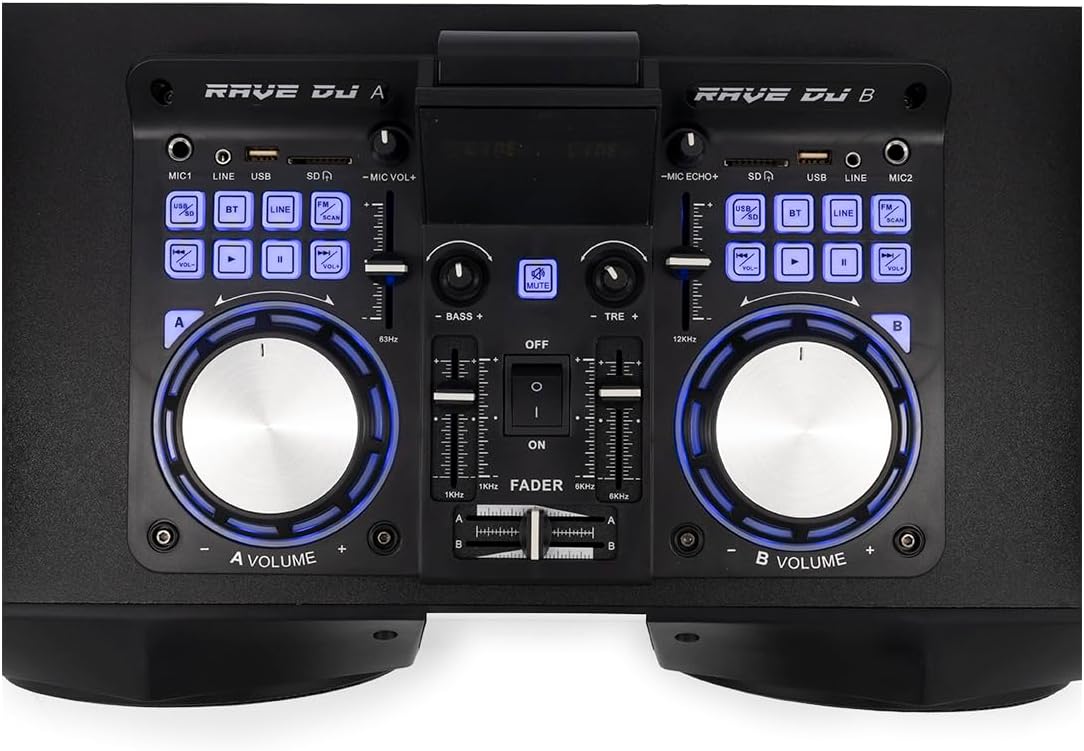
Figure 6: Top-down perspective of the control panel, highlighting the dual decks.
Video 3: A quick demonstration of the DJ mixing capabilities and LED lights.
Maintenance
To ensure the longevity and optimal performance of your Select Sound Rave DJ speaker, follow these maintenance guidelines:
- Cleaning: Use a soft, dry cloth to wipe down the exterior of the speaker. Avoid using abrasive cleaners or solvents, as they may damage the finish.
- Storage: When not in use, store the speaker in a cool, dry place away from direct sunlight and extreme temperatures.
- Handling: Handle the speaker with care. Avoid dropping it or subjecting it to strong impacts, which can damage internal components.
Troubleshooting
| Problem | Possible Cause | Solution |
|---|---|---|
| No Power | Power cable not connected properly; Power outlet not working. | Ensure the power cable is securely plugged into both the speaker and a working electrical outlet. Try a different outlet. |
| No Sound | Volume too low; Incorrect input mode selected; Device not paired (Bluetooth). | Increase volume on both the speaker and the connected device. Select the correct input mode (Bluetooth, USB, Aux, FM). Re-pair Bluetooth device. |
| Bluetooth Disconnection | Device out of range; Interference. | Move the Bluetooth device closer to the speaker (within 10m). Avoid obstacles or other electronic devices causing interference. |
| USB/SD Card Not Playing | Unsupported file format; Corrupted files; Incorrect insertion. | Ensure audio files are in supported formats (MP3, AAC, WMA, WAV). Check if the USB/SD card is inserted correctly. Try a different USB/SD card. |
Specifications
- Brand: Select Sound
- Model: Rave Dj
- Manufacturer: Importadora Mizco
- Connectivity Technology: Bluetooth, USB, Auxiliary
- Bluetooth Technology Supported: Yes
- Compatible Devices: MP3 Player, Personal Computer, Television, Tablet, Smartphone
- Audio Output Mode: Stereo
- Supported Audio Formats: MP3, AAC, WMA, WAV
- Speaker Surround Sound Channel Configuration: 2.0
- Power Source: Corded Electric
- Mounting Accessories: Remote control
- Number of Products: 1
- Color: Black
- Package Dimensions: 60 x 37 x 34 cm; 9.44 kg
Warranty and Support
This product comes with a manufacturer's warranty. Please refer to the warranty card included in your package for specific terms and conditions. For technical support, troubleshooting assistance, or warranty claims, please contact Select Sound customer service through their official website or the retailer where the product was purchased.
You can visit the official Select Sound store for more information: Select Sound Store
Ask a question about this manual
Ask about setup, troubleshooting, compatibility, parts, safety, or missing instructions. Manuals+ will review the question and use this page’s manual context to help answer it.