
1. Introduction
Thank you for choosing the Daakro M19-BT Amplifier Stereo Receiver. This device is designed to deliver powerful and clear Hi-Fi sound for your home audio system. It features multiple input options, including Bluetooth 5.3, RCA, Optical, Coaxial, and Microphone, along with a dedicated headphone output. This manual provides essential information for setting up, operating, and maintaining your amplifier.

The Daakro M19-BT amplifier positioned on a wooden surface, demonstrating its compact size alongside a pair of bookshelf speakers, illustrating a typical home audio setup.
2. Package Contents
Please check the package carefully for the following items:
- Daakro M19-BT Amplifier Stereo Receiver
- DC 24V Power Adapter
- Remote Controller
- Bluetooth Antenna
- User Manual (this document)
3. Product Overview
3.1 Front Panel

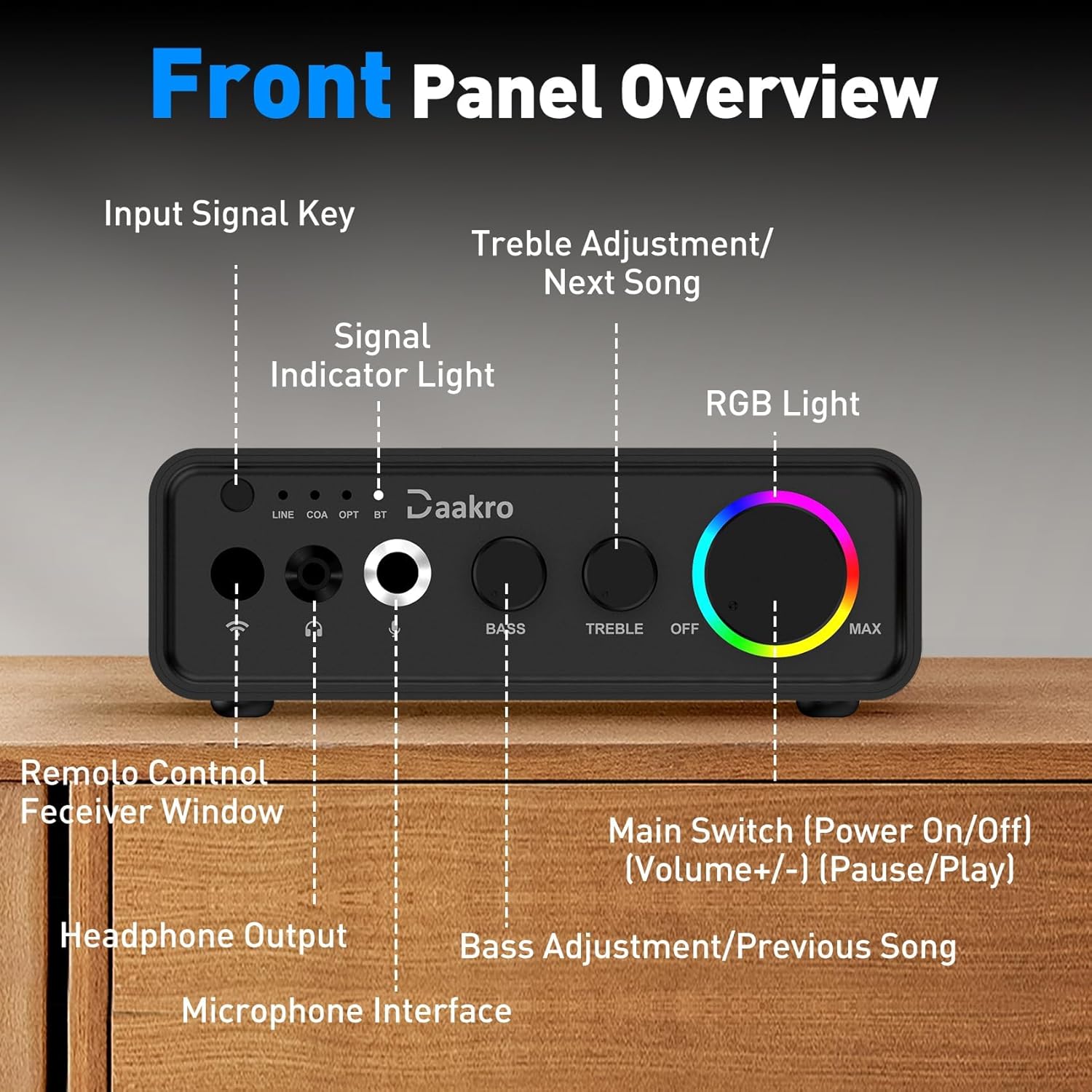
A clear diagram labeling each control and input on the front panel of the Daakro M19-BT amplifier, including the input signal key, signal indicator lights, headphone output, microphone interface, bass and treble adjustments, and the main switch/volume knob with RGB lighting.
- Input Signal Key: Press to cycle through LINE, Coaxial (COA), Optical (OPT), and Bluetooth (BT) inputs.
- Signal Indicator Light: Illuminates to show the currently selected input.
- Headphone Output: 3.5mm jack for wired headphones or active speakers (32Ω).
- Microphone Interface: 6.5mm jack for standard microphones.
- Bass Adjustment: Rotary knob to adjust low-frequency output. Also functions as Previous Song button with remote.
- Treble Adjustment: Rotary knob to adjust high-frequency output. Also functions as Next Song button with remote.
- Main Switch (Power On/Off) / Volume Knob: Rotary control for volume adjustment. Press to power on/off, play/pause. Features dynamic RGB lighting.
- Remote Control Receiver Window: Infrared receiver for the remote control.
3.2 Rear Panel
A detailed diagram illustrating the rear panel of the Daakro M19-BT amplifier, highlighting the right and left channel inputs, coaxial input, optical input, speakers binding posts for passive speakers, Bluetooth antenna, and DC 12-24V power interface.
- Right Channel Input (RCA): For connecting audio sources via RCA cable.
- Left Channel Input (RCA): For connecting audio sources via RCA cable.
- Coaxial Input: For connecting digital audio sources via coaxial cable.
- Optical Input: For connecting digital audio sources via optical cable.
- Speakers Binding Posts: For connecting passive speakers (Left Channel Speaker Output, Right Channel Speaker Output).
- Bluetooth Antenna: For stable Bluetooth signal reception.
- DC Power Interface: For connecting the DC 12-24V power adapter.
4. Setup
4.1 Connecting Speakers
- Ensure the amplifier is powered off.
- Connect your passive speakers to the Speakers Binding Posts on the rear panel. Ensure correct polarity (red to red, black to black) and channel (Left to L, Right to R).
- Caution: Avoid short circuits when connecting positive and negative poles. This amplifier is designed for passive speakers only; do not connect powered speakers.
4.2 Connecting Audio Sources
Choose one of the following methods to connect your audio source:
- RCA Input: Connect devices like CD players, DVD players, or preamplifiers using RCA cables to the Left Channel Input and Right Channel Input.
- Optical Input: Connect devices such as TVs, game consoles, or media players with an optical output to the Optical Input.
- Coaxial Input: Connect devices with a coaxial digital output to the Coaxial Input.
- Bluetooth: For wireless connection from smartphones, tablets, or laptops. Refer to Section 5.2 for pairing instructions.
4.3 Connecting Power
- First, insert the DC plug of the provided 24V power adapter into the DC Power Interface on the amplifier's rear panel.
- Then, plug the power adapter into a suitable wall outlet.

A comprehensive connection diagram for the Daakro M19-BT amplifier, showing how to connect smartphones, tablets, laptops, and projectors via Bluetooth, optical, coaxial, or RCA inputs, and how to connect passive speakers, wired headphones, active speakers, and microphones.
5. Operating Instructions
5.1 Power On/Off
Press the Main Switch / Volume Knob to power on the amplifier. Press it again to power off.
5.2 Input Selection
Press the Input Signal Key on the front panel to cycle through the available input modes: LINE (RCA), COAXIAL (COA), OPTICAL (OPT), and BLUETOOTH (BT). The corresponding indicator light will illuminate.

A magnified view of the input signal indicator lights (LINE, COA, OPT, BT) on the Daakro M19-BT amplifier, showing which input source is currently active.
5.3 Bluetooth Pairing
- Select the BT input mode using the Input Signal Key. The Bluetooth indicator light will flash, indicating it's in pairing mode.
- On your mobile device (smartphone, tablet, laptop), enable Bluetooth and search for available devices.
- Select "M19-BT" from the list of devices to pair.
- Once paired, the Bluetooth indicator light will remain solid.
- Note: Keep the distance between your device and the amplifier within 65 feet (20 meters) without significant obstructions for optimal connection stability.

An image demonstrating the Bluetooth 5.3 connectivity of the Daakro M19-BT amplifier, showing a smartphone wirelessly connected to the device with an indicated range of up to 65 feet (20 meters).
5.4 Volume and Tone Control
- Volume: Rotate the Main Switch / Volume Knob clockwise to increase volume and counter-clockwise to decrease it.
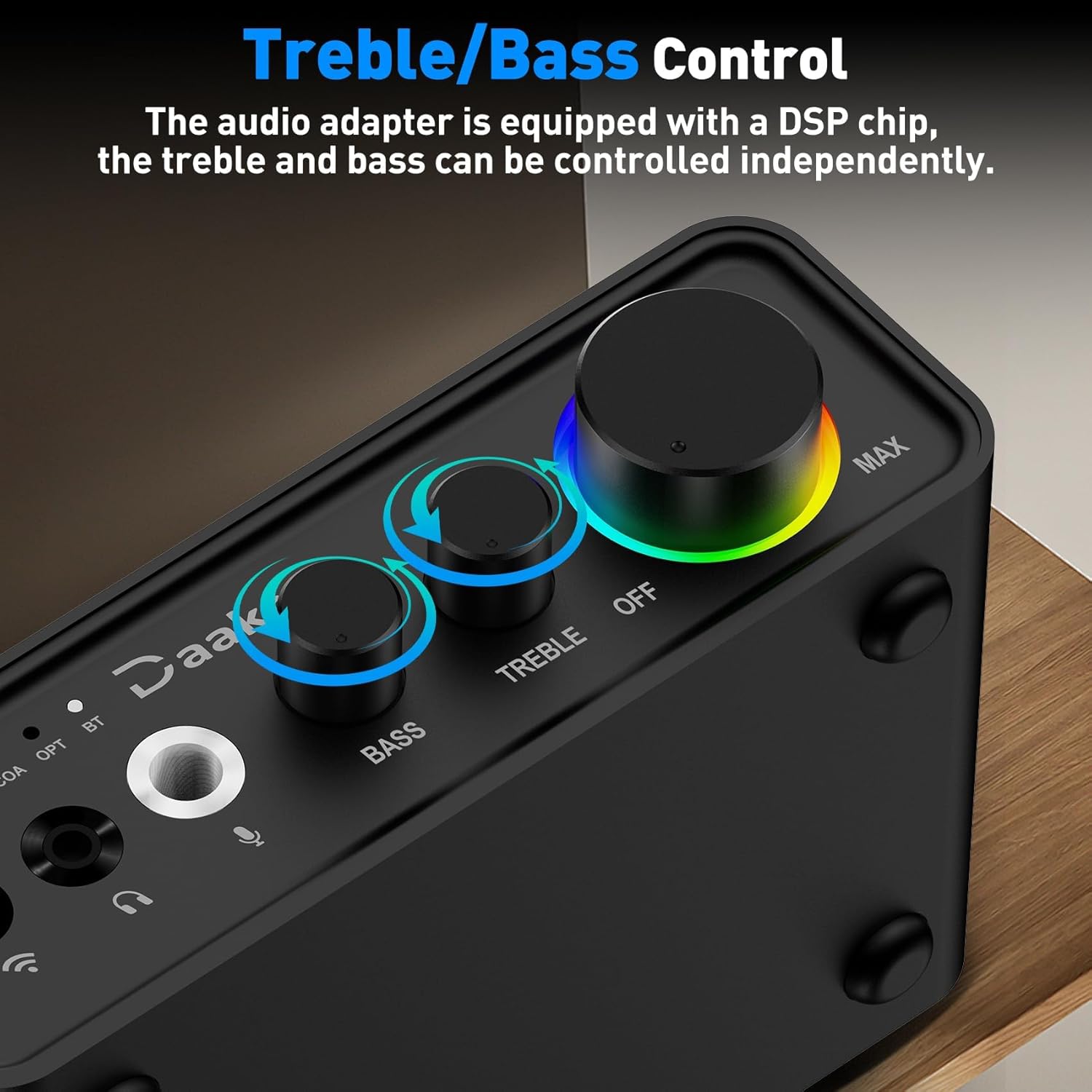
- Bass: Rotate the Bass Adjustment knob to increase or decrease low frequencies.
- Treble: Rotate the Treble Adjustment knob to increase or decrease high frequencies.

A close-up view of the independent bass and treble adjustment knobs on the Daakro M19-BT amplifier, indicating their function in fine-tuning audio output.
5.5 Microphone and Headphone Use
- Microphone: Plug a standard 6.5mm microphone into the Microphone Interface on the front panel.
- Headphones: Plug wired headphones (32Ω) into the Headphone Output jack. This output can also be used for active speakers.

A diagram focusing on the front panel inputs of the Daakro M19-BT amplifier, explaining the use of the 3.5mm headphone output jack for wired headphones or active speakers, and the 6.5mm microphone jack for standard microphones.
5.6 Remote Control Functions
The included remote control allows for convenient operation:
- Input Selection: Switch between LINE, COA, OPT, BT.
- Volume Control: Adjust volume up or down.
- Play/Pause: Control media playback.
- Previous/Next Song: Skip tracks (in Bluetooth mode).
- EQ Sound Adjustment: Adjust equalization settings.
- Reverb Volume: Control reverb effects.
- Microphone Volume: Adjust microphone input level.
An image showing the remote control for the Daakro M19-BT amplifier being used to operate the unit, highlighting its convenience for selecting input modes and adjusting volume from a distance.
6. Maintenance
- Keep the amplifier in a dry, well-ventilated area, away from direct sunlight, heat sources, and moisture.
- Clean the unit with a soft, dry cloth. Do not use liquid cleaners or aerosols.
- Ensure proper airflow around the unit to prevent overheating.
- Disconnect power before cleaning or if the unit will be unused for an extended period.
7. Troubleshooting
| Problem | Possible Cause | Solution |
|---|---|---|
| No sound output. |
|
|
| Bluetooth connection unstable or unable to pair. |
|
|
| Distorted sound. |
|
|
| Amplifier does not power on. |
|
|
| "Input connected" message is too loud. | This is a characteristic of the device and cannot be adjusted. | No user-adjustable solution. |
| RGB light on volume knob is too bright/distracting. | The RGB lighting is integrated and not independently controllable. | No user-adjustable solution for turning off or dimming the RGB light. Consider placement if this is an issue. |
8. Specifications
| Feature | Specification |
|---|---|
| Model Number | M19-BT |
| Output Power | 100W RMS per channel (at 4 ohms, 20 Hz - 20 kHz, 0.04% THD) |
| Amplifier Chip | Texas Instruments TPA3116D2 (Class D) |
| Bluetooth Version | 5.3 |
| Bluetooth Range | Up to 65 feet (20 meters) |
| Input Modes | RCA (LINE), Optical, Coaxial, Bluetooth, Microphone |
| Output Modes | Passive Speaker Output, 3.5mm Headphone Output |
| Power Supply | DC 12-24V (24V adapter included) |
| Item Weight | 2.55 pounds |
| Package Dimensions | 11.81 x 9.17 x 2.17 inches |

An internal diagram of the Daakro M19-BT amplifier, illustrating the placement of two Texas Instruments TPA3116D2 chips, which are central to its audio processing capabilities.
9. Warranty and Support
Daakro is committed to providing high-quality products and customer satisfaction.
- Warranty: This product comes with a 30-day warranty.
- Customer Service: 24-hour online customer service is available for any inquiries or issues.
- Satisfaction Guarantee: We aim for 100% customer satisfaction.
For support, please refer to the contact information provided with your purchase or visit the official Daakro store page on Amazon.

A graphic outlining Daakro's after-sales support, which includes a 30-day warranty, 24-hour online customer service, and a commitment to 100% customer satisfaction.