
1. Important Safety Instructions
Read all instructions carefully before using the appliance and retain them for future reference. Failure to follow these instructions may result in electric shock, fire, or serious injury.
- Always ensure the voltage indicated on the rating label matches your mains voltage.
- Do not immerse the appliance, power cord, or plug in water or any other liquid.
- Keep the appliance out of reach of children and pets.
- Do not leave the appliance unattended while it is switched on or connected to the power supply.
- Exercise caution when handling hot steam. Steam can cause burns. Keep hands and face away from the steam nozzle.
- Only use the appliance for its intended purpose as described in this manual.
- Unplug the appliance from the power outlet before filling or emptying the water tank, and before cleaning or maintenance.
- Do not operate the appliance with a damaged cord or plug, or if the appliance malfunctions or has been damaged in any manner.
- Place the appliance on a stable, heat-resistant surface when not in use.
- Do not direct steam at people, animals, or electrical appliances.
2. Product Overview
The Princess Portable Steam Iron is designed for efficient wrinkle removal and fabric sanitization. It features a powerful 1800W heating element, a 260ml water tank, and delivers a continuous steam output of 30 g/min. The device heats up in approximately 30 seconds, making it suitable for quick garment refreshing.
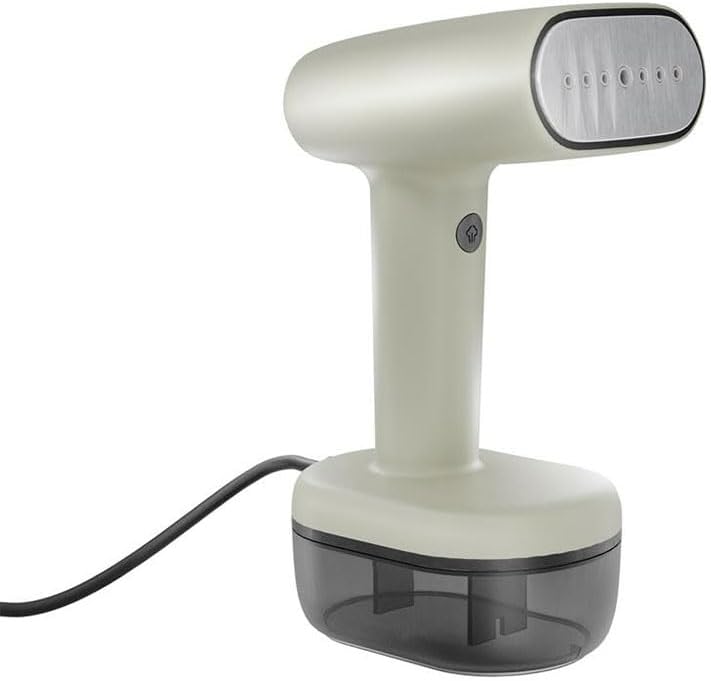
Figure 2.1: Front view of the Princess Portable Steam Iron, showing the steam plate and handle.
3. Package Contents
Ensure all items are present and in good condition upon unpacking:
- Princess Portable Steam Iron (Main Unit)
- Removable Water Tank (260ml capacity)
- Brush Accessory
- User Manual (this document)

Figure 3.1: The steam iron with its detachable water tank and brush accessory.
4. Technical Specifications
| Specification | Value |
|---|---|
| Model Number | 01.332880.01.001 |
| Power | 1800 W |
| Voltage | 230 V |
| Water Tank Capacity | 260 ml |
| Continuous Steam Output | 30 g/min |
| Heat-up Time | 30 seconds |
| Product Dimensions (L x W x H) | 15L x 10W x 23H cm |
| Item Weight | 0.5 kg |
| Power Cable Length | 1.8 m |
5. Setup and Assembly
5.1 Filling the Water Tank
- Ensure the steam iron is unplugged from the power outlet.
- Detach the water tank from the main unit by pulling it downwards.
- Open the water tank cap.
- Fill the tank with clean tap water up to the MAX fill line. Do not overfill.
- Close the water tank cap securely.
- Reattach the water tank to the main unit, ensuring it clicks into place.
5.2 Attaching the Brush Accessory
The brush accessory is useful for thicker fabrics and upholstery, helping to open fabric weaves for better steam penetration and lint removal.
- Ensure the appliance is cool and unplugged.
- Align the brush accessory with the steam plate of the iron.
- Gently push the accessory onto the steam plate until it securely locks into position.
- To remove, pull the accessory off the steam plate.
6. Operating Instructions
6.1 Initial Use
- After filling the water tank (Section 5.1), plug the appliance into a suitable power outlet.
- The indicator light will illuminate, indicating the appliance is heating up.
- Wait approximately 30 seconds until the indicator light changes or stops flashing, signifying it is ready for use.
6.2 Steaming Garments
- Hang the garment on a hanger.
- Hold the steam iron vertically, keeping the steam plate a few centimeters away from the fabric.
- Press and hold the steam trigger to release steam. For continuous steam, engage the lockable steam switch if available.
- Move the steam iron slowly downwards over the fabric, allowing the steam to penetrate and relax the fibers.
- For stubborn wrinkles, gently press the steam plate against the fabric while steaming.
- When finished, release the steam trigger and unplug the appliance.

Figure 6.1: The steam iron with the brush accessory attached, ready for use on thicker fabrics.
6.3 Using the Brush Accessory
Attach the brush accessory as described in Section 5.2. Use it for:
- Thicker fabrics like coats, jackets, and upholstery.
- Removing lint, hair, and dust while steaming.
- Helping to open fabric weaves for deeper steam penetration.
6.4 Automatic Shut-off
For safety, the appliance is equipped with an automatic shut-off function. If left idle for a certain period, it will automatically turn off. To restart, unplug and re-plug the appliance, or press the power button if available.
7. Maintenance and Cleaning
Regular maintenance ensures optimal performance and extends the lifespan of your steam iron.
7.1 After Each Use
- Unplug the appliance from the power outlet and allow it to cool down completely.
- Detach the water tank and empty any remaining water.
- Wipe the exterior of the appliance with a soft, damp cloth.
7.2 Cleaning the Steam Plate
If mineral deposits accumulate on the steam plate, gently wipe it with a damp cloth. Do not use abrasive cleaners or scouring pads, as these can damage the surface.
7.3 Descaling
Depending on water hardness and frequency of use, mineral deposits may build up inside the appliance. If you notice reduced steam output or white residue, descaling may be necessary. Consult the manufacturer's website or customer support for specific descaling instructions, or use a commercially available descaling solution suitable for steam appliances, following its instructions carefully.
8. Storage
When not in use, store the steam iron in a cool, dry place. Ensure the water tank is empty and the appliance is completely cool before storing. Wrap the power cord neatly around the base or use a cord wrap if provided.
9. Troubleshooting
| Problem | Possible Cause | Solution |
|---|---|---|
| No steam output | Water tank empty; Appliance not heated; Clogged steam nozzles | Refill water tank; Wait for indicator light; Descale or clean nozzles |
| Water leaking from steam plate | Overfilled water tank; Appliance not hot enough; Condensation | Do not overfill; Wait for full heat-up; This is normal during initial use or if held horizontally |
| Appliance not turning on | Not plugged in; Power outlet issue; Automatic shut-off activated | Check power connection; Test outlet with another device; Unplug and re-plug to reset |
| Reduced steam output | Mineral buildup (scaling) | Perform descaling procedure (Section 7.3) |
10. Warranty and Support
This Princess appliance comes with a manufacturer's warranty. For detailed warranty terms and conditions, please refer to the warranty card included with your purchase or visit the official Princess website. For technical support, spare parts, or service inquiries, please contact Princess customer service through their official channels.
You can find contact information and further resources on the official Princess website: www.princesshome.eu
