
Introduction
Thank you for choosing the Rfiver 4-Tier AV Media Stand with Wheels, Model HF2001BWM. This mobile audio tower is designed to organize your audio-visual equipment, offering adjustable shelves and convenient mobility. Please read this manual carefully before assembly and use to ensure proper installation and safe operation.
Important Safety Information
- Weight Limit: Do not exceed the maximum weight capacity of 120 lbs (54.43 kg) for the entire stand. Distribute weight evenly across shelves.
- Shelf Weight Limits: The top and bottom shelves can each hold up to 44 lbs (20 kg). The two middle adjustable shelves can each hold up to 22 lbs (10 kg).
- Assembly: Follow all assembly instructions carefully. Ensure all screws and fasteners are securely tightened before use.
- Stability: Always ensure the stand is on a level surface. Lock the wheels when the stand is in its desired position to prevent accidental movement.
- Children: Keep small parts away from children during assembly. Do not allow children to climb on or play with the stand.
- Placement: Avoid placing the stand in areas with excessive moisture, direct sunlight, or extreme temperatures.
Assembly Instructions
Assembly of the Rfiver AV Media Stand is straightforward and typically takes about 10 minutes. It is recommended to have a clear, open space for assembly. All necessary tools are included in the package, but using your own screwdriver or wrench may provide more comfort.
Package Contents:
- 4 x Wooden Shelves (1 top, 1 bottom, 2 adjustable middle)
- Metal Frame Components
- 4 x Swivel Caster Wheels (with locks)
- Assembly Hardware (screws, nuts, washers)
- Assembly Tool (Allen wrench, small wrench)
Step-by-Step Assembly:
- Unpack and Identify Parts: Carefully remove all components from the packaging. Verify that all parts listed above are present.
- Attach Caster Wheels: Secure the four swivel caster wheels to the bottom wooden shelf using the provided hardware. Ensure the locking mechanism is facing outwards for easy access.
- Assemble Base Frame: Attach the lower metal frame components to the bottom wooden shelf. Do not fully tighten screws at this stage to allow for adjustments.
- Install Middle Shelves: Slide the two adjustable wooden shelves into the designated slots on the metal frame. You can adjust their height later. Secure them loosely with screws.
- Attach Top Shelf: Place the top wooden shelf onto the upper metal frame components and secure it with screws.
- Tighten All Fasteners: Once all components are in place, systematically tighten all screws and nuts using the provided tools. Ensure the stand is stable and level.
- Adjust Shelf Height: If desired, loosen the screws on the middle shelves, adjust them to your preferred height, and then re-tighten securely.

Image: Fully assembled Rfiver 4-Tier AV Media Stand, showcasing its capacity for various audio equipment.

Image: Detailed dimensions of the Rfiver 4-Tier AV Media Stand, including shelf sizes and overall height.
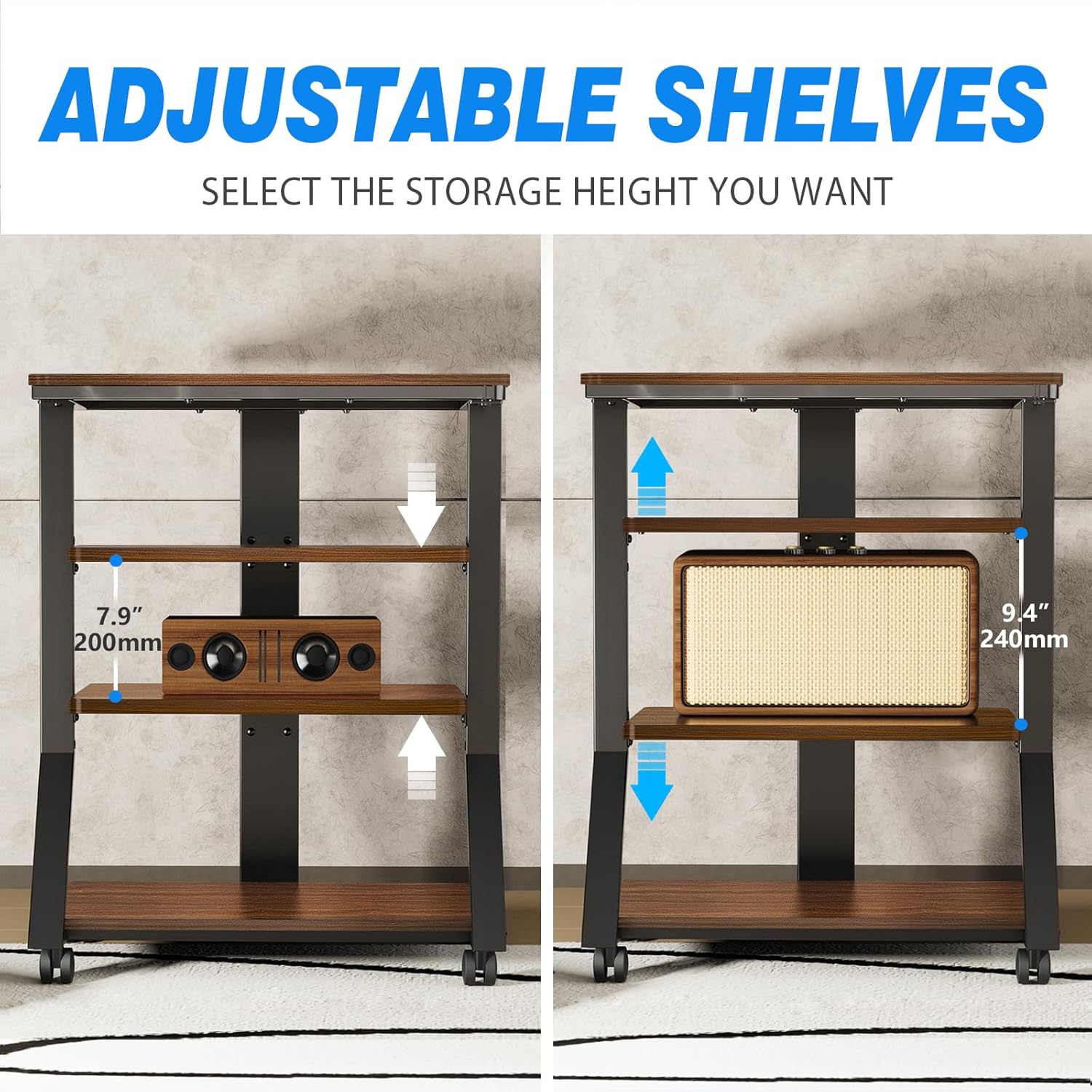
Image: Illustration demonstrating the adjustable height feature of the middle shelves on the Rfiver AV Media Stand.

Image: Close-up of the 360° rotating silent wheels with locking functionality for the Rfiver AV Media Stand.
Video: An official product video demonstrating the features and mobility of the Rfiver AV Media Stand.
Operation
Placing Equipment:
- Distribute your audio-visual components, such as record players, amplifiers, game consoles, or speakers, across the four shelves.
- Ensure that the weight of each item does not exceed the individual shelf capacity (44 lbs for top/bottom, 22 lbs for middle shelves).
- The open design promotes good heat dissipation for electronic devices.
Adjusting Shelf Height:
- The two middle shelves are height-adjustable. To adjust, carefully remove any items from the shelf.
- Loosen the screws securing the shelf to the metal frame.
- Slide the shelf up or down to the desired position.
- Once positioned, securely tighten all screws to ensure stability before placing items back on the shelf.
Mobility:
- The stand is equipped with 360° rotating silent wheels for easy movement.
- To move the stand, unlock all four caster wheels.
- Gently push the stand to its new location.
- Once in the desired position, engage the locks on all four wheels to prevent unintended movement and ensure stability.
Maintenance
- Cleaning: Wipe the wooden shelves and metal frame with a soft, damp cloth. Avoid using harsh chemicals or abrasive cleaners, which can damage the finish.
- Dusting: Regularly dust the stand to prevent buildup, especially around electronic equipment.
- Inspections: Periodically check all screws and fasteners to ensure they remain tight. Re-tighten if necessary.
- Wheel Care: Keep the caster wheels free of debris to ensure smooth movement.
Troubleshooting
| Issue | Possible Cause | Solution |
|---|---|---|
| Stand is wobbly or unstable. | Loose screws or uneven surface. | Ensure all assembly screws are fully tightened. Move the stand to a level surface. |
| Wheels do not roll smoothly. | Debris in wheels or wheels are locked. | Check for and remove any debris (hair, lint) from the wheels. Ensure all wheel locks are disengaged. |
| Shelf height adjustment is difficult. | Screws are too tight or items are on the shelf. | Remove all items from the shelf. Loosen the screws sufficiently before attempting to adjust. |
| Stand exceeds weight capacity. | Too many heavy items placed on the stand. | Remove items to reduce the total weight. Ensure individual shelf limits are also respected. |
Specifications
| Feature | Detail |
|---|---|
| Model Name | Media Stand |
| Model Number | HF2001BWM |
| Brand | Rfiver |
| Material | Wood (MDF board) and Steel |
| Color | Brown (Walnut-colored wooden board with black steel tube) |
| Product Dimensions (D x W x H) | 17.7"D x 25.39"W x 33.47"H (45cm D x 64.5cm W x 85cm H) |
| Number of Shelves | 4 |
| Shelf Thickness | 15 mm |
| Total Weight Capacity | 120 lbs (54.43 kg) |
| Top/Bottom Shelf Capacity | 44 lbs (20 kg) each |
| Middle Shelf Capacity | 22 lbs (10 kg) each |
| Special Features | Adjustable middle shelves, 360° swivel caster wheels with locks, Space-saving design |
| Mounting Type | Floor Mount (Freestanding) |
| Item Weight | 37.7 Pounds (17.1 kg) |
Support & Warranty
For any questions regarding assembly, missing parts, or product operation, please contact Rfiver customer support. Refer to your purchase documentation for specific warranty details and contact information.
You can often find support contact information on the manufacturer's official website or through the retailer where the product was purchased.
