
Geevon 230016
Geevon Water Flow Meter User Manual
Model: 230016
1. Introduction
Thank you for choosing the Geevon Water Flow Meter. This device is designed to accurately measure water consumption and flow rate for various outdoor applications, including garden watering, RV water measurement, pool filling, and greenhouse irrigation. Its high precision, durable construction, and IPX6 waterproof rating ensure reliable performance in diverse environments. This manual provides detailed instructions for setup, operation, maintenance, and troubleshooting to help you get the most out of your water meter.

Image 1.1: Geevon Water Flow Meter, showing the digital display and hose connections.
2. Product Features
- High Precision: Measures water flow with an accuracy of up to ±3%.
- IPX6 Waterproof: Designed to withstand strong jets of water, suitable for outdoor use.
- Durable Construction: Features a brass inlet metal thread for secure and leak-free connections.
- Multiple Measurement Modes: Offers four distinct modes for comprehensive water tracking.
- Wide Measuring Range: Capable of measuring up to 99,999 gallons (or liters).
- Large LCD Display: Provides clear and easy-to-read measurements.
- User-Friendly Operation: Simple one-click setting for mode switching and resetting.
- Anti-UV Material: Constructed with materials resistant to UV degradation for extended outdoor life.
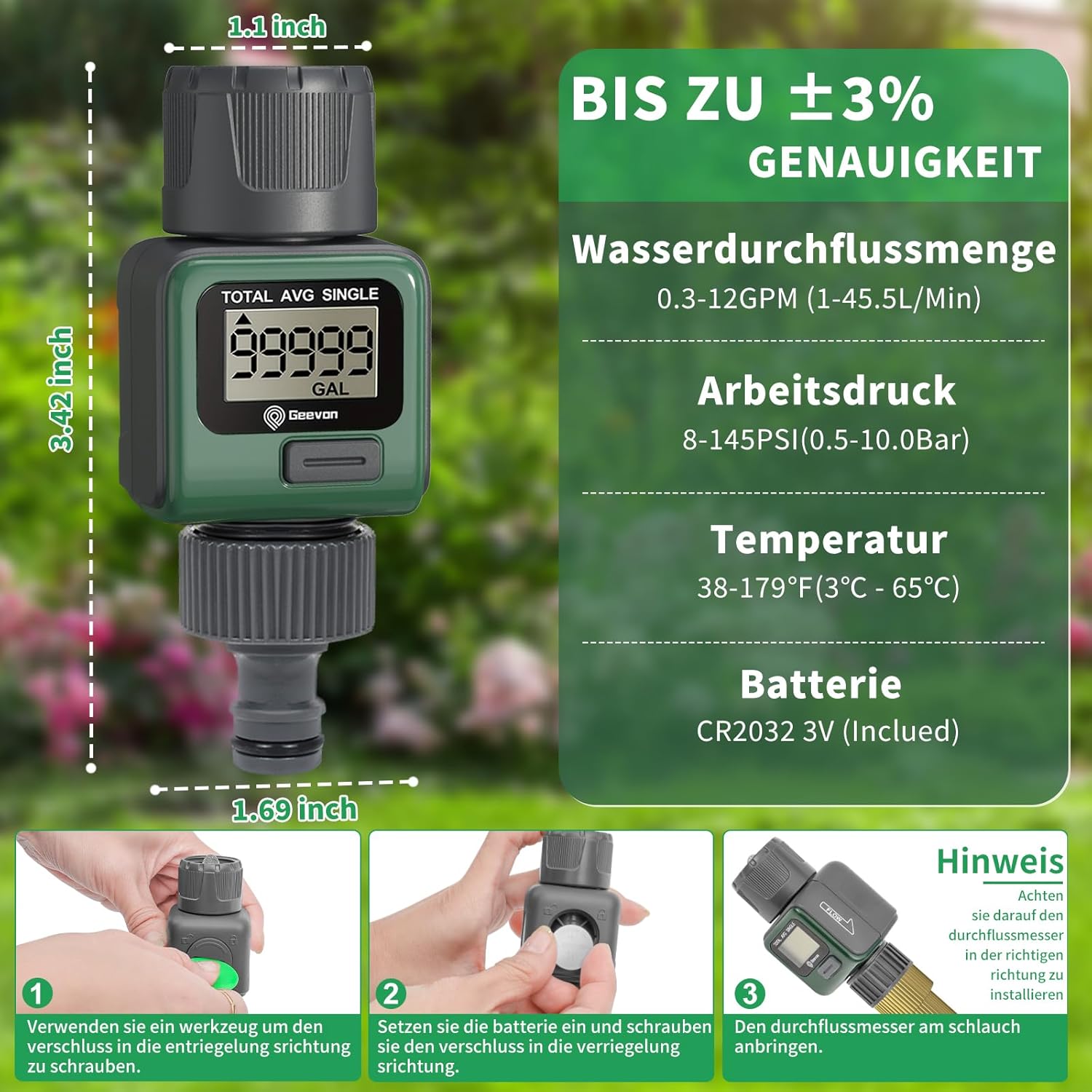
Image 2.1: Detailed view of the water meter's dimensions and key specifications.
3. Package Contents
Please check the package contents upon opening to ensure all items are present:
- Geevon Water Flow Meter Unit
- CR2032 3V Battery (pre-installed or included separately)
- Hose Coupling Adapters (pre-attached or included separately)
- Small Plastic Tool for Battery Compartment (may be included)
4. Setup
Follow these steps to set up your Geevon Water Flow Meter for first use:
- Battery Installation: If the battery is not pre-installed, locate the battery compartment on the side of the meter. Use a small tool (or the provided plastic tool) to unscrew the cap in the unlock direction. Insert the CR2032 3V battery with the positive (+) side facing up. Screw the cap back on in the lock direction to ensure a waterproof seal.
- Connect to Water Source: Attach the inlet side of the water meter (marked with an arrow indicating flow direction) to your water tap or hose. Ensure the connection is tight to prevent leaks.
- Connect to Hose/Accessory: Attach your garden hose, sprinkler, or other watering accessory to the outlet side of the water meter. Again, ensure a secure connection.
- Verify Flow Direction: The meter is designed to measure flow in one direction. Ensure the arrow on the meter aligns with the direction of water flow from your tap to your watering device.

Image 4.1: Visual guide for battery installation and connecting the meter to a hose.
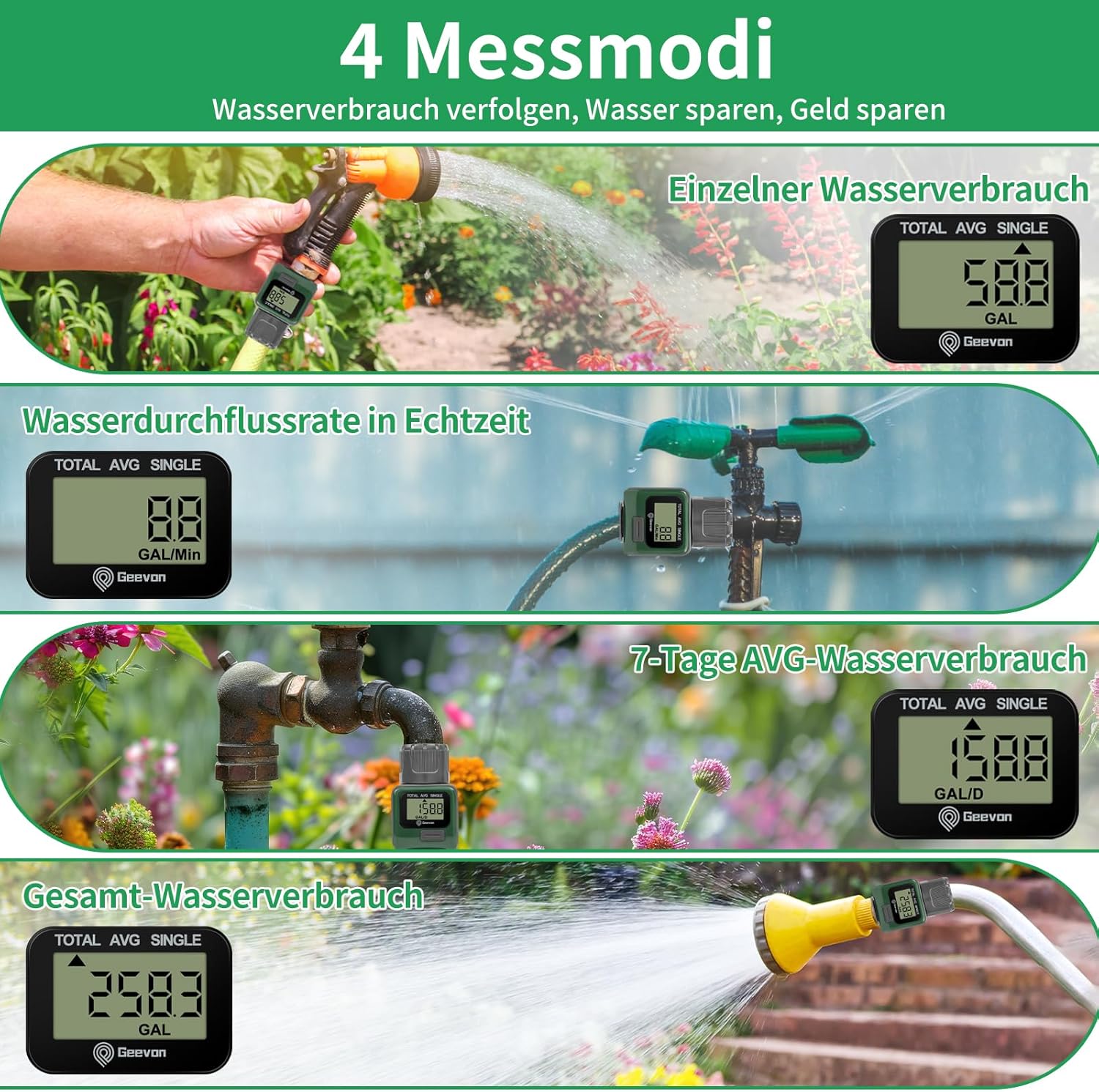
Image 4.2: Close-up of the waterproof battery compartment, showing the CR2032 battery.
5. Operating Instructions
The Geevon Water Flow Meter features four measurement modes to suit your needs. Use the single button on the front to navigate and reset values.
5.1. Measurement Modes
- Consumption Mode (SINGLE): Displays the water consumed for a single watering session. This value can be reset for each new use.
- Flow Rate Mode (GAL/Min or L/Min): Shows the real-time water flow rate, indicating how much water is passing through the meter per minute.
- Average Mode (AVG): Calculates and displays the average daily water consumption over a 7-day period.
- Total Mode (TOTAL): Accumulates the total water consumption over time. This value is not easily reset and provides a long-term record of water usage.
5.2. Switching Modes and Resetting
- To Switch Modes: Briefly press the button on the front of the meter. Each press will cycle through the four modes: Consumption, Flow Rate, Average, and Total.
- To Reset Consumption Mode: While in Consumption Mode, press and hold the button for approximately 3 seconds until the display resets to zero.
- To Reset Average Mode: While in Average Mode, press and hold the button for approximately 3 seconds until the display resets.
- To Reset Total Mode: The Total Mode is designed for cumulative measurement and typically does not have a simple reset function to prevent accidental data loss. Refer to troubleshooting or contact support if a full reset is required.
- To Switch Units (Gallons/Liters): While in Flow Rate Mode, press and hold the button for approximately 3 seconds to toggle between Gallons per Minute (GAL/Min) and Liters per Minute (L/Min). This unit change will apply to all measurement modes.

Image 5.1: Illustration of the four measurement modes and their respective displays.

Image 5.2: The water meter in use, connected to an outdoor tap, showing the display.

Image 5.3: The water meter attached to a garden hose, demonstrating its use with a spray nozzle.
6. Maintenance
Proper maintenance ensures the longevity and accuracy of your Geevon Water Flow Meter.
- Cleaning: Periodically wipe the exterior of the meter with a soft, damp cloth. Do not use abrasive cleaners or solvents.
- Filter Screen: The water inlet features a filter screen to prevent debris from entering the meter. Regularly inspect and clean this screen to ensure unobstructed water flow and accurate readings. To clean, disconnect the meter, unscrew the inlet connection, and rinse the screen under running water.
- Battery Replacement: When the display becomes dim or the meter stops functioning, it's time to replace the CR2032 battery. Follow the battery installation steps in Section 4.1.
- Storage: When not in use for extended periods, especially during freezing temperatures, disconnect the meter from the water source and hose. Drain any remaining water and store it in a dry, protected area to prevent damage.

Image 6.1: Close-up view of the water inlet with its integrated filter screen, important for maintenance.
7. Troubleshooting
If you encounter issues with your Geevon Water Flow Meter, refer to the following common problems and solutions:
| Problem | Possible Cause | Solution |
|---|---|---|
| Display is blank or dim. | Low or dead battery. | Replace the CR2032 battery (refer to Section 4.1). |
| No reading when water flows. | Incorrect flow direction; Blocked filter screen; Insufficient water pressure. | Ensure arrow on meter aligns with water flow; Clean the filter screen (Section 6); Check water pressure. |
| Inaccurate readings. | Air in the line; Blocked filter screen; Damaged internal components. | Ensure all air is purged from the hose system; Clean the filter screen; If problem persists, contact customer support. |
| Water leakage at connections. | Loose connections; Worn O-rings/washers. | Tighten connections; Inspect and replace O-rings/washers if damaged. |
8. Specifications
| Specification | Detail |
|---|---|
| Model Number | 230016 |
| Dimensions (L x W x H) | 5.5 x 5 x 12.5 cm (2.17 x 1.97 x 4.92 inches) |
| Weight | 110 grams (0.24 lbs) |
| Water Flow Rate Range | 0.3 - 12 GPM (1 - 45.5 L/Min) |
| Working Pressure | 8 - 145 PSI (0.5 - 10.0 Bar) |
| Operating Temperature | 38 - 179°F (3 - 65°C) |
| Battery Type | CR2032 3V (Included) |
| Accuracy | ±3% |
| Waterproof Rating | IPX6 |
9. Warranty and Support
For information regarding warranty coverage, returns, or technical support, please refer to the warranty card included with your product or visit the official Geevon website. You may also contact the retailer from whom you purchased the product for assistance.
Related Documents - 230016
 |
Geevon FML-04 Water Flow Meter User Manual Comprehensive user manual for the Geevon FML-04 water flow meter, detailing product overview, specifications, quick installation, operations, measurement modes, and important cautions for outdoor use. |
 |
RESTMO Water Flow Meter User Manual User manual for the RESTMO Water Flow Meter (Model 0-WM-2), detailing its features, specifications, installation, operation, and warranty information. This device measures water flow rate and consumption in gallons and liters. |
 |
EDEN Digital Water Flow Meter User Manual and Guide Comprehensive user manual for the EDEN Digital Water Flow Meter (Model 94294EDAMZ). Learn how to set up, operate, and maintain your water flow meter, including understanding different measurement modes (Auto, Total, Per Minute), battery installation, connection methods, technical specifications, and important safety warnings. |
 |
PARKSIDE Brass Spray Gun - User Manual and Instructions Comprehensive user manual for the PARKSIDE Brass Spray Gun, detailing its intended use, safety instructions, operation, maintenance, disposal, and warranty information. Includes technical specifications and troubleshooting guidance. |
 |
Restmo O-HT-7 Automatic Water Timer User Manual | Garden Hose Timer Guide Comprehensive user manual for the Restmo O-HT-7 Automatic Water Timer. Learn how to set up watering programs, manual watering, delay watering, and troubleshoot common issues for your garden hose timer. |
 |
LCD Digital Water Flow Meter (SGS05) User Guide User guide for the Aideepen LCD Digital Water Flow Meter. Features, technical specifications, and operating instructions for monitoring water consumption in gardening and agricultural applications. |
Ask a question about this manual
Ask about setup, troubleshooting, compatibility, parts, safety, or missing instructions. Manuals+ will review the question and use this page’s manual context to help answer it.