
Kssvzz HCD-1P
Kssvzz HCD-1P Hidden Camera Detector Instruction Manual
Model: HCD-1P
Introduction
This manual provides detailed instructions for the safe and effective use of your Kssvzz HCD-1P Hidden Camera Detector. This device is designed to help you detect various hidden surveillance equipment, including wireless cameras, listening devices, and GPS trackers, ensuring your privacy and security in diverse environments.
Key Features
- LED Display: Equipped with an HD LED display and simple function buttons for intuitive operation and status display.
- Multiple Detection Functions: Includes signal detection, camera detection, and magnetic field detection to identify various hidden devices.
- Portable and Durable: Constructed from advanced PC material, small, lightweight, and features a built-in rechargeable battery for extended standby time.
- Smart Chip Upgrade: Features the latest 5th generation upgraded smart chips with 8 sensitivity levels for accurate signal source location.
- Wide Applicability: Suitable for use in homes, hotels, cars, bathrooms, offices, and during travel to protect personal privacy.
Package Contents
Please ensure all items are present upon unboxing:
- Kssvzz HCD-1P Hidden Camera Detector Unit
- USB-C Charging Cable
- Magnetic Probe (for magnetic field detection)
- User Manual (this document)
Product Overview
Familiarize yourself with the components and controls of your detector.

Image: Overview of the Kssvzz HCD-1P detector, highlighting its display screen, function selection buttons, charging light, power switch, charging port, LED light lamp, and LED laser lamp.
- Display Screen: Shows battery level, signal strength, and active detection mode.
- Function Selection Buttons: Used to cycle through different detection modes.
- Sensitivity Adjustment: A slider or button to increase or decrease detection sensitivity.
- Power Switch: Turns the device on/off.
- Charging Port (USB-C): For recharging the internal battery.
- LED Light Lamp: Provides illumination for visual inspection.
- LED Laser Lamp: Emits red light for camera lens detection.
Setup
Charging the Device
Before first use, fully charge the detector. Connect the provided USB-C cable to the charging port on the device and plug the other end into a compatible USB power source (e.g., wall adapter, computer USB port). The charging light on the display will indicate charging status.

Image: The Kssvzz HCD-1P detector connected to a USB-C charging cable, illustrating the charging process and battery life indicators.
Attaching the Magnetic Probe (for Magnetic Field Detection)
For magnetic field detection, attach the flexible magnetic probe to the designated port on the detector. This probe enhances the device's ability to locate magnetic trackers.
Video: This video demonstrates the overview of a hidden camera detector, including its features and how to attach accessories like the magnetic probe for enhanced detection capabilities.
Operating Modes
The Kssvzz HCD-1P offers multiple detection modes to address various surveillance threats.

Image: The Kssvzz HCD-1P detector displaying various detection modes, including wireless signal detection, laser scanning detection for pinhole cameras, and GPS detection for trackers.
1. RF Signal Detection Mode (Wireless Signal Detection)
This mode detects radio frequency signals emitted by wireless cameras, listening devices, and other RF-emitting bugs. Use this mode to scan areas for active wireless transmissions.
- Turn on the device using the power switch.
- Select the RF Signal Detection mode using the function selection button.
- Adjust the sensitivity to an appropriate level. Start with lower sensitivity and gradually increase it.
- Slowly sweep the detector around the area. The signal strength indicator on the LED display will light up and the device will beep or vibrate when a signal is detected.
- Increase sensitivity as needed to pinpoint the source.
Video: This video demonstrates the K20 RF Signal Detection mode, showing how the device detects wireless signals and indicates their strength.

Image: The Kssvzz HCD-1P detector in WiFi Detection Mode, illustrating its ability to detect invisible cameras, sneak cameras, and eavesdroppers in a meeting room setting.
2. Camera Detection Mode (Laser Scanning)
This mode uses a laser to detect reflective camera lenses, including pinhole cameras, wired cameras, and infrared cameras. This is a visual detection method.
- Select the Camera Detection mode. The LED laser lamp will activate.
- Look through the red viewing window on the detector.
- Slowly scan the area, paying close attention to objects, walls, and furniture. Hidden camera lenses will appear as bright red reflective dots when illuminated by the laser.
- Adjust the flashing frequency of the LED laser lamp using the sensitivity button to better identify reflections.

Image: The Kssvzz HCD-1P detector in Infrared Detection Mode, showing how it can be used to locate pinhole cameras, invisible cameras, and stealth cameras by scanning with its red laser light.
3. Magnetic Field Detection Mode (GPS Detection)
This mode is specifically designed to detect magnetic GPS trackers and other devices attached using magnets. The magnetic probe is essential for this mode.
- Attach the magnetic probe to the detector.
- Select the Magnetic Field Detection mode.
- Slowly move the magnetic probe along surfaces, especially in vehicles (under seats, chassis, bumpers) or under furniture.
- The device will alert you with sound and/or vibration, and the LED display will indicate the presence of a magnetic field.

Image: The Kssvzz HCD-1P detector in Magnet Detection Mode, demonstrating its use in a car to locate GPS transmitters, GPS locators, and GPS trackers attached magnetically.
4. Anti-Theft Alarm System
The device can also function as a motion-activated alarm to protect your belongings.
- Select the Anti-Theft Alarm mode.
- Place the device on or near the item you wish to protect (e.g., on a bag, near a door).
- After a short delay (e.g., 10 seconds), the device will enter motion detection mode. Any movement or disturbance will trigger a loud alarm or vibration.
Video: This video demonstrates the overview of a hidden camera detector, including its features and how to use the anti-theft alarm system by placing it on a door handle.
Sensitivity Adjustment
The detector features 8 sensitivity levels. Adjusting the sensitivity is crucial for effective detection and minimizing false alarms.
- Increase Sensitivity: Use the sensitivity adjustment button to increase the detection range. This is useful for scanning larger areas or detecting weaker signals.
- Decrease Sensitivity: Reduce sensitivity to narrow down the search area and pinpoint the exact location of a detected device. This helps to avoid interference from common household electronics.
Video: This video demonstrates the overview of a hidden camera detector, including its features and how to adjust sensitivity for optimal detection.
Alert Modes
The detector provides both audible and silent (vibration) alert options.
- Audible Alert: The device will emit beeping sounds when a signal or magnetic field is detected. The frequency of beeps increases with signal strength.
- Vibration Alert (Silent Mode): For discreet detection, switch to vibration mode. The device will vibrate instead of beeping, allowing you to detect threats without alerting others.
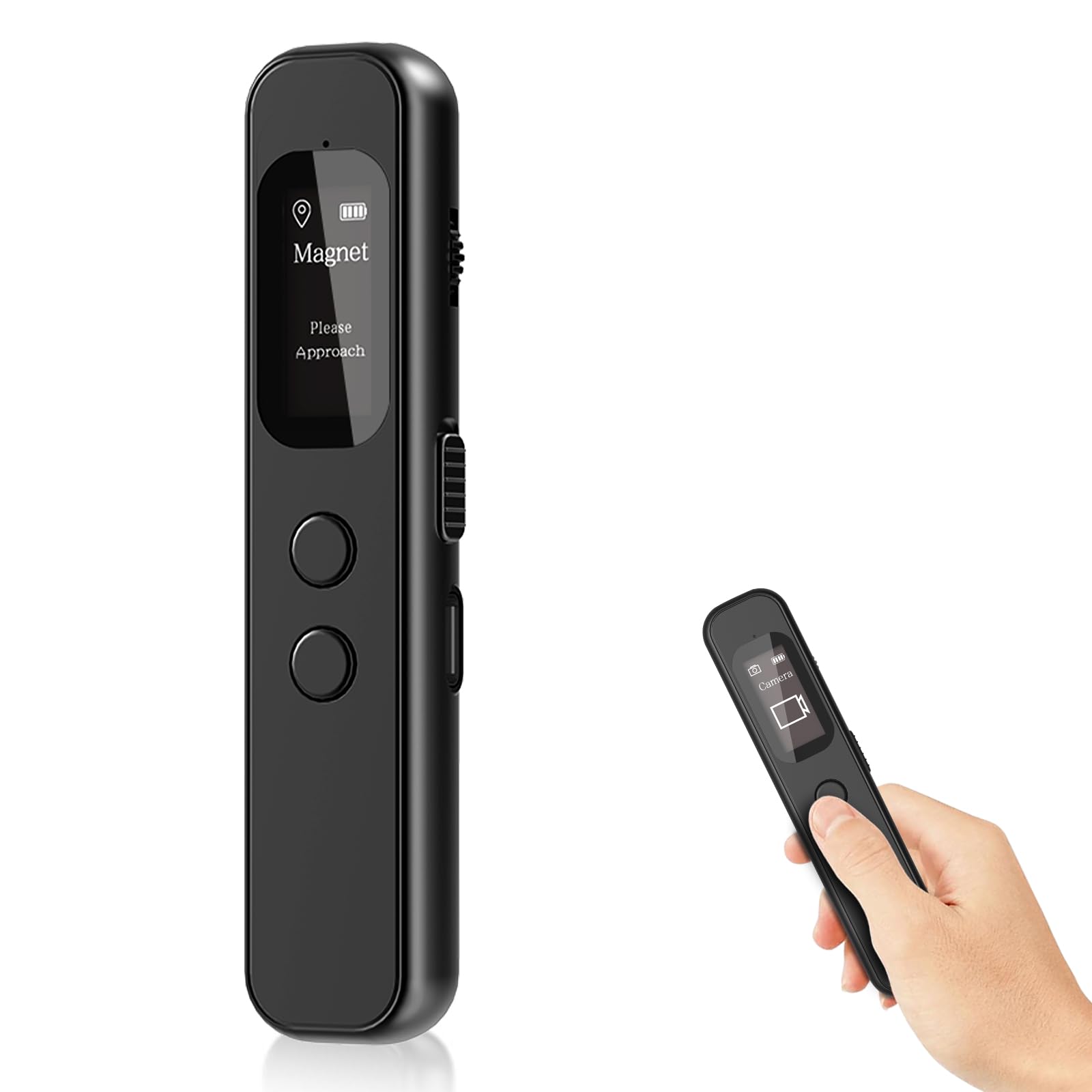
Image: The Kssvzz HCD-1P detector's intelligent LCD display showing electricity level, signal strength, flashlight lighting, and indicating support for silent mode.
Maintenance
- Keep the device clean and free from dust and moisture.
- Store in a cool, dry place when not in use.
- Avoid dropping the device or exposing it to extreme temperatures.
- Charge the battery regularly to maintain its lifespan, even if not in frequent use.
Troubleshooting
| Problem | Possible Cause | Solution |
|---|---|---|
| Device not turning on. | Low battery. | Charge the device fully. |
| False alarms in RF detection mode. | High sensitivity, interference from other devices (Wi-Fi, cell phones). | Decrease sensitivity. Move away from known signal sources. |
| Cannot detect hidden cameras in laser mode. | Incorrect scanning technique, camera too well hidden. | Scan slowly and thoroughly. Adjust laser flashing frequency. Ensure the room is dark for best results. |
| Magnetic detection not working. | Magnetic probe not attached or faulty. | Ensure the magnetic probe is securely attached. Test the probe on a known magnet. |
Specifications
| Feature | Detail |
|---|---|
| Model Number | HCD-1P |
| Brand | Kssvzz |
| Parcel Dimensions | 11.9 x 6.3 x 3.9 cm; 80 g |
| Power Source | Battery Powered |
| Display Type | LED |
| Unit Count | 1 Count |
| Compatible Devices | Camera |
| Manufacturer | Kssvzz |
| Country of Origin | China |

Image: The Kssvzz HCD-1P detector highlighting its long battery life, 1-hour charging time, 25 hours working time, 30 days standby, and 650 mAh battery capacity with a convenient Type-C charging port.
Warranty and Support
For warranty information or technical support, please refer to the contact details provided on the product packaging or visit the official Kssvzz website. Keep your purchase receipt for warranty claims.
Ask a question about this manual
Ask about setup, troubleshooting, compatibility, parts, safety, or missing instructions. Manuals+ will review the question and use this page’s manual context to help answer it.