
Retevis H-777H
Retevis H-777H Walkie Talkies User Manual
Model: H-777H
1. Introduction
This user manual provides comprehensive instructions for the operation, maintenance, and troubleshooting of your Retevis H-777H Walkie Talkies. Please read this manual thoroughly before using the product to ensure proper functionality and safety.
2. Package Contents
Upon opening the package, please verify that all the following items are included:
- 10 x Retevis H-777H Walkie Talkies with 1000mAh (Li-ion) battery
- 10 x Belt Clips
- 10 x Type-C charging cable
- 10 x Charging dock
- 10 x Charger adapter
- 10 x Speaker mic
- 1 x User Manual

Image: All items included in the Retevis H-777H Walkie Talkies package, including radios, batteries, charging accessories, belt clips, speaker mics, and user manual.
3. Product Features
- Hidden Display: The walkie talkie features a shatterproof hidden display, allowing easy viewing of battery status and channel information.

Image: Close-up of the Retevis H-777H walkie talkie highlighting its hidden display, which shows the current channel and battery level.
- Type-C Charging: Equipped with a standard Type-C charging port and a dedicated charging base, offering versatile charging options via power bank, computer, or vehicle.

Image: The Retevis H-777H walkie talkie in its charging dock, with an additional view showing the Type-C charging port for direct cable connection.
- Compatibility: Fully compatible with older H777 two-way radios and their accessories, ensuring seamless integration with existing equipment.
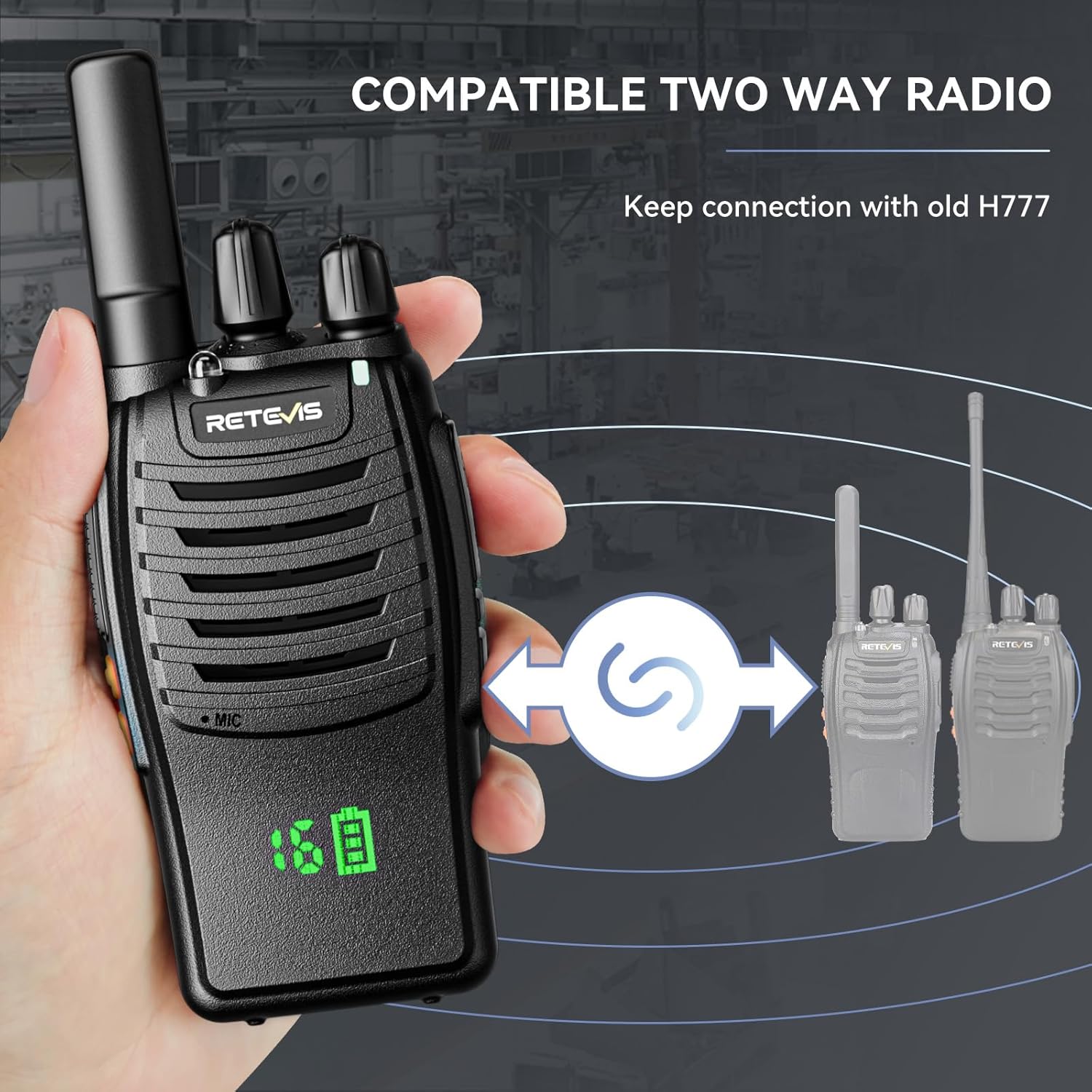
Image: Illustration demonstrating the compatibility of the Retevis H-777H with previous H777 models, allowing for combined use.
- License-Free Operation: No complex settings required; simply adjust to the same channel for quick intercommunication.
- Emergency Alarm: Features both remote and local alarm functions, enhancing user safety in outdoor or work environments. Activate by long-pressing Side Key 1.

Image: The Retevis H-777H walkie talkie emitting an alarm signal, with a visual representation of a siren, indicating its emergency alarm capability.
- LED Flashlight: A built-in LED flashlight provides illumination for night use. Activate by short-pressing Side Key 2.
- One-Key Pairing: Simplifies communication within a team by allowing quick pairing of channels.
- Portable Design: Integrated antenna and belt clip for easy carrying during work or outdoor activities.

Image: A Retevis H-777H walkie talkie attached to a belt via its integrated belt clip, demonstrating its portability.
4. Setup Guide
4.1. Battery Installation and Charging
- Ensure the walkie talkie is powered off.
- Align the battery pack with the battery compartment on the back of the radio.

Image: View of the back of the Retevis H-777H walkie talkie with its battery pack detached, showing the connection points.
- Gently push the battery into place until it clicks securely.
- To charge, connect the Type-C charging cable to the radio or place the radio in the charging dock. Connect the adapter to a power source.
- The charging indicator light will show charging status. A full charge typically takes several hours.
4.2. Attaching the Belt Clip
Attach the belt clip to the designated slot on the back of the radio by sliding it down until it locks into place. This allows for convenient carrying.
4.3. Attaching the Speaker Mic
Plug the speaker mic into the accessory port on the side of the walkie talkie. Ensure it is firmly seated for clear audio transmission and reception.
5. Operating Instructions
5.1. Power On/Off and Volume Control
- To power on the radio, rotate the Power/Volume Knob clockwise. You will hear an audible "Power On" prompt.
- Continue rotating the knob clockwise to increase the volume, and counter-clockwise to decrease it.
- To power off, rotate the knob counter-clockwise until it clicks and you hear "Power Off".
5.2. Channel Selection
- Rotate the Channel Selector Knob (the other top knob) to select your desired channel (1-16).
- The hidden display will show the selected channel number. Ensure all radios you wish to communicate with are set to the same channel.
5.3. Transmitting and Receiving
- To transmit, press and hold the Push-to-Talk (PTT) Button on the side of the radio. Speak clearly into the microphone.
- Release the PTT button to stop transmitting and return to receive mode.
- When receiving a transmission, the radio will automatically output the audio.
5.4. Emergency Alarm Function
- To activate the emergency alarm, long-press Side Key 1 (programmable function key). The radio will emit a loud alarm sound and may transmit an alarm signal to other radios on the same channel.
- To deactivate, short-press the PTT button or power cycle the radio.
5.5. LED Flashlight
- To turn on the LED flashlight, short-press Side Key 2 (programmable function key).
- Short-press Side Key 2 again to turn off the flashlight.
5.6. VOX (Voice Operated Transmission)
- The VOX function allows for hands-free operation. When enabled, the radio will automatically transmit when it detects your voice.
- Refer to the advanced programming guide (if applicable) for enabling and adjusting VOX sensitivity.

Image: A person communicating hands-free using the Retevis H-777H walkie talkie, illustrating the VOX feature.
6. Maintenance
- Cleaning: Use a soft, damp cloth to clean the radio's exterior. Do not use harsh chemicals or abrasive cleaners.
- Battery Care:
- Fully charge batteries before first use.
- Avoid overcharging or completely draining the battery.
- Store batteries in a cool, dry place when not in use for extended periods.
- Storage: Store the walkie talkies in a dry, dust-free environment away from direct sunlight and extreme temperatures.
- Antenna: Do not bend or twist the antenna excessively, as this can damage the radio's performance.
7. Troubleshooting
| Problem | Possible Cause | Solution |
|---|---|---|
| Radio does not power on. | Battery is low or not installed correctly. | Charge the battery or re-install it securely. |
| Cannot communicate with other radios. | Radios are on different channels or out of range. | Ensure all radios are on the same channel. Move closer to the other radio. Check for obstructions. |
| Poor audio quality or static. | Weak signal, interference, or low battery. | Move to an open area. Avoid sources of electronic interference. Charge the battery. |
| Battery life is shorter than expected. | Battery is old, not fully charged, or used in extreme temperatures. | Ensure full charge. Replace old batteries. Operate within recommended temperature range. |
8. Specifications
- Model: H-777H
- Item Weight: 6.4 ounces
- Product Dimensions: 1.25 x 2.34 x 4.49 inches
- Batteries: 1 Lithium Ion battery required (included)
- Manufacturer: Retevis
- Color: Black
- Number of Channels: 16
- Special Features: Hidden Display, License-free, USB-C Charging
- Frequency Range: FRS
- Talking Range Maximum: 2 Mile
- Voltage: 3.7 Volts
- Water Resistance Level: Water Repellent
9. Warranty and Support
Retevis provides the following warranty and support for the H-777H Walkie Talkies:
- Warranty Period: 2-year warranty for the radio body and 1-year warranty for accessories.
- Return Policy: 30 days no reason to return.
- Post-Warranty Service: Maintain service is offered beyond the warranty period; buyers are responsible for associated costs.
- Customer Support: For any inquiries or support needs, please contact Retevis customer service on Amazon. Responses are typically provided within 12 hours.
Related documentsH-777H


Ask a question about this manual
Ask about setup, troubleshooting, compatibility, parts, safety, or missing instructions. Manuals+ will review the question and use this page’s manual context to help answer it.