
Product Overview
The Moen Arbor Chrome Motionsense Wave Touchless One-Handle Pulldown Kitchen Faucet (Model 7594EWC) features a slightly flared handle and curving spout, offering a transitional look that seamlessly blends into various home styles. Its motion-activated sensor provides a convenient hands-free experience, allowing you to turn the water on and off with a simple hand wave. The retractable pull-down spray nozzle ensures easy reach within your sink, complemented by the Power Boost feature for faster cleaning at the touch of a button. This faucet is designed for single-hole installation but includes an additional deck plate for compatibility with 3-hole sink configurations.

A full view of the Moen Arbor Chrome Motionsense Wave Touchless One-Handle Pulldown Kitchen Faucet, showcasing its elegant design and chrome finish.
What's Included
Your Moen Arbor Faucet package includes the following components:
- Kitchen faucet
- 6 AA batteries
- Flexible supply lines with 3/8" compression fittings
- Deck Plate
- Control Box
- Instruction Manual
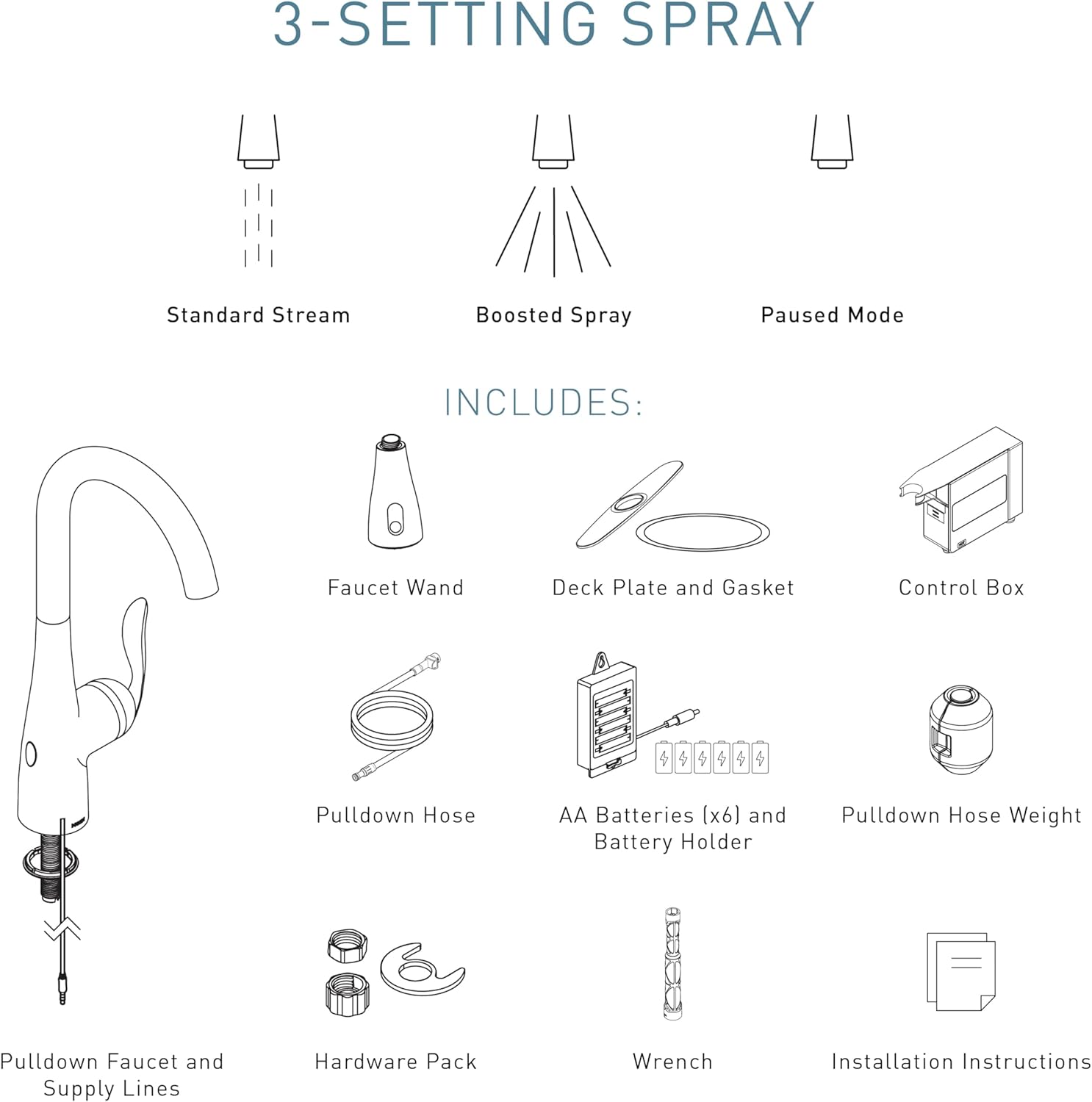
An illustration detailing the various components included with the Moen Arbor faucet, such as the faucet wand, deck plate, control box, pulldown hose, batteries, and hardware pack.
Setup and Installation
The Moen Arbor faucet is designed for straightforward installation. It features the Duralock quick connect system, which simplifies the process and often eliminates the need for additional tools. The faucet can be installed in either a 1-hole or 3-hole sink configuration, with a deck plate included for the latter.

A close-up view demonstrating the Duralock quick connect system, highlighting its ease of use for installation without requiring additional tools.
For detailed, step-by-step installation instructions, please refer to the comprehensive Installation Manual (PDF) provided with your product. Ensure all connections are secure and leak-free before regular use.

A diagram illustrating the key dimensions of the Moen Arbor faucet, including spout height, spout reach, and connection size, along with notes on 1 or 3-hole installation.
Operating Instructions
MotionSense Wave Touchless Activation
The MotionSense Wave feature allows for convenient hands-free operation. Simply wave your hand over the sensor located at the base of the faucet to turn the water on or off. This is ideal for when your hands are messy or full.

A hand waving over the sensor located at the base of the Moen Arbor faucet, demonstrating the touchless activation feature.
Handle Operation
For manual control, use the single lever handle. Push the handle forward for cold water and pull it back for hot water. Adjust the handle's position to control water flow and temperature precisely.
Spray Modes
The pull-down spray head offers multiple spray modes for various tasks:
- Standard Stream: For everyday tasks like filling pots or washing hands.
- Power Clean Spray: Provides 50% more spray power compared to other pull-down faucets without this technology, making it effective for tough cleaning jobs while minimizing splash.
- Paused Mode: Temporarily stops water flow from the spray head.
This video demonstrates the Power Clean spray technology, showing how it provides increased spray power for more efficient cleaning while minimizing splash.

An image showcasing the Power Clean spray technology effectively cleaning a plate, alongside a description of the Reflex system for secure spray head docking.

The Moen Arbor faucet in use, demonstrating its high arc design and pull-down spray head for easily filling large pots in the kitchen sink.
Care and Maintenance
To maintain the pristine appearance and optimal performance of your Moen Arbor faucet, regular cleaning is recommended. The chrome finish is highly reflective and designed for durability. For best results, clean with a damp cloth and mild soap, then rinse thoroughly with warm water and dry with a soft cloth. Avoid abrasive cleaners, harsh chemicals, or scouring pads, as these can damage the finish. The Spot Resist finish helps prevent water spots and fingerprints, making cleaning even easier.

A graphic indicating that Moen products are certified to meet U.S. Water Safety Standards, emphasizing product quality and safety.
Troubleshooting
If you encounter any issues with your Moen Arbor faucet, consider the following common troubleshooting steps:
- No Water Flow: Ensure the water supply valves under the sink are fully open. Check if the 6 AA batteries are correctly installed and have sufficient charge.
- Low Water Pressure: Inspect the aerator at the end of the spout for any debris or mineral buildup that might be restricting flow. Clean as necessary.
- Sensor Not Responding: Ensure the sensor area is clean and unobstructed. Check battery levels.
- Leaking: Verify all connections are tight. If leaking persists, it may indicate an issue with internal components, which might require professional assistance or warranty claim.
For more complex issues or detailed diagnostic steps, please refer to the complete Installation Manual or contact Moen Customer Support.
Product Specifications
| Feature | Specification |
|---|---|
| Brand | Moen |
| Model Name | Arbor |
| Model Number | 7594EWC |
| Finish Type | Chrome |
| Material | Metal |
| Mounting Type | Deck Mount |
| Number of Handles | 1 |
| Hole Count | 1 (or 3 with included deck plate) |
| Special Feature | Touchless (MotionSense Wave) |
| Maximum Flow Rate | 1.5 Gallons Per Minute |
| Spout Height | 15.5 Inches |
| Spout Reach | 7.87 Inches |
| Hose Length | 68 Inches |
| Power Source | 6 AA Batteries (included, optional AC power available) |
Warranty and Support
The Moen Arbor Kitchen Faucet is backed by a Limited Lifetime Warranty, ensuring peace of mind regarding its quality and durability. For specific warranty details, claims, or technical support, please refer to the official documentation included with your product or visit the Moen website.
You can also find the official Installation Manual (PDF) for further assistance: Moen Arbor Installation Manual


