
Introduction
This manual provides detailed instructions for the Teslong 360 Articulating Borescope with Autofocus Endoscope, Model TF600. This device is designed for precision inspections in various environments, particularly automotive engines and other confined spaces. Please read this manual thoroughly before operating the device to ensure proper use and to maximize its functionality.
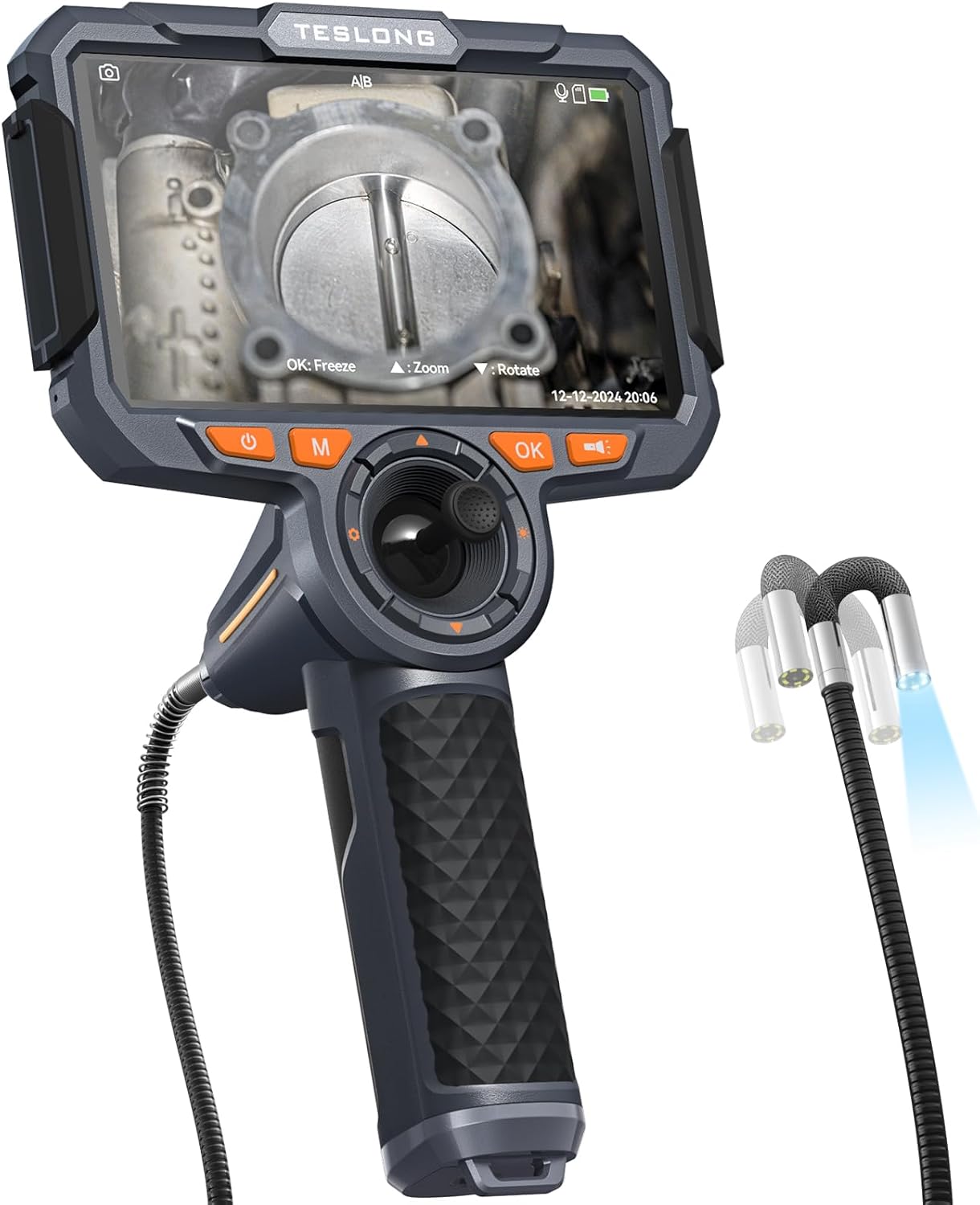
The Teslong 360 Articulating Borescope TF600, showcasing its main monitor unit and flexible probe.
What's in the Box
Carefully unpack your Teslong TF600 Borescope and verify that all components are present:
- TF600 Endoscope Monitor
- 4-Way Articulating Probe with Autofocus Camera
- Type-C Charging Cable
- 32GB Micro SD Card (pre-installed or separate)
- Hard Plastic Carrying Case
- User's Manual (this document)

All items included in the Teslong TF600 Borescope package.
Product Overview: Components and Controls
Familiarize yourself with the various parts and controls of your Teslong TF600 Borescope:

Detailed diagram illustrating the components and control buttons of the Teslong TF600 Borescope.
- Mini HDMI Port: For connecting to an external display.
- Reset Button: To restart the device if unresponsive.
- USB-C Charging/Data Port: For charging the internal battery and transferring data.
- Micro SD Card Slot: For inserting the memory card to store recordings.
- Power Button: To turn the device on or off.
- Mode Button (M): To switch between photo and video modes.
- Settings Button: To access device settings.
- Flashlight Button: To activate the integrated flashlight on the monitor unit.
- OK Button: To confirm selections, freeze images, or capture photos/videos.
- Probe Joystick: Controls the articulation of the camera probe.
- Up/Zoom Button: Adjusts digital zoom or navigates menus.
- Down/Rotate Button: Rotates the image or navigates menus.
- Articulating Probe: The flexible cable with the camera at its tip.
- Semi-Rigid Gooseneck: The flexible section of the probe that retains its shape.
Setup
- Charge the Device: Before first use, fully charge the TF600 monitor using the provided Type-C charging cable and a compatible USB power adapter (not included). The charging indicator will show progress.
- Insert Micro SD Card: Locate the Micro SD card slot on the side of the monitor. Insert the included 32GB Micro SD card with the gold contacts facing down until it clicks into place. This card is essential for recording images and videos.
- Attach the Probe: Ensure the articulating probe is securely connected to the main monitor unit. Align the connectors and twist gently to lock it in place if applicable.
Operating Instructions
Powering On/Off
Press and hold the Power Button for a few seconds to turn the device on. The 6-inch IPS LCD screen will illuminate. To power off, press and hold the Power Button again until the screen shuts down.
Navigating the Interface
Use the directional buttons and the OK Button to navigate through menus and settings. The Mode Button (M) switches between photo and video capture modes.
Using 4-Way Articulation
The borescope features a 4-way articulating probe, allowing the camera tip to bend and rotate. Use the Probe Joystick to control the camera's direction. The tip can turn 360° and bend back 210°, providing comprehensive viewing angles.

Visual representation of the 4-way articulation feature, enabling precision inspection from various angles.
Autofocus Camera Lens
The integrated autofocus camera lens automatically adjusts the focus to provide clear images. This eliminates the need for manual focusing, allowing you to concentrate on the inspection. The focal distance ranges from approximately 0.21 inches to infinity.

The autofocus camera lens ensures optimal clarity for detailed inspections.

The wide depth of field allows for clear viewing of objects both near and far.
Capturing Images and Videos
In photo mode, press the OK Button to capture a still image. In video mode, press the OK Button once to start recording and again to stop. All captured media is saved to the Micro SD card.
Adjusting LED Brightness
The camera probe is equipped with adjustable LED lights. Use the dedicated buttons (often integrated with navigation or zoom controls) to increase or decrease the brightness of these lights, ensuring optimal illumination in dark inspection areas.
Ergonomic Design and Display
The TF600 features an ergonomic design for comfortable handling during inspections. The 6-inch 1080P IPS screen provides a clear and vivid display of the inspection area.

The large 6-inch 1080P IPS screen provides clear visualization for precision inspections.

The ergonomic 'finger-first' design facilitates easy image and video capture.

The flexible gooseneck probe can be bent and shaped to access difficult areas.
Maintenance
- Cleaning the Probe and Lens: After each use, gently wipe the camera lens and probe with a soft, dry cloth. For stubborn dirt, a slightly damp cloth can be used, followed by drying. Ensure no liquids enter the probe's articulation mechanism.
- Battery Care: To prolong battery life, avoid fully discharging the device frequently. Charge the device regularly, even if not in use for extended periods. Store in a cool, dry place.
- Storage: Store the borescope and its accessories in the provided hard plastic carrying case to protect it from dust, moisture, and physical damage.
Troubleshooting
| Problem | Possible Cause | Solution |
|---|---|---|
| Device does not power on. | Low battery; device frozen. | Charge the device fully. Press the Reset button with a thin object. |
| No image on screen. | Probe not connected; camera damaged. | Ensure probe is securely connected. Contact customer service if issue persists. |
| Cannot record images/videos. | No SD card; SD card full or corrupted. | Insert a Micro SD card. Delete old files or format the card (backup important data first). |
| Image is blurry. | Lens dirty; beyond focal range. | Clean the camera lens. Ensure the object is within the autofocus range (0.21 inches to infinity). |
| Probe articulation is stiff or unresponsive. | Debris in mechanism; internal issue. | Gently try to clear any visible debris. Do not force the joystick. Contact customer service. |
Specifications
- Model: TF600
- Display: 6-inch IPS LCD (1920x1080 HD resolution)
- Camera Articulation: 4-Way Joystick Control (360° rotation, 210° bend back)
- Focus Type: Autofocus
- Focal Distance: 0.21 inches to infinity
- Probe Diameter: 0.24 inches (6mm)
- Battery: 6000mAh Rechargeable Lithium Polymer
- Storage: Supports Micro SD Card (32GB included)
- Video Capture Resolution: 1080p
- Image Format: JPG
- Video Format: AVI
- Connectivity: USB-C, Mini HDMI
- Construction: Industrial-grade plastic and toughened glass (drop-resistant, splashproof)
- Item Weight: 3.3 pounds
- Package Dimensions: 14.6 x 13 x 4.4 inches
Warranty and Support
The Teslong TF600 Borescope comes with a worry-free 12-month warranty. For technical assistance, troubleshooting, or warranty claims, please contact Teslong customer service. Refer to the contact information provided on the Teslong website or in your product packaging for friendly and responsive support.
For additional resources and product information, visit the official Teslong store: Teslong Store on Amazon.


