
1. Introduction
The Blink Outdoor 4 XR is a wireless smart security camera system designed to provide extensive coverage and reliable monitoring for your property. This system includes the Blink Outdoor 4 camera and the Sync Module XR, which extends the camera's range and enhances connectivity.
Key features include two-year battery life, 4x security coverage with up to 1000 feet open-air range (400 feet typical use) from the Sync Module XR, 20% faster live view access, and 70% more reliable connection compared to Wi-Fi-only operation. The system supports local storage via a MicroSD card (sold separately) and integrates with Alexa-enabled devices.

Image: Blink Outdoor 4 XR camera mounted on a tree, illustrating its extended range capabilities.
2. What's Included
Your Blink Outdoor 4 XR 1 Camera System package contains the following components:
- One (1) Blink Outdoor 4 Camera
- One (1) Blink Sync Module XR
- Two (2) AA 1.5V Energizer Lithium Metal Batteries (non-rechargeable)
- One (1) Mounting Kit for the camera
- One (1) USB-C Cable for the Sync Module XR
- One (1) Power Adapter for the Sync Module XR
Note: A Blink MicroSD card for local storage is sold separately.
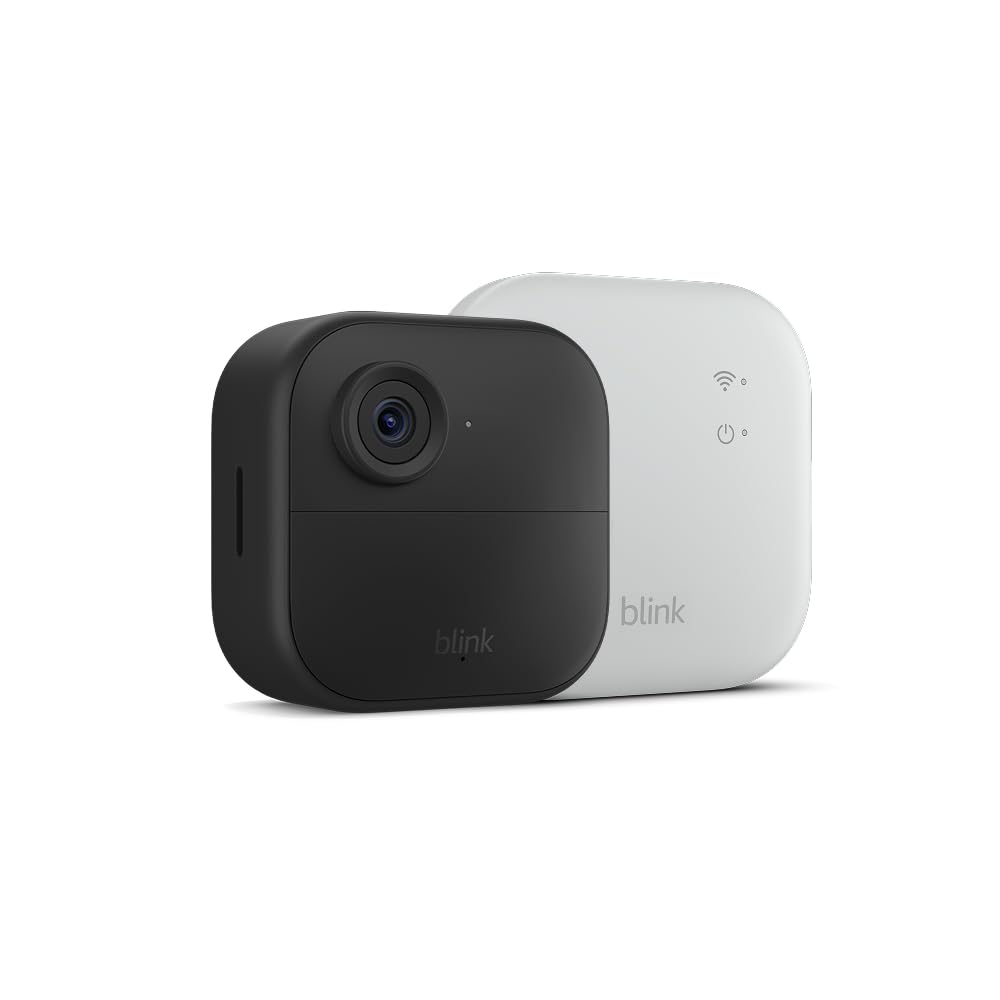
Image: The Blink Outdoor 4 camera and Sync Module XR, key components of the system.
3. Setup Guide
3.1. Download the Blink Home Monitor App
Before beginning setup, download the 'Blink Home Monitor' app from your device's app store. The app is compatible with iOS 15.0+, Android 9.0+, or Fire 9.0+.
3.2. Set Up the Sync Module XR
- Plug the Sync Module XR into a power outlet using the provided USB-C cable and power adapter.
- Ensure the Sync Module XR is placed within range of your 2.4 GHz Wi-Fi network (802.11b/g/n).
- Follow the in-app instructions to connect the Sync Module XR to your home Wi-Fi network.
3.3. Install the Outdoor 4 Camera
- Insert the two AA lithium metal batteries into the Outdoor 4 camera.
- Choose a suitable location for your camera. The Sync Module XR allows for camera placement up to 400 feet (typical use) or 1000 feet (open air) away.
- Use the included mounting kit to securely attach the camera to a wall or other surface. Ensure the camera has a clear field of view (143° diagonal).
- Add the camera to your system via the Blink Home Monitor app, following the on-screen prompts.

Image: A Blink Outdoor 4 camera mounted outdoors, demonstrating typical placement for extended range.
4. Operating Your System
4.1. Live View
Access live 1080p HD video from your camera through the Blink Home Monitor app. The XR technology provides 20% quicker access to live view, even at long distances.

Image: A smartphone displaying a live view from the Blink Outdoor 4 camera.
4.2. Motion Detection and Activity Zones
The Outdoor 4 camera features dual-zone, enhanced motion detection. You can customize activity zones within the app to specify areas where motion should trigger recordings, reducing false alerts.

Image: The Blink app interface showing customizable activity zones for motion detection.
4.3. Two-Way Audio
Utilize the two-way audio feature to speak and listen through the camera, allowing for communication with visitors or deterring unwanted activity.
4.4. Saving and Sharing Clips
Event clips can be stored conveniently in the cloud with a Blink Subscription Plan (free 30-day trial included) or locally with the Sync Module XR and a MicroSD card (up to 256 GB, sold separately). You can download important videos to your mobile device.
4.5. Arming and Disarming
Control up to 10 Blink devices from the Blink app, making it easy to arm, disarm, and group your cameras together for comprehensive security management.
4.6. Alexa Integration
Connect your Blink system to an Alexa-enabled device to engage live view, arm and disarm your system, and set motion-triggered routines using voice commands.

Image: An Echo Show displaying a live feed from a Blink camera, demonstrating Alexa integration.
5. Maintenance
5.1. Battery Life and Replacement
The Outdoor 4 camera is designed for up to two years of battery life with the included Energizer Lithium AA batteries, based on default settings. Battery life may vary based on device settings, usage, and environmental factors. Replace batteries with new AA 1.5V lithium metal batteries when indicated by the app.
5.2. Cleaning
Periodically clean the camera lens and housing with a soft, dry cloth to ensure optimal image clarity and prevent obstruction of sensors.
5.3. Software Updates
Your device will receive guaranteed software security updates for at least four years after its last availability for purchase as a new unit. Ensure your Sync Module XR is connected to the internet to receive these updates automatically.
6. Troubleshooting
6.1. Connectivity Issues
If you experience disconnections, ensure your Sync Module XR is within optimal range of your Wi-Fi router and the camera is within range of the Sync Module XR. XR cameras are designed for up to 70% fewer disconnects than Wi-Fi-only cameras.
6.2. Live View Delays
While XR technology aims for 20% faster live view, environmental factors or network congestion can still cause delays. Ensure your internet connection is stable and strong.
6.3. Motion Detection Not Triggering
Check your activity zone settings in the Blink app. Ensure the camera lens is clean and unobstructed. Verify that the camera's batteries are not low.
6.4. General Troubleshooting Steps
- Restart the Blink Home Monitor app.
- Unplug the Sync Module XR, wait 30 seconds, and plug it back in.
- Check your home Wi-Fi network for issues.
- Ensure your smartphone meets the minimum requirements (iOS 15.0+, Android 9.0+, or Fire 9.0+).
7. Specifications
| Feature | Specification |
|---|---|
| Camera Resolution | 1080p HD video |
| Photo Resolution | 640 x 360 |
| Field of View | 143° diagonal |
| Camera Frame Rate | Up to 30 fps |
| Audio | 2-way audio |
| Camera Power | Two AA 1.5V lithium metal batteries (non-rechargeable) |
| Camera Battery Life | Up to two years (based on default settings) |
| Camera Dimensions | 2.8 x 2.8 x 1.6 inches (70 x 70 x 41 mm) |
| Camera Weight | 5.0 oz (141 g) |
| Camera Operating Temperature | -4°F to 113°F (-20°C to 45°C) |
| Sync Module XR Electrical Rating | Plug-in. 100-240VAC, 50/60Hz |
| Sync Module XR Dimensions | 3.19in x 3.19in x 0.8in (81mm x 81mm x 20.32mm) |
| Sync Module XR Weight | 0.19lb (0.085kg) |
| Sync Module XR Operating Temperature | 32°F to 104°F (0°C to 40°C) Indoor use only |
| Wi-Fi Connectivity | 2.4 GHz 802.11b/g/n |
| Minimum Smartphone Requirements | iOS 15.0, Android 9.0, or Fire 9.0 |
| Generation | 4th generation – 2023 release |
8. Warranty and Support
8.1. Warranty Information
The Blink Outdoor 4 XR system comes with a 1-year limited warranty. Use of Blink cameras is subject to the terms found on the official Blink website.
8.2. Product Support
For additional information, troubleshooting guides, and frequently asked questions, please visit the official Blink Support page. You can find specific support pages for the Sync Module XR and the Outdoor 4 camera.
Visit the Blink Store for more product information and accessories.


