
1. Introduction
Thank you for choosing the G-Power GP-PB014 10000mAh Power Bank. This portable charging device is designed to provide reliable power for your electronic devices on the go. It features multiple ports and integrated safety mechanisms like over-charging, over-current, and short-circuit protection. Please read this manual carefully before using the product to ensure safe and optimal performance. Keep this manual for future reference.
2. Safety Instructions
To prevent damage to the product or injury to yourself and others, please observe the following safety precautions:
- Do not expose the power bank to extreme temperatures (hot or cold), direct sunlight, or high humidity.
- Do not disassemble, modify, or attempt to repair the device. This will void the warranty and may cause damage.
- Keep the power bank away from water and other liquids.
- Do not drop, puncture, or apply excessive force to the power bank.
- Use only certified charging cables and adapters.
- Keep out of reach of children.
- Dispose of the power bank responsibly according to local regulations. Do not dispose of it in household waste.
3. Package Contents
Please check the package for the following items:
- G-Power GP-PB014 10000mAh Power Bank
- USB Charging Cable (Type-A to Type-C or Micro-USB, depending on model variant)
- User Manual
4. Product Overview
The G-Power GP-PB014 is a compact and efficient power bank featuring multiple charging ports and an LED indicator for battery status.
Components:
- USB-A Output Ports (x2): For charging external devices.
- Type-C Port: Functions as both input for charging the power bank and output for charging devices.
- LED Indicator Lights: Display the remaining battery capacity.
- Power Button: Activates the LED indicator and initiates charging.
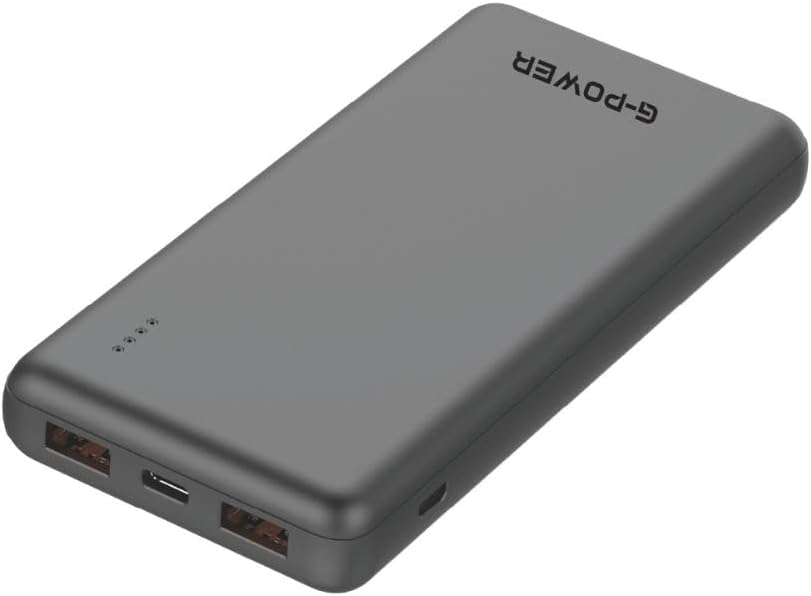
Image: Top view of the G-Power GP-PB014 Power Bank, highlighting the two USB-A output ports and the single USB-C port. This view helps identify the different connection types available on the device.

Image: Front view of the G-Power GP-PB014 Power Bank, displaying the four small LED indicator lights that show the current battery charge level.
5. Setup
Initial Charging of the Power Bank:
Before first use, fully charge your G-Power GP-PB014 Power Bank.
- Connect the provided USB charging cable to the Type-C input port on the power bank.
- Connect the other end of the cable to a USB wall adapter (not included) or a computer's USB port.
- The LED indicators will light up and blink, showing the charging progress. All four LEDs will be solid when fully charged.
6. Operating Instructions
Charging Your Devices:
- Connect your device's charging cable to one of the USB-A output ports or the Type-C port on the power bank.
- Connect the other end of the cable to your device.
- The power bank will automatically begin charging your device. If not, press the power button once to initiate charging.
- The LED indicators will show the remaining battery level of the power bank during charging.

Image: The G-Power GP-PB014 Power Bank connected via a cable to a smartphone, indicating active charging. The phone screen shows a charging percentage.
Checking Battery Level:
Press the power button once to check the remaining battery capacity. The LED indicators will light up for a few seconds:
- 4 LEDs: 75% - 100% charged
- 3 LEDs: 50% - 75% charged
- 2 LEDs: 25% - 50% charged
- 1 LED: 0% - 25% charged (recharge soon)
7. Maintenance
- Cleaning: Wipe the power bank with a soft, dry cloth. Do not use harsh chemicals or abrasive materials.
- Storage: Store the power bank in a cool, dry place away from direct sunlight and extreme temperatures.
- Battery Care: To prolong battery life, fully charge the power bank at least once every three months if not in regular use.
8. Troubleshooting
| Problem | Possible Cause | Solution |
|---|---|---|
| Power bank not charging | Cable is faulty or not properly connected; charger is not working; power bank is fully charged. | Check cable connections; try a different cable or wall adapter; verify LED indicators. |
| Device not charging from power bank | Power bank battery is depleted; cable is faulty or not properly connected; device is incompatible; power button not pressed. | Recharge power bank; check cable connections; try a different cable; ensure device is compatible; press power button. |
| Slow charging | Cable is not suitable for fast charging; device requires higher input; multiple devices charging simultaneously. | Use a high-quality, fast-charging cable; ensure device supports fast charging; charge devices one at a time for optimal speed. |
9. Specifications
| Model Number | GP-PB014 |
| Battery Capacity | 10000mAh |
| Battery Type | Lithium Polymer |
| Input (Type-C) | 5V / 2.1A (Typical) |
| Output (USB-A x2) | 5V / 2.1A (Max per port) |
| Output (Type-C) | 5V / 2.1A (Max) |
| Total Output | 2.1 Amps |
| Product Dimensions | 20 x 5 x 10 cm |
| Item Weight | 200 Grams |
| Special Features | Fast Charging, LED Indicator Lights, Slim Design |
| Color | Black |
| Manufacturer | G-Power |
| Country of Origin | China |
10. Warranty and Support
G-Power products are manufactured to the highest quality standards. This product comes with a limited warranty from the date of purchase. For detailed warranty information, technical support, or customer service inquiries, please refer to the warranty card included with your product or visit the official G-Power website.
Please retain your proof of purchase for warranty claims.