
ZWP RC-R0502
ZWP RC-R0502 Replacement Remote Control User Manual
Compatible with Kenwood Audio KR-V5080, KR-V5560, KR-V5570, KR-V5580, KV-6080
1. Introduction
This manual provides detailed instructions for the ZWP RC-R0502 Replacement Remote Control. This remote is designed to be a direct replacement for original Kenwood Audio system remotes, specifically compatible with models KR-V5080, KR-V5560, KR-V5570, KR-V5580, and KV-6080. Constructed from high-quality ABS material, it offers durability and a comfortable grip.

Figure 1: Comparison of the ZWP RC-R0502 remote (left) with original Kenwood remotes (right). This image illustrates the new remote's design and its intended compatibility with older Kenwood models.
2. Setup
2.1 Battery Installation
The ZWP RC-R0502 remote control requires two (2) 1.5V AAA batteries for operation. Batteries are not included with the remote.
- Locate the battery compartment cover on the back of the remote control.
- Slide the cover downwards or press the latch (if present) to open the compartment.
- Insert two AAA batteries, ensuring that the positive (+) and negative (-) terminals align correctly with the markings inside the compartment.
- Replace the battery compartment cover by sliding it back into place until it clicks securely.

Figure 2: Detailed view of the battery compartment, illustrating correct AAA battery insertion.
2.2 Initial Use
Once batteries are installed, the ZWP RC-R0502 remote control is ready for immediate use. No programming or pairing is required. It functions directly with compatible Kenwood Audio systems.
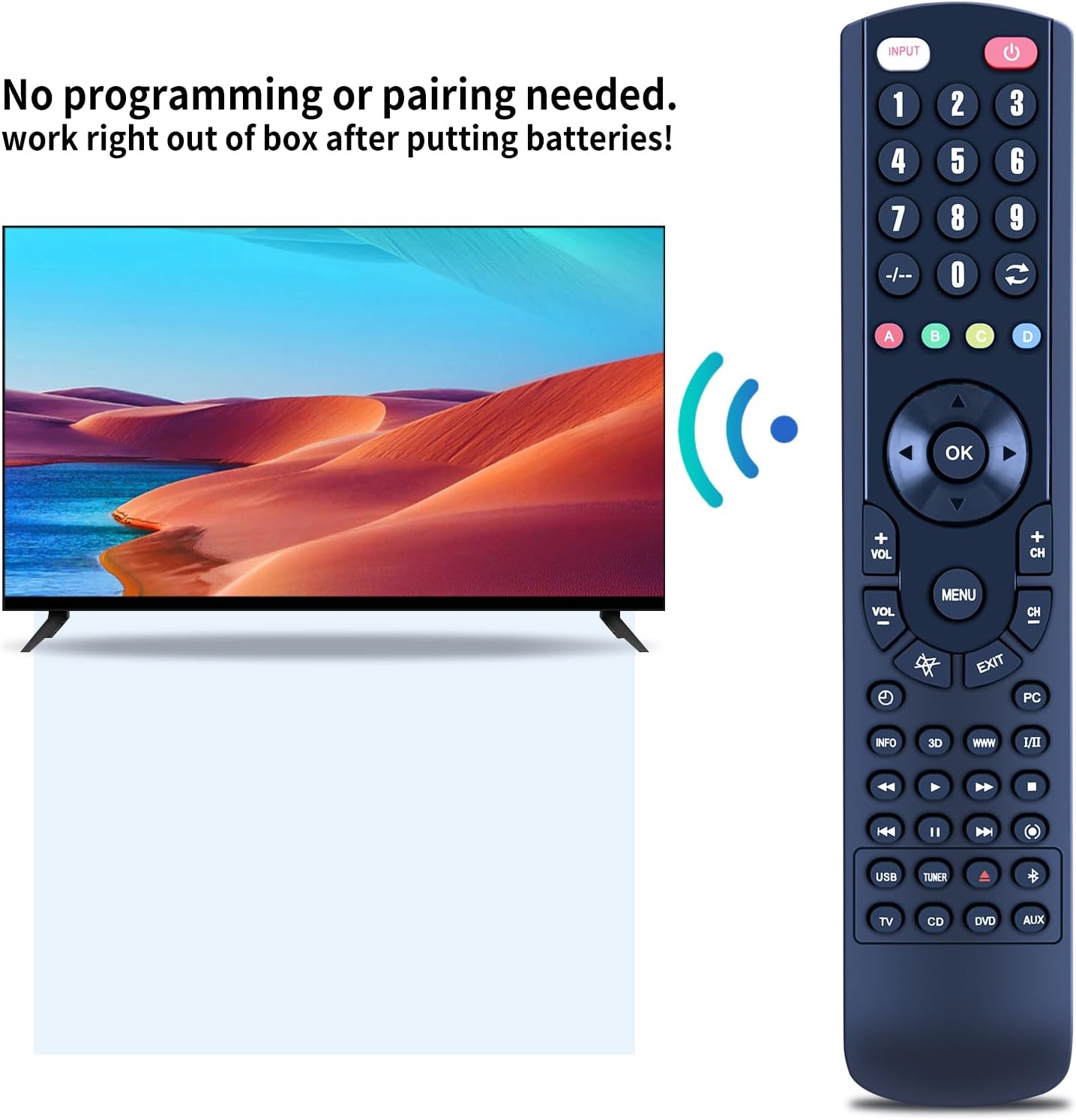
Figure 3: The remote operates immediately after battery insertion, requiring no complex programming or pairing.
3. Operating Instructions
The ZWP RC-R0502 remote control utilizes infrared (IR) technology for communication with your Kenwood Audio system. Ensure a clear line of sight between the remote's IR emitter (located at the top front) and the receiver on your audio device.
3.1 Remote Control Range
The remote provides precise control from a distance of up to 10 meters (approximately 33 feet). Its multi-angle induction design allows for effective operation even when not directly pointed at the device, though direct line of sight is always recommended for optimal performance.

Figure 4: Demonstrates the remote's effective operating range and multi-angle infrared capability.
3.2 Button Functions
The remote control features a comprehensive set of buttons for controlling your Kenwood Audio system. While specific functions may vary slightly depending on your Kenwood model, the general layout and purpose of the buttons are as follows:
- Power Button (●): Turns the audio system on or off.
- Input Button: Cycles through available audio inputs (e.g., CD, DVD, AUX, USB, Tuner).
- Number Pad (0-9): Used for direct input, such as selecting radio stations or track numbers.
- Volume Control (VOL +/-): Adjusts the master volume level.
- Channel Control (CH +/-): Navigates through radio presets or other channel-based functions.
- Navigation Buttons (▲ ▼ ◀ ►): Used for menu navigation and selection.
- OK Button: Confirms selections in menus.
- Menu Button: Accesses the system's main menu.
- Exit Button: Exits current menu or function.
- Playback Controls (◀◀, ►►, ■, ►): Standard controls for media playback (Rewind, Fast Forward, Stop, Play/Pause).
- Mute Button: Toggles audio mute on/off.
- Info Button: Displays information about the current track or input.
- 3D Button: Activates or deactivates 3D audio effects (if supported by your system).
4. Maintenance
Proper care and maintenance will extend the lifespan of your remote control.
- Cleaning: Use a soft, dry cloth to wipe the surface of the remote. For stubborn dirt, slightly dampen the cloth with water or a mild, non-abrasive cleaner. Do not use harsh chemicals or abrasive materials.
- Storage: Store the remote in a cool, dry place away from direct sunlight and extreme temperatures.
- Battery Care: If the remote will not be used for an extended period (e.g., more than one month), remove the batteries to prevent leakage and potential damage to the remote.
- Avoid Drops: While durable, avoid dropping the remote, as this can damage internal components.
5. Troubleshooting
If you experience issues with your ZWP RC-R0502 remote control, please refer to the following common solutions:
| Problem | Possible Cause | Solution |
|---|---|---|
| Remote not responding. |
|
|
| Remote works intermittently. |
|
|
| Certain buttons do not work. |
|
|
6. Specifications
| Brand | ZWP |
| Model Number | RC-R0502 |
| Compatible Devices | Kenwood Audio Systems: KR-V5080, KR-V5560, KR-V5570, KR-V5580, KV-6080 (Stereo System) |
| Connector Type | Infrared (IR) |
| Special Feature | Ergonomic design |
| Power Source | 2 x 1.5V AAA Batteries (not included) |
| Material | High-quality ABS |
| Color | Black |
| Approximate Dimensions (L x W x T) | 22.5 cm x 2.3 cm x 3.5 cm (8.86 in x 0.91 in x 1.38 in) |
| Approximate Weight | 68.04 g |

Figure 5: Detailed dimensions of the ZWP RC-R0502 remote control.
7. Warranty and Support
7.1 Customer Support
For any questions, concerns, or issues regarding your ZWP RC-R0502 Replacement Remote Control, please do not hesitate to contact the seller, ZWP-STORE-CA, directly through the platform where the purchase was made. They are committed to assisting you with any inquiries and resolving any problems you may encounter.
Please provide your order details when contacting support to ensure a prompt and efficient resolution.
Ask a question about this manual
Ask about setup, troubleshooting, compatibility, parts, safety, or missing instructions. Manuals+ will review the question and use this page’s manual context to help answer it.