
1. Introduction
This manual provides essential information for the safe and effective operation, setup, and maintenance of your ANDELI CUT-55DS Plasma Cutter. Please read this manual thoroughly before using the equipment to ensure proper function and to prevent injury or damage.
Safety Precautions
- Always wear appropriate personal protective equipment (PPE), including welding helmet, gloves, and protective clothing.
- Ensure adequate ventilation in the work area to disperse fumes.
- Do not operate the machine in damp or wet conditions.
- Verify proper grounding of the equipment and work piece.
- Keep children and unauthorized personnel away from the operating area.
- Disconnect power before performing any maintenance or changing consumables.
2. Package Contents
Upon unpacking, verify that all items listed below are present and undamaged. If any items are missing or damaged, contact your supplier immediately.
- Plasma Cutter (CUT-55DS) x 1
- Plasma Cutter Torch x 1
- Gas Pipe (3M) x 1
- Hose Hoop x 2
- Electrode x 10
- Nozzle Shield x 10
- Hose Barb x 2
- Oil-water Separator x 1
- 110/220V Plug Converter x 1 (for free switching)

Figure 2.1: The ANDELI CUT-55DS Plasma Cutter and its standard accessories.
3. Setup Instructions
3.1 Power Connection
The CUT-55DS supports dual voltage input (110V/220V). Use the provided plug converter to match your power supply. Ensure the power source is capable of providing the necessary amperage for the desired cutting output.
- Connect the power cord to a suitable grounded electrical outlet.
- The machine automatically detects the input voltage.
3.2 Air Compressor Connection
A clean, dry air supply is crucial for optimal plasma cutting performance.
- Connect the gas pipe to the air inlet on the back of the plasma cutter.
- Attach the other end of the gas pipe to your air compressor's output.
- Install the oil-water separator between the compressor and the plasma cutter to ensure dry air.
- Set the air pressure according to the material thickness and cutting current (refer to operating parameters).
3.3 Torch and Ground Clamp Connection
- Connect the plasma torch cable to the designated port on the front panel of the machine.
- Connect the ground clamp cable to the ground terminal on the front panel.
- Securely attach the ground clamp to the workpiece or work table, ensuring good electrical contact.

Figure 3.1: Front panel of the plasma cutter with torch and ground clamp connections.
4. Operating Instructions
4.1 Control Panel Overview
The LED high-definition display provides real-time information and allows for function selection.

Figure 4.1: Detailed view of the LED control panel.
- Warning Prompts: Indicators for "Over current" and "Over heat".
- VRD / ON / OFF: Voltage Reduction Device status.
- Cutting Plate Thickness Display: Shows the recommended cutting thickness.
- Voltage Display: Shows the current voltage.
- Function Selection: Toggle between MMA (welding mode) and CUT (cutting mode).
- Gas Check: For testing air flow.
- LF (Low Frequency Cutting): Select for specific cutting requirements.
- 2T / 4T Operation: Torch trigger modes (see Section 4.3).
- Pre Gas / Post Gas: Adjusts gas flow before and after cutting.
4.2 Cutting Process
The CUT-55DS features a Non-Touch Pilot Arc, allowing for easier cuts on rough, rusty, or painted surfaces with minimal slag.
- Select "CUT" mode on the control panel.
- Adjust the cutting current (Amps) based on the material type and thickness.
- Ensure proper air pressure is set.
- Position the torch nozzle approximately 1/8 inch (3mm) above the workpiece for non-touch pilot arc initiation.
- Press the torch trigger to initiate the arc and begin cutting.
- Maintain a steady travel speed for a clean cut.

Figure 4.2: Example of plasma cutting mesh material.
4.3 2T / 4T Torch Operation
The 2T and 4T modes control how the torch trigger operates, offering flexibility for different cutting tasks.
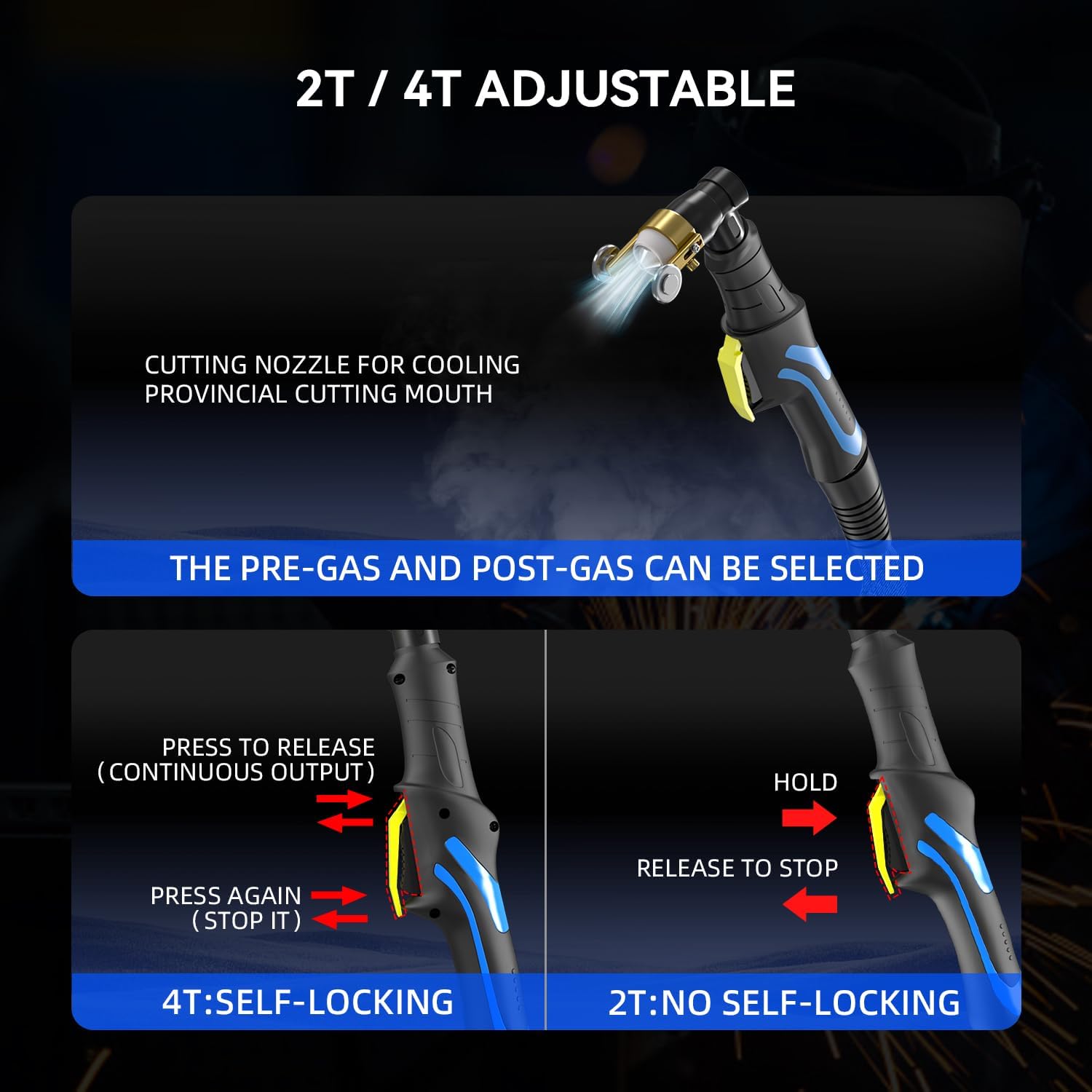
Figure 4.3: Explanation of 2T (No Self-Locking) and 4T (Self-Locking) modes.
- 2T (Two-Touch / No Self-Locking):
- Press and hold the trigger: Arc initiates and cutting continues.
- Release the trigger: Arc stops.
- Recommended for short cuts or tacking.
- 4T (Four-Touch / Self-Locking):
- Press and release the trigger: Arc initiates and cutting continues without holding the trigger.
- Press and release the trigger again: Arc stops.
- Recommended for long, continuous cuts to reduce hand fatigue.
5. Maintenance
Regular maintenance ensures the longevity and optimal performance of your plasma cutter.
5.1 Consumable Replacement
Electrodes and nozzles are consumables that wear out over time. Replace them when you notice a decrease in cut quality or difficulty in arc initiation.
- Ensure the machine is powered off and disconnected from the power supply.
- Unscrew the torch head to access the electrode and nozzle.
- Remove worn components and replace with new ones, ensuring they are seated correctly.
- Tighten the torch head securely.
5.2 Air Filter / Oil-Water Separator
Periodically check and drain the oil-water separator to prevent moisture from entering the plasma cutter, which can damage internal components and affect cut quality.
- Drain accumulated water from the separator bowl regularly.
- Clean or replace the filter element as needed, depending on usage and air quality.
5.3 General Cleaning
- Keep the machine clean and free from dust and metal particles.
- Use a dry, soft cloth to wipe down the exterior.
- Periodically use compressed air to blow out dust from the internal components, ensuring the machine is unplugged.
6. Troubleshooting
This section addresses common issues you might encounter. For problems not listed here, contact customer support.
| Problem | Possible Cause | Solution |
|---|---|---|
| Machine powers on, but control panel display is off or unresponsive. | Internal connection issue, faulty display, or specific internal component failure. | Power cycle the machine. If the issue persists, contact customer support for assistance. |
| No arc initiation. |
|
|
| Poor cut quality (rough, excessive slag). |
|
|
| "Over heat" warning light illuminates. | Machine has exceeded its duty cycle or is operating in a high ambient temperature. | Allow the machine to cool down. Ensure adequate ventilation around the unit. Reduce continuous cutting time. |
7. Specifications
| Parameter | Value |
|---|---|
| Model Number | CUT-55DS |
| Manufacturer | ANDELI |
| Power Source Type | AC (Alternating Current) |
| Input Voltage | 110V/220V Dual Voltage |
| Output Current | 15-50A DC |
| Ideal Clean Cutting Thickness (220V) | 1/2 inch (14mm) |
| Maximum Cutting Thickness (220V) | 3/4 inch (20mm) |
| Technology | IGBT Inverter, Non-Touch Pilot Arc |
| Package Dimensions | 51.41 x 40.59 x 27.51 cm |
| Item Weight | 11.46 kg |
8. Warranty and Support
8.1 Product Warranty
The ANDELI CUT-55DS Plasma Cutter comes with a two-year warranty covering manufacturing defects and free replacement parts. Please retain your proof of purchase for warranty claims.
8.2 Customer Support
For technical assistance, troubleshooting guidance, or warranty inquiries, please contact ANDELI customer service. Refer to your purchase documentation for specific contact details.


