
Bloomfold BF001
Bloomfold 12L Dehumidifier User Manual
Model: BF001
Brand: Bloomfold
1. Introduction
Thank you for choosing the Bloomfold 12L Dehumidifier. This manual provides essential information for the safe and efficient operation, maintenance, and troubleshooting of your new appliance. Please read this manual thoroughly before use and keep it for future reference. This dehumidifier is designed to effectively remove excess moisture from the air, helping to prevent mold, mildew, and unpleasant odors, thereby improving the overall air quality in your home.
2. Important Safety Instructions
WARNING: To reduce the risk of fire, electric shock, or injury, always follow these basic precautions:
- Read all instructions before using the appliance.
- Do not operate the dehumidifier with a damaged cord or plug.
- Ensure the power supply matches the voltage specified on the rating label.
- Do not block air inlets or outlets. Maintain at least 20 cm clearance around the unit.
- Do not immerse the unit, cord, or plug in water or other liquids.
- Unplug the dehumidifier before cleaning or performing any maintenance.
- Keep out of reach of children and pets.
- Use only on a stable, level surface.
- Do not use in direct sunlight or near heat sources.
3. What's in the Box
Upon unpacking, please ensure all the following items are present:
- Bloomfold Dehumidifier (Model BF001)
- User Manual (this document)
- Drain Hose for continuous drainage
4. Product Overview
Familiarize yourself with the main components of your Bloomfold Dehumidifier:

Figure 4.1: Front view of the Bloomfold 12L Dehumidifier.

Figure 4.2: Key features of the Bloomfold Dehumidifier, including mold prevention, laundry drying, quiet operation, and energy efficiency.
Main Components:
- Control Panel: Intuitive digital display and touch controls for settings.
- Air Inlet/Outlet: Located on the back and top for efficient air circulation.
- Water Tank: Removable 2-liter tank for collected moisture.
- Continuous Drain Outlet: Port for attaching the drain hose for continuous water removal.
- Wheels: For easy portability and movement.
5. Setup
5.1 Unpacking and Placement
- Carefully remove the dehumidifier from its packaging.
- Place the unit upright on a firm, level surface.
- Ensure there is at least 20 cm (8 inches) of space around all sides of the unit for proper airflow. Avoid placing it against walls or furniture that could obstruct the air inlets or outlets.
- Do not place the unit near heat-generating appliances or in direct sunlight.
5.2 Power Connection
Plug the power cord into a grounded electrical outlet. Ensure the outlet's voltage matches the specifications of the dehumidifier.
5.3 Continuous Drainage (Optional)
For continuous operation without needing to empty the water tank, you can use the included drain hose:
- Locate the continuous drain outlet on the back of the unit.
- Remove the rubber stopper (if present).
- Connect one end of the drain hose to the outlet, ensuring a secure fit.
- Route the other end of the hose to a suitable drain (e.g., floor drain, large bucket), ensuring it is sloped downwards for gravity drainage.

Figure 5.1: Setting up the continuous drainage function with the included hose.
6. Operating Instructions
6.1 Control Panel Overview

Figure 6.1: Detailed view of the control panel and its functions.
- Power Button: Turns the unit ON/OFF.
- Mode Button: Cycles through different operating modes (e.g., Auto, Continuous, Laundry Drying).
- Humidity Set Button: Adjusts the desired humidity level.
- Speed Button: Adjusts fan speed.
- Timer Button: Sets the auto-on or auto-off timer.
- Child Lock Button: Locks the control panel to prevent accidental changes.
- Digital Display: Shows current humidity, set humidity, or timer settings.
6.2 Powering On/Off
Press the Power button to turn the dehumidifier on or off. The digital display will illuminate when the unit is on.
6.3 Setting Desired Humidity
Press the Humidity Set button repeatedly to cycle through desired humidity levels (e.g., 40%, 50%, 60%). The unit will operate until the set humidity is reached, then cycle on/off to maintain it.

Figure 6.2: The intelligent humidity sensor with color-coded display for current humidity levels.

Figure 6.3: The dehumidifier intelligently regulates humidity, starting when levels are high and stopping when the target is met.
6.4 Operating Modes
Press the Mode button to select:
- Auto Mode: The unit automatically adjusts operation based on the ambient humidity.
- Continuous Mode: The unit runs continuously regardless of humidity level, ideal for very damp conditions or for use with continuous drainage.
- Laundry Drying Mode: Optimized settings for faster drying of clothes in a confined space.
6.5 Timer Function
Press the Timer button to set a desired operating duration (e.g., 2 hours, 4 hours). The unit will automatically turn off after the set time. You can also set a delayed start timer.
6.6 Quiet Operation
The Bloomfold Dehumidifier is designed for quiet operation, making it suitable for various living spaces including bedrooms and offices.

Figure 6.4: Noise level comparison, highlighting the dehumidifier's quiet 36dB operation.
6.7 Versatile Application
The compact design and efficient performance make this dehumidifier ideal for various rooms in your home.
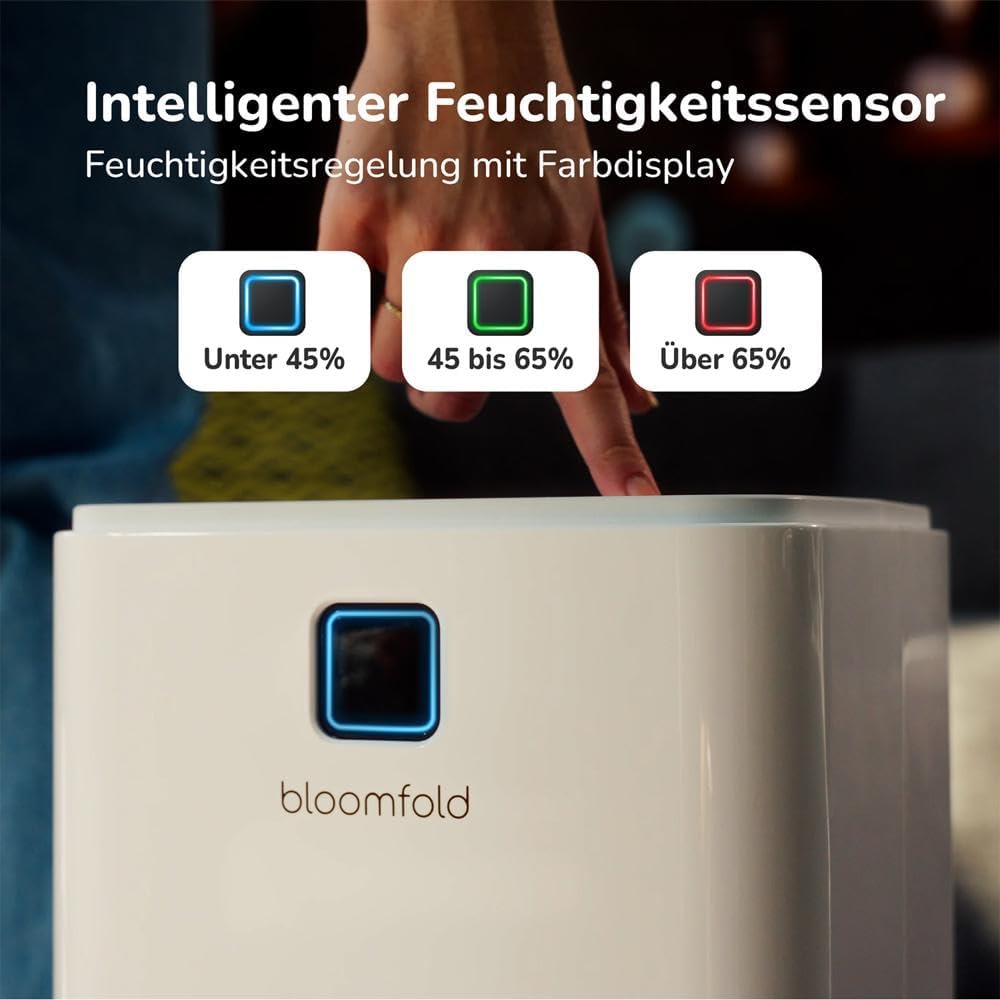
Figure 6.5: The dehumidifier is suitable for use in bathrooms, cellars, living rooms, laundry rooms, and bedrooms.
7. Maintenance
Regular maintenance ensures optimal performance and extends the lifespan of your dehumidifier.
7.1 Emptying the Water Tank
When the water tank is full, the unit will automatically stop operating and an indicator light will illuminate. To empty the tank:
- Gently pull out the water tank from the front of the unit.
- Carefully carry the tank to a sink or drain.
- Pour out the collected water.
- Slide the empty tank back into the unit until it clicks into place. The unit will resume operation.

Figure 7.1: Manually emptying the 2-liter water tank.
7.2 Cleaning the Air Filter
The air filter should be cleaned every two weeks or more frequently depending on usage and air quality. A dirty filter can reduce efficiency.
- Turn off and unplug the dehumidifier.
- Locate the air filter (usually behind the air inlet grille).
- Remove the filter.
- Clean the filter with a vacuum cleaner or wash it with warm, soapy water. Rinse thoroughly.
- Allow the filter to air dry completely before reinstalling it.
7.3 General Cleaning
Wipe the exterior of the unit with a soft, damp cloth. Do not use harsh chemicals or abrasive cleaners.
8. Troubleshooting
Before contacting customer support, please refer to the following common issues and solutions:
| Problem | Possible Cause | Solution |
|---|---|---|
| Dehumidifier does not turn on. | No power supply. | Check if the unit is plugged in and the power outlet is working. |
| Unit is running but not collecting water. | Room humidity is too low; Air filter is clogged; Temperature is too low. | Increase desired humidity setting; Clean the air filter; Ensure room temperature is above 5°C (41°F). |
| Water tank is full, but unit is still running. | Water tank not properly seated. | Remove and reinsert the water tank, ensuring it is fully seated. |
| Unit is noisy. | Unit is not on a level surface; Air filter is clogged. | Place the unit on a flat, stable surface; Clean the air filter. |
9. Specifications
| Feature | Detail |
|---|---|
| Model Number | BF001 |
| Dehumidification Capacity | Up to 12 Liters/Day |
| Water Tank Volume | 2 Liters |
| Power Consumption | 185 Watts |
| Airflow | 125 CMPH |
| Product Dimensions (L x W x H) | 25.5 x 22 x 47 cm |
| Item Weight | 10.7 Kilograms |
| Material | ABS Plastic |
| Special Features | Adjustable Humidity Control, Continuous Draining, Portable, Automatic Restart, Digital Display |
10. Warranty and Support
Your Bloomfold Dehumidifier comes with a standard manufacturer's warranty. Please refer to the warranty card included with your purchase for specific terms and conditions. For any technical issues, questions, or support needs not covered in this manual, please contact Bloomfold customer service. Contact details can typically be found on the product packaging or the official Bloomfold website.
Related documentsBF001


Ask a question about this manual
Ask about setup, troubleshooting, compatibility, parts, safety, or missing instructions. Manuals+ will review the question and use this page’s manual context to help answer it.