
1. Introduction
The ThermTec Wild 335L is an advanced thermal imaging camera designed for outdoor and hunting applications. It integrates a high-sensitivity thermal sensor with a laser rangefinder (LRF) to provide precise target detection and distance measurement. This manual provides essential information for the safe and effective operation, setup, and maintenance of your device.
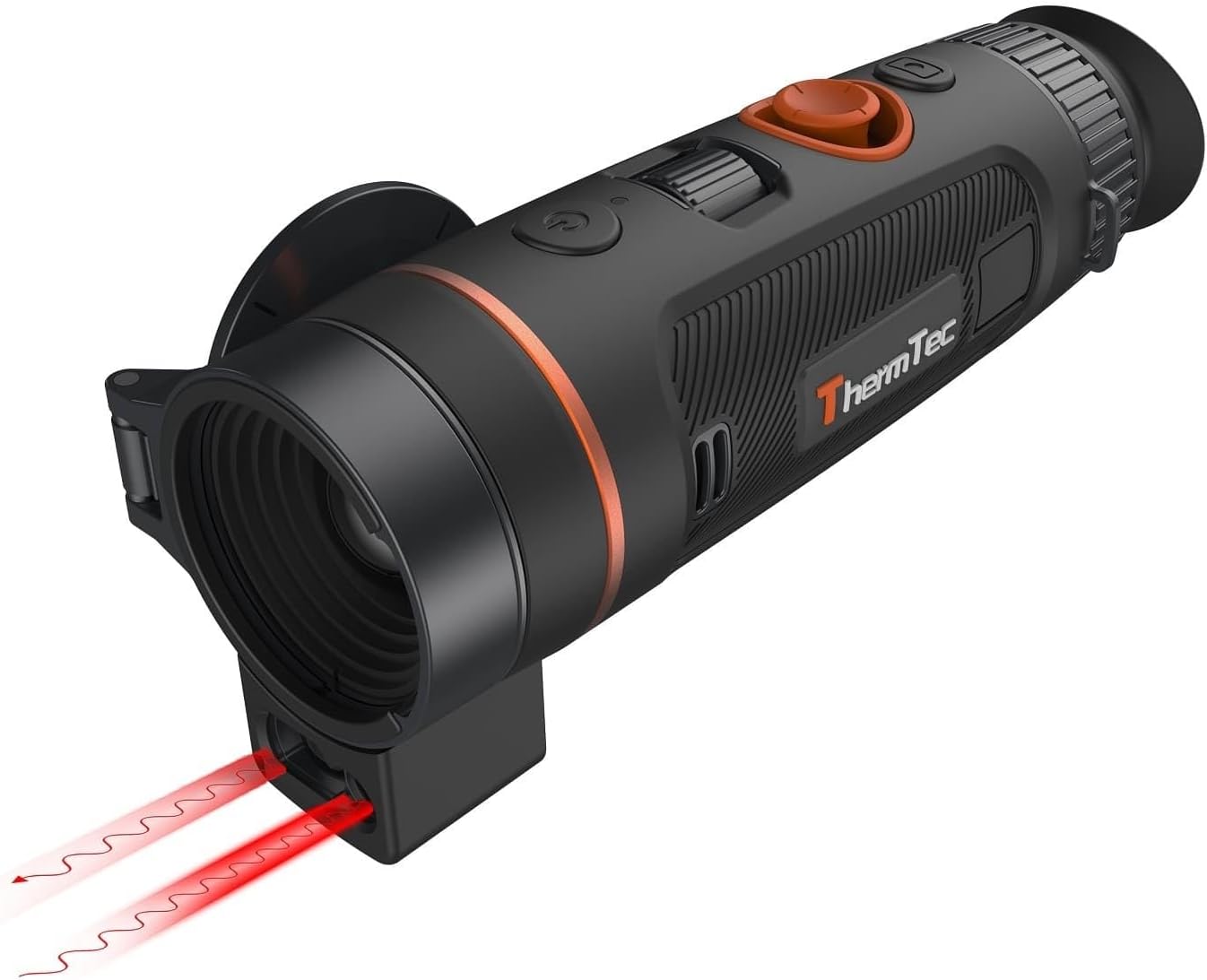
Figure 1: ThermTec Wild 335L Thermal Imaging Camera. This image shows the device from a front-side angle, highlighting the objective lens, control buttons, and the integrated laser rangefinder module.
Key Features:
- High-Sensitivity Sensor: Equipped with a sensor featuring a NETD value of ≤ 18 mK for superior thermal detail.
- Integrated Laser Rangefinder (LRF): Measures distances up to 1,000 meters with high accuracy.
- LRF-Boost Technology: Combines AI and laser ranging for precise multi-target distance measurement.
- Ergonomic Design: New focusing wheel positioned for convenient one-hand operation.
- Interchangeable Battery System: Utilizes standard 18650 batteries, offering up to 8 hours of operation.
- AI Technology: Self-learning image calibration for enhanced image stability.
- Robust Construction: IP67 waterproof and shockproof magnesium housing with rubberized grip.
- Zoom-Pro Function: Optimized image algorithm for sharp details even with 2x-4x digital zoom.
- AMOLED Display: High-resolution 1024 x 768 pixel display with adjustable background colors.
- Extensive Image Settings: Adjustable sharpness, noise reduction, brightness, and contrast in 10 steps, plus 2 scene modes and 6 color palettes.
- Internal Storage: 64 GB for recording images and videos.
2. Package Contents
Please check the box for the following items:
- ThermTec WILD 335L Thermal Imaging Device
- 2x 18650 Rechargeable Batteries
- USB-C Cable
- Battery Charger
- Cleaning Cloth
- Hand Strap
- Neck Strap
- Storage Bag
- User Manual (this document)
3. Safety Information
Read all safety information before using the device to prevent injury and damage. Keep this manual for future reference.
- Do not look directly into the sun or other strong light sources through the device, as this may cause permanent eye damage.
- Avoid exposing the device to extreme temperatures, direct sunlight for prolonged periods, or high humidity.
- Do not attempt to disassemble or modify the device. Repairs should only be performed by authorized service personnel.
- Use only the specified batteries and charging accessories. Improper use can lead to fire, explosion, or other hazards.
- Keep the device out of reach of children.
- Dispose of batteries and electronic components according to local regulations.
4. Setup
4.1 Battery Installation
- Locate the battery compartment on the device.
- Open the battery compartment cover.
- Insert the two 18650 batteries, ensuring correct polarity (+/-).
- Close the battery compartment cover securely.

Figure 2: Battery installation and charging. The image illustrates the 18650 battery being inserted into the device and the USB-C charging port in use, indicating the device's power features.
4.2 Charging the Batteries
Before first use, fully charge the batteries.
- Connect the USB-C cable to the device's charging port and the other end to the provided charger.
- Plug the charger into a power outlet.
- The charging indicator will show the charging status. Once fully charged, disconnect the charger.
- Alternatively, the 18650 batteries can be charged externally using the supplied battery charger.
4.3 Powering On/Off
- Power On: Press and hold the power button (usually marked with a power symbol) for a few seconds until the display illuminates.
- Power Off: Press and hold the power button again until the device shuts down.
5. Operating Instructions
5.1 Focusing
The Wild 335L features a new focusing mechanism for convenient one-hand operation.
- Look through the eyepiece.
- Rotate the focusing wheel, located on the top of the device, until the image appears sharp and clear.

Figure 3: One-hand operation and focus wheel. This image highlights the ergonomic design of the device, showing how the focus wheel is easily accessible for single-handed use.
5.2 Digital Zoom
The device supports stepless digital magnification from 1x to 4x.
- Use the designated zoom buttons or joystick control to adjust the magnification level.
- The Zoom-Pro function enhances image quality and detail even at higher digital zoom levels.
5.3 Color Palettes and Display Settings
The Wild 335L offers various display customization options:
- Color Palettes: Choose from 6 color palettes, including an eye-friendly green mode. Unused palettes can be deactivated in the quick menu.
- Display Backlight: Adjustable in 4 colors (Gray, Blue, Purple, Red).
- Image Adjustments: Fine-tune sharpness, image noise, brightness, and contrast in 10 steps.
- Scene Modes: Select from 2 optimized scene modes for different environments.
5.4 Laser Rangefinder (LRF)
The integrated LRF allows for precise distance measurement.
- Activate the LRF function via the menu or a dedicated button.
- Aim the crosshair at the target.
- Press the LRF measurement button. The distance will be displayed on the screen.
- The LRF-Boost technology combines AI and laser measurement for more accurate readings of multiple targets.
5.5 AI Features
The device incorporates advanced AI technology:
- AI Image Calibration: Self-learning algorithm provides image stability for up to an hour without manual calibration.
- AI Rangefinder: Utilizes deep-learning algorithms for distance estimation.
- AI Object Recognition: Assists in identifying objects within the field of view.
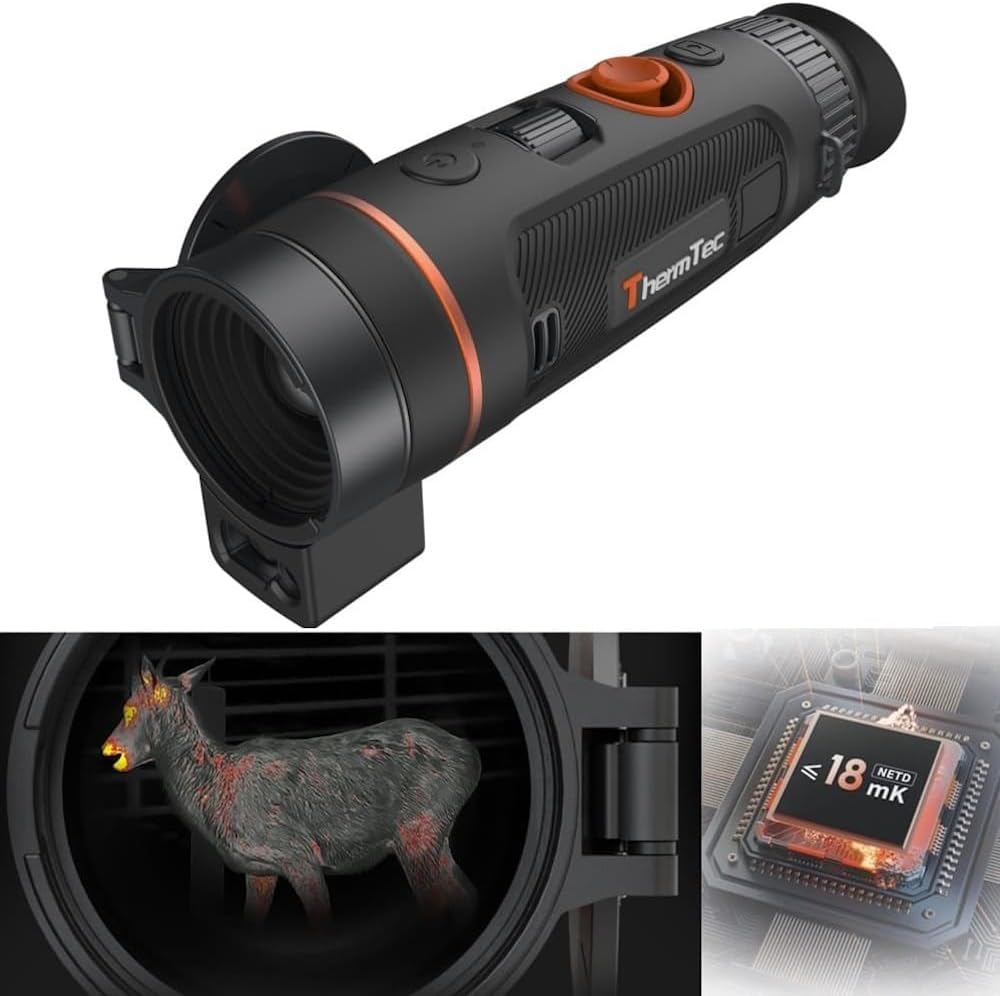
Figure 4: Thermal sensor and AI technology. This image illustrates the advanced thermal sensor with a NETD value of ≤ 18 mK and its integration with AI processing for enhanced image quality and object detection.
5.6 Recording and Playback
The Wild 335L features 64 GB of internal storage for capturing and reviewing media.
- Recording: Press the record button to start/stop video recording or capture a still image.
- Playback: Access the gallery or playback function through the menu to review stored images and videos directly on the device.
6. Maintenance
6.1 Cleaning
- Use the provided cleaning cloth to gently wipe the lenses and display.
- For the device body, use a soft, damp cloth. Do not use abrasive cleaners or solvents.
- Ensure the device is powered off before cleaning.
6.2 Storage
- Store the device in its protective storage bag when not in use.
- Keep the device in a cool, dry place, away from direct sunlight and extreme temperatures.
- If storing for extended periods, remove the batteries.
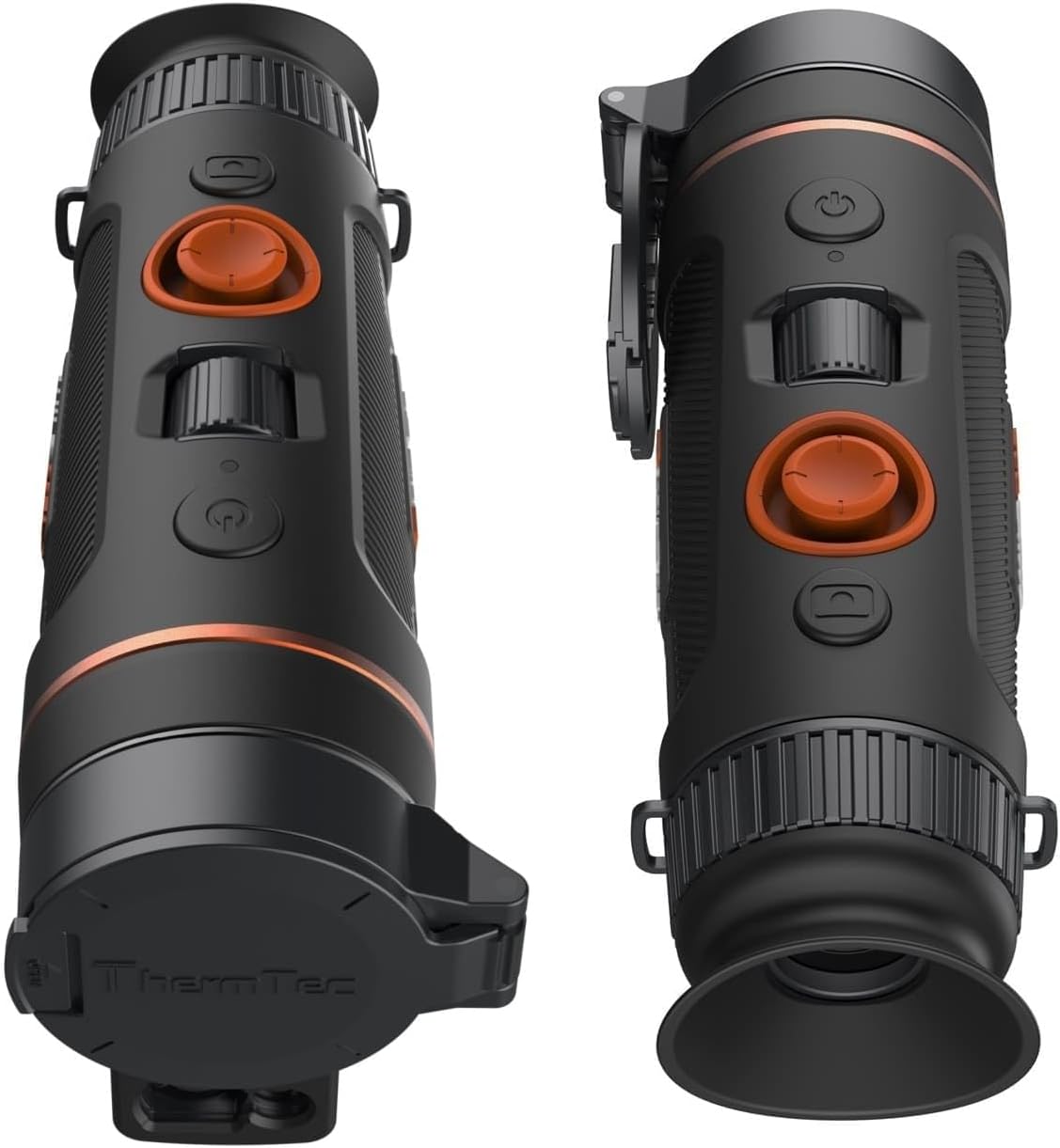
Figure 5: Magnesium housing and IP67 rating. This image highlights the robust magnesium housing and rubberized exterior, indicating the device's durability and IP67 water and dust resistance.
7. Troubleshooting
If you encounter issues with your ThermTec Wild 335L, refer to the following common solutions:
- Device does not power on: Ensure batteries are correctly installed and fully charged.
- Image is blurry: Adjust the focus wheel until the image is clear. Check the diopter adjustment for your eyesight.
- LRF not working: Ensure the LRF function is activated and there are no obstructions in front of the laser emitter/receiver.
- Short battery life: Ensure batteries are fully charged. Operating in extreme cold can reduce battery performance.
- No image on display: Check if the device is powered on. Adjust display brightness.
For persistent issues, please contact customer support.
8. Specifications
Technical data for the ThermTec Wild 335L:
| Feature | Specification |
|---|---|
| Manufacturer | ThermTec |
| Model | WILD 335L |
| Lens Focal Length | 35 mm |
| Lens Aperture | F0.8 |
| Frame Rate | 50 Hz |
| Pixel Pitch | 12 µm |
| NETD Value @300k | <18 mK |
| Battery Life | 8 hours |
| Microbolometer Resolution | 384x288 pixels |
| Sensor Type | VOx (sun-safe) |
| Field of View (H/V) | 7.5°x5.6° |
| Field of View at 100m | 13.1 m |
| AMOLED Display Resolution | 1024 x 768 pixels |
| Optical Magnification | 3.3x |
| Digital Magnification (Zoom) | 1x - 4x (stepless) |
| Diopter Adjustment | Yes |
| Color Palettes | 6 |
| Detection Distance (Deer) | 1800 m |
| Recognition Distance (Deer) | 600 m |
| AI Rangefinder | Yes |
| AI Object Recognition | Yes |
| Laser Rangefinder (LRF) | Yes |
| LRF Range | 1,000 m |
| LRF Accuracy | +/-1 m |
| LRF-Boost Technology | Yes |
| Hotspot Connection | Yes |
| Object Alarm (via APP) | Yes |
| Hot Spot Marking Function | Yes |
| PIP (Picture in Picture) | Yes |
| Recording Function | Yes |
| Playback Function | Yes |
| Manual Lens Focus | Yes |
| Internal Storage | 64 GB |
| Protection Class | IP67 |
| Tripod Thread | 1/4" Yes |
| Weight | 515 g |
| Dimensions (LxWxH) | 190x69x77 mm |
| Operating Temperature | -20° C / + 50 ° C |
| Battery Type | Li-ion |
| Supply Voltage | 3.7 V |
| External Power Supply (USB) | 5 V |
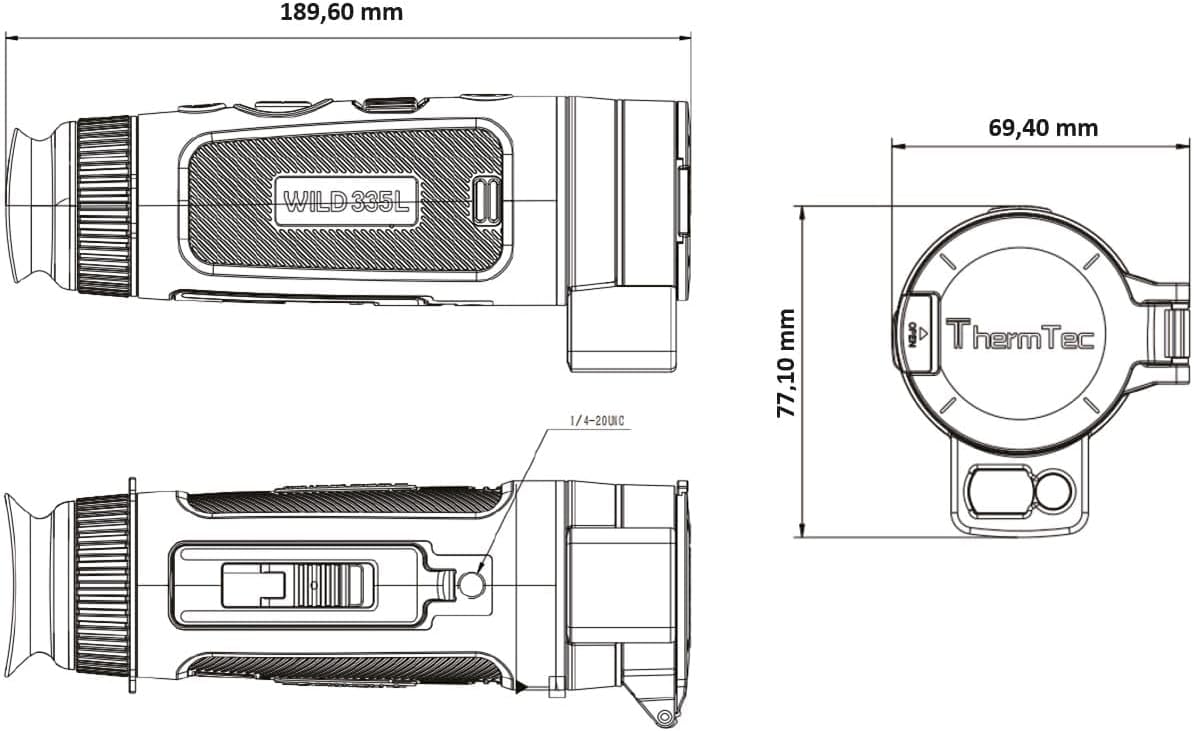
Figure 6: Dimensions diagram of the ThermTec Wild 335L. This technical drawing provides precise measurements of the device's length, width, and height.
9. Warranty and Support
The ThermTec Wild 335L comes with a 3-year warranty from the date of purchase, covering manufacturing defects. Please retain your proof of purchase for warranty claims.
For technical support, service, or warranty inquiries, please contact your authorized ThermTec dealer or visit the official ThermTec website for contact information.


