
Introduction
Welcome to the user instruction manual for your Nikon Nikomat FTN SLR Film Camera with the Nikon 50mm Nikkor-H f/2.0 Lens. The Nikomat FTN, also known as Nikkormat FTN in some regions, is a robust and reliable 35mm Single-Lens Reflex (SLR) camera designed for precision photography. This manual provides essential information for setting up, operating, maintaining, and troubleshooting your camera to ensure optimal performance and longevity.

Figure 1: Front-right view of the Nikon Nikomat FTN camera with the 50mm Nikkor-H f/2.0 lens mounted.
Camera Components
Familiarize yourself with the key components of your Nikomat FTN camera. Understanding each part's function is crucial for proper operation.
- Lens Mount: The bayonet mount for attaching Nikkor lenses.
- Shutter Speed Dial: Located on top, controls the duration the shutter remains open.
- Film Advance Lever: Winds the film and cocks the shutter for the next exposure.
- Rewind Crank: Used to rewind exposed film back into the cassette.
- Exposure Meter: Built-in light meter for accurate exposure readings.
- Viewfinder: For composing and focusing your shots.
- Film Compartment: Where the 35mm film cassette is loaded.

Figure 2: Front view of the Nikomat FTN camera body, highlighting the lens mount.

Figure 3: Rear view of the Nikomat FTN camera, showing the film door and film advance mechanism.
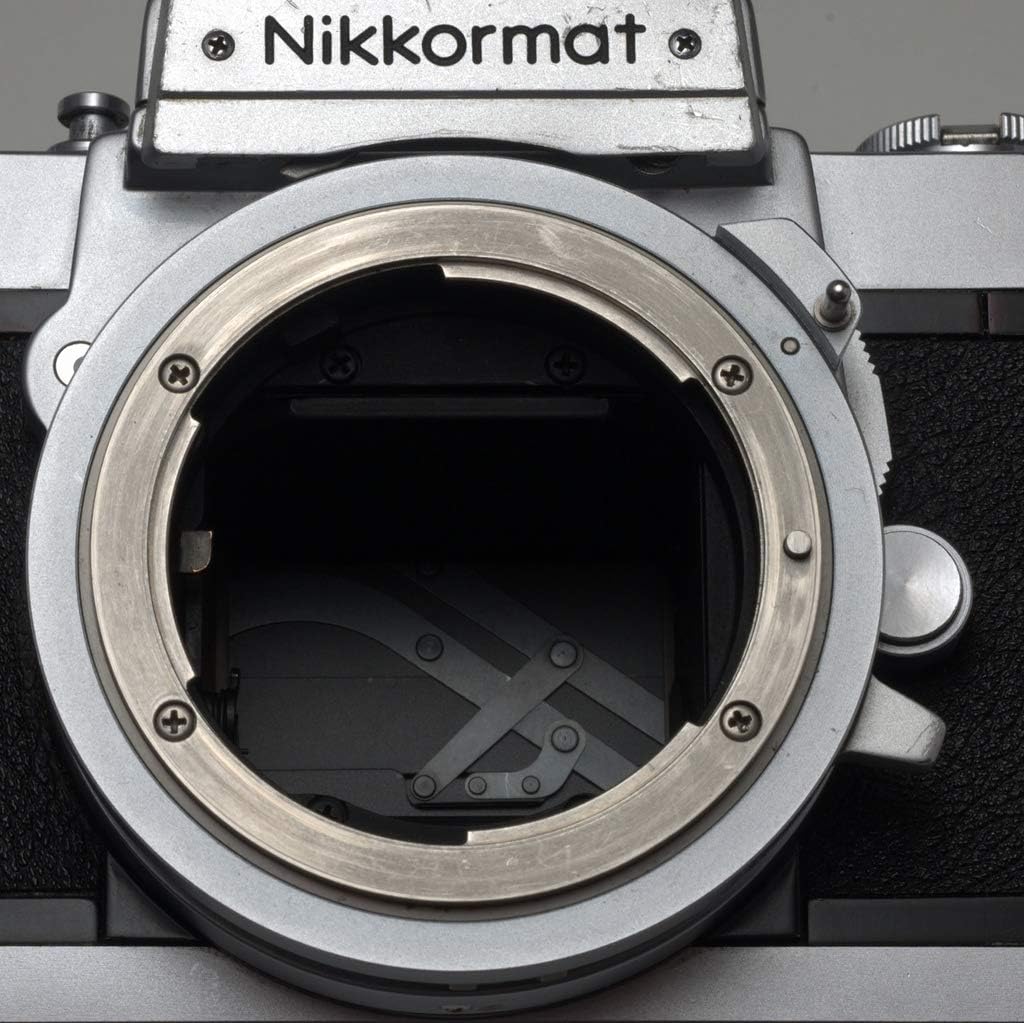
Figure 4: Detailed view of the Nikomat FTN's lens mount and internal mirror box.
Setup
1. Attaching the Lens
- Align the red dot on the lens barrel with the red dot on the camera's lens mount.
- Insert the lens into the mount and rotate it clockwise until it clicks into place.
- To remove, press the lens release button on the camera body and rotate the lens counter-clockwise.
2. Loading Film
- Open the camera back by pulling up the rewind crank.
- Insert a 35mm film cassette into the film chamber on the left side.
- Pull the film leader across to the take-up spool on the right side and insert it into one of the slots.
- Advance the film slightly using the film advance lever to ensure it catches on the sprocket teeth.
- Close the camera back firmly until it clicks.
- Advance the film two frames (by pressing the shutter button and advancing the lever) to ensure the film is properly loaded and to clear any light-exposed film. The rewind crank should rotate as you advance the film, indicating proper loading.
3. Setting Film Speed (ISO/ASA)
The Nikomat FTN has a built-in light meter that requires the film speed to be set for accurate readings.
- Lift and rotate the outer ring of the shutter speed dial to align the ASA/ISO rating of your film with the index mark.
Operating the Camera
1. Focusing
Look through the viewfinder. The Nikomat FTN typically features a split-image rangefinder and microprism collar for precise focusing.
- Rotate the focusing ring on the lens until the split images in the center of the viewfinder merge into a single, clear image, or until the microprism collar appears clear and not shimmering.
2. Setting Exposure
The Nikomat FTN uses a through-the-lens (TTL) light meter.
- Shutter Speed: Rotate the shutter speed dial to select your desired shutter speed (e.g., 1/125s, 1/500s).
- Aperture: Rotate the aperture ring on the lens to select your desired f-stop (e.g., f/2.0, f/8).
- Metering: Half-press the shutter button or use the meter switch (if present) to activate the light meter. In the viewfinder, you will see a needle. Adjust either the shutter speed or aperture until the needle is centered, indicating correct exposure.
3. Taking a Picture
- Compose your shot through the viewfinder.
- Focus the lens.
- Set the exposure using the light meter.
- Gently press the shutter button all the way down to take the picture.
- Advance the film using the film advance lever to prepare for the next shot.
4. Rewinding Film
Once all frames on the film roll have been exposed:
- Press the film rewind button located on the bottom of the camera.
- Fold out the rewind crank and turn it clockwise until you feel the tension release, indicating the film leader has fully retracted into the cassette.
- Open the camera back by pulling up the rewind crank and remove the film cassette.
Maintenance
Cleaning
- Camera Body: Use a soft, dry cloth to wipe down the camera body. For stubborn dirt, a slightly damp cloth can be used, but avoid excessive moisture.
- Lens: Use a lens brush or air blower to remove dust. For smudges, use a specialized lens cleaning solution and a microfiber lens cloth. Apply solution to the cloth, not directly to the lens.
- Viewfinder/Mirror: Use an air blower to remove dust. Avoid touching the mirror or viewfinder prism directly. For professional cleaning, consult a camera repair specialist.
Storage
Store the camera in a cool, dry place away from direct sunlight and extreme temperatures. Use a desiccant pack if storing in a humid environment.
Battery Replacement
The Nikomat FTN's light meter requires a battery. Refer to the battery compartment (usually on the bottom of the camera) for the correct battery type (often a 1.35V PX625 mercury battery, which may need a modern alkaline equivalent or adapter due to mercury battery discontinuation). Replace the battery when the meter needle becomes erratic or unresponsive.
Troubleshooting
- Film Advance Lever is Stuck:
Ensure the shutter has been released. If not, press the shutter button. Check if the film is properly loaded and not jammed. Do not force the lever.
- Light Meter Not Working:
Check the battery. Ensure the film speed (ASA/ISO) is correctly set. Verify that the meter switch (if applicable) is engaged. Clean battery contacts if corroded.
- Shutter Not Firing:
Ensure the film advance lever is fully advanced. Check if the self-timer is engaged. If the camera has a battery-dependent shutter (less common for mechanical FTN but worth checking), verify battery status.
- Film Not Advancing/Rewinding:
Ensure the film leader is properly attached to the take-up spool. For rewinding, ensure the rewind button is pressed and held (if it's a non-locking type) while turning the rewind crank.
Specifications
| Brand | Nikon |
| Model Name | Nikomat FTN (also known as Nikkormat FTN) |
| Compatible Devices | Nikon Nikomat FTN |
| Film Format Type | 35mm |
| Exposure Control Type | Manual |
| Min Shutter Speed | 1/1000 Seconds |
| Max Shutter Speed | 1 Second (B, T for longer exposures) |
| Included Components | Camera Body & Lens (Nikon 50mm Nikkor-H f/2.0 Lens) |
| Item Weight | 3 pounds |
| Package Dimensions | 8 x 4 x 4 inches |
| UPC | 701980140921 |
Warranty and Support
This Nikon Nikomat FTN camera is a renewed product. Renewed products typically come with a specific return or warranty policy from the seller or platform.
- Return Policy: This renewed product is eligible for a 90-day refund or replacement policy from the date of purchase. Please refer to the seller's specific return policy for detailed terms and conditions.
- Technical Support: For technical assistance or repair inquiries beyond the return period, it is recommended to contact specialized vintage camera repair services or independent camera technicians. Nikon no longer provides direct support for this vintage model.


