
Introduction
This manual provides essential instructions for the proper installation, operation, and maintenance of the Ailsa Hexi Logic Board ST4251B03-1-C-1. This component is designed as a replacement part for the L43M5-5A television model. Please read this manual thoroughly before proceeding with any installation or troubleshooting to ensure safe and correct usage.
Safety Information
Warning: Installation of this logic board requires technical expertise and should only be performed by qualified professionals. Incorrect installation can lead to damage to the television, the logic board, or personal injury due to electric shock. Always disconnect the television from the power source before beginning any installation or repair work.
- Ensure the television is unplugged from the main power outlet.
- Discharge any residual power by pressing the power button on the TV for a few seconds after unplugging.
- Wear anti-static gloves or use an anti-static wrist strap to prevent electrostatic discharge (ESD) damage to sensitive electronic components.
- Keep all tools and components away from liquids.
Setup and Installation
This section outlines the general steps for replacing the logic board. Specific disassembly and reassembly procedures for your L43M5-5A television model may vary. Refer to your television's service manual for detailed instructions.
- Preparation: Place the television face down on a soft, clean surface to prevent screen damage.
- Access the Logic Board: Carefully remove the back cover of the television. This usually involves unscrewing several screws around the perimeter and sometimes in the center.
- Locate the Existing Logic Board: Identify the current logic board. It is typically the largest circuit board in the television, often with numerous connectors for other components like the power supply, T-con board, and speakers.
- Disconnect Cables: Gently disconnect all cables connected to the existing logic board. Take photos or make notes of the cable connections for easier reassembly. Be careful with ribbon cables; use the appropriate release mechanisms.
- Remove Old Logic Board: Unscrew the mounting screws holding the old logic board in place and carefully lift it out.
- Install New Logic Board: Position the Ailsa Hexi Logic Board ST4251B03-1-C-1 into the television chassis, aligning it with the screw holes. Secure it with the mounting screws.
- Reconnect Cables: Reconnect all cables to the new logic board, ensuring they are seated correctly and securely. Refer to your notes or photos taken during disassembly.
- Initial Test: Before replacing the back cover, temporarily connect the television to power and perform a brief test to ensure basic functionality (e.g., power on, display backlight). If issues arise, disconnect power and recheck connections.
- Reassemble: Once functionality is confirmed, disconnect power, replace the back cover, and secure all screws.
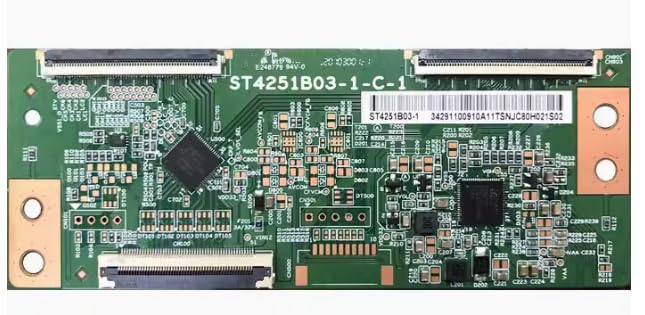
Image: The Ailsa Hexi Logic Board ST4251B03-1-C-1. This image shows the main circuit board with its various ports and components, which is a direct replacement for the L43M5-5A television model.
Operating Principles
The logic board, also known as the main board or motherboard, is the central control unit of your L43M5-5A television. It processes all input signals from various sources (HDMI, USB, antenna, etc.), manages the television's operating system, and sends commands to other components such as the T-con board (for display), audio amplifier (for sound), and power supply. Once correctly installed, the Ailsa Hexi Logic Board ST4251B03-1-C-1 will restore the full operational capabilities of your television, allowing it to function as intended by the manufacturer.
Maintenance
As an internal electronic component, the logic board itself requires no routine maintenance. To ensure its longevity and optimal performance, consider the following general television maintenance tips:
- Ventilation: Ensure the television's ventilation openings are not blocked to prevent overheating, which can stress internal components.
- Cleaning: Keep the television's exterior clean using a soft, dry cloth. Avoid spraying liquids directly onto the screen or chassis.
- Power Surges: Use a surge protector to safeguard against electrical spikes that could damage sensitive electronics.
- Environment: Operate the television in a stable environment, avoiding extreme temperatures or high humidity.
Troubleshooting
If your L43M5-5A television exhibits issues after replacing the logic board, consider these troubleshooting steps. Remember to disconnect power before checking internal components.
- No Power/No Display:
- Verify all power cables are securely connected to the logic board and the power supply unit.
- Ensure the television is plugged into a working power outlet.
- Check for any visible damage to the logic board or connected cables.
- Incorrect or Distorted Display:
- Ensure the ribbon cables connecting the logic board to the T-con board (if separate) and the display panel are properly seated and not damaged.
- Check input source settings on the television.
- No Audio:
- Verify speaker connections to the logic board.
- Check audio settings in the television's menu.
- Remote Control Not Responding:
- Ensure the IR receiver cable is properly connected to the logic board.
- Test with new remote batteries.
If issues persist after performing these checks, it is recommended to consult a professional television repair technician.
Specifications
| Feature | Detail |
|---|---|
| Model Number | ST4251B03-1-C-1 |
| Compatibility | L43M5-5A Television |
| Brand | Ailsa Hexi |
| UPC/GTIN | 723907786609 |
| Included Components | Logic Board (as shown in product image), no other accessories |
Warranty and Support
This Ailsa Hexi Logic Board ST4251B03-1-C-1 is a replacement part. For information regarding warranty coverage, return policies, or technical support, please refer to the original seller or manufacturer from whom the product was purchased. It is important to retain your purchase receipt for any warranty claims.
For further assistance, you may contact the seller directly via the platform where the purchase was made. Always provide the model number (ST4251B03-1-C-1) and the television model (L43M5-5A) when seeking support.