
1. Introduction
Thank you for choosing the SBAOH P605 600W Portable Power Station. This device is designed to provide reliable power for various applications, including outdoor activities, camping, travel, and emergency backup. It features a 538.7Wh capacity and multiple output ports to charge and power your electronic devices and small appliances.
Safety Guidelines
- Do not disassemble, repair, or modify the unit.
- Keep the unit away from fire or high temperatures.
- Do not use or store the unit in direct sunlight or in hot environments.
- Avoid exposure to water or other liquids.
- Do not drop, strike, or subject the unit to strong impacts.
- Keep out of reach of children.
- Ensure proper ventilation during use and charging.
- Use only the provided or approved accessories.
2. Package Contents
Please check that all the following items are included in your package:
- SBAOH P605 600W Portable Power Station
- AC Adapter
- Car Cigarette Lighter Cable
- User Manual

Figure 2.1: Package Contents of the SBAOH P605 Portable Power Station.
3. Product Overview
Familiarize yourself with the ports, buttons, and display of your SBAOH P605 Portable Power Station.
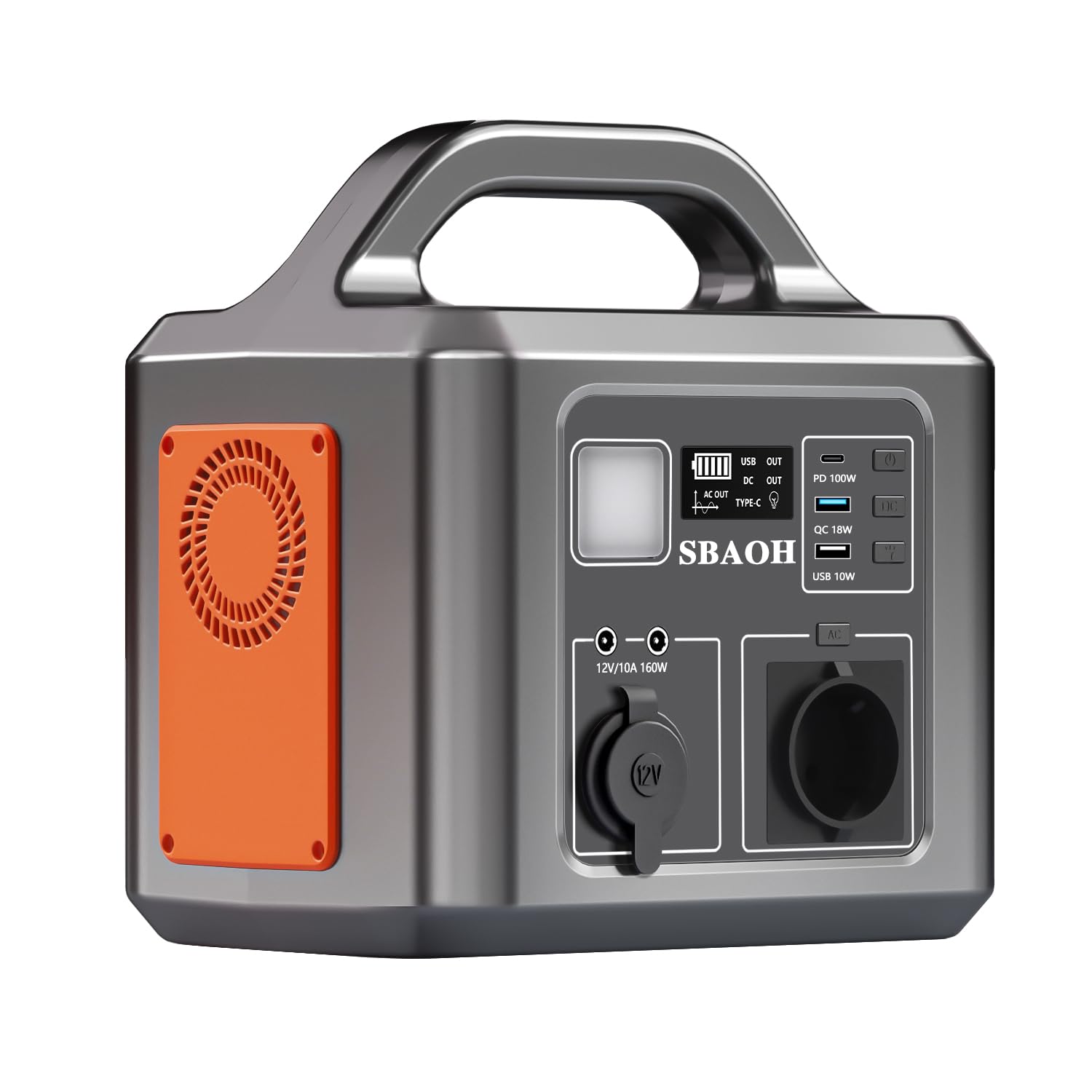
Figure 3.1: Front and Top Panel Overview with Labeled Components.
- ON/OFF Button: Main power switch for the unit.
- DC ON/OFF Button: Activates/deactivates the DC output ports.
- LED Switch: Controls the built-in LED light.
- Type-C PD100W Output: USB-C port for fast charging compatible devices.
- USB QC 18W Output: USB-A port with Quick Charge 3.0 for rapid device charging.
- USB-A 10W Output: Standard USB-A port for charging various devices.
- AC ON/OFF Button: Activates/deactivates the AC output sockets.
- LCD Display: Shows battery level, output status, and other operational information.
- Lamp Panel: Integrated LED light for illumination.
- 2*DC Output: Two DC output ports for compatible devices.
- Car Charger Output (12V/10A 120W): 12V car socket for powering car appliances.
- AC Output: Standard AC power outlets (220V).
- Input Port: Port for charging the power station (AC adapter, car charger, solar panel).
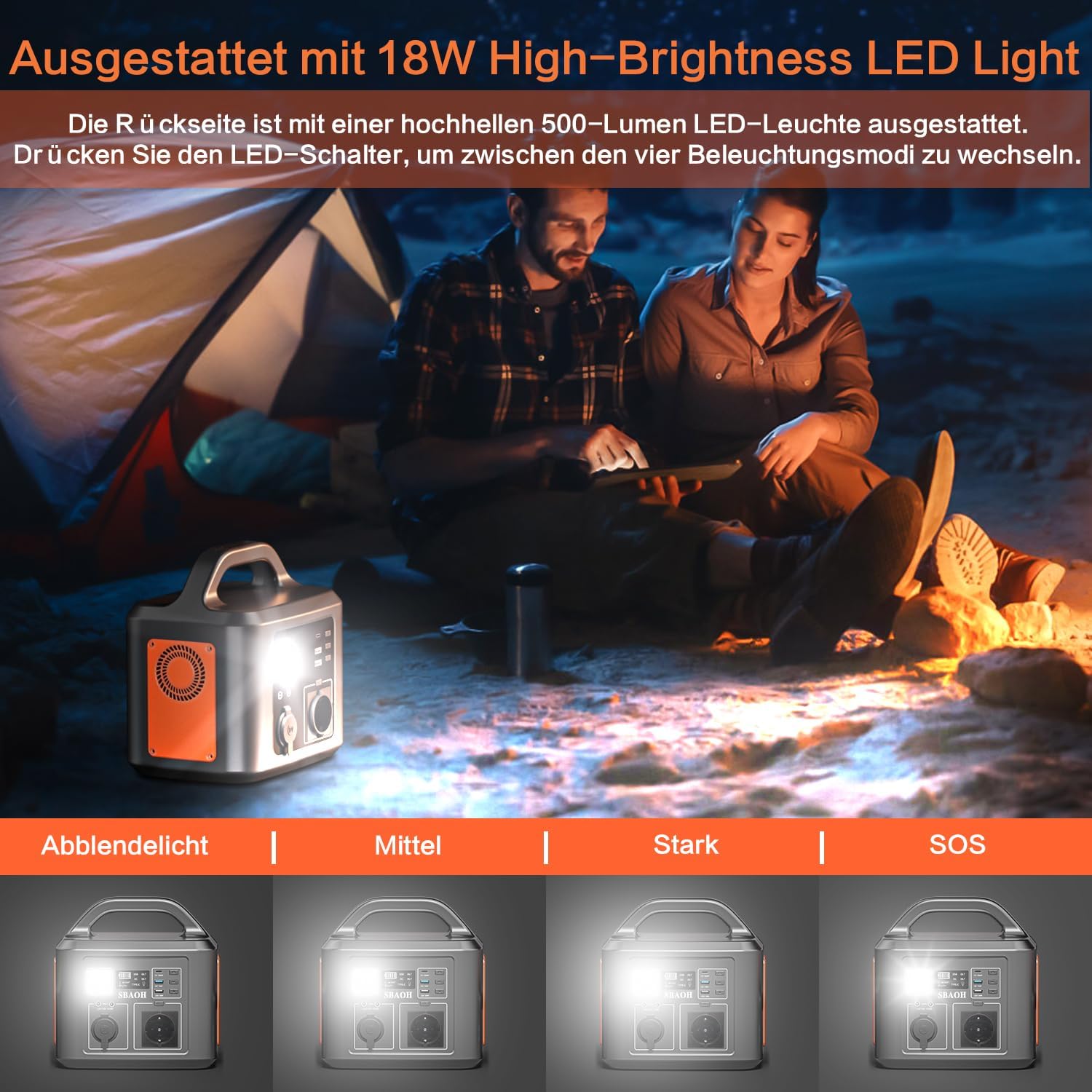
Figure 3.2: The 18W High-Brightness LED Light with four modes: Dim, Medium, Strong, and SOS.
4. Charging the Power Station
The SBAOH P605 can be charged using an AC wall outlet, a car charger, or a solar panel.
4.1 AC Wall Charging
- Connect the provided AC adapter to the Input Port (13) on the power station.
- Plug the AC adapter into a standard wall outlet.
- The LCD display (8) will indicate charging status.
4.2 Car Charging
- Connect the provided car charger cable to the Input Port (13) on the power station.
- Plug the other end into your vehicle's 12V cigarette lighter socket.
- The LCD display (8) will indicate charging status.
4.3 Solar Panel Charging
- Connect a compatible solar panel (not included) to the Input Port (13) on the power station.
- Ensure the solar panel is placed in direct sunlight for optimal charging.
- The LCD display (8) will indicate charging status.

Figure 4.1: Various Charging Methods: Wall Socket, Car Charger, and Solar Panel (60W).
5. Operating the Power Station
5.1 Powering On/Off
- To turn on the main power, press and hold the ON/OFF Button (1) for a few seconds until the LCD display (8) illuminates.
- To turn off the main power, press and hold the ON/OFF Button (1) again until the display turns off.
5.2 Using AC Output
- Ensure the main power is on.
- Press the AC ON/OFF Button (7) to activate the AC outlets. The AC icon will appear on the LCD display.
- Plug your AC-powered device into the AC Output (12) sockets.
- To turn off AC output, press the AC ON/OFF Button (7) again.
5.3 Using DC Output
- Ensure the main power is on.
- Press the DC ON/OFF Button (2) to activate the DC output ports. The DC icon will appear on the LCD display.
- Plug your DC-powered device into the DC Output (10) or Car Charger Output (11).
- To turn off DC output, press the DC ON/OFF Button (2) again.
5.4 Using USB Output
- Ensure the main power is on.
- The USB ports (Type-C PD100W Output (4), USB QC 18W Output (5), USB-A 10W Output (6)) are typically active when the main power is on.
- Connect your USB-powered devices to the appropriate USB ports.
5.5 LED Light Function
- Press the LED Switch (3) to cycle through the different lighting modes: Dim, Medium, Strong, and SOS.
- Press the LED Switch (3) again to turn off the light.

Figure 5.1: The power station supports simultaneous charging of multiple devices.
6. Maintenance and Storage
6.1 Cleaning
- Always turn off the power station before cleaning.
- Use a dry, soft cloth to wipe the exterior of the unit.
- Do not use abrasive cleaners or solvents.
6.2 Battery Care and Storage
- For optimal battery life, fully charge the power station every 3-6 months, even if not in use.
- Store the unit in a cool, dry place, away from direct sunlight and extreme temperatures.
- Avoid storing the unit in a completely discharged state for extended periods.
7. Troubleshooting
If you encounter issues with your power station, refer to the following common problems and solutions:
- Unit not turning on: Ensure the main ON/OFF button is pressed and held until the display activates. Check if the battery is completely depleted and needs charging.
- No output from AC/DC/USB ports: Ensure the respective AC ON/OFF or DC ON/OFF buttons are pressed to activate the outputs. Check the LCD display for output indicators.
- Device not charging: Verify that the power station has sufficient battery charge. Ensure the device is properly connected and compatible with the output port's specifications (voltage, wattage).
- Overload protection activated: If the power draw exceeds the unit's capacity (600W continuous, 1200W peak), the unit may shut down. Disconnect some devices and restart the power station.
- Overheating: If the unit becomes excessively hot, it may enter protection mode and shut down. Allow it to cool down in a well-ventilated area before resuming use.
8. Technical Specifications
Detailed specifications for the SBAOH P605 Portable Power Station.

Figure 8.1: Product Dimensions of the SBAOH P605.
| Feature | Specification |
|---|---|
| Model Number | P605 |
| Battery Type | Lithium-ion |
| Capacity | 538.7 Wh |
| AC Output Power | 600 W (Continuous), 1200 W (Peak) |
| AC Output Voltage | 220 Volts (AC) |
| USB-C Output | PD100W |
| USB-A QC Output | 18W |
| USB-A Output | 10W |
| DC Output | 2 x DC Output |
| Car Charger Output | 12V/10A (120W) |
| Charging Input | AC Adapter, Car Charger, Solar Panel |
| Dimensions (L x W x H) | 22.6 x 17.1 x 23.1 cm (8.9 x 6.7 x 9.1 inches) |
| Weight | 4.5 kg (9.9 lbs) |
| Recommended Uses | Travel, Hiking, Camping, Fishing, Emergencies, Outdoor Activities |
9. Warranty and Support
SBAOH products are manufactured to high-quality standards. This product comes with a standard manufacturer's warranty against defects in materials and workmanship. Please refer to the warranty card included in your package for specific terms and conditions.
For technical support, warranty claims, or any questions regarding your SBAOH P605 Portable Power Station, please contact our customer service team. Contact details can typically be found on our official website or on the warranty card.
