
1. Product Overview
The LNEX MPPT Solar Charge Controller 30A is an advanced solar panel regulator designed to efficiently manage power flow from your solar panels to various battery types. Utilizing Maximum Power Point Tracking (MPPT) technology, it optimizes solar energy harvesting, ensuring your batteries are charged effectively and safely. This controller is compatible with 12V and 24V DC systems and supports a wide range of battery chemistries, including LiFePO4, AGM, Gel, Flooded, and Lithium batteries.

Figure 1: Front view of the LNEX MPPT Solar Charge Controller 30A, showing the display and control buttons.
2. Key Features
- Advanced MPPT Design: Features innovative Max Power Point Tracking Technology with up to 99.5% tracking efficiency and 98% peak conversion efficiency. This significantly improves the utilization rate of your solar panel system, even in less than ideal conditions.
- Automatic 12V/24V System Detection: The controller automatically detects and adapts to either 12V or 24V DC system voltages. The integrated LCD screen and multiple LED indicators provide real-time information on solar charging and battery operation.
- Versatile Battery Compatibility: Supports a wide range of battery types including LiFePO4, LTO, GEL, AGM, Lead-Acid, and Calcium, as well as EFB batteries. It is suitable for deep cycle, starter, marine, car, RV, and powersport applications.
- 5-Stage Safe Charging: Implements a comprehensive 5-stage charging process (Soft Start, Bulk, Absorption, Equalization, and Float) for lead-acid batteries to maximize battery life and system performance. For Lithium batteries, it features a 4-stage charging process (Bulk and Absorption) along with Lithium Reactivation.
- Full System Protection: Equipped with multiple built-in safety features including over-temperature protection, over-voltage protection, over-current protection, over-charging protection, over-discharging protection, overload protection, and short-circuit protection. These safeguards protect your battery and system from potential damage.
- Temperature Sensor Port: Includes a dedicated port for an optional temperature sensor (sold separately). This allows the controller to measure battery temperature in real-time and apply accurate temperature compensation for stable and consistent charging.
- User-Friendly Design: Designed for ease of use with straightforward setup steps. Parameters can be customized as needed via the intuitive interface.

Figure 2: Visual representation of the high tracking and conversion efficiency of the MPPT controller.

Figure 3: The controller supports multiple battery types including LiFePO4, Wet, AGM, GEL, LCO, Crystal, LTO, and Calcium, with custom setting options.

Figure 4: Detailed charging stages for different battery chemistries, designed to optimize battery health and longevity.

Figure 5: Overview of the 7 safety protections integrated into the controller, ensuring system and battery safety.
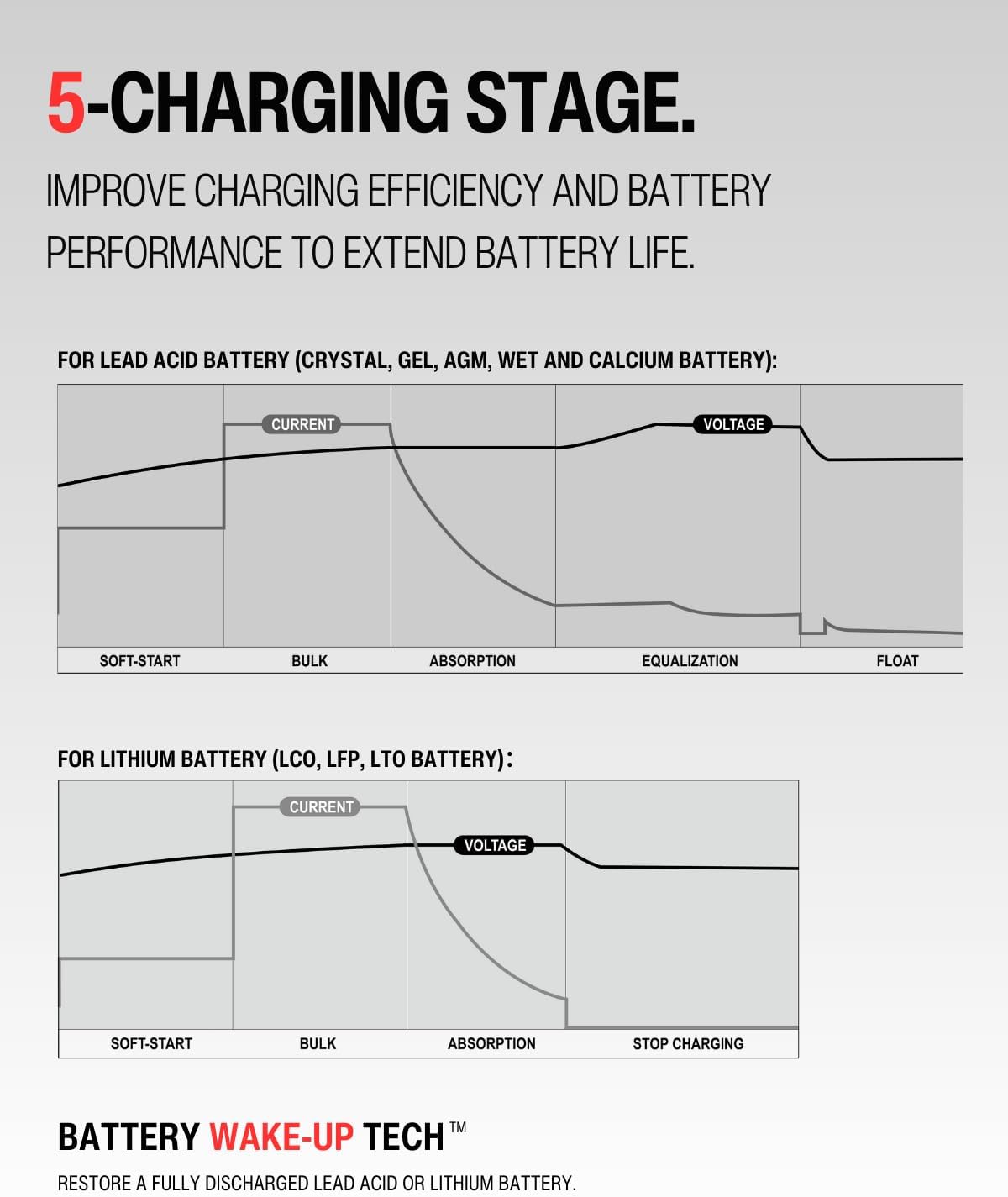
Figure 6: Key design elements contributing to the controller's user-friendliness, including the protective rubber mask, LED indicators, and backlit LCD.
3. Specifications

Figure 7: Detailed technical specifications for the LNEX MPPT Solar Charge Controller.
| Specification | Value |
|---|---|
| Model | 30A |
| System Nominal Voltage | 12V/24V Auto |
| Max PV Open Circuit Voltage | 100V DC |
| System Grounded | Negative Ground |
| Conversion Efficiency | 98% |
| Tracking Efficiency | 99.5% |
| Max PV Charging Current | 30A |
| Max. Recommended PV Input Power (12V) | 440 Watt |
| Max. Recommended PV Input Power (24V) | 880 Watt |
| Battery Type Preset | Crystal, Gel, AGM, Wet, Calcium, LiFePO4, LTO + CUSTOM Setting |
| Housing Case Color | Grey & Black |
| IP Grade | IP43 for Inside PCBA, IP22 for Connection Area |
| Operating Temperature | -25 ~ 50°C / -13 ~ 122°F |
| Storage Temperature | -40 ~ 85°C / -40 ~ 185°F |
| Operating Humidity Range | 0-85% RH |
| Mounting | Surface Mounting |
| Dimensions | 7.1" x 5.5" x 2.9" (180mm x 140.7mm x 73.7mm) |
| Item Weight | 2.69 pounds (1220 Grams) |
4. Setup and Installation
Proper installation is crucial for the safe and efficient operation of your MPPT solar charge controller. Please follow these steps carefully:
- Safety First: Before beginning installation, ensure all power sources (solar panels and batteries) are disconnected. Wear appropriate personal protective equipment.
- Mounting: Choose a dry, well-ventilated location for mounting the controller, away from direct sunlight, high temperatures, and moisture. Ensure there is sufficient airflow around the unit for heat dissipation. The controller is designed for surface mounting.
- Wiring Sequence: It is critical to connect components in the correct order to prevent damage to the controller or batteries.
- Step 1: Connect the Battery: Connect the battery to the controller's battery terminals first. Ensure correct polarity (+ to + and - to -). The controller will automatically detect the battery voltage (12V or 24V).
- Step 2: Connect the Solar Panel: Connect the solar panel array to the controller's PV input terminals. Ensure correct polarity.
- Step 3: Connect the Load (Optional): If your system includes a DC load directly connected to the controller, connect it to the load terminals. Ensure correct polarity.
- Temperature Sensor (Optional): If using an external temperature sensor (sold separately), connect it to the designated temperature sensor port on the controller. This allows for accurate temperature compensation during charging.
- Verify Connections: Double-check all wiring connections for tightness and correct polarity before applying power.

Figure 8: Dimensions of the compact solar charge controller, aiding in installation planning.
5. Operating Instructions
The LNEX MPPT Solar Charge Controller features an intuitive LCD display and control buttons for easy operation and monitoring.
5.1. Display and Buttons
The front panel includes an LCD screen, LED indicators, and control buttons. The LCD displays real-time system parameters such as battery voltage, charging current, charging power, and accumulated energy. The LED indicators provide a quick visual status of the PV input, battery charge, and load status.
5.2. Parameter Viewing
Use the navigation buttons (typically labeled with arrows or symbols) to cycle through different display screens and view various system parameters. Common parameters include:
- Battery Voltage (V)
- Charging Current (A)
- Charging Power (W)
- Accumulated Charge Energy (Wh)
5.3. Battery Type Selection
To optimize charging for your specific battery type, you may need to manually select it. Refer to the controller's interface for instructions on how to enter the settings menu and choose the appropriate battery preset (e.g., LiFePO4, AGM, Gel). The controller supports custom voltage settings if required.
5.4. Charging Process
The controller automatically manages the multi-stage charging process to ensure optimal battery health and longevity. You can observe the current charging stage (Soft Start, Bulk, Absorption, Equalization, Float) on the LCD display.
6. Maintenance
Regular maintenance helps ensure the longevity and optimal performance of your solar charge controller.
- Periodic Inspection: Regularly check all wiring connections for tightness and signs of corrosion. Ensure the controller's terminals are clean and free of debris.
- Cleanliness: Keep the controller clean and free from dust and dirt. Use a dry cloth to wipe the exterior. Do not use liquid cleaners.
- Ventilation: Ensure that the ventilation openings are not blocked to allow for proper heat dissipation.
- Environmental Conditions: Verify that the operating environment remains within the specified temperature and humidity ranges.
7. Troubleshooting
If you encounter issues with your LNEX MPPT Solar Charge Controller, consider the following common troubleshooting steps:
- No Display/Power: Check all power connections from the battery and solar panels. Ensure correct polarity and secure connections. Verify that the battery has sufficient voltage to power the controller.
- No Charging: Confirm that solar panels are receiving adequate sunlight. Check PV input voltage and current on the display. Ensure PV connections are secure and correct. Verify that the battery type setting matches your battery.
- Error Codes: If an error code appears on the LCD, refer to the specific meaning of the code (if provided in the full product manual or manufacturer's website) to identify the issue. Common errors relate to over-voltage, over-current, or short circuits.
- Battery Not Fully Charged: Check battery health and capacity. Ensure the selected battery type and charging parameters are appropriate. Verify that the solar panel array size is sufficient for your battery bank.
- Overheating: Ensure the controller is mounted in a well-ventilated area and that its heat sinks are not obstructed. Reduce load if consistently overheating.
For persistent issues or complex problems, please contact LNEX customer support.
8. Warranty and Support
The LNEX MPPT Solar Charge Controller comes with 2-Year Limited Support. For warranty claims, technical assistance, or further inquiries, please contact LNEX customer service through the official channels provided at the point of purchase or on the manufacturer's website.
