
HiCFM SFSD1-500B3IW
HiCFM 20-inch High Velocity Pedestal Oscillating Fan
Instruction Manual
1. Product Overview
The HiCFM 20-inch High Velocity Pedestal Oscillating Fan is designed for powerful air movement in large spaces such as warehouses, workshops, factories, garages, basements, and covered patios. Featuring a robust 1/5 HP motor and turbo aluminum blades, it delivers high airflow with adjustable settings for optimal comfort and air circulation.

Image: The HiCFM 20-inch Pedestal Fan, showcasing its design and suitability for large industrial environments.
2. Safety Information
Please read and understand all safety instructions before operating this fan. Failure to follow these instructions may result in electric shock, fire, or serious personal injury.
- Always unplug the fan from the power outlet before cleaning, servicing, or moving.
- Do not operate the fan with a damaged cord or plug. If the cord or plug is damaged, contact qualified service personnel.
- Keep fingers, hair, and loose clothing away from the fan blades during operation.
- Do not immerse the fan in water or other liquids.
- This fan is designed for indoor use only. Do not use outdoors or in wet locations.
- Ensure the fan is placed on a stable, level surface to prevent tipping.
- Do not block air openings or operate near curtains or other materials that could be drawn into the fan.
- This appliance has a polarized plug (one blade is wider than the other). To reduce the risk of electric shock, this plug is intended to fit in a polarized outlet only one way. If the plug does not fit fully in the outlet, reverse the plug. If it still does not fit, contact a qualified electrician. Do not attempt to defeat this safety feature.
3. Package Contents
Verify that all components are present before assembly:
- Fan Head Assembly (with motor and blades)
- Base
- Stand Pole (adjustable)
- Power Cord (6 ft SJT)
4. Setup and Assembly
Assembly of your HiCFM Pedestal Fan is designed to be quick and straightforward, requiring no special tools. Follow these simple steps:
- Attach the Stand Pole to the Base: Securely insert the bottom end of the stand pole into the fan base. Ensure it clicks into place or is tightened according to the base design.
- Attach the Fan Head to the Stand Pole: Carefully align the fan head assembly with the top of the stand pole. Push down firmly until it is securely seated. The pre-locked screw design ensures a stable connection.
- Adjust Height (Optional): Loosen the height adjustment knob on the stand pole. Extend or retract the pole to your desired height (between 41 and 55 inches). Tighten the knob firmly to secure the height.
- Position the Fan: Place the assembled fan on a stable, level surface in the desired location, ensuring the power cord can reach a suitable outlet without being stretched or obstructed.

Image: Visual guide illustrating the four simple steps for assembling the HiCFM Pedestal Fan, highlighting the pre-locked screws for easy setup.
5. Operating Instructions
Your HiCFM fan offers versatile control for optimal air circulation.
5.1 Power and Speed Control
The fan features a rotary switch for power ON/OFF and selecting one of three speed settings:
- Low Speed: Approximately 3000 CFM
- Medium Speed: Approximately 4000 CFM
- High Speed: Approximately 5000 CFM
Rotate the switch clockwise to cycle through the speeds. Turn it counter-clockwise to turn the fan off.

Image: Illustration detailing the fan's airflow capacity at high (5000 CFM), medium (4000 CFM), and low (3000 CFM) speeds.
Video: Demonstrates the fan's 3-speed control and the effect of airflow on a ribbon, showcasing the powerful air movement.
5.2 Oscillation Function
The fan features an 80-degree oscillation function to distribute air across a wider area. To activate or deactivate oscillation, press down or pull up the oscillation button located on the top of the motor housing.

Image: Close-up view of the oscillation button, indicating how to engage or disengage the 80-degree swing function.
Video: Illustrates the fan's 80-degree oscillation feature, showing the fan head smoothly moving from side to side to cover a wider area.
5.3 Height Adjustment
The fan's height can be adjusted from 41 inches to 55 inches to direct airflow precisely where needed. Loosen the adjustment knob on the stand pole, slide the pole to the desired height, and then firmly tighten the knob to secure it.

Image: Diagram illustrating the adjustable height range of the fan, from 41 inches to 55 inches, alongside its overall dimensions.
Video: Shows how to adjust the fan's height, demonstrating the range from 41 inches to 55 inches for versatile positioning.
6. Maintenance
Regular maintenance ensures optimal performance and longevity of your fan. Always unplug the fan before performing any maintenance.
- Cleaning: Use a soft, damp cloth to wipe down the exterior surfaces of the fan. Do not use abrasive cleaners or chemicals. For the fan blades and grille, use a vacuum cleaner with a brush attachment or a soft, dry cloth to remove dust and debris.
- Storage: When not in use for extended periods, store the fan in a cool, dry place, preferably in its original packaging or covered to protect it from dust.
- Inspection: Periodically inspect the power cord and plug for any signs of damage. Ensure all connections are secure.
7. Troubleshooting
Refer to the table below for common issues and their solutions:
| Problem | Possible Cause | Solution |
|---|---|---|
| Fan does not turn on. | No power to the outlet; fan unplugged; power switch off. | Check power outlet; ensure fan is plugged in securely; turn power switch to ON. |
| Reduced airflow. | Dust buildup on blades/grille; fan not on highest speed setting. | Clean fan blades and grille; adjust speed setting to High. |
| Fan is noisy. | Loose parts; fan not on a stable surface; normal operating noise for high-velocity fan. | Check for loose screws or components; place fan on a stable surface. Note that high-velocity fans produce more noise than standard household fans. |
| Oscillation not working. | Oscillation button not engaged correctly. | Ensure the oscillation button is fully pressed down (or pulled up, depending on mechanism) to engage the function. |
8. Specifications
Detailed technical specifications for your HiCFM Pedestal Fan:
| Feature | Detail |
|---|---|
| Brand | HiCFM |
| Model Name | 20 inch Pedestal Shroud Fan (SFSD1-500B3IW) |
| Electric Fan Design | Floor Fan |
| Power Source | AC |
| Voltage | 120 Volts (AC) |
| Wattage | 160 Watts |
| Air Flow Capacity | Up to 5000 Cubic Feet Per Minute (CFM) |
| Number of Speed Levels | 3 |
| Oscillation | 80 degrees |
| Adjustable Height | 41 inches to 55 inches |
| Product Dimensions (DxWxH) | 19.7"D x 21.6"W x 55.5"H (at max height) |
| Item Weight | 24.4 pounds |
| Blade Material | Aluminum |
| Safety Certification | UL Safety Listed, OSHA, cUL |

Image: Detailed illustration of airflow measurements (m/s) and noise levels (dB) at various distances from the fan.
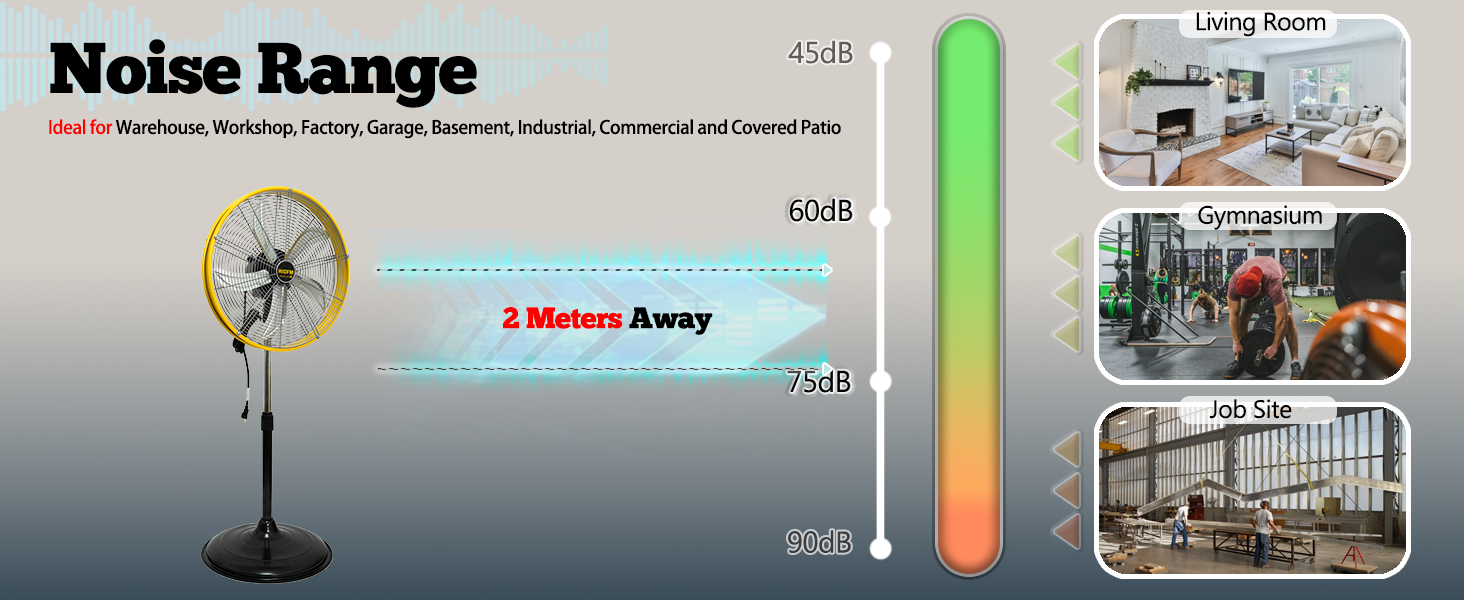
Image: Chart indicating the fan's noise range and its suitability for various environments like warehouses, gymnasiums, and job sites.
9. Warranty and Support
For warranty information or technical support, please refer to the contact details provided with your product packaging or visit the official HiCFM website. Keep your purchase receipt as proof of purchase for any warranty claims.
Related documentsSFSD1-500B3IW


Ask a question about this manual
Ask about setup, troubleshooting, compatibility, parts, safety, or missing instructions. Manuals+ will review the question and use this page’s manual context to help answer it.