
Dowinx LS-6657K08
Dowinx Fabric Gaming Chair
User Manual
1. Introduction
Thank you for choosing the Dowinx Fabric Gaming Chair. This manual provides essential information for the assembly, operation, and maintenance of your new chair. Designed for comfort and durability, this chair features advanced tech fabric upholstery, a pocket spring cushion, and multiple adjustable functions to enhance your gaming, working, or relaxation experience.

Image 1.1: The Dowinx Fabric Gaming Chair in Beige, showcasing its ergonomic design and neutral color.
2. Safety Information
- Ensure the chair is assembled correctly according to the instructions before use.
- Do not exceed the maximum weight recommendation of 300 pounds (136 kg) to prevent damage or injury.
- Keep hands and fingers clear of moving parts during adjustment.
- Avoid standing on the chair or using it as a step stool.
- Place the chair on a flat, stable surface to prevent tipping.
- Keep children and pets away from the chair during assembly.
3. Package Contents
Please check the package contents against the list below. If any parts are missing or damaged, please contact Dowinx customer service.
- Backrest Assembly
- Seat Base Assembly with Armrests
- Star Base
- Casters (5 pieces)
- Gas Lift Cylinder with Cover
- Mechanism Plate
- Lumbar Support Cushion (with massage function)
- Headrest Pillow
- Footrest Assembly
- Hardware Kit (screws, washers, Allen wrench)
4. Assembly Instructions
Assembly of the Dowinx Gaming Chair is straightforward and typically takes about 30-60 minutes. All necessary tools are included in the hardware kit.
- Insert the casters into the holes at the end of each leg of the star base.
- Place the gas lift cylinder into the center hole of the star base, then cover it with the telescopic plastic cover.
- Attach the mechanism plate to the underside of the seat base using the provided screws. Ensure the front of the mechanism faces the front of the seat.
- Carefully place the assembled seat base onto the gas lift cylinder.
- Attach the backrest to the seat base using the screws on the side brackets.
- Slide the lumbar support cushion onto the backrest, positioning it for optimal lower back support. Connect the USB cable for the massage function to a power source (e.g., power bank, USB adapter).
- Attach the headrest pillow to the top of the backrest.
- Install the retractable footrest into its designated slots beneath the seat.
5. Operating Instructions
Your Dowinx Gaming Chair offers several adjustable features for personalized comfort:
- Height Adjustment: Pull the lever on the right side of the seat upwards to adjust the chair's height. Release the lever at your desired height.
- Recline Function: Pull the lever on the right side of the seat (separate from height adjustment) upwards to recline the backrest. The backrest can recline up to 135 degrees. Push the lever down to lock the backrest in place.
- Lumbar Massage: The lumbar cushion includes a USB-powered massage function. Connect the USB cable to a power source to activate the massage.
- Retractable Footrest: Pull the footrest out from under the seat when desired, and push it back in when not in use.
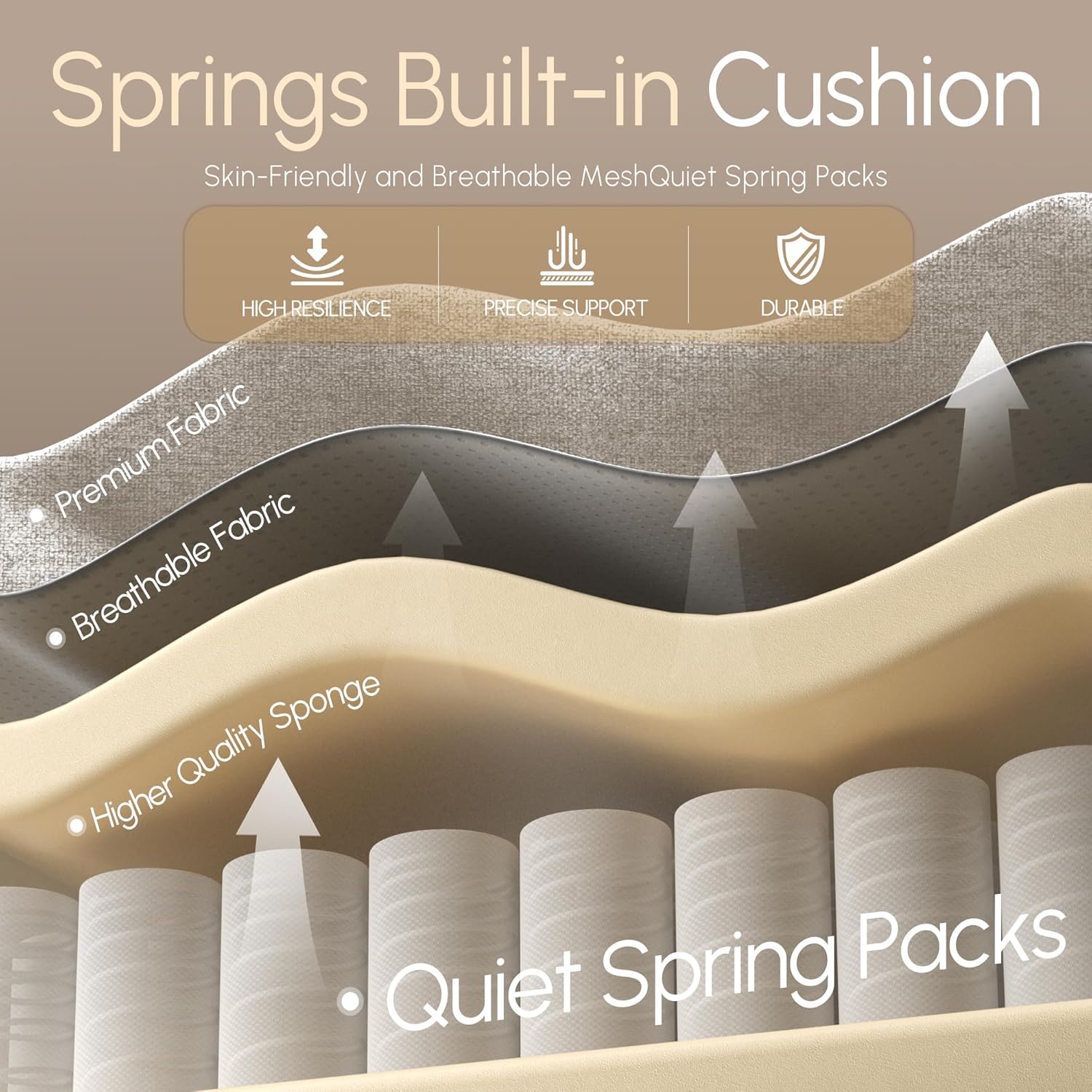
Image 5.1: Visual representation of the chair's 135-degree adjustable recline, massage lumbar support, 3-gas cylinder, retractable footrest, and heavy-duty base.

Image 5.2: A user demonstrating the spacious and comfortable seating area, highlighting the flat seat cushion design that allows for greater freedom of movement.
6. Maintenance
To ensure the longevity and appearance of your Dowinx Gaming Chair, follow these simple maintenance guidelines:
- Cleaning: Wipe clean with a damp cloth. For tougher stains on the fabric upholstery, use a mild fabric cleaner and test on an inconspicuous area first. Avoid harsh chemicals or abrasive cleaners.
- Regular Checks: Periodically check all screws and bolts to ensure they are tight. Re-tighten if necessary.
- Caster Care: Keep casters free of hair and debris to ensure smooth movement.

Image 6.1: Detailed view of the upgraded tech fabric upholstery, illustrating its breathable and durable layers.

Image 6.2: An illustration showing the internal structure of the seat cushion with individually pocketed springs, providing precise support and durability.
7. Troubleshooting
If you encounter any issues with your chair, please refer to the common problems and solutions below:
- Chair Squeaks: Check all bolts and screws and tighten them. A small amount of silicone lubricant can be applied to moving parts if needed.
- Chair Does Not Adjust Height: Ensure the gas lift lever is fully engaged. If the issue persists, the gas lift cylinder may need replacement. Contact customer service.
- Chair Feels Unstable: Verify that all casters are securely inserted into the base and that the star base is not damaged. Ensure all assembly screws are tightened.
- Footrest Does Not Extend/Retract Smoothly: Check for any obstructions in the footrest mechanism. Ensure it is properly aligned.
8. Specifications
| Feature | Specification |
|---|---|
| Brand | Dowinx |
| Model Name | LS-6657K08 |
| Color | Beige |
| Product Dimensions | 19.7"D x 24.4"W x 48.4"H |
| Maximum Weight Recommendation | 300 Pounds (136 kg) |
| Material | Tech Fabric Upholstery, Sponge Fill |
| Special Features | Reclining (up to 135°), Adjustable Lumbar (with massage), Ergonomic, Foot Rest, Adjustable Backrest |
| Included Components | Arm Pad, Cushion, Caster |
| Item Weight | 43 pounds (19.5 kg) |

Image 8.1: Detailed dimensions of the Dowinx Gaming Chair, including height, width, and depth measurements.
9. Warranty and Support
Dowinx provides comprehensive after-sales support for your gaming chair:
- Return Policy: The chair is eligible for a 1-month return period from the date of purchase.
- Maintenance Service: Enjoy 1-year maintenance services for your product.
- Customer Support: Our dedicated after-sales service team is available to provide installation guidance and offer complimentary replacement parts as needed.
For assistance, please visit the official Dowinx website or contact their customer service through the retailer where you purchased the product.
Ask a question about this manual
Ask about setup, troubleshooting, compatibility, parts, safety, or missing instructions. Manuals+ will review the question and use this page’s manual context to help answer it.