
Introduction
Thank you for choosing the MORENTO MR5866 Air Purifier. This manual provides essential information for the safe operation, maintenance, and troubleshooting of your device. Please read it thoroughly before use and retain it for future reference. The MORENTO MR5866 is designed to enhance your indoor air quality by effectively filtering airborne particles and odors in large rooms up to 1690 sq. ft.
Important Safety Instructions
WARNING: To reduce the risk of fire, electric shock, or injury, please observe the following:
- Read all instructions before operating the appliance.
- Do not operate any fan with a damaged cord or plug. Discard fan or return to an authorized service facility for examination and/or repair.
- Do not run cord under carpeting. Do not cover cord with throw rugs, runners, or similar coverings. Do not route cord under furniture or appliances. Arrange cord away from traffic area and where it will not be tripped over.
- Do not use the air purifier outdoors.
- Always unplug the air purifier before moving it, opening the grille, changing filters, cleaning, or whenever it is not in use.
- Do not use the air purifier in wet or damp environments.
- Keep the air purifier away from heat sources and flammable materials.
- Ensure the air inlet and outlet are not blocked.
- This appliance has a polarized plug (one blade is wider than the other). To reduce the risk of electric shock, this plug is intended to fit in a polarized outlet only one way. If the plug does not fit fully in the outlet, reverse the plug. If it still does not fit, contact a qualified electrician. Do not attempt to defeat this safety feature.
Package Contents
- MORENTO MR5866 Air Purifier (1 unit)
- HEPA Filters (2 packs, pre-installed or separate depending on packaging)
- User Manual (this document)
Product Overview
The MORENTO MR5866 features a dual-sided air intake system for efficient purification, a smart control panel, and an integrated PM2.5 air quality monitor.
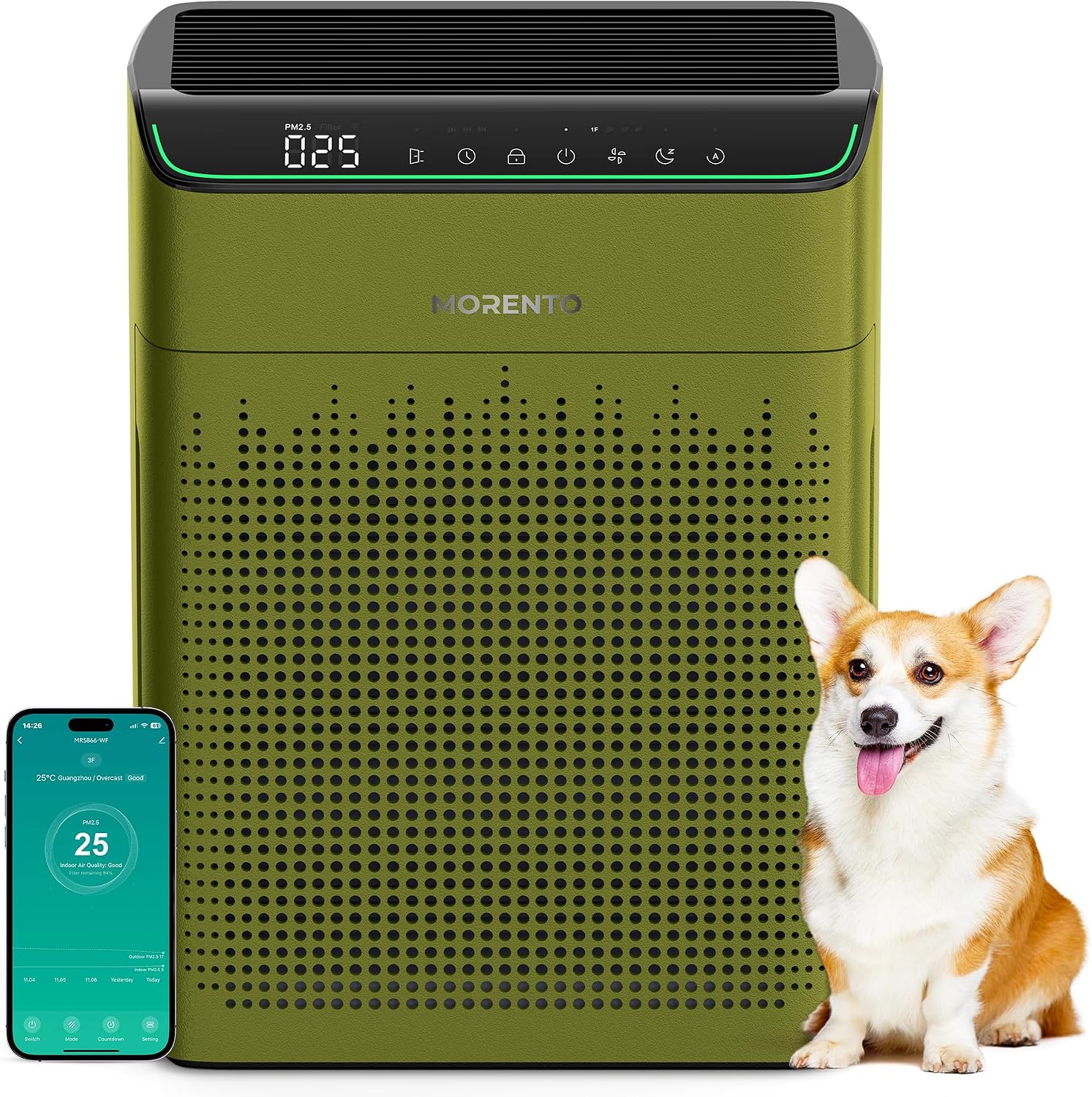
Image: The MORENTO MR5866 Air Purifier in dark green, shown with a dog and a smartphone displaying the control app. This image highlights the product's design and smart features.
Control Panel Features:

Image: A detailed view of the air purifier's top control panel, illustrating icons for Filter Reminder, Timer (2/5/8H), Child Lock, 3 Fan Speeds, Sleep Mode, and Auto Mode. The PM2.5 display shows "025".
- PM2.5 Display: Shows real-time air quality.
- Filter Reminder: Indicates when to replace filters.
- Timer: Set operation duration (2, 5, or 8 hours).
- Child Lock: Prevents accidental changes to settings.
- Fan Speed: Adjust between 3 levels.
- Sleep Mode: Operates quietly with display lights off.
- Auto Mode: Automatically adjusts fan speed based on air quality.
- Wi-Fi Indicator: Shows connection status.
Setup
1. Unpacking and Placement:
- Remove the air purifier from its packaging.
- Place the unit on a firm, level surface.
- Ensure there is at least 1.6 inches (40cm) of clear space around the infrared detection port to ensure accurate air quality readings.
- Position the air purifier in a location where air can circulate freely, avoiding obstructions to the dual-sided air intake.

Image: An illustration demonstrating the dual-sided air intake of the MORENTO MR5866 Air Purifier, showing air being drawn in from both sides and expelled upwards, highlighting its efficiency for large rooms up to 1690 sq. ft.
2. Filter Installation:
The filters may come pre-installed or require installation. If not pre-installed, follow these steps:
- Unplug the air purifier from the power outlet.
- Open the filter compartment cover(s).
- Remove any plastic packaging from the new filters.
- Insert the filters into the designated slots, ensuring they are correctly oriented.
- Close the filter compartment cover(s) securely.

Image: A cutaway diagram illustrating the three-stage filtration system of the MORENTO MR5866 Air Purifier, showing the Pre-Filter, True HEPA Filter, and Activated Carbon Filter layers.
3. Power Connection:
- Plug the power cord into a suitable electrical outlet.
Operating Instructions
1. Power On/Off:
- Press the Power button on the control panel to turn the unit on or off.
2. Fan Speed Adjustment:
- Press the Fan Speed button to cycle through 3 available fan speeds.
3. Auto Mode:
- Press the Auto Mode button. The purifier will automatically adjust its fan speed based on the detected air quality (PM2.5 levels).

Image: A table illustrating the real-time air quality display, correlating indicator colors (Green, Orange, Red) with air quality descriptions (Good, Moderate, Bad), corresponding Auto Mode fan speeds, and PM2.5 ranges.
4. Sleep Mode:
- Press the Sleep Mode button. The purifier will operate at its lowest fan speed (23dB) and turn off all display lights for undisturbed sleep.

Image: The MORENTO MR5866 Air Purifier operating quietly in a bedroom, with an overlay indicating "Sleep Mode 23dB Quiet Operation," emphasizing its low noise level for undisturbed rest.
5. Timer Function:
- Press the Timer button to set the purifier to operate for 2, 5, or 8 hours before automatically shutting off.
6. Child Lock:
- Press and hold the Child Lock button for a few seconds to activate or deactivate. This prevents accidental changes to settings.
7. Smart App Control (Havaworks App):
Download the "Havaworks" app from the App Store or Google Play to control your air purifier remotely.
- Download and install the "Havaworks" app on your smartphone.
- Register or log in to your account.
- Follow the in-app instructions to connect your MORENTO MR5866 Air Purifier to your Wi-Fi network.
- Once connected, you can:
- Power on/off
- Switch between custom or sleep modes
- Set timers
- Adjust fan speed (including 2-3 levels at night)
- Receive filter replacement reminders
- Turn off the display light

Image: Multiple smartphone screens displaying the "Havaworks" app interface, demonstrating various control options for the MORENTO MR5866 Air Purifier, such as mode selection, timer settings, and general settings.
8. Voice Control (Alexa & Google Assistant):
The MORENTO MR5866 is compatible with Amazon Alexa and Google Assistant for hands-free control.
- Ensure your air purifier is connected to the "Havaworks" app and your smart assistant device (e.g., Amazon Echo, Google Home) is set up.
- Enable the "Havaworks" skill/action in your Alexa or Google Home app.
- Follow the instructions in the smart assistant app to link your Havaworks account.
- Use voice commands such as:
- "Alexa, turn on the air purifier."
- "Hey Google, set the air purifier to Auto Mode."
- "Alexa, turn off the air purifier."

Image: A woman meditating in a living room with the MORENTO MR5866 Air Purifier and an Amazon Echo Dot nearby, illustrating the convenience of intelligent voice control with commands like "Alexa, set the air purifier to Auto Mode."
Maintenance
1. Filter Replacement:
The filter life is approximately 2,200 hours. The Filter Reminder indicator on the control panel or in the app will notify you when replacement is needed.
- Unplug the air purifier.
- Open the filter compartment cover(s).
- Remove the old filters and dispose of them properly.
- Remove any plastic packaging from the new filters.
- Insert the new filters into the designated slots, ensuring correct orientation.
- Close the filter compartment cover(s) securely.
- Plug in the air purifier.
- Reset the filter life indicator (refer to app or specific button combination if available on unit).
2. Cleaning the Air Purifier:
- Always unplug the unit before cleaning.
- Wipe the exterior of the air purifier with a soft, dry cloth.
- Do not use abrasive cleaners or solvents.
- Gently vacuum the air intake vents to remove dust buildup.
3. Cleaning the PM2.5 Sensor:
Periodically clean the PM2.5 sensor to ensure accurate readings.
- Unplug the air purifier.
- Locate the PM2.5 sensor opening (usually a small vent on the side).
- Use a dry cotton swab to gently clean the sensor lens.
- Do not use water or liquid cleaners.

Image: The MORENTO MR5866 Air Purifier highlighting its infrared inspection capability for PM2.5 values, with color-coded indicators (Green=Good, Orange=Moderate, Red=Bad) and a note to keep the detection port clear.
Troubleshooting
| Problem | Possible Cause | Solution |
|---|---|---|
| Unit does not turn on. | Not plugged in; Power outage; Damaged cord/plug. | Ensure plug is securely in outlet; Check power supply; Contact customer support if cord/plug is damaged. |
| Airflow is weak or purification is ineffective. | Filters are dirty or clogged; Air inlets/outlets blocked; Unit in low fan speed. | Replace filters; Clear any obstructions; Increase fan speed. |
| Unusual noise. | Foreign object inside; Unit not on a level surface; Filter not installed correctly. | Unplug and check for obstructions; Place on a stable surface; Reinstall filters. |
| PM2.5 reading seems inaccurate. | Sensor is dirty; Sensor port is blocked. | Clean the PM2.5 sensor; Ensure nothing is blocking the sensor port. |
| App control not working. | Wi-Fi disconnected; App not properly paired; Router issues. | Check Wi-Fi connection; Re-pair device in app; Restart router. |
| Voice control not responding. | Smart assistant not linked; Incorrect commands; Wi-Fi issues. | Ensure Havaworks skill/action is enabled and linked; Use correct voice commands; Check Wi-Fi. |
Specifications
| Feature | Detail |
|---|---|
| Model Number | MR5866 |
| Brand | MORENTO |
| Color | Dark Green |
| Product Dimensions | 13.6"D x 7.8"W x 17.7"H |
| Item Weight | 7.96 pounds |
| Floor Area Coverage | Up to 1690 Square Feet |
| CADR | 200 CFM (340 m³/h) |
| Noise Level (Sleep Mode) | 23 dB |
| Controller Type | APP, Amazon Alexa, Button Control |
| Filtration System | 3-Stage (Pre-Filter, True HEPA Filter, Activated Carbon Filter) |
| Filter Life | Up to 2,200 hours |
| Certifications | ETL, DOE, ENERGY STAR, EPA, FCC, CARB Compliant |
Warranty and Support
For warranty information and customer support, please refer to the official MORENTO website or contact their customer service directly.
MORENTO Official Store: Visit the MORENTO Store on Amazon
For technical assistance or inquiries, please reach out to MORENTO customer support.

