
Product Overview
The INKBIRD ITH-21-B is a versatile Bluetooth thermometer and hygrometer designed for accurate indoor temperature and humidity monitoring. It features a large, clear LCD display and connects to a smart app for advanced control, data logging, and alerts. This device is ideal for maintaining optimal environmental conditions in various settings such as homes, offices, nurseries, wine cellars, and greenhouses.

This image illustrates the compact design of the INKBIRD ITH-21-B, its large digital display, and its connectivity with the INKBIRD mobile application. Two AA batteries, which power the device, are also shown.
Key features include a 6-in-1 display showing temperature, humidity, comfort level, time, date, and week. It utilizes upgraded Bluetooth 5.0 for stable connectivity and a Swiss-made sensor for high accuracy and quick response times.

This diagram highlights the six primary functions displayed on the device: Temperature & Humidity, Time & Date, Comfort Level Indicators, Bluetooth App Control, History Storage & Export, and 2 Display Modes.
Package Contents
- 1 x INKBIRD ITH-21-B Bluetooth Thermometer Hygrometer
- 2 x AA Batteries
- 1 x User Manual
Setup
1. Battery Installation and Initial Power On
Before first use, open the back cover of the device and remove the insulating strip from the battery compartment. The ITH-21-B will then switch on automatically.
This image demonstrates the process of opening the battery compartment and removing the protective strip to activate the device. The device powers on automatically once the batteries are fully connected.
2. App Download and Bluetooth Pairing
Download the "INKBIRD" app from your smartphone's app store. Open the app and click on the "+" icon to find the ITH-21-B. Follow the on-screen instructions in the app to establish a Bluetooth connection. The device supports Bluetooth 5.0 for a stable connection up to 230 feet (70 meters) in obstruction-free environments.

This image shows a user interacting with the INKBIRD app on a smartphone to discover and pair with the ITH-21-B device, illustrating the ease of establishing a wireless connection.

This diagram visually explains the extended range of Bluetooth 5.0 (up to 70m/230ft) and compares its advantages over Bluetooth 4.0, including faster transmission speed, more stable connection, lower power consumption, and better compatibility.
3. Automatic Time and Date Synchronization
Once successfully connected via Bluetooth, the device will automatically synchronize its time and date with your smartphone.

This image highlights how the device's display automatically updates its time and date to match the connected smartphone, ensuring accurate timekeeping without manual adjustment.
Operating Instructions
1. Display Modes
The ITH-21-B offers two main display modes: Time Mode and Temperature-Humidity Mode. You can switch between these modes by pressing the designated button on the device.

This image illustrates the two primary display configurations: one focusing on time and date, and the other on current temperature and humidity readings. A button on the device allows for easy toggling between these views.
2. Temperature Unit Switching (°C/°F)
To change the temperature unit between Celsius (°C) and Fahrenheit (°F), press and hold the C/F button for 5 seconds.
3. Max/Min Record Clearing
To clear the maximum and minimum recorded temperature and humidity values, press and hold the MAX/MIN button for 5 seconds.
4. Comfort Level Indicators
The device provides comfort level indicators (Cold, Comfort, Hot for temperature; Wet, Comfort, Dry for humidity) to help you quickly assess the environment. These levels can be customized via the INKBIRD app.

This diagram details the visual indicators for temperature (Cold, Comfort, Hot) and humidity (Wet, Comfort, Dry), which help users understand the current environmental comfort at a glance. These settings can be personalized through the app.
5. Data History and Export
The INKBIRD app allows you to view and export up to 2 years of historical data stored in the Cloud, and up to 300 days of offline data stored directly on the sensor. This feature enables detailed analysis of environmental trends.

This image demonstrates the app's capability to display and export historical temperature and humidity data, with options for viewing data over various timeframes and saving offline data.
6. Real-time Alarms
Set custom high/low temperature and humidity alarms via the INKBIRD app to receive real-time notifications when conditions exceed your set parameters. Note: Alarms are only active when the device is connected via Bluetooth.

This image shows a smartphone receiving a "High temperature alarm" notification from the INKBIRD app, indicating the device's ability to alert users to significant environmental changes.
Maintenance
1. Cleaning
Wipe the device clean with a soft, dry cloth. Do not use abrasive cleaners or immerse the device in water.
2. Battery Replacement
The device is powered by 2 AA batteries, offering an ultra-long battery life of up to 15+ months. Replace batteries when the low battery indicator appears on the display.

This image highlights the impressive 15+ months of battery life provided by the two included AA batteries, reducing the frequency of replacements. Device dimensions are also provided for reference.
Troubleshooting
| Issue | Possible Cause | Solution |
|---|---|---|
| Device not powering on. | Batteries not installed or insulating strip not removed. | Ensure batteries are correctly installed and the insulating strip is removed. Replace batteries if depleted. |
| Cannot connect to app via Bluetooth. | Device out of range, Bluetooth disabled, or app issue. | Ensure device is within 230ft (70m) of your phone. Check if Bluetooth is enabled on your phone. Restart the app or device. |
| Inaccurate readings. | Sensor obstruction or need for calibration. | Ensure the sensor is not covered. Calibrate temperature and humidity via the INKBIRD app if necessary. |
| Time/Date incorrect. | Not synchronized with app or manual adjustment needed. | Connect to the INKBIRD app for automatic synchronization. If persistent, manually adjust time/date via app settings. |
Specifications
- Model Name: ITH-21-B
- Temperature Measurement Range: -4°F~140°F (-20°C~60°C)
- Humidity Measurement Range: 0%RH-99%RH
- Temperature Accuracy: ±0.36°F (±0.2°C)
- Humidity Accuracy: ±2%RH
- Response Time: Samples every 3 seconds
- Display Type: 3.8-inch Large LCD Digital Display
- Connectivity: Bluetooth 5.0 (up to 230ft/70m obstruction-free)
- Power Source: 2 x AA Batteries (included)
- Battery Life: Up to 15+ months
- Data Storage: Up to 2 years in Cloud (via app), 300 days on sensor
- Material: Plastic
- Indoor/Outdoor Usage: Indoor
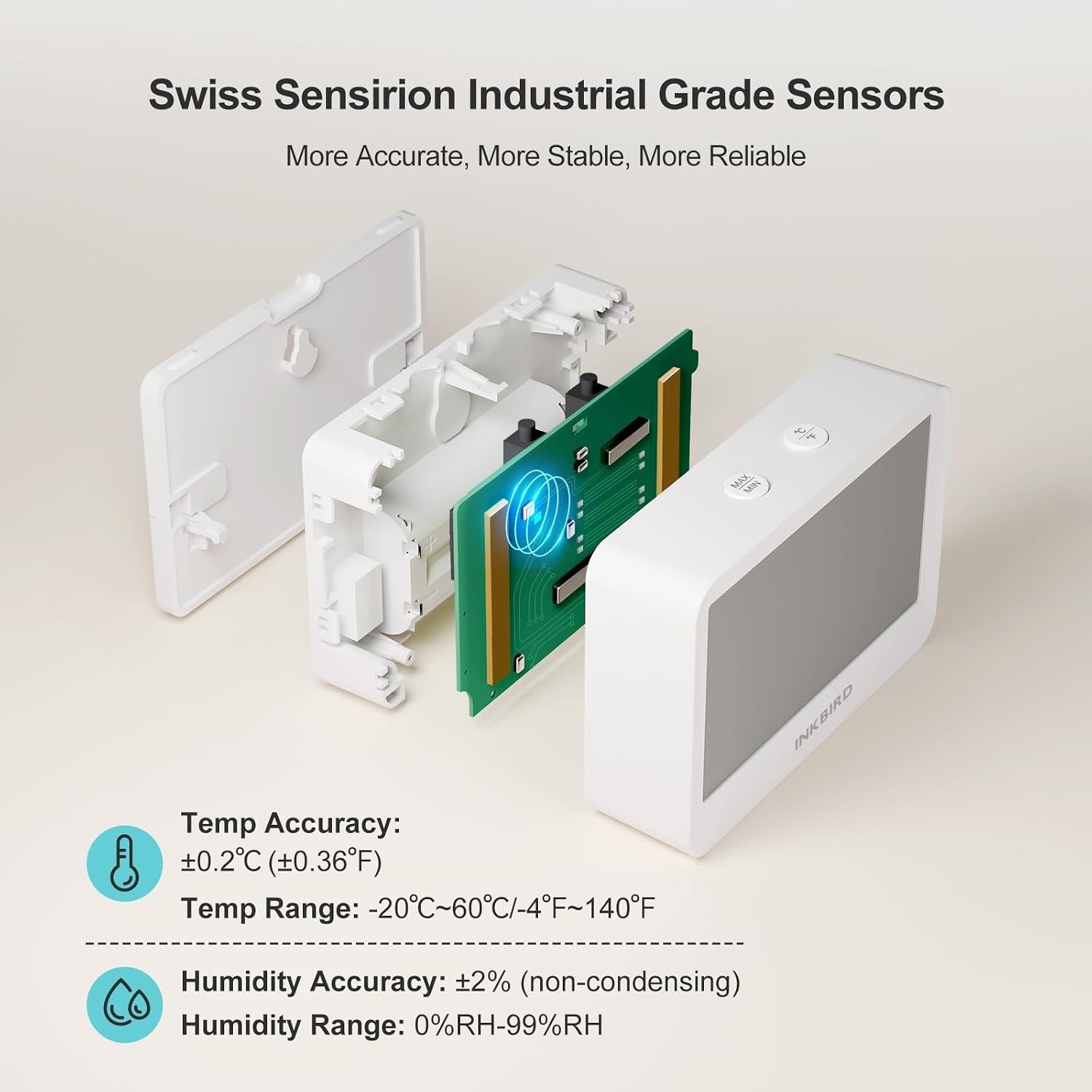
This image highlights the precision of the Swiss Sensirion Industrial Grade Sensors, detailing the temperature accuracy (±0.2°C / ±0.36°F) and humidity accuracy (±2%RH), along with their respective measurement ranges.
Official Product Video
This official product video provides a comprehensive overview of the INKBIRD ITH-21-B, demonstrating its features, setup, and various functionalities in a practical setting. It highlights the ease of use and benefits of the device for monitoring indoor environments.
Warranty and Support
For warranty information and technical support, please refer to the official Inkbird website or contact their customer service directly. The user manual included in the package also contains detailed contact information and warranty terms.


