
1. Product Overview
The MORENTO MR5866 Air Purifier is designed to improve indoor air quality in large rooms. It features a dual air intake system, a 3-stage filtration process, and smart controls including Wi-Fi connectivity and voice assistant compatibility.
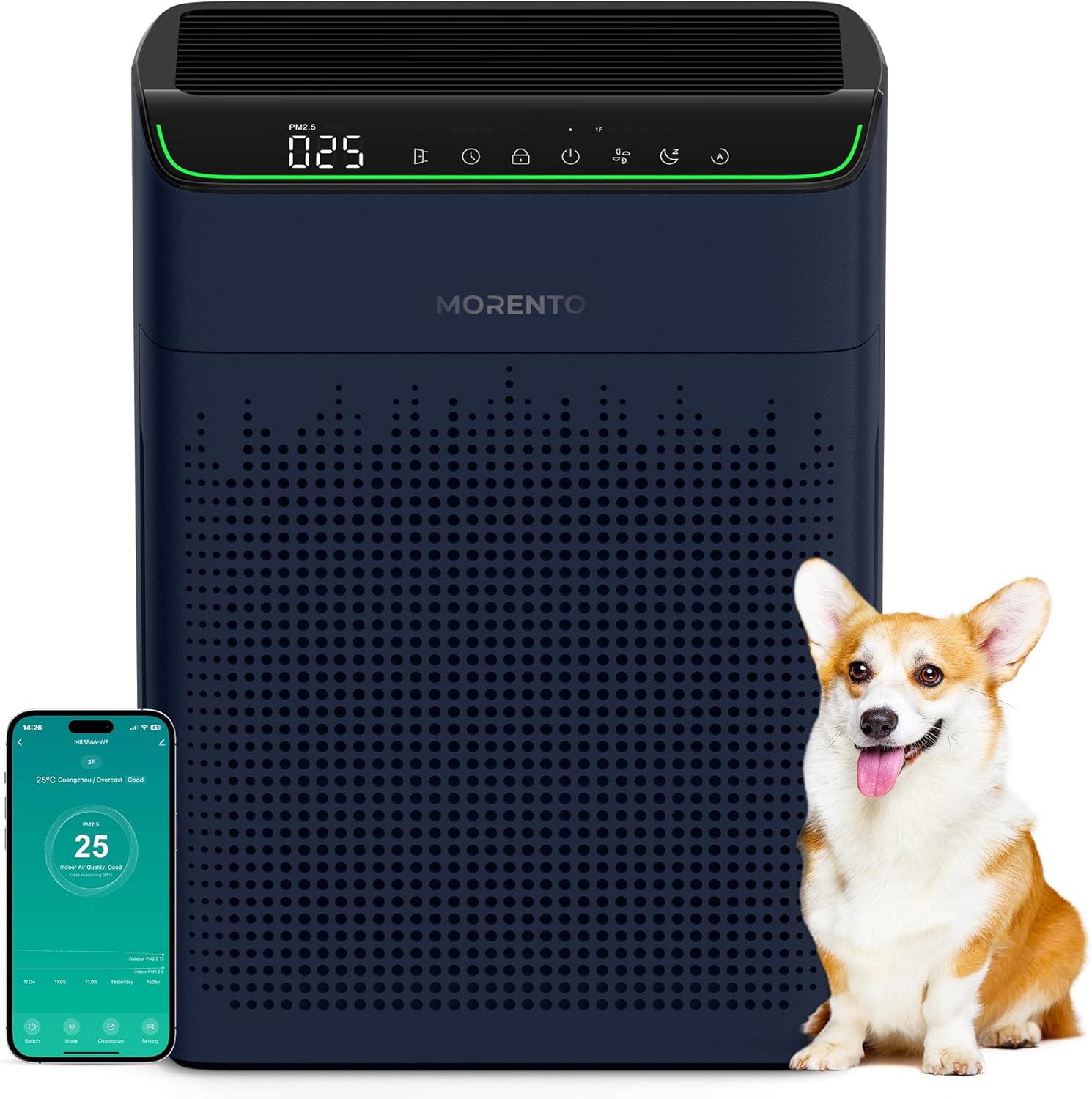
Figure 1: MORENTO MR5866 Air Purifier unit with accompanying smartphone app interface and a dog.
Key Features:
- Enhanced Dual Air Intake: Cleans air in spaces up to 1690 sq. ft. with a CADR of 200 CFM (340 m³/h).
- Smart App Control: Remote operation via the "Havaworks" app for power, modes, timers, fan speed, and filter reminders.
- Voice Control: Compatible with Amazon Alexa and Google Assistant for hands-free operation.
- High-Efficiency 3-Stage Filtration: Includes Pre-Filter, True HEPA Filter, and Activated Carbon Filter for particles as small as 0.3 microns.
- Air Quality Monitor: Professional infrared PM2.5 sensor with a 3-color AQI indicator (Green=Good, Orange=Moderate, Red=Poor).
- Quiet Operation: Operates at 23dB in sleep mode for undisturbed rest.
- Multiple Modes: Offers 3 adjustable fan speeds, Auto Mode, and a timer function (2, 5, or 8 hours).
- Certifications: ETL, DOE, ENERGY STAR, EPA, FCC, and CARB certified.
2. Important Safety Instructions
Please read all instructions carefully before using the appliance and retain them for future reference. Failure to follow these instructions may result in electric shock, fire, or serious injury.
- Always place the air purifier on a firm, level surface.
- Keep the appliance away from heat sources, direct sunlight, and moisture.
- Do not operate the appliance with a damaged cord or plug.
- Do not block air inlets or outlets. Ensure at least 16 inches (40 cm) clearance from walls or obstacles for the infrared sensor.
- Unplug the air purifier before cleaning or performing any maintenance.
- Do not use the appliance in areas where flammable gases or vapors are present.
- This appliance is not intended for use by persons (including children) with reduced physical, sensory, or mental capabilities, or lack of experience and knowledge, unless they have been given supervision or instruction concerning use of the appliance by a person responsible for their safety.
- Children should be supervised to ensure that they do not play with the appliance.
- Only use MORENTO original replacement filters.
3. Setup Guide
3.1 Package Contents
- MORENTO MR5866 Air Purifier Unit
- HEPA Filter Set (Pre-installed or separate, check packaging)
- Additional HEPA Filter Set (if purchased as 1 Pack + 2 Pack)
- User Manual
3.2 Filter Installation
The air purifier uses a 3-stage filtration system. Ensure filters are correctly installed before first use.
- Unpack the air purifier and place it on a stable surface.
- Locate the filter compartments, typically on the sides or back of the unit.
- Open the filter covers.
- Remove any plastic packaging from the filters.
- Insert the filters into the unit, ensuring they are oriented correctly (refer to markings on the filters or unit). The 3-stage filter typically includes a Pre-Filter, True HEPA Filter, and Activated Carbon Filter.
- Close the filter covers securely.

Figure 2: Illustration of the 3-stage filtration system.
3.3 Placement
For optimal performance, place the air purifier in a central location within the room. Ensure adequate clearance around the unit.
- Maintain at least 16 inches (40 cm) of space from walls or furniture, especially around the infrared detection port.
- Avoid placing near curtains or objects that could obstruct airflow.
- Place on a flat, stable surface.

Figure 3: Recommended placement for effective dual side air intake.
3.4 Power Connection
Plug the power cord into a standard electrical outlet. The unit will enter standby mode.
3.5 Smart App and Voice Control Setup
- Download the App: Search for "Havaworks" in your smartphone's app store (iOS or Android) and download it.
- Register/Log In: Follow the in-app instructions to create an account or log in.
- Add Device: In the app, select "Add Device" and follow the pairing instructions for the MORENTO MR5866. Ensure your phone is connected to a 2.4GHz Wi-Fi network during setup.
- Voice Assistant Integration:
- For Amazon Alexa: Open the Alexa app, go to "Skills & Games," search for "Havaworks," enable the skill, and link your Havaworks account.
- For Google Assistant: Open the Google Home app, tap "Set up device," then "Works with Google," search for "Havaworks," and link your account.

Figure 4: Havaworks app interface for smart control.

Figure 5: Voice control integration with smart home assistants.
4. Operating Instructions
The MORENTO MR5866 can be operated via the control panel on the unit, the Havaworks app, or voice commands.

Figure 6: Control panel features and indicators.
4.1 Control Panel Functions
- Power Button: Press to turn the unit On or Off.
- Fan Speed Button: Cycle through 3 fan speeds (Low, Medium, High).
- Mode Button: Switch between Auto Mode, Sleep Mode, and Manual Mode.
- Timer Button: Set the operating timer for 2, 5, or 8 hours.
- Child Lock Button: Press and hold to activate/deactivate child lock, preventing accidental changes.
- Display Light Button: Turn the display lights On/Off.
- Filter Reset Indicator: Lights up when filter replacement is needed.
4.2 Air Quality Indicator (AQI)
The integrated PM2.5 sensor provides real-time air quality readings, displayed on the unit and in the app. The indicator light changes color based on air quality:

Figure 7: Infrared PM2.5 sensor and air quality indicators.
| Indicator Color | Air Quality | Auto Mode Fan Speed | PM2.5 Range |
|---|---|---|---|
| Green | Good | 1F (Low) | PM2.5 < 75 |
| Orange | Moderate | 2F (Medium) | 75 ≤ PM2.5 < 150 |
| Red | Poor | 3F (High) | PM2.5 ≥ 150 |

Figure 8: Visual representation of the Air Quality Index (AQI) display.
4.3 Sleep Mode
Activate Sleep Mode for quiet operation (23dB) and dimmed display lights, ensuring an undisturbed environment. Display lights can also be controlled via the app.

Figure 9: Quiet operation in Sleep Mode (23dB).
5. Maintenance
Regular maintenance ensures optimal performance and extends the lifespan of your air purifier.
5.1 Filter Replacement
The filter typically lasts up to 2,200 hours. The filter replacement indicator on the control panel and in the app will alert you when it's time to change the filter.
- Unplug the air purifier from the power outlet.
- Open the filter covers on the unit.
- Remove the old filter(s) and dispose of them properly.
- Unpack the new MORENTO replacement filter(s).
- Insert the new filter(s) into the unit, ensuring correct orientation.
- Close the filter covers securely.
- Plug in the air purifier.
- Press and hold the Filter Reset button on the control panel (or use the app) to reset the filter lifetime counter.
Note: Only use genuine MORENTO replacement filters to maintain performance and warranty.
5.2 Cleaning the Unit
- Wipe the exterior of the air purifier with a soft, dry cloth.
- Do not use abrasive cleaners or solvents.
- Clean the air intake and outlet grilles with a soft brush or vacuum cleaner attachment to remove dust.
5.3 Cleaning the PM2.5 Sensor
If the air quality readings appear inaccurate, the PM2.5 sensor may need cleaning.
- Unplug the air purifier.
- Locate the sensor cover (usually a small panel on the side of the unit).
- Gently open the cover.
- Use a clean, dry cotton swab to carefully wipe the lens and dust inlet of the sensor.
- Close the sensor cover.
- Plug in the air purifier.
6. Troubleshooting
Refer to the following table for common issues and their solutions.
| Problem | Possible Cause | Solution |
|---|---|---|
| Unit does not turn on. | Not plugged in; Power outlet malfunction; Power cord damaged. | Ensure power cord is securely plugged in; Try a different outlet; Contact customer support if cord is damaged. |
| Airflow is weak or purification is ineffective. | Filters are dirty or clogged; Air inlets/outlets are blocked; Filters not unwrapped. | Check and replace filters if necessary; Ensure no obstructions around the unit; Verify filters were removed from plastic packaging. |
| Unusual noise. | Foreign object inside; Unit not on a level surface; Filter not installed correctly. | Unplug and check for foreign objects; Place on a stable, flat surface; Reinstall filters correctly. |
| App cannot connect to the unit. | Incorrect Wi-Fi password; Router too far; Not on 2.4GHz network; App not updated. | Verify Wi-Fi password; Move unit closer to router; Ensure 2.4GHz network is used during setup; Update Havaworks app. |
| Air quality reading seems inaccurate. | PM2.5 sensor is dirty; Obstruction near sensor. | Clean the PM2.5 sensor (refer to Section 5.3); Ensure at least 16 inches (40 cm) clearance from obstacles. |
7. Specifications
| Model Number | MR5866 |
| Brand | MORENTO |
| Product Dimensions | 13.6"D x 7.8"W x 17.7"H |
| Floor Area Coverage | Up to 1690 Square Feet |
| CADR | 200 CFM (340 m³/h) |
| Noise Level (Sleep Mode) | 23 dB |
| Controller Type | APP, Amazon Alexa, Button Control |
| Item Weight | 7.96 pounds |
| Certifications | ETL, DOE, ENERGY STAR, EPA, FCC, CARB Certified |
| Filter Lifespan | Up to 2,200 hours |
8. Warranty and Customer Support
MORENTO products are manufactured to the highest quality standards. For detailed warranty information, please refer to the warranty card included with your purchase or visit the official MORENTO website.
If you encounter any issues or have questions regarding your MORENTO MR5866 Air Purifier, please contact our customer support team:
- Website: MORENTO Official Store on Amazon
- Email: For support, please visit the official MORENTO website or contact through the Amazon store page.
- Phone: For support, please visit the official MORENTO website or contact through the Amazon store page.
Please have your model number (MR5866) and purchase date ready when contacting support.


