
1. Safety Information
Please read and understand all instructions before assembling and using this product. Failure to follow these instructions may result in injury or damage to the product.
- Keep all packaging materials away from children to prevent choking hazards.
- Ensure all screws and fasteners are securely tightened before use. Periodically check and re-tighten as necessary.
- Do not overload shelves or the desktop. Refer to specifications for weight limits.
- Place the desk on a flat, stable surface to prevent tipping.
- Keep liquids away from electrical components (power outlets, LED lights) to prevent electric shock.
- Use only the provided power cord and ensure it is not pinched or damaged.
2. Package Contents
Verify that all components listed below are present before beginning assembly. If any parts are missing or damaged, contact GreenForest customer support.
- Desktop panels (main desk, monitor stand, shelf panels)
- Metal frame components
- Fabric drawer
- Power outlet unit (3 AC outlets, 2 USB ports)
- LED strip light with remote control
- Assembly hardware (screws, bolts, Allen wrench)
- Instruction manual
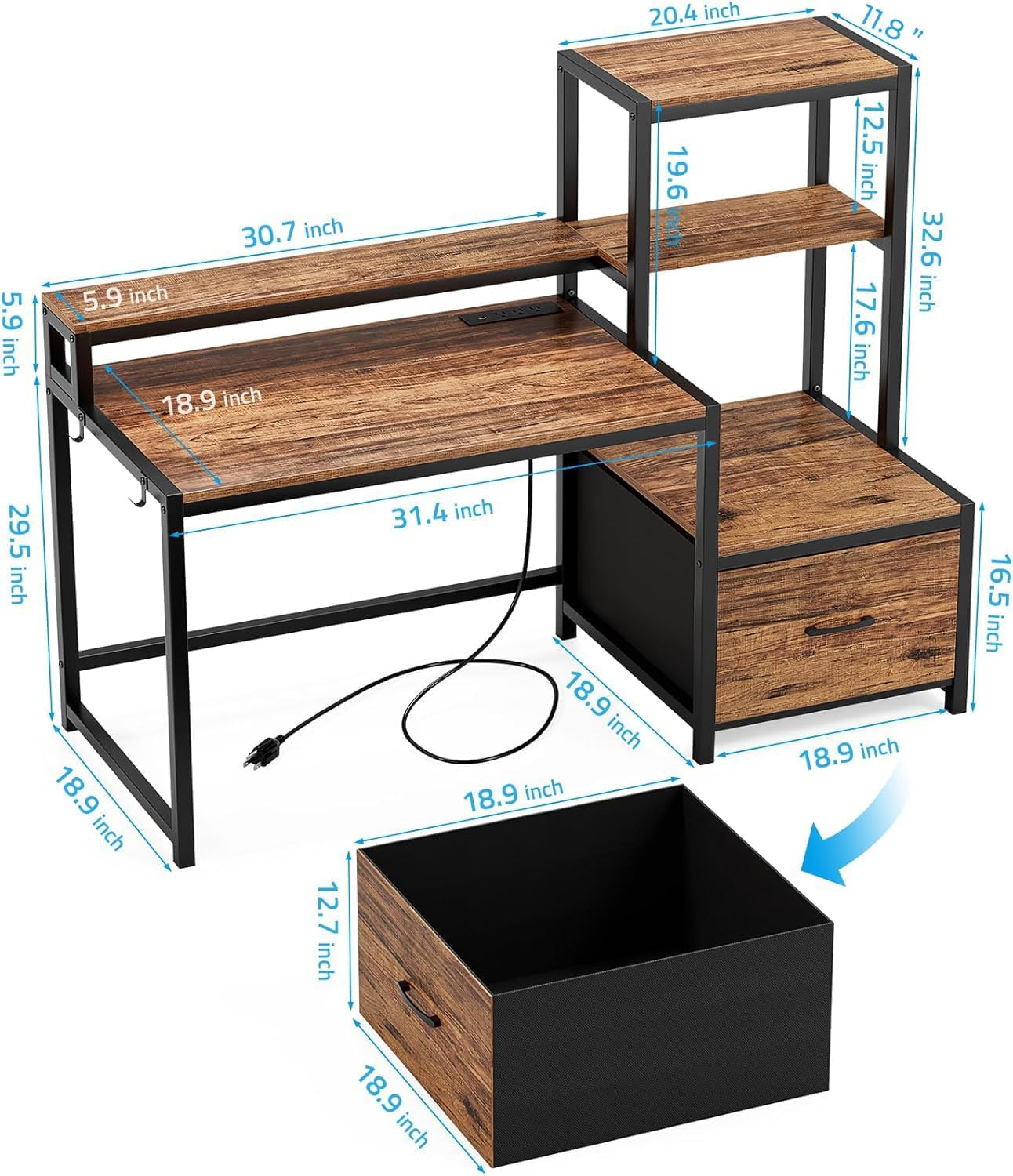
Figure 2.1: Exploded view of desk components and dimensions.
3. Setup & Assembly
Assembly typically takes approximately 30 minutes with two people. All necessary tools are included. Follow the numbered steps carefully.
- Unpack Components: Carefully remove all parts from the packaging and lay them out on a clean, soft surface to prevent scratches. Verify all parts against the package contents list.
- Assemble Main Desk Frame: Attach the metal frame components for the main desktop using the provided screws. Do not fully tighten screws until all parts are aligned.
- Attach Desktop Panel: Secure the main desktop panel to the assembled frame.
- Install Monitor Stand: Attach the monitor stand frame and panel to the main desktop. Ensure it is securely fastened.
- Assemble Storage Shelves: Construct the frame for the side storage shelves.
- Reversible Design (Optional): Decide whether the storage shelves will be on the left or right side of the main desk. The design allows for flexible adjustment based on room layout.

Figure 3.1: Reversible design of the desk, allowing shelves to be placed on either side.
- Attach Storage Shelves to Desk: Connect the assembled storage shelf unit to the main desk frame.
- Insert Fabric Drawer: Place the fabric drawer into its designated slot within the storage unit.
- Install Power Outlet Unit: Secure the power outlet unit into the pre-drilled slot on the monitor stand. Connect the power cord.
- Apply LED Strip Light: Adhere the LED strip light to the underside of the monitor stand. Ensure the remote receiver is accessible.
- Final Tightening: Once all components are in place and aligned, fully tighten all screws and fasteners.
Video 3.1: Assembly overview of the GreenForest Computer Desk, demonstrating the setup process and key features.
4. Operating Instructions
4.1. Monitor Stand
The integrated monitor stand is designed to elevate your monitor to an ergonomic height, reducing strain on your neck and eyes. Place your monitor directly on the stand.

Figure 4.1: Monitor placed on the ergonomic monitor stand.
4.2. Storage Shelves and Drawer
The desk features four tiers of storage space and one fabric drawer. These are suitable for storing printers, computer towers, documents, books, and other office supplies.
- The bottom shelf is ideal for a printer or CPU tower.
- The fabric drawer provides concealed storage for various items.

Figure 4.2: Detailed view of the storage shelves and fabric drawer.
4.3. LED Lights
The RGB LED strip light is located under the monitor stand. Use the provided remote control to adjust its settings.
- Power On/Off: Press the red power button on the remote.
- Color Selection: Choose from 20 static colors using the color buttons.
- Dynamic Modes: Select from 21 dynamic modes (e.g., constant, jump, flash, fade) using the "MODE" button.
- Brightness Adjustment: Use the brightness up/down buttons to select from 8 adjustable brightness levels.
- Speed Adjustment: In dynamic modes, use the speed up/down buttons to adjust the speed of the light effects (8 speeds).

Figure 4.3: LED strip light in operation with its remote control.
4.4. Power Outlets
The desk includes a built-in power strip with 3 AC outlets and 2 USB ports for convenient charging and powering of devices.
- AC Outlets: Provide 125V/12A power for standard electronics.
- USB Ports: Provide 5V/2A power for charging mobile devices.
- The power cord is 6.5 feet long.
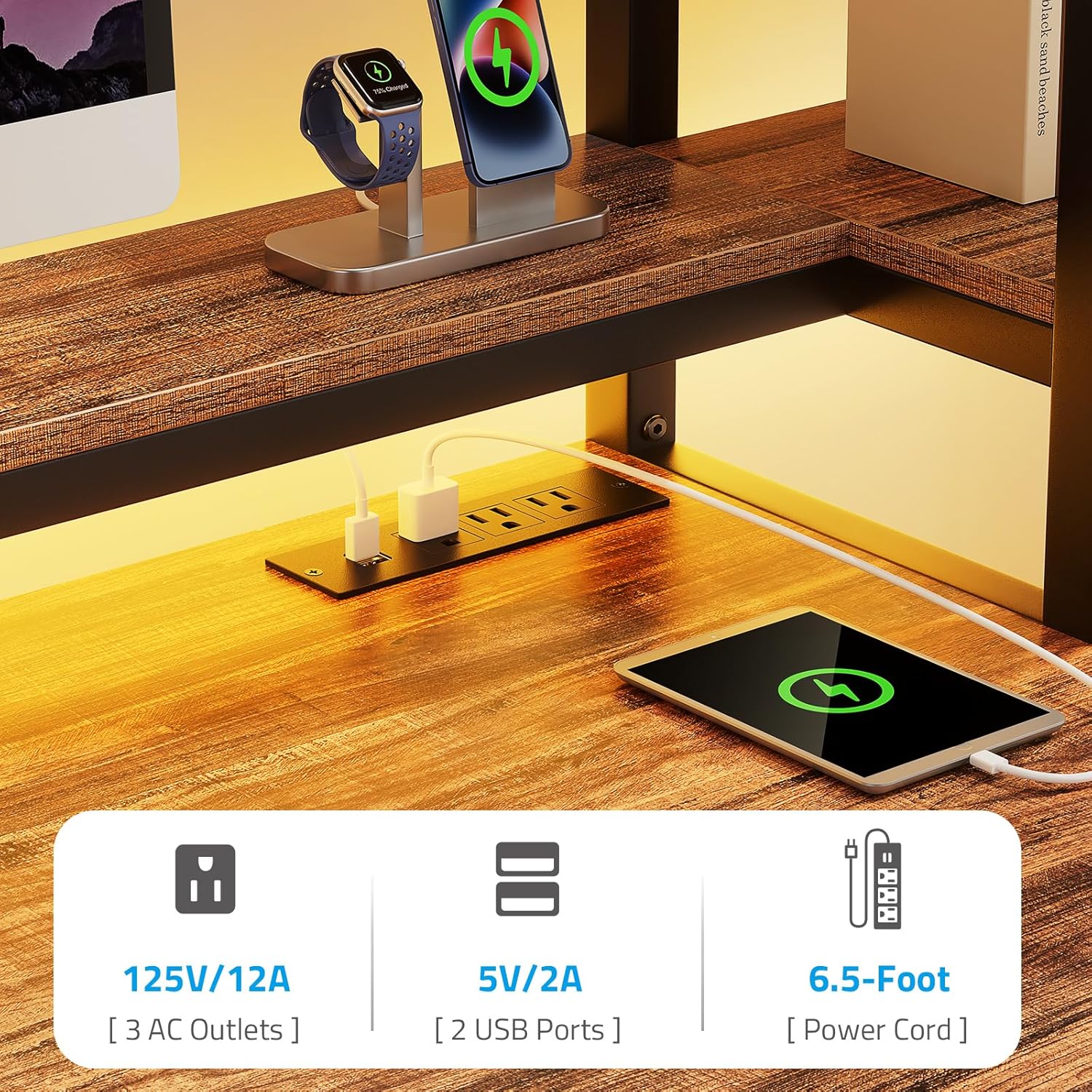
Figure 4.4: Integrated power outlets and USB charging ports.
5. Maintenance
Proper care will extend the life and appearance of your GreenForest computer desk.
- Cleaning: Wipe surfaces with a damp cloth, then immediately dry with a clean, dry cloth. Avoid abrasive cleaners or harsh chemicals.
- Spills: Clean up spills immediately to prevent staining or damage to the engineered wood.
- Fasteners: Periodically check all screws and bolts to ensure they remain tight. Re-tighten if necessary.
- Heat: Avoid placing hot items directly on the desktop. Use coasters or protective pads.
6. Troubleshooting
If you encounter issues with your desk, refer to the following common problems and solutions:
| Problem | Possible Cause | Solution |
|---|---|---|
| Desk is wobbly. | Loose fasteners; uneven floor. | Ensure all screws and bolts are tightened. Adjust leveling feet if present, or place shims under legs on uneven surfaces. |
| LED lights not working. | Power connection issue; remote battery dead; LED strip damaged. | Check if the LED strip is properly plugged into the power source. Replace remote battery. If still not working, contact support. |
| Power outlets not providing power. | Desk not plugged in; circuit breaker tripped; faulty outlet unit. | Ensure the desk's main power cord is securely plugged into a working wall outlet. Check your home's circuit breaker. If the issue persists, contact support. |
| Fabric drawer does not slide smoothly. | Obstruction; drawer not properly seated. | Remove the drawer and check for any obstructions. Re-insert the drawer, ensuring it is correctly aligned within its slot. |
7. Specifications
| Feature | Detail |
|---|---|
| Brand | GreenForest |
| Model Number | B0D99S7H98 |
| Product Dimensions (D x W x H) | 18.89"D x 51.18"W x 49.21"H |
| Material Type | Engineered Wood, Metal Frame |
| Color | Walnut (Wood), Black (Frame) |
| Number of Drawers | 1 (Fabric) |
| Number of Shelves | 4 (including monitor stand) |
| Power Outlets | 3 AC Outlets (125V/12A) |
| USB Ports | 2 USB Ports (5V/2A) |
| LED Lights | RGB Strip Light (20 colors, 21 modes, 8 brightness, 8 speeds) |
| Assembly Required | Yes (Tools included, 2 people recommended) |
| Item Weight | 20.39 Kilograms |
8. Warranty & Support
This GreenForest computer desk comes with a Limited Warranty. For specific terms and conditions, please refer to the warranty card included in your package or visit the official GreenForest website.
For technical support, missing parts, or any other inquiries, please contact GreenForest customer service:
- Manufacturer: GreenForest
- Website: Visit GreenForest Store on Amazon (for general product information)
- Please have your model number (B0D99S7H98) and purchase date ready when contacting support.