
Introduction
This manual provides essential instructions for the safe and efficient operation of your Kaiser MSA-2016 Professional Portable Bluetooth Speaker System. Please read this manual thoroughly before using the product and retain it for future reference.
Important Safety Information
- Power Source: Use only the specified power adapter for charging.
- Water Exposure: This device is not waterproof. Avoid exposure to water or excessive moisture.
- Ventilation: Ensure proper ventilation. Do not block any ventilation openings.
- Cleaning: Disconnect from power before cleaning. Use a dry, soft cloth.
- Servicing: Do not attempt to repair this product yourself. Refer all servicing to qualified personnel.
- Battery: The unit contains a rechargeable battery. Do not expose to extreme temperatures or dispose of in fire.
Package Contents
The following items are included in your package:
- 1 x Kaiser MSA-2016 Speaker System
- 1 x Wired Microphone
- 1 x User Manual
- 1 x Power Cable
Product Overview
Speaker Components
The Kaiser MSA-2016 speaker system features a robust design with integrated controls and multiple connectivity options.

Figure 1: Front view of the Kaiser MSA-2016 speaker, showing dual 25 cm speakers and dynamic LED illumination.
Control Panel Layout
The top-mounted control panel provides intuitive access to all speaker functions.

Figure 2: Detailed view of the control panel, including power switch, input ports (Micro SD, USB, AUX, MIC, Guitar), volume, EQ, and playback controls.
Rear Panel and Portability
The rear of the speaker includes a bass reflex port and features for enhanced portability.
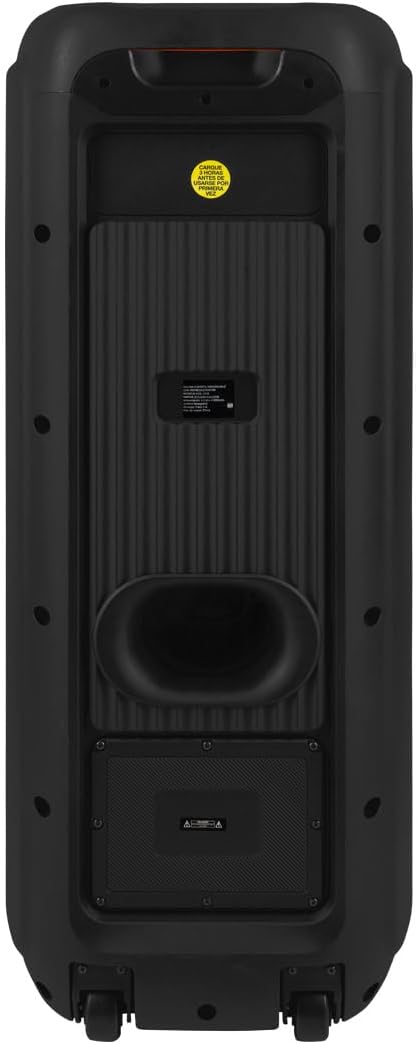
Figure 3: Rear view of the speaker, showing the bass port and overall enclosure design.
Connectivity Options
The speaker supports various audio input methods for versatile use.

Figure 4: Diagram detailing the input ports: AUX 3.5 mm, two 6.3 mm microphone inputs, one 6.3 mm guitar input, USB, and Micro SD card slot.
Included Accessories
The package includes a wired microphone for immediate use.

Figure 5: The wired microphone accessory provided with the Kaiser MSA-2016 speaker.
Setup Instructions
Charging the Speaker
- Connect the power cable to the speaker's power input.
- Plug the other end of the power cable into a standard electrical outlet.
- The charging indicator (if available) will illuminate.
- The speaker can operate while charging, but for optimal battery life, it is recommended to fully charge before first use.
Initial Power On
- Locate the POWER switch on the control panel.
- Flip the switch to the "ON" position. The display will light up, indicating the speaker is active.
Operating Instructions
Mode Selection
Press the MODE button on the control panel to cycle through available input modes: Bluetooth, USB, Micro SD, AUX, and FM Radio.
Bluetooth Connection
- Turn on the speaker and select Bluetooth mode using the MODE button. The display will show "BLUE" or a similar indicator.
- On your mobile device (smartphone, tablet, etc.), enable Bluetooth and search for available devices.
- Select "Kaiser MSA-2016" from the list of devices.
- Once paired, the speaker will emit a confirmation sound, and the display will indicate a successful connection.
- You can now play audio from your device wirelessly through the speaker.
USB/Micro SD Playback
- Insert a USB flash drive or Micro SD card into the corresponding port on the control panel.
- The speaker will automatically switch to USB or Micro SD mode and begin playing audio files. If not, press the MODE button to select the correct input.
- Use the playback control buttons (Play/Pause, Previous, Next) to manage your music.
AUX Input
- Connect an external audio device (e.g., MP3 player, laptop) to the AUX input port using a 3.5mm audio cable.
- Press the MODE button to select AUX mode.
- Audio from your connected device will now play through the speaker.
FM Radio
- Press the MODE button to select FM Radio mode.
- Press and hold the Play/Pause button to initiate an automatic scan for FM stations. The speaker will save detected stations.
- Use the Previous and Next buttons to navigate between saved stations.
Microphone and Guitar Inputs
- Connect a wired microphone to either MIC 1 or MIC 2 input.
- Connect a guitar to the GUITAR input.
- Adjust the MIC VOL knob for microphone volume and GUITAR VOL knob for guitar volume.
- Use the ECHO and MIC DELAY knobs to add effects to the microphone audio.
Audio Adjustment
Use the VOLUME knob to control the overall master volume. The TREBLE and BASS knobs allow you to adjust the high and low frequencies of the audio output.
The EQ button allows you to cycle through preset equalizer modes for different audio profiles.
Maintenance
Cleaning
Wipe the speaker's exterior with a soft, dry cloth. Do not use abrasive cleaners, waxes, or solvents as they may damage the finish. Ensure the speaker is powered off and unplugged before cleaning.
Storage
When not in use for extended periods, store the speaker in a cool, dry place, away from direct sunlight and extreme temperatures. It is recommended to charge the battery periodically to maintain its health.
Troubleshooting
| Problem | Possible Cause | Solution |
|---|---|---|
| No power | Battery drained, power cable disconnected. | Charge the speaker. Ensure power cable is securely connected. |
| No sound | Volume too low, incorrect input mode, device not connected properly. | Increase volume. Select correct input mode. Reconnect audio source. |
| Bluetooth pairing failure | Speaker not in pairing mode, device too far, interference. | Ensure speaker is in Bluetooth mode. Move device closer. Turn off other Bluetooth devices. |
| Microphone not working | Microphone not plugged in, MIC VOL too low, microphone switch off. | Ensure microphone is fully plugged into MIC 1 or MIC 2. Increase MIC VOL. Check microphone's ON/OFF switch. |
Specifications
| Feature | Detail |
|---|---|
| Model Name | MSA-2016 |
| Brand | Kaiser |
| Speaker Type | Tower |
| Speaker Size | 25 cm (10 inches) x 2 |
| Output Power | 60 Watts RMS |
| Frequency Response | 60 KHz |
| Connectivity Technology | Bluetooth |
| Wireless Communication | Bluetooth |
| Control Method | Tactile (Knobs/Buttons) |
| Power Source | Hybrid (Electric Cable and Battery) |
| Battery Life (Average) | 6 Hours |
| Rechargeable Battery | Yes |
| Dimensions (D x W x H) | 33 cm x 32 cm x 84 cm |
| Waterproof | No |
| Included Components | 1 Speaker, 1 User Manual, 1 Wired Microphone |
Warranty and Support
This product comes with a limited warranty. For detailed warranty information and support, please refer to the warranty card included in your package or visit the official Kaiser website. For customer service inquiries, please contact Kaiser support directly.
You can visit the Kaiser store on Amazon for more products and information: Kaiser Store


