
1. Introduction
This manual provides instructions for the ALLIMITY AXD7534 Replacement Remote Control. This infrared remote is designed to function as a direct replacement for the original Pioneer AV Receiver / Audio/Video Multi-channel Receiver remote control model AXD7534. Please read these instructions carefully before using the remote control.
2. Setup
2.1 Battery Installation
To begin using your remote control, you must first install two (2) AAA alkaline batteries (not included). Ensure correct polarity (+/-) when inserting the batteries.
- Open the battery compartment cover located on the back of the remote control.
- Insert two new AAA alkaline batteries, matching the polarity indicators inside the compartment.
- Close the battery compartment cover securely.

3. Operating Instructions
The AXD7534 remote control operates using infrared (IR) signals. For optimal performance, follow these guidelines:
- Aiming: Point the remote control directly towards the infrared sensor on your Pioneer AV Receiver.
- Obstacles: Ensure there are no physical obstructions (e.g., furniture, objects) between the remote control and the receiver's sensor.
- Distance: Operate the remote within a reasonable distance from the receiver.
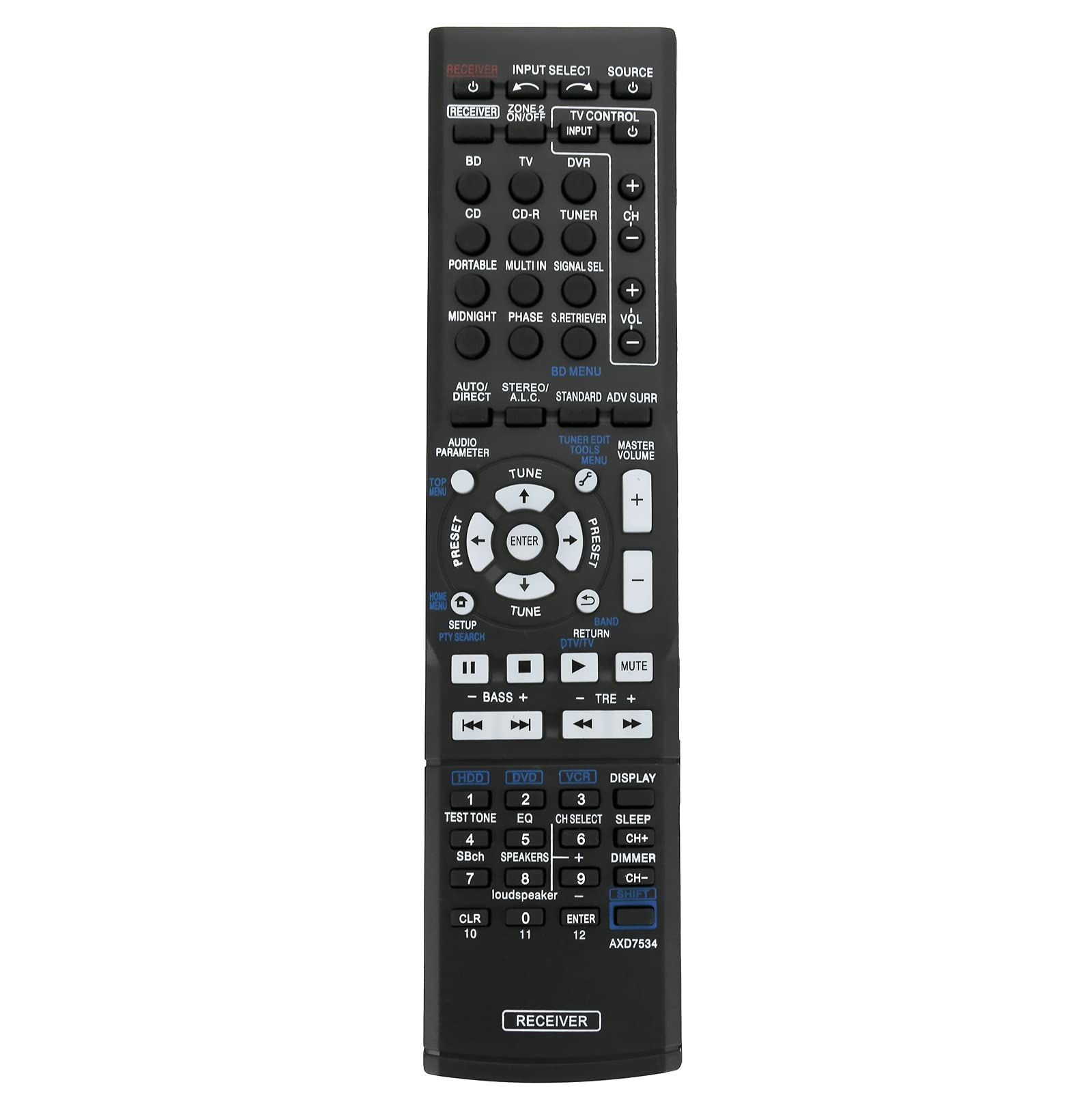
3.1 Key Functions
The remote control features various buttons for controlling your Pioneer AV Receiver. Refer to your receiver's manual for specific functions of each button. Common functions include:
- Power On/Off: Controls the power state of the receiver.
- Input Select: Switches between different audio/video input sources (e.g., BD, TV, CD, DVR).
- Volume Control: Adjusts the master volume level.
- Navigation: Arrow keys and ENTER button for menu navigation.
- Sound Modes: Buttons for various audio processing modes (e.g., AUTO/DIRECT, STANDARD, ADV SURR).
4. Compatible Models
This replacement remote control is compatible with the following Pioneer AV Receiver models:
- SX-319V
- VSX-529-K
- VSX-520
- VSX-912A-H
- VSX-920-K
- VSX-520K
- VSX-519
- VSX-923
- VSX-828-K
If your specific Pioneer AV Receiver model is not listed above, please contact customer support for assistance in verifying compatibility.
5. Maintenance
To ensure the longevity and proper functioning of your remote control, follow these maintenance tips:
- Cleaning: Wipe the remote control with a soft, dry cloth. Do not use liquid cleaners or abrasive materials.
- Battery Replacement: Replace batteries promptly when the remote's performance degrades. Remove batteries if the remote will not be used for an extended period to prevent leakage.
- Storage: Store the remote in a cool, dry place, away from direct sunlight and extreme temperatures.
6. Troubleshooting
If you experience issues with your remote control, try the following troubleshooting steps:
- Remote Not Responding:
- Ensure new alkaline batteries are correctly installed.
- Verify that the remote is pointed directly at the receiver's IR sensor.
- Check for any obstructions between the remote and the receiver.
- Try replacing the batteries with a fresh set.
- Intermittent Functionality:
- This may indicate low battery power; replace batteries.
- Ensure consistent line of sight to the receiver.
If problems persist after attempting these steps, please contact customer support.
7. Specifications
| Feature | Detail |
|---|---|
| Model Number | AXD7534 (ZCM-AXD7534) |
| Product Dimensions | 5 x 2 x 0.6 inches (approximately 12.7 x 5.08 x 1.52 cm) |
| Item Weight | 1 ounce (approximately 28 grams) |
| Power Source | 2 x AAA Alkaline Batteries (not included) |
| Color | Black |
| Special Feature | Ergonomic design |

8. Support and Warranty
For any questions, concerns, or if your specific AV receiver model is not listed as compatible, please contact ALLIMITY customer support. While specific warranty details are not provided in this manual, please refer to your purchase documentation or contact the seller for information regarding warranty coverage and return policies.