
Parsonver LW45
Parsonver Smart Watch User Manual
Model: LW45
Product Overview
The Parsonver Smart Watch is a versatile wearable device designed for both iOS and Android phones, offering a seamless blend of advanced technology and style. It features an HD screen, IP68 waterproof rating, and comprehensive health monitoring capabilities, including heart rate, sleep, steps, and calorie tracking. This smartwatch allows users to make and answer calls directly from their wrist, receive smart notifications, and track over 100 built-in sports modes. Its ultralight design and customizable watch faces make it a comfortable and personalized companion for a healthier, more connected lifestyle.
What's in the Box
- 1x Parsonver Smartwatch
- 1x Magnetic Charging Cable
- 1x Multilingual User Manual

Image: The Parsonver Smart Watch in Rose Gold, accompanied by its magnetic charging cable and user manual, as found in the product packaging.
Setup Guide
1. Initial Charging
Before first use, fully charge your smartwatch. Connect the magnetic charging cable to the charging points on the back of the watch and plug the USB end into a compatible power adapter (not included). A full charge typically takes about 2 hours.

Image: The smartwatch connected to its magnetic charging cable, illustrating the charging process and battery life indicators.
2. App Download and Installation
Scan the QR code in the user manual or search for the "Dafit" app in your smartphone's app store (Google Play Store for Android or Apple App Store for iOS). Download and install the application.
3. Device Pairing
- Ensure Bluetooth is enabled on your smartphone.
- Open the "Dafit" app and follow the on-screen instructions to add your device.
- Select "LW45" or the corresponding device name from the list of available devices.
- Confirm the pairing request on both your smartphone and the smartwatch.

Image: The new application interface, providing a detailed experience for health management and workout tracking.
Operating Instructions
This section provides detailed instructions on how to use the various features of your Parsonver Smart Watch.
Video: A comprehensive demonstration of the Parsonver Smart Watch's features, including unboxing, navigation, call functions, and health tracking.
1. Call Features
Connect your smartwatch via Bluetooth to easily make and answer calls directly from your wrist. The watch stores contacts and call history for convenience.
- Making Calls: Access the "Phone Call" menu, select from recent calls, use the dial pad, or choose from your synced contacts.
- Answering Calls: When a call comes in, simply tap the green answer icon on your watch screen.
- Call History & Contacts: View your recent call history and access favorite contacts directly from the watch.

Image: The smartwatch interface showing options for phone calls, recent calls, dial pad, and contacts, alongside notification examples.
2. Smart Notifications
Receive alerts for calls, texts, and app notifications (e.g., Facebook, Instagram, WhatsApp) directly on your wrist. Lift your wrist to stay informed.

Image: The smartwatch showing incoming notifications from various social media and messaging applications.
3. Health Monitoring
The smartwatch provides comprehensive health management features, caring for you 24/7.
- Heart Rate Monitoring: Track your heart rate in real-time.
- Blood Oxygen (SpO2) Monitoring: Monitor your blood oxygen levels.
- Sleep Monitoring: Analyze your sleep quality with sophisticated analysis, including deep sleep, light sleep, and awake times.
- Stress Monitoring: Smart stress monitoring helps you maintain emotional balance.
- Women's Health: Specialized tools for tracking menstrual and ovulation cycles.
- Activity Tracking: Track steps, distance, calories, and real-time heart rate.
- Reminders: Stay active with reminders for sedentary time and hydration.

Image: The smartwatch showing current health metrics including heart rate, blood oxygen saturation, and real-time pressure.

Image: The smartwatch and its companion app interface detailing sleep monitoring data and sleep quality analysis.
4. Sports Modes
Elevate your fitness journey with over 100 built-in sports modes. Each mode is designed to maximize your performance and help you achieve your fitness goals.
- Includes modes like running, cycling, hiking, yoga, badminton, basketball, football, ice skating, curling, sledding, skiing, and more.
- Track your steps, distance, calories, and heart rate in real-time for each activity.

Image: The smartwatch interface showing a selection of over 100 built-in sports modes and daily activity tracking metrics.
5. Customization
Personalize your smartwatch to reflect your style.
- Watch Faces: Choose from over 200 stunning DIY watch faces or personalize your watch with your favorite photos.
- Interchangeable Straps: The watch supports universal 22mm replacement watch straps, allowing for easy changes to match your style.

Image: The smartwatch screen showcasing a variety of customizable watch faces, including options for personal photos.
6. Other Practical Functions
This multifunctional watch enhances your daily routine with numerous practical features.
- Smart alarms
- Weather updates
- Breathing exercises
- Music controls (for your phone's music player)
- Remote camera control (shutter)
- Find My Phone feature
- Calculator
- Timers and Stopwatches
- Games
- Weight and BMI tracking (via app)
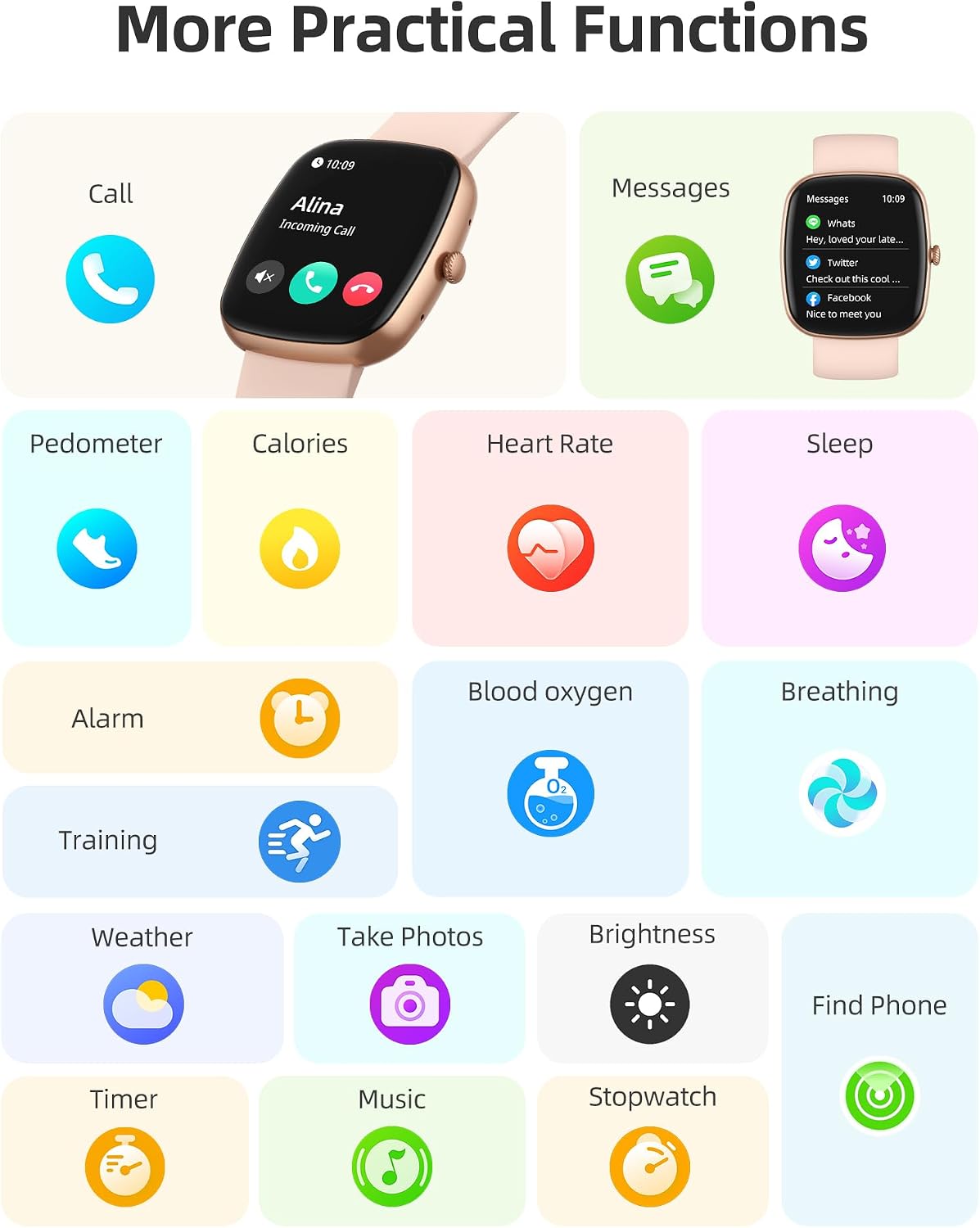
Image: A visual representation of the smartwatch's practical functions, including communication, health, and utility features.
Maintenance
Waterproof and Dustproof
The Parsonver Smart Watch features an IP68 waterproof and dustproof design. This means you can confidently wear it during workouts, in the rain, or while washing your hands without worrying about splashes or dust. However, it is important to note that the watch is not suitable for diving or sauna use.

Image: The smartwatch being exposed to water, highlighting its waterproof design for daily activities like handwashing.
Troubleshooting
If you encounter any issues with your Parsonver Smart Watch, please consider the following common solutions:
- Connectivity Issues: Ensure Bluetooth is enabled on your phone and the watch is within range. Restart both the watch and your phone, then attempt to re-pair.
- Notifications Not Appearing: Check the "Dafit" app settings to ensure all desired app notifications are enabled. Also, verify your phone's notification settings for the app.
- Inaccurate Readings: Ensure the watch is worn snugly on your wrist, but not too tight. Clean the sensors on the back of the watch regularly.
- Battery Life: Battery life can vary with usage. Reduce screen brightness, limit continuous heart rate monitoring, and disable unnecessary notifications to extend battery life. Regular charging is recommended.
- Watch Not Responding: Try performing a soft reset by pressing and holding the side button until the watch restarts.
Specifications
| Feature | Detail |
|---|---|
| Product Dimensions | 10.24 x 1.61 x 0.43 inches |
| Item Weight | 1.23 ounces (35 Grams) |
| Item Model Number | LW45 |
| Batteries | 1 C battery required (included) |
| Standing Screen Display Size | 1.8 Inches (Visible screen diagonal: 2" / 5 cm) |
| Memory Storage Capacity | 512 MB |
| Operating System Compatibility | iOS 9.0/Android 6.0 or above Smartphones |
| Battery Capacity | 230 Milliamp Hours |
| Connectivity Technology | Bluetooth 5.3 |
| GPS | GPS Via Smartphone |
| Shape | Square |
Warranty and Support
Parsonver is dedicated to ensuring you have a seamless and enjoyable experience with their products. They offer 24/7 after-sales support.
For any questions, feedback, or assistance, please contact the Parsonver support team. Your input is valued, and they strive to provide solutions that enhance your life through innovative technology.
Image: Icon indicating 24/7 online support availability.
Related documentsLW45


Ask a question about this manual
Ask about setup, troubleshooting, compatibility, parts, safety, or missing instructions. Manuals+ will review the question and use this page’s manual context to help answer it.