
1. Introduction
This manual provides detailed instructions for the setup, operation, maintenance, and troubleshooting of your Haute42 R16 Black Leverless Controller. Designed for precision gaming, this controller features a leverless design with crystal low-profile switches, hot-swap capability, and customizable RGB lighting, compatible with PC, PS4, and Nintendo Switch.
2. Package Contents
Upon opening your Haute42 R16 Leverless Controller package, please verify that all the following items are included:
- 1 x Black R16 Leverless Controller (Dimensions: 296*196*12.5mm, Weight: 780g)
- 1 x 1.5m USB Cable (Type-C)
- 1 x Kailh Low-Profile Switch (Spare)
- 1 x Switch Puller
- 2 x 6mm Button Caps
- 8 x Anti-Slip Pads
- 1 x Instruction Manual
3. Setup
3.1 System Compatibility
The Haute42 R16 is compatible with a variety of systems:
- Windows 10 or above
- Steam Deck
- PS3
- PS4 (requires an adapter, not included)
- Nintendo Switch
- Windows (Keyboard mode only)
For detailed information on connecting to PS4/PS5, please refer to our official website.

3.2 Web Configuration Access
To configure your controller settings, including input modes, button mapping, and LED customization, access the web configuration interface:
- Connect your controller to a PC via the USB-C cable.
- Open a web browser and navigate to 192.168.7.1.
- The web interface will allow you to customize various settings.
3.3 Input Mode Settings
The controller supports various input modes. You can select the desired mode via the web configuration or by holding specific buttons during connection:
- XInput: For PC (Steam) / Steam Deck.
- Nintendo Switch: For Nintendo Switch consoles.
- PS3/DirectInput: For PS3, Android, and most emulators/arcade games on PC or Android devices.
- Keyboard: For regular keyboard key values on Windows.
- PS4: For PlayStation 4. Note: PS4 will timeout after 8 minutes without authentication. You can avoid this by uploading key files or selecting 'Host USB' and inserting a dongle to the extension port.
- PS5: For PlayStation 5. You must choose 'Host USB' and insert a dongle to the extension port for authentication.
- Xbox One: Requires a USB host connection and USB dongle for proper authentication.
- Original Xbox & Mini/Classic Console Modes: For retro platforms like Sega Genesis/MegaDrive Mini, NEOGEO mini, PC Engine/Turbografx 16 Mini, EGRET II mini, ASTROCITY Mini, and Playstation Classic.
3.4 Customizing RGB Lighting
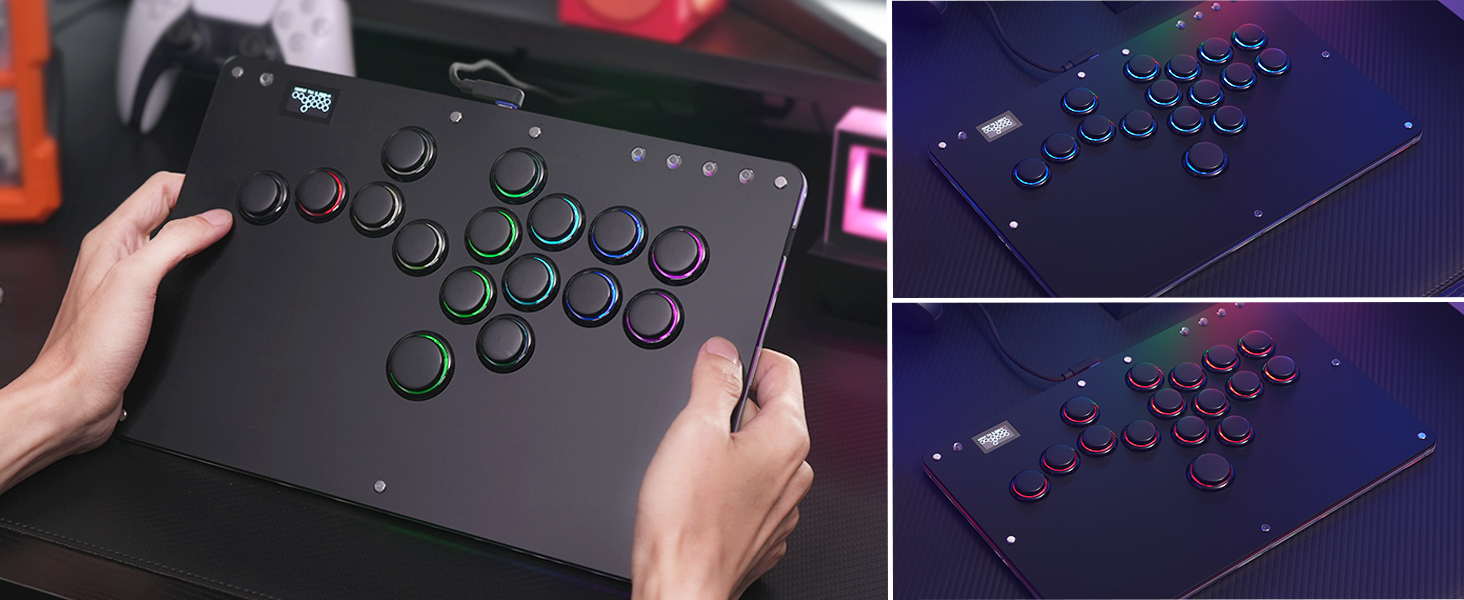
The controller features customizable RGB lighting. You can personalize the lighting effects and colors through the web configuration interface to match your preferences.
4. Operating Instructions
4.1 Basic Operation
The Haute42 R16 is a leverless controller designed for precise input. It uses four dedicated movement buttons instead of a traditional joystick, offering enhanced control and minimal reaction lag. The M2 button is strategically placed for pinky finger access, allowing for custom function assignments.

4.2 SOCD Cleaning
The controller supports SOCD (Simultaneous Opposing Cardinal Directions) cleaning, which is crucial for competitive play. This feature prevents conflicting directional inputs, ensuring fair and consistent gameplay. The web configuration allows for various SOCD cleaning modes.
4.3 Low Latency Performance
Equipped with a Raspberry Pi RP2024 controller chip and GP2040-CE firmware, the Haute42 R16 boasts ultra-low latency of less than 1ms, ensuring that your inputs are registered almost instantly, with over 95% of frames experiencing no leakage.
5. Maintenance
5.1 Hot-Swappable Switches
The Haute42 R16 features hot-swappable technology, allowing you to easily replace mechanical key switches without soldering. This enables quick customization and maintenance of your buttons.

5.2 Cleaning
To ensure optimal performance and longevity, regularly clean the surface and especially the grooves between the buttons. Use a soft, dry cloth for general cleaning. For deeper cleaning of button grooves, a small brush or cotton swab can be used carefully.
5.3 Firmware Updates
Keep your controller's firmware up-to-date to ensure the best performance and access to new features. Firmware updates can be found on the official website.
6. Troubleshooting
6.1 Connection Issues (PS4/PS5)
If you encounter issues connecting to PS4 or PS5, ensure you are using the correct input mode and have the necessary authentication dongle plugged into the extension port. Refer to the official website for specific PS4/PS5 connection guidance.
6.2 Restoring Settings After Customization
If you experience issues after customizing settings via the web configuration, you can restore the controller to its original stable state. This involves flashing a 'nuke' file and then re-updating the firmware. Detailed instructions are available on the official support page.
6.3 General Issues
For any other questions or technical difficulties, please contact our customer service team for support.
7. Specifications
- Model: Haute42 R16 Black Leverless Controller
- Dimensions: 11.65 x 7.71 x 0.39 inches (29.6 x 19.6 x 1.0 cm)
- Weight: 2.07 Pounds (780g)
- Controller Chip: Raspberry Pi RP2024 with GP2040-CE firmware
- Latency: <1ms
- Switches: Crystal Low-Profile Switches (Kailh)
- Connectivity: USB Type-C
- Features: Hot-Swappable, Customizable RGB, SOCD Cleaning, M1/M2 Custom Keys, EXT Port, Web Configuration

8. Warranty and Support
ONEED is committed to providing high-quality products and excellent customer service. If you have any questions, concerns, or require technical assistance with your Haute42 R16 Leverless Controller, please do not hesitate to contact our dedicated after-sales customer service team. We are here to provide comprehensive technical support and ensure your satisfaction.
For further support, including firmware updates and specific console connection guides, please visit our official website.