
1. Introduction
This manual provides detailed instructions for the installation, operation, and maintenance of your UHPPOTE HBK-RW01-280D WiFi Electromagnetic Double Door Lock Kit. This system offers secure access control for residential and commercial doors, featuring remote and smartphone app control capabilities. Please read this manual thoroughly before installation and use to ensure proper function and safety.

Image 1.1: Overview of the UHPPOTE WiFi Electromagnetic Double Door Lock Kit with smartphone app interface.
2. Product Overview and Components
The UHPPOTE HBK-RW01-280D kit is designed for convenient and secure door access. It integrates a powerful electromagnetic lock with a versatile control system that supports both wireless RF remote and Wi-Fi smartphone app control.
2.1 Key Features
- Wireless RF Remote Control: Open the door by pressing the wireless RF remote. The receiver can program up to 40 remotes and has a range of 164 feet.
- Smartphone App Control (Tuya App): Remotely control the lock via the free Tuya App, available for iOS and Android. Requires a 2.4GHz Wi-Fi connection.
- Share Control: Share device control with family and friends through the Tuya App.
- Timing Functions: Set timing schedules for automatic lock/unlock operations, including countdown, scheduled on/off, and loop timing.
- Exit Button: An included exit button allows for easy egress from indoors.
- Grouping Function: Organize multiple devices into groups within the Tuya App for easier management.
- Smart Scene: Configure smart scenes to automatically trigger lock actions based on other smart devices.
2.2 Included Components
The kit includes the following items:
- Electromagnetic Lock (600lb Double Door)
- Remote Receiver (HBK-RW01)
- Remote Transmitter (RF Remote)
- Exit Button (PBK-814A)
- Power Adapter (DC12V)

Image 2.1: The 600lb electromagnetic double door lock.

Image 2.2: The included push-to-exit button.

Image 2.3: The DC12V power adapter.
3. Setup and Installation
Installation of the UHPPOTE HBK-RW01-280D kit is designed to be straightforward. It is recommended to review all diagrams and instructions before beginning. Ensure all power is disconnected during installation.
3.1 Electromagnetic Lock Installation
Mount the electromagnetic lock and armature plates according to the provided diagram. Ensure proper alignment for secure locking.
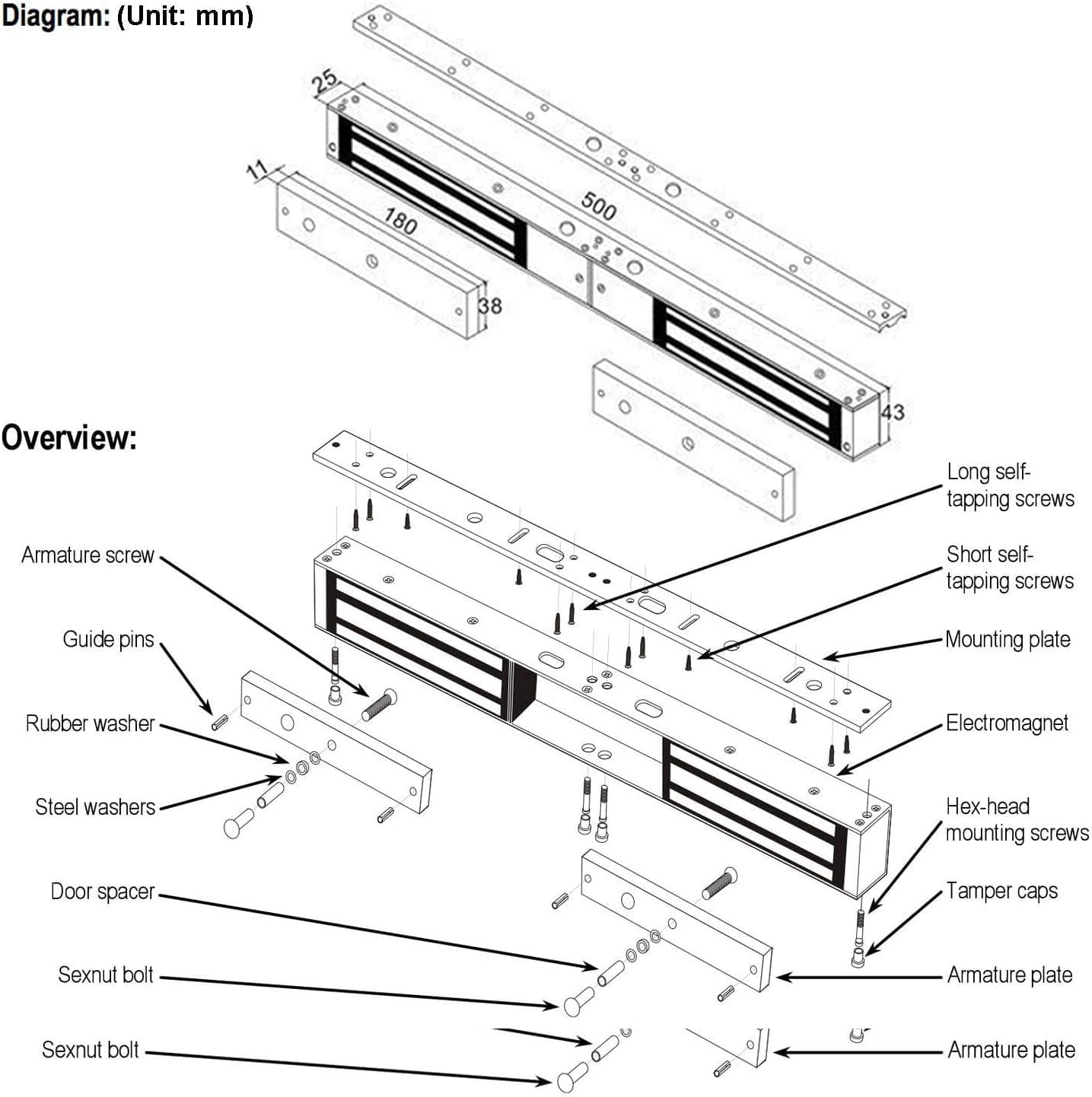
Image 3.1: Exploded view diagram of the electromagnetic lock components.
3.2 Wiring Diagram
Connect the components as shown in the wiring diagram. Pay close attention to the polarity and correct terminals for the electromagnetic lock, exit button, and power adapter. The receiver unit (HBK-RW01) acts as the central control point.

Image 3.2: Wiring diagram for the access control system.
3.3 Remote Receiver Settings (HBK-RW01)
The remote receiver has external function keys for easy configuration. These include settings for buzzer, mode, and time delay (0, 5, 10 seconds).

Image 3.3: Remote receiver (HBK-RW01) with external setting keys.
4. Operating Instructions
4.1 Using the RF Remote Control
The wireless RF remote allows you to unlock the door from a distance. Press the button on the remote to temporarily unlock the electromagnetic lock. The lock will re-engage after the set time delay (configured on the receiver).

Image 4.1: The wireless RF remote control.
4.2 Using the Exit Button
To exit from indoors, simply press the physical exit button. This will temporarily unlock the electromagnetic lock, allowing the door to be opened.
4.3 Smartphone App Control (Tuya App)
The Tuya App provides comprehensive control and management features for your lock system.
- Download the App: Download the free Tuya App from the App Store (iOS) or Google Play (Android).
- Connect to Wi-Fi: Ensure your smartphone and the lock system's receiver are connected to a 2.4GHz Wi-Fi network. Follow the in-app instructions to add the device.
- Remote Control: Once connected, you can remotely lock or unlock the door from anywhere with an internet connection.
- Share Control: Invite family members or colleagues to control the device by sharing access through the app.
- Timing Functions: Set up schedules for automatic locking/unlocking. This includes:
- Scheduled On/Off: Set specific times for the lock to engage or disengage daily.
- Countdown: Set a timer for the lock to change state after a specified duration.
- Loop Timing: Configure the lock to cycle between locked and unlocked states at preset intervals.
- Grouping Function: If you have multiple Tuya-compatible devices, you can assign them to groups for easier management.
- Smart Scene: Create automated scenarios where the lock interacts with other smart devices. For example, unlock when a specific sensor is triggered.
5. Specifications
| Feature | Specification |
|---|---|
| Brand | UHPPOTE |
| Model Number | HBK-RW01-280D |
| Lock Type | Electromagnetic Lock |
| Holding Force | 600lb (per door, double door system) |
| Special Feature | Double Door |
| Material | Stainless Steel |
| Item Dimensions (L x W x H) | 19.69 x 1.91 x 0.98 inches |
| Connectivity Protocol | Wi-Fi (2.4GHz only) |
| Control Method | App, Remote |
| Remote Range | Up to 164 feet (50 meters) |
| Recommended Uses | Residential Doors, Commercial Doors |
6. Troubleshooting
If you encounter issues with your UHPPOTE lock kit, please refer to the following common solutions:
- Lock Not Engaging/Disengaging:
- Check all wiring connections to ensure they are secure and correctly polarized.
- Verify the power adapter is plugged in and supplying power.
- Ensure the electromagnetic lock and armature plates are properly aligned and free of obstructions.
- Remote Control Not Working:
- Check the battery in the remote transmitter.
- Ensure the remote receiver is powered and within range (164 feet).
- Re-pair the remote with the receiver if necessary (refer to receiver instructions for pairing mode).
- Smartphone App Control Issues:
- Confirm your Wi-Fi network is 2.4GHz. The device does not support 5GHz Wi-Fi.
- Ensure your smartphone has a stable internet connection.
- Restart the Tuya App and try again.
- Check if the receiver's Wi-Fi indicator light is active and connected.
- If the device is offline in the app, try re-adding it or restarting your Wi-Fi router.
- Exit Button Not Functioning:
- Verify the wiring of the exit button to the receiver.
- Ensure the button itself is not physically stuck or damaged.
7. Maintenance
To ensure the longevity and optimal performance of your UHPPOTE Electromagnetic Double Door Lock Kit, follow these maintenance guidelines:
- Regular Cleaning: Keep the electromagnetic lock and armature plates clean and free of dust or debris. Use a soft, dry cloth.
- Check Connections: Periodically inspect all wiring connections for looseness or corrosion. Tighten as needed.
- Armature Plate Alignment: Ensure the armature plate remains properly aligned with the electromagnet for maximum holding force. Adjust if necessary.
- Remote Battery: Replace the remote control battery when its performance degrades.
- Software Updates: Keep the Tuya App updated to the latest version for new features and bug fixes.
8. Warranty and Support
For warranty information and technical support, please contact UHPPOTE directly through their official website or the retailer from whom you purchased the product. Keep your purchase receipt as proof of purchase.
