1. Introduction
Thank you for choosing the COWAY AIRMEGA 100(B) Air Purifier. This manual provides essential information for the safe and efficient operation, maintenance, and troubleshooting of your new air purifier. Please read this manual thoroughly before using the product and keep it for future reference.
The COWAY AIRMEGA 100(B) is designed to improve indoor air quality by effectively removing airborne contaminants. It features a True HEPA Filtration System, intelligent auto mode, sleep mode, and a convenient timer function.
2. Safety Information
To reduce the risk of electric shock, fire, or injury, please observe the following safety precautions:
- Always unplug the air purifier before moving, cleaning, or performing any maintenance.
- Do not operate the unit with a damaged cord or plug.
- Keep the power cord away from heated surfaces.
- Do not block air inlets or outlets.
- Do not use the air purifier in wet or damp environments, such as bathrooms.
- This appliance is not intended for use by persons (including children) with reduced physical, sensory or mental capabilities, or lack of experience and knowledge, unless they have been given supervision or instruction concerning use of the appliance by a person responsible for their safety.
- Children should be supervised to ensure that they do not play with the appliance.
3. Product Overview
3.1 Components
The COWAY AIRMEGA 100(B) air purifier consists of the main unit, a filter set, and a user manual.

Figure 3.1: Front view of the COWAY AIRMEGA 100(B) Air Purifier.

Figure 3.2: Key features and dimensions of the COWAY AIRMEGA 100(B), highlighting the 3-in-1 True HEPA Filter, 360° Cylindrical Air Intake, PM 2.5 Sensor, Smart Mode & Real-time AQI, Sleep Mode (20dB), and Calming Night Light. The unit measures approximately 15.5 inches in height and 8.6 inches in width.
3.2 Control Panel
The control panel is located on the top of the unit and features touch-sensitive buttons for various functions.

Figure 3.3: Detailed view of the functional touch control panel. Buttons include: Airflow Speed (Smart Auto, 1, 2, 3), Control Panel Lock (Press for 3 seconds), Sleep Mode (initially all display lights off), Filter Replacement Indicator (on every 12 months), Preset Timer (1, 2, 4, 8 hours), and Light On/Off (Toggle 3 lighting options).
- Power Button: Turns the unit on or off.
- Fan Speed Control: Adjusts the fan speed (Low, Medium, High, Smart Auto).
- Timer Button: Sets the operating time (1, 2, 4, or 8 hours).
- Light Button: Toggles the night light and AQI indicator light.
- Filter Reset Button: Resets the filter replacement indicator after filter change.
- Child Lock Button: Locks the control panel to prevent accidental changes.
4. Setup
4.1 Unboxing and Placement
- Carefully remove the air purifier from its packaging.
- Place the unit on a firm, level surface. Ensure there is at least 6 inches (15 cm) of space from walls or furniture for optimal airflow.
- Plug the power cord into a standard electrical outlet.
4.2 Filter Installation
The COWAY AIRMEGA 100(B) comes with a 3-in-1 True HEPA Filtration System. Ensure all filters are properly installed before first use.
- Open the filter cover on the unit.
- Remove the new filter set from its plastic packaging. Important: The filter must be unwrapped before use.
- Insert the filter set into the unit, ensuring it is seated correctly.
- Close the filter cover securely.
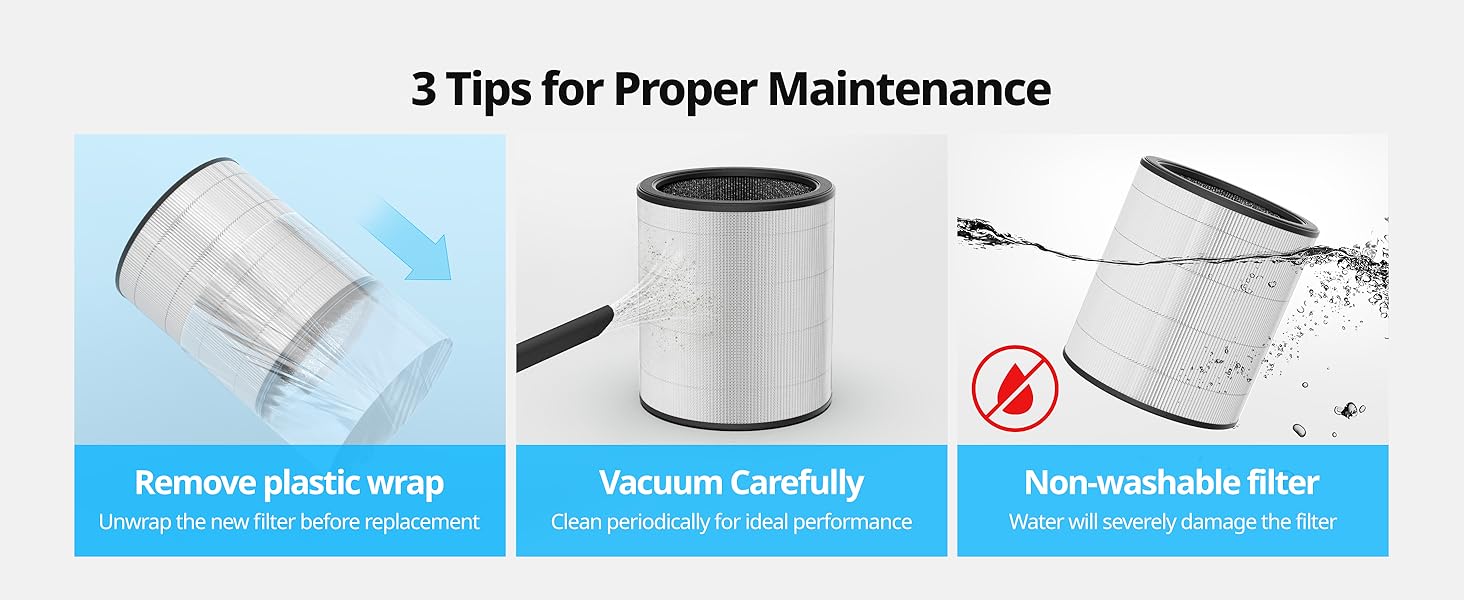
Figure 4.1: Ensure to remove the plastic wrap from the new filter before installation to allow proper air filtration.
5. Operating Instructions
5.1 Power On/Off
Press the Power button on the control panel to turn the unit on or off.
5.2 Fan Speed Control
Press the Fan Speed button to cycle through available fan speeds: Low, Medium, High, and Smart Auto.
- Smart Auto Mode: The air purifier automatically adjusts the fan speed based on the detected air quality.
- Manual Speeds (1, 2, 3): Allows you to manually select the desired fan intensity.

Figure 5.1: The air quality indicator changes color (Good, Moderate, Bad, Very Bad) to reflect real-time air quality. In Smart Mode, the airflow speed adjusts automatically based on this indicator.

Figure 5.2: The COWAY AIRMEGA 100(B) is optimized to clean spaces up to 810 sq. ft. in 60 minutes or 167 sq. ft. in 12.5 minutes, providing powerful 360° purification.
5.3 Sleep Mode
Press the Sleep Mode button to activate sleep mode. In this mode, the AQI and touch button lights are turned off, and the fan runs at the lowest speed to ensure quiet operation for a good night's sleep.

Figure 5.3: The AIRMEGA 100 operates at a quiet 20dB in sleep mode, comparable to a whisper, ensuring minimal disturbance.
5.4 Timer Function
Press the Timer button to set the desired operating duration. You can choose between 1, 2, 4, or 8 hours. The unit will automatically turn off after the set time.
5.5 Night Light
Press the Light button to toggle between different lighting options for the night light and AQI indicator. This allows you to adjust the ambiance to your preference.

Figure 5.4: The air purifier offers multiple light settings, including AQI Light On, Night Light On, and All Light Off, controlled by a simple tap.
6. Maintenance
Regular maintenance ensures optimal performance and extends the lifespan of your air purifier.
6.1 Filter System
The COWAY AIRMEGA 100(B) utilizes a 3-in-1 True HEPA Filtration System:
- Pre-filter: Captures larger particles like dust, pet hair, and dander. This filter is vacuumable.
- Deodorization Filter: Reduces odors, food smells, smoke particles, and volatile organic compounds (VOCs).
- True HEPA Filter: Traps 99.999% of 0.01-micron particles, including fine dust, bacteria, mold, viruses, and pollen allergens.

Figure 6.1: Illustration of the 3-stage filtration system: Vacuumable Pre-Filter, True HEPA Filter, and Deodorization Filter. Filters are not separable and can be damaged by water.
6.2 Filter Cleaning and Replacement
The filter replacement indicator will illuminate when it's time to change the filter, typically every 12 months. The pre-filter should be cleaned periodically for ideal performance.
- Unplug the unit from the power outlet.
- Open the filter cover and remove the filter set.
- For the pre-filter, gently vacuum to remove accumulated dust and debris.
- Replace the entire 3-in-1 filter set when the filter replacement indicator lights up. Caution: The True HEPA and Deodorization filters are not washable and water will severely damage them.
- After replacing the filter, press and hold the Filter Reset button until the indicator light turns off.
Figure 6.2: Maintenance tips include carefully vacuuming the pre-filter periodically and understanding that the main filter is non-washable and water will damage it.
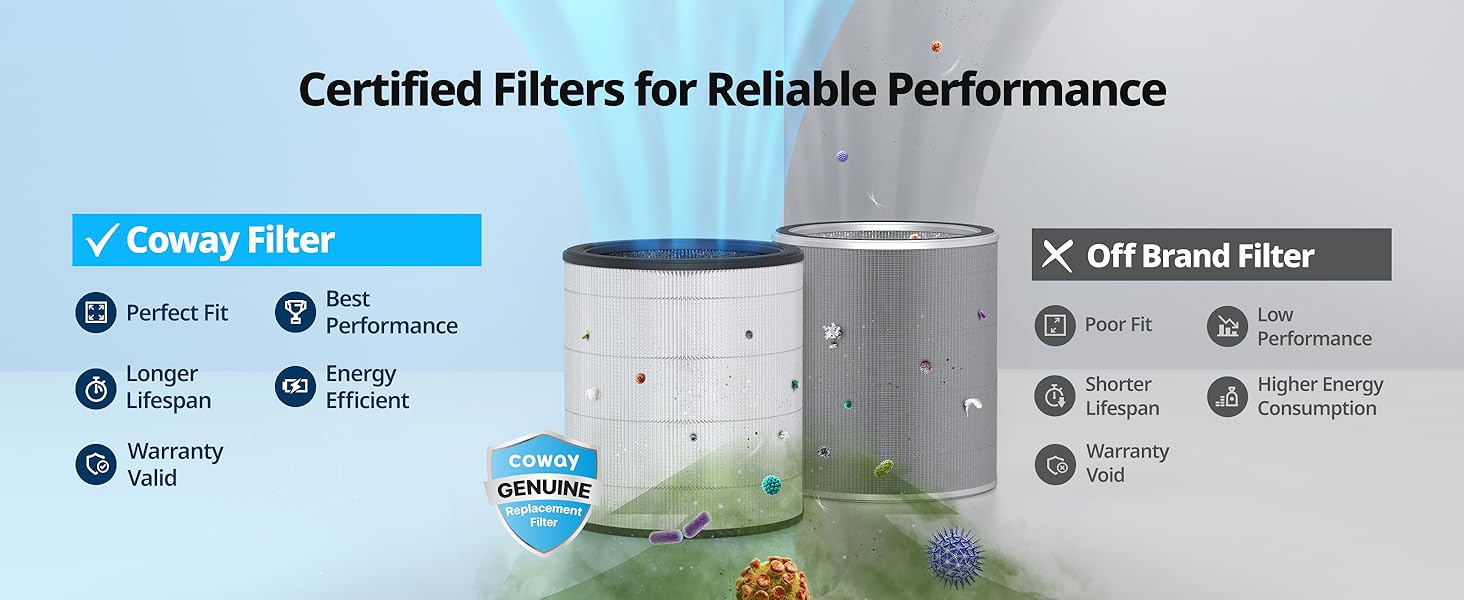
Figure 6.3: Using Coway Certified Filters ensures perfect fit, best performance, longer lifespan, energy efficiency, and keeps your warranty valid. Off-brand filters may lead to poor fit, low performance, shorter lifespan, higher energy consumption, and void the warranty.
6.3 Exterior Cleaning
Wipe the exterior of the unit with a soft, dry cloth. Do not use abrasive cleaners or solvents.
7. Troubleshooting
If you experience issues with your COWAY AIRMEGA 100(B), please refer to the following common problems and solutions:
| Problem | Possible Cause | Solution |
|---|---|---|
| Unit does not turn on. | Power cord not securely plugged in. No power from outlet. | Ensure power cord is firmly plugged into a working outlet. Check circuit breaker. |
| Airflow is weak. | Filters are dirty or clogged. Air inlets/outlets are blocked. | Clean or replace filters as needed. Ensure nothing is obstructing the air inlets or outlets. |
| Unusual noise. | Filter not installed correctly. Foreign object inside unit. | Reinstall filter correctly. Unplug unit and check for foreign objects. |
| Odor coming from unit. | Filters are saturated with odors. | Replace the deodorization filter. |
| Filter indicator light remains on after replacement. | Filter reset button not pressed. | Press and hold the Filter Reset button until the light turns off. |
If the problem persists after trying these solutions, please contact Coway Customer Support.
8. Specifications
| Feature | Detail |
|---|---|
| Brand | Coway |
| Model Number | AIRMEGA 100(B) |
| Color | Black |
| Product Dimensions | 8.66"D x 8.66"W x 15.55"H |
| Floor Area Coverage | Up to 810 Square Feet (in 60 minutes) |
| Noise Level | 20 dB |
| Particle Retention Size | 0.01 Micron |
| Controller Type | Touch |
| Wattage | 30 watts |
| UPC | 826439000943 |
| Certifications | CARB Certified, ETL Certified, Energy Star Certified |
| Included Components | Air Purifier, Filter Set, User Manual |
9. Warranty and Support
The COWAY AIRMEGA 100(B) comes with a 3-year warranty, as indicated in the product description. For detailed warranty terms and conditions, please refer to the warranty card included with your product or visit the official Coway website.
For technical support, replacement parts, or any inquiries regarding your air purifier, please contact Coway Customer Service. Contact information can typically be found on the Coway website or on the product packaging.
Online Resources:
- Visit the Coway Store on Amazon for product information and accessories.


