Product Overview
The Lenovo Legion K510 Mini Pro Gaming Keyboard is designed for optimal gaming performance and efficient workspace utilization. It features a compact 75% layout, tactile mechanical switches, dynamic RGB illumination, and hot-swappable functionality for enhanced durability and customization.

Figure 1: Lenovo Legion K510 Mini Pro Gaming Keyboard showcasing its compact design and vibrant RGB lighting.
Key features include:
- Optimal Gaming: Tactile mechanical keys with a fingerprint-proof matte-finish on translucent keycaps for optimal feeling and control.
- Maximize Your Game Space: Contemporary, space-saving 75% compact design with 84 keys (US layout), including arrow and function keys.
- Durable Design: 50 million click key lifecycles, ultra-fast reaction times, and tactile mechanical switches with hot-swappable function.
- Lenovo Legion Lighting: Dynamic 5-zone RGB illumination with 16.8M colors and 10+ prebuilt lighting modes, controllable via Fn volume and multimedia controls.
- Customizable Wired Keyboard: USB 2.0 connectivity interface with a 1.8m detachable cable. Supports Microsoft Dynamic Lighting and Copilot key, with further customization via Lenovo Accessory and Display Manager.
Setup Guide
Follow these steps to set up your Lenovo Legion K510 Mini Pro Gaming Keyboard:
- Unpack the Keyboard: Carefully remove the keyboard and its accessories from the packaging. Ensure all components are present, including the 1.8m detachable braided cable.
- Connect the Cable: Locate the USB-C port on the keyboard and the USB-A end of the detachable cable. Connect the USB-C end to the keyboard and the USB-A end to an available USB 2.0 port on your computer.
- Initial Recognition: Your computer should automatically detect and install the necessary drivers for the keyboard. This process may take a few moments.
- Software Installation (Optional): For advanced customization, including per-key RGB lighting and programmable keys, download and install the Lenovo Accessory and Display Manager software from the official Lenovo support website.
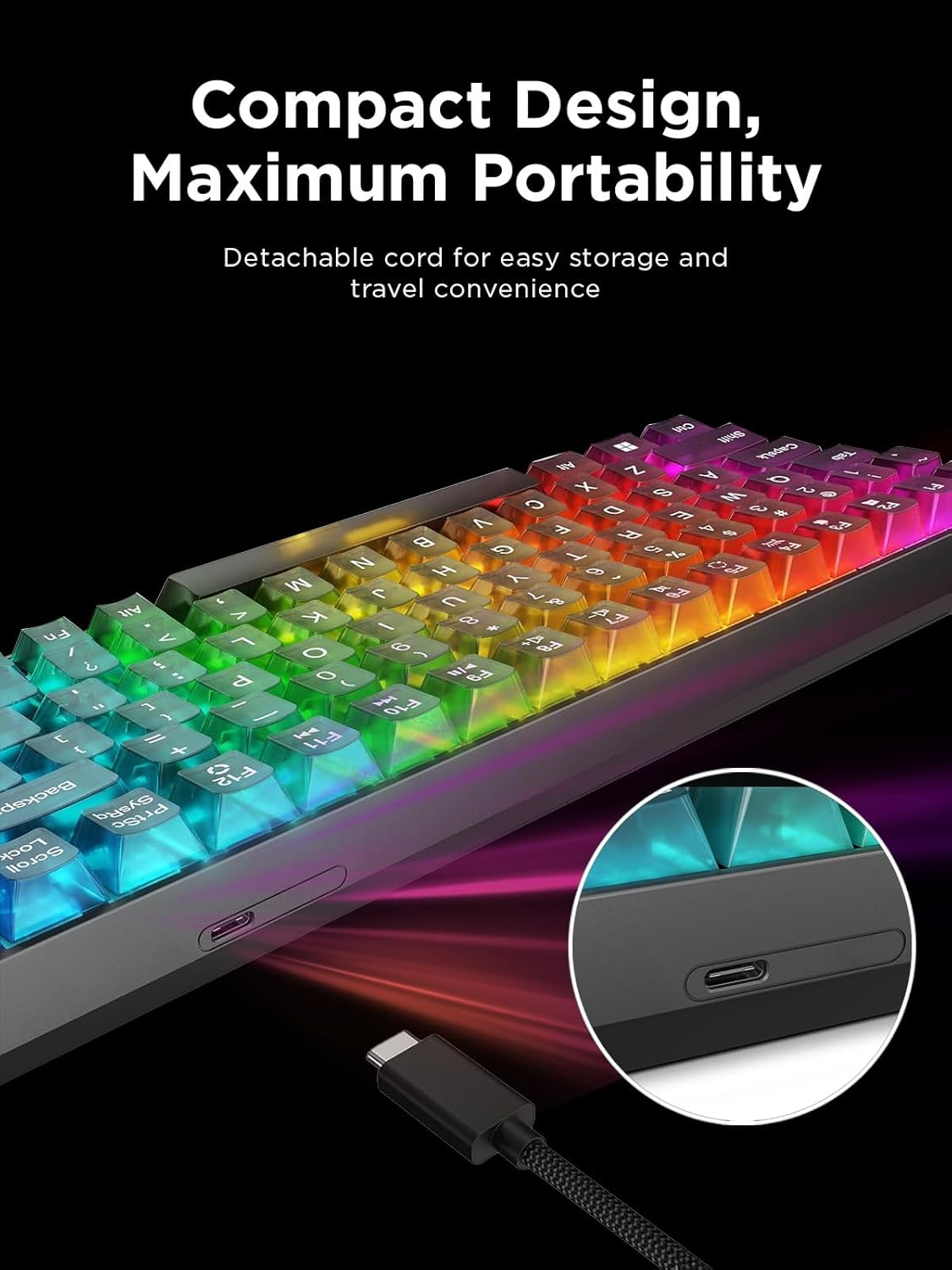
Figure 2: The detachable USB-C cable provides convenient connectivity and portability for the keyboard.
Operating Instructions
The Lenovo Legion K510 Mini Pro Gaming Keyboard offers various functions and customization options:
RGB Illumination Control
The keyboard features dynamic 5-zone RGB illumination with 16.8 million colors and over 10 prebuilt lighting modes. Use the Fn key combinations to cycle through effects or adjust brightness.

Figure 3: The keyboard's extensive RGB lighting options allow for personalized visual effects.
Hot-Swappable Mechanical Switches
The hot-swappable design allows users to easily change mechanical switches without soldering. This enables customization of typing feel and extends the keyboard's lifespan.

Figure 4: Detail of the hot-swappable mechanical switches and the translucent keycaps, highlighting their design.
Programmable Keys and Multimedia Controls
Utilize the Lenovo Accessory and Display Manager software to program specific keys for macros or custom functions. The keyboard also includes dedicated Fn key combinations for volume and multimedia control, enhancing convenience during gaming or general use.
The keyboard supports Microsoft Dynamic Lighting and includes a Copilot key for enhanced Windows integration.
Product Overview Video
Video 1: An official overview of the Lenovo Legion K510 RGB Gaming Keyboard, demonstrating its features and design.
Maintenance
Proper maintenance ensures the longevity and performance of your keyboard:
- Cleaning: Regularly wipe the keyboard surface with a soft, dry, lint-free cloth. For deeper cleaning, use a slightly damp cloth with mild soap solution, ensuring no liquid enters the key switches or internal components. The fingerprint-proof matte finish helps reduce visible smudges.
- Keycap Cleaning: Keycaps can be carefully removed for thorough cleaning. Use a keycap puller (not included) to avoid damage. Clean keycaps with water and mild soap, then dry completely before reattaching.
- Switch Maintenance: Due to the hot-swappable design, individual switches can be replaced if they become faulty. Refer to the Lenovo Accessory and Display Manager software or online resources for compatible switch types and replacement procedures.
- Cable Care: The detachable braided cable should be handled with care. Avoid sharp bends or excessive pulling to prevent internal wire damage.
Troubleshooting
If you encounter issues with your keyboard, try the following solutions:
| Problem | Possible Cause | Solution |
|---|---|---|
| Keyboard not responding | Loose cable connection, faulty USB port, driver issue. | Ensure the USB cable is securely connected to both the keyboard and the computer. Try a different USB port. Restart your computer. Reinstall keyboard drivers via Device Manager. |
| RGB lighting not working or incorrect | Software settings, Fn key combination error. | Check the Lenovo Accessory and Display Manager software for lighting settings. Use Fn key combinations to cycle through lighting modes and adjust brightness. Ensure the software is up to date. |
| Keys not registering or double-typing | Dust/debris under keycap, faulty switch. | Remove the keycap and clean around the switch. If the issue persists, the switch may need to be replaced due to its hot-swappable nature. |
| Programmable keys not working | Software not running, incorrect profile loaded. | Ensure the Lenovo Accessory and Display Manager software is running in the background. Verify that the correct profile with your programmed keys is active. |
Specifications
| Feature | Detail |
|---|---|
| Brand | Lenovo |
| Model | K510 Mini Pro (GY41P80859) |
| Keyboard Description | Mechanical |
| Layout | 75% Compact, 84 Keys (US Layout) |
| Connectivity Technology | Wired (USB-A, USB-C) |
| Cable Length | 1.8m detachable braided cable |
| RGB Backlighting | 5-zone, 16.8M colors, 10+ prebuilt modes |
| Switch Lifespan | 50 million clicks |
| Special Features | Portable, Hotkeys and Media Keys, Programmable Keys, Hot-Swappable, Fingerprint-proof matte finish |
| Compatible Devices | Laptop, PC |
| Item Weight | 2.01 pounds (approx. 911.7 g) |
| Product Dimensions (LxWxH) | 12.25 x 4.75 x 1.54 inches (approx. 311.15 x 120.65 x 39.11 mm) |

Figure 5: Physical dimensions and weight of the Lenovo Legion K510 Mini Pro Gaming Keyboard.
Warranty and Support
For warranty information, technical support, or to download the latest software and drivers, please visit the official Lenovo support website. Keep your purchase receipt for warranty claims.
You can also visit the Lenovo Store on Amazon for additional product information and accessories.


