
Falebare H-60
Falebare H-60 Bluetooth Over-Ear Headphones User Manual
Model: H-60 | Brand: Falebare
Introduction
Thank you for choosing the Falebare H-60 Bluetooth Over-Ear Headphones. These headphones are designed to provide a superior audio experience with advanced noise-cancelling technology, extended battery life, and comfortable design. Please read this manual carefully to ensure proper use and maintenance of your device.
What's in the Box
- Falebare H-60 Bluetooth Over-Ear Headphones
- USB Type-C Charging Cable
- 3.5mm Audio Cable
- User Manual
Product Overview

Front view of the Falebare H-60 Bluetooth Over-Ear Headphones in beige, showcasing the earcups and adjustable headband.

Side view of the headphones highlighting the Active Noise Cancelling (ANC) switch and other controls.
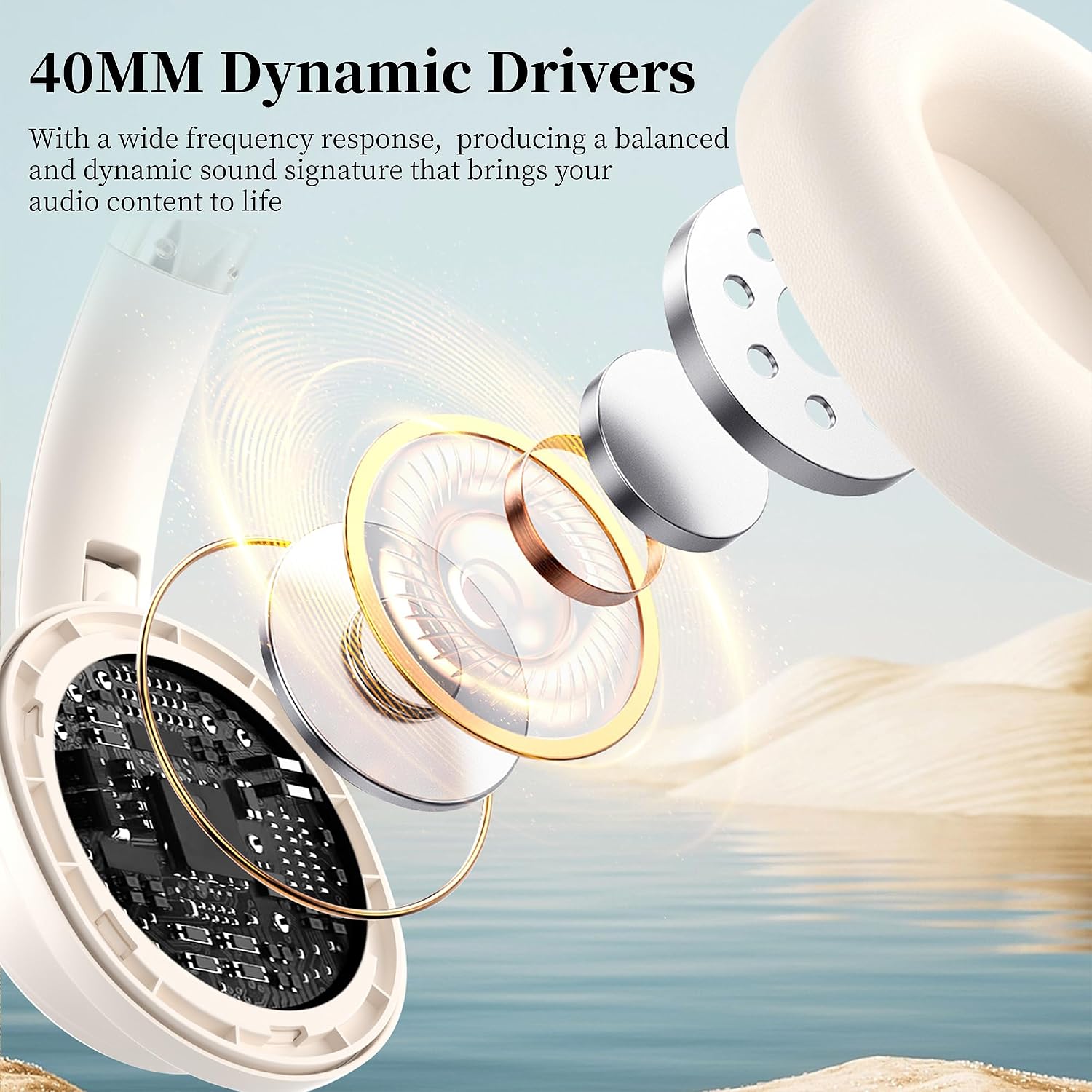
Internal diagram illustrating the 40mm Dynamic Drivers responsible for high-fidelity sound.
Key Components:
- Earcups: Ultra-soft memory foam for comfort.
- Adjustable Headband: Accommodates various head sizes.
- Control Buttons: For power, volume, playback, and ANC.
- Microphone: Built-in for calls.
- USB Type-C Port: For charging.
- 3.5mm Audio Jack: For wired connection.
Specifications
| Model Name | ANC Headphones (H-60) |
| Brand | Falebare |
| Connectivity Technology | Wireless (Bluetooth 5.3), Wired (3.5 mm Jack) |
| Noise Control | Active Noise Cancellation (ANC) |
| Audio Driver Size | 40mm Dynamic Drivers |
| Playtime (ANC OFF) | Up to 80 hours |
| Playtime (ANC ON) | Up to 60 hours |
| Fast Charging | 10-minute charge provides 5 hours playback |
| Weight | 11.3 ounces |
| Dimensions | 5.31 x 3.15 x 6.69 inches |
| Compatible Devices | Cellphones, Laptops, Tablets, Smart Speakers |
Setup
1. Charging the Headphones
Before first use, fully charge your headphones. Use the provided USB Type-C cable to connect the headphones to a power source (e.g., computer USB port, wall adapter). The charging indicator light will show charging status.
- A 10-minute charge provides approximately 5 hours of playback.
- Full charge provides up to 80 hours of playtime (ANC OFF) or 60 hours (ANC ON).

Image illustrating the impressive 80-hour playtime (ANC OFF) and the fast charging capability of the headphones.
2. Bluetooth Pairing
To connect your Falebare H-60 headphones to a Bluetooth-enabled device:
- Ensure the headphones are charged and powered off.
- Press and hold the Power button on the headphones for 3 seconds until the indicator light flashes, indicating pairing mode.
- On your device (smartphone, tablet, laptop), enable Bluetooth and search for available devices.
- Select "H60" from the list of found devices.
- Once connected, the indicator light on the headphones will change, and you will hear an audible confirmation.
The headphones utilize advanced Bluetooth 5.3 technology for faster, more stable, and secure transmission with lower latency.

A detailed view of the internal components, highlighting the advanced Bluetooth 5.3 chip for stable connectivity.
Operating Instructions
Power On/Off
- Power On: Press and hold the Power button until the indicator light illuminates.
- Power Off: Press and hold the Power button until the indicator light turns off.
Active Noise Cancellation (ANC)
The Falebare H-60 headphones feature Active Noise Cancellation to reduce ambient noise.
- Activate ANC: Locate the ANC switch on the earcup and slide it to the "ON" position.
- Deactivate ANC: Slide the ANC switch to the "OFF" position.
- Note: ANC functionality is only available in wireless (Bluetooth) mode. It is disabled when using the headphones in wired mode.
Side view of the headphones highlighting the Active Noise Cancelling (ANC) switch and other controls.
Wired Connection
For situations where Bluetooth is not available or preferred, you can use the included 3.5mm audio cable.
- Connect one end of the 3.5mm audio cable to the headphone's audio jack.
- Connect the other end to your audio source's 3.5mm output.
- Note: The ANC function and microphone are not available when the headphones are in wired mode.

Visual representation of both wireless and wired connection modes, offering flexibility for different usage scenarios.
Media Control and Calls
The headphones feature integrated controls for managing your audio and phone calls.
- Play/Pause: Press the Multi-function button once.
- Next Track: Press and hold the Volume Up button.
- Previous Track: Press and hold the Volume Down button.
- Volume Up: Short press the Volume Up button.
- Volume Down: Short press the Volume Down button.
- Answer/End Call: Press the Multi-function button once during an incoming call or active call.
- Reject Call: Press and hold the Multi-function button during an incoming call.
- Voice Assistant: Double-press the Multi-function button (if supported by your device).
Maintenance and Care
- Keep the headphones dry. Do not expose to water or excessive humidity.
- Clean the earcups and headband with a soft, dry cloth. Avoid using harsh chemicals or abrasive materials.
- Store the headphones in a cool, dry place, away from direct sunlight and extreme temperatures.
- When not in use, fold the ear cushions for convenient storage and portability.
- Avoid dropping or subjecting the headphones to strong impacts.
Troubleshooting
| Problem | Possible Solution |
|---|---|
| Headphones won't turn on. | Ensure the headphones are fully charged. Connect to a power source and try again. |
| Cannot pair with Bluetooth device. |
|
| No sound or low volume. |
|
| ANC not working in wired mode. | This is normal. ANC functionality is only available in wireless (Bluetooth) mode. |
| Microphone not working in wired mode. | This is normal. The microphone is not available when the headphones are in wired mode. |
Official Product Video
Official product video showcasing the Falebare H-60 Noise Cancelling Bluetooth Headphones, highlighting key features and design.
Warranty and Support
Falebare products are designed and manufactured to the highest quality standards. For warranty information, technical support, or customer service inquiries, please refer to the warranty card included with your product or visit the official Falebare website.
You can also visit the Falebare Store on Amazon for more information and product details.
Related documentsH-60


Ask a question about this manual
Ask about setup, troubleshooting, compatibility, parts, safety, or missing instructions. Manuals+ will review the question and use this page’s manual context to help answer it.