
Introduction
Thank you for choosing the Ddidbi MC003 Bluetooth 5.3 Shower Speaker. This manual provides essential information for setting up, operating, and maintaining your speaker. Please read it carefully before use to ensure optimal performance and longevity of the device.
The Ddidbi MC003 is designed for an enhanced audio experience, featuring Bluetooth 5.3 connectivity, IPX7 waterproofing, colorful RGB LED lights, an LED display, and hands-free calling capabilities. It is ideal for use in various environments, including bathrooms.
Package Contents
Please check the package for the following items:
- Ddidbi MC003 Bluetooth Shower Speaker
- USB-C Charging Cable
- User Manual
- Suction Cup (pre-attached or separate)
Product Overview
Familiarize yourself with the speaker's components and controls.
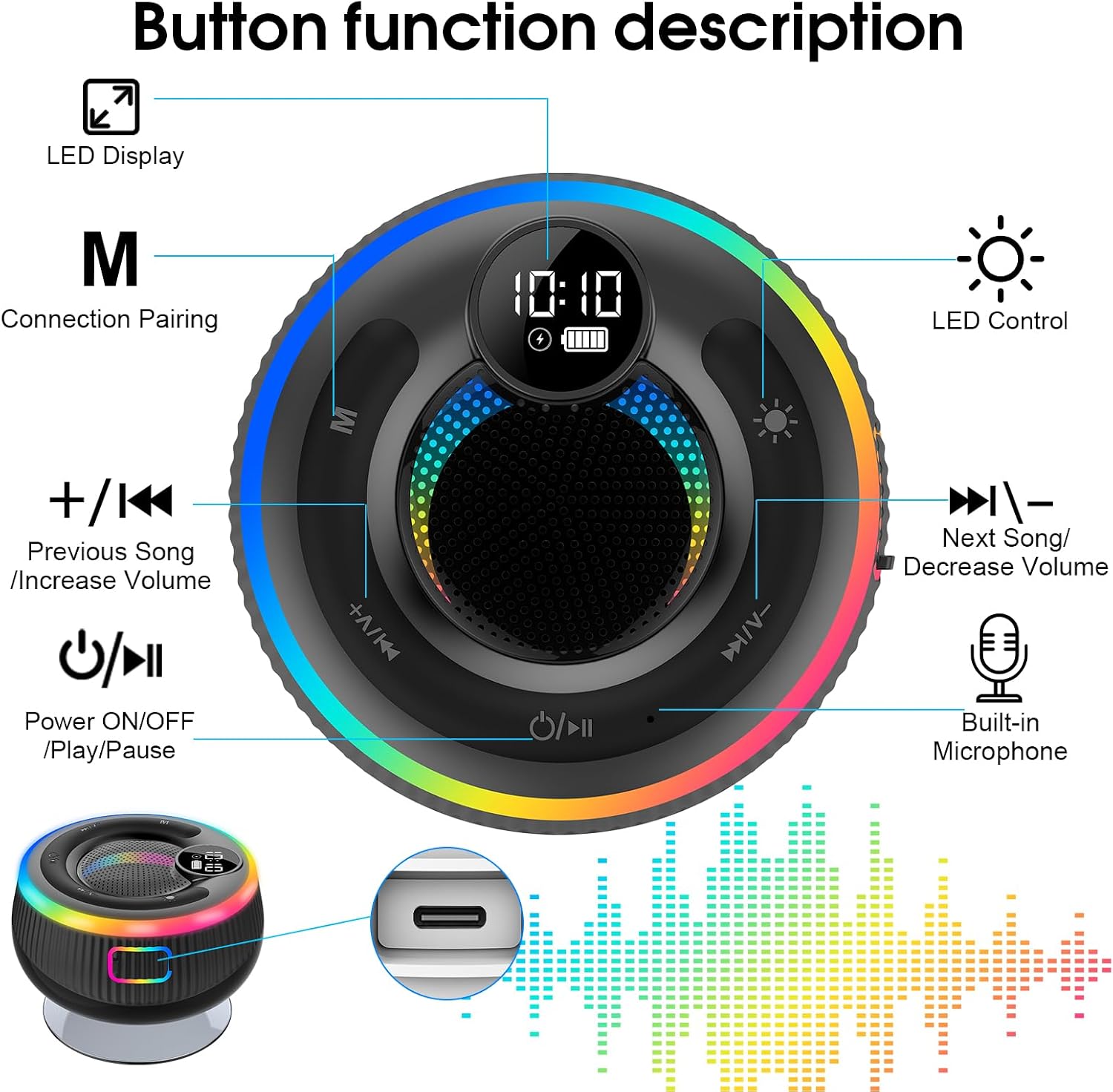
Image: Overview of the Ddidbi MC003 speaker showing button functions and LED display. Key features include LED Display, Connection Pairing (M button), LED Control (sun icon), Previous Song/Increase Volume (+/K button), Next Song/Decrease Volume (K/V- button), Power ON/OFF/Play/Pause (power/play icon), and Built-in Microphone. The image also highlights the Type-C charging port.
- Power ON/OFF / Play/Pause Button: Press and hold to power on/off. Press briefly to play/pause music.
- +/- K Button: Press briefly for previous track. Press and hold to increase volume.
- K / V- Button: Press briefly for next track. Press and hold to decrease volume.
- M Button: Mode/Connection Pairing button.
- LED Control Button: Press to cycle through LED light modes.
- LED Display: Shows time, battery level, and other indicators.
- Type-C Charging Port: For charging the device.
- Built-in Microphone: For hands-free calls.
Setup
1. Charging the Speaker
Before first use, fully charge the speaker. Connect the provided USB-C charging cable to the speaker's charging port and the other end to a USB power adapter (not included) or a computer's USB port.
- The LED display will indicate charging status.
- A full charge typically takes approximately 2-3 hours.
- Ensure the charging port cover is securely closed after charging to maintain waterproofing.

Image: Exploded view of the Ddidbi MC003 speaker highlighting its internal components for 360-degree surround sound. Icons around the speaker indicate Type-C charging, hands-free calls, IPX7 waterproof rating, Bluetooth 5.3, colorful lights, and 8 hours playtime.
2. Powering On/Off
Press and hold the Power ON/OFF / Play/Pause button for 3 seconds to turn the speaker on or off. You will hear an audible prompt.
3. Bluetooth Pairing
- Ensure the speaker is powered on. The LED display will show a Bluetooth icon, indicating it's in pairing mode.
- On your smartphone, tablet, or other Bluetooth-enabled device, go to the Bluetooth settings.
- Search for available devices and select "Ddidbi MC003" from the list.
- Once paired, the speaker will emit a confirmation sound, and the Bluetooth icon on the LED display will become solid.
- The speaker will automatically reconnect to the last paired device when powered on, if the device is within range and Bluetooth is enabled.
Operating Instructions
Music Playback
- Play/Pause: Press the Power ON/OFF / Play/Pause button briefly.
- Next Track: Press the K / V- button briefly.
- Previous Track: Press the +/- K button briefly.
- Volume Up: Press and hold the +/- K button.
- Volume Down: Press and hold the K / V- button.
Hands-Free Calling
When connected to your smartphone via Bluetooth, you can use the speaker for hands-free calls.
- Answer Call: Press the Power ON/OFF / Play/Pause button briefly when a call comes in.
- End Call: Press the Power ON/OFF / Play/Pause button briefly during a call.
- Reject Call: Press and hold the Power ON/OFF / Play/Pause button for 2 seconds when a call comes in.
LED Light Control
The speaker features colorful RGB LED lights. Press the LED Control button (sun icon) to cycle through different light modes or turn them off.
Time Display
The integrated LED display shows the current time. The time can be set via the connected device or adjusted manually if the feature is available (refer to specific device settings if applicable).
Maintenance and Care
- Cleaning: Wipe the speaker with a soft, damp cloth. Do not use abrasive cleaners or solvents.
- Waterproofing: The speaker is IPX7 waterproof, meaning it can be submerged in up to 1 meter of water for 30 minutes. Ensure the charging port cover is always securely closed before exposing the speaker to water.
- Storage: Store the speaker in a cool, dry place when not in use. Avoid extreme temperatures.
- Battery Care: To prolong battery life, avoid fully discharging the speaker frequently. Charge it regularly, even if not in constant use.

Image: The Ddidbi MC003 speaker partially submerged in water, illustrating its IPX7 waterproof capability. This rating ensures protection against temporary immersion.
Troubleshooting
| Problem | Possible Cause | Solution |
|---|---|---|
| Speaker does not turn on. | Low battery. | Charge the speaker fully. |
| Cannot pair with Bluetooth device. | Speaker not in pairing mode; device Bluetooth off; too far from speaker. | Ensure speaker is on and in pairing mode. Turn Bluetooth on your device. Move device closer to speaker (within 10 meters). Forget previous pairings on your device and try again. |
| No sound or low volume. | Volume too low on speaker or connected device; speaker not properly paired. | Increase volume on both speaker and connected device. Re-pair the speaker. |
| Sound distortion. | Volume too high; device too far from speaker. | Reduce volume. Move device closer to speaker. |
| LED lights not working. | Lights turned off or in a static mode. | Press the LED Control button to cycle through modes or turn them on. |
Specifications
| Feature | Detail |
|---|---|
| Model Number | MC003 |
| Brand | Ddidbi |
| Connectivity Technology | Bluetooth 5.3 |
| Waterproof Rating | IPX7 |
| Special Features | Built-in Microphone, Colorful RGB LED Lights, LED Display |
| Compatible Devices | Laptop, Smartphone, Tablet |
| Power Source | Battery Powered |
| Maximum Range | Approximately 100 feet (30 meters) |
| Speaker Size | 95 Millimeters |
| Product Dimensions (L x W x H) | 12 x 5.5 x 14.5 cm |
| Item Weight | 320 grams |
| Color | Black |

Image: The Ddidbi MC003 speaker being placed into a bag, illustrating its compact and portable design suitable for travel or carrying.
Warranty and Support
Ddidbi products are designed for reliability and performance. For warranty information and customer support, please refer to the warranty card included with your purchase or visit the official Ddidbi website.
If you encounter any issues not covered in the troubleshooting section, please contact Ddidbi customer support for assistance. Please have your model number (MC003) and purchase details ready.
Contact Information:
- (Please refer to your product packaging or the official Ddidbi website for the most current contact details.)