
1. Setup Guide
1.1 Initial Charging
Before first use, fully charge your Fastrack Limitless Glide X Smart Watch. Connect the magnetic charging cable to the charging pins on the back of the watch and plug the USB end into a standard USB power adapter (not included).

Image: The Fastrack Limitless Glide X Smart Watch, illustrating its design and the magnetic charging cable connection point.
1.2 App Installation and Pairing
- Download the Fastrack Reflex World App: Search for "Fastrack Reflex World" in your smartphone's app store (available for Android and iOS devices).
- Create an Account: Open the app and follow the on-screen instructions to create your user account.
- Enable Bluetooth: Ensure Bluetooth is enabled on your smartphone.
- Pair the Watch: In the Fastrack Reflex World App, navigate to the device pairing section. Select "Fastrack Limitless Glide X" from the list of available devices. Follow any prompts on both your phone and watch to complete the pairing process.

Image: A smartphone displaying the Fastrack Reflex World App interface, showing various health and activity tracking screens.
2. Operating Instructions
2.1 Display and Navigation
The Fastrack Limitless Glide X features a 1.83-inch UltraVU HD display with 450 Nits brightness for clear visibility. Navigate the watch using the touchscreen and the physical button on the side.
- Swipe Up/Down: Access notifications or quick settings.
- Swipe Left/Right: Scroll through widgets like activity, heart rate, weather, etc.
- Tap: Select an item or open an application.
- Press Side Button: Return to the home screen or access the app menu.

Image: A close-up of the Fastrack Limitless Glide X Smart Watch display, showing the time and a vibrant watch face.
2.2 Bluetooth Calling
With single-sync Bluetooth calling, you can answer, reject, or mute calls directly from your smartwatch. Ensure your watch is paired with your smartphone and Bluetooth is active.
- Answering Calls: When a call comes in, tap the green answer icon on the watch screen.
- Rejecting Calls: Tap the red reject icon.
- Making Calls: Access the dialer or contacts through the watch menu to initiate a call.

Image: The Fastrack Limitless Glide X Smart Watch displaying an incoming call notification with options to answer or reject.
2.3 Health Tracking Features
The watch provides comprehensive health monitoring:
- Heart Rate Monitoring: Continuous 24x7 heart rate tracking. View real-time data on the watch or in the app.
- SpO2 Monitoring: Measure your blood oxygen levels.
- Sleep Tracking: Monitors sleep stages (deep, light, awake) and provides sleep quality analysis.
- Stress Tracking: Monitors stress levels throughout the day.
- Breathing Exercises: Guided breathing sessions to help manage stress.
- Hydration & Sedentary Alerts: Reminders to drink water and move after periods of inactivity.
- Women's Health: Track menstrual cycles and receive predictions.

Image: The Fastrack Limitless Glide X Smart Watch displaying various health metrics icons, including heart rate, stress, SpO2, and sleep monitoring.
2.4 Sports Modes and Fitness Tracking
The watch supports over 100 sports modes to track your workouts. It includes an AI Coach and Auto Multisport Recognition for enhanced tracking.
- Accessing Sports Modes: Navigate to the 'Workout' or 'Sports' section on your watch.
- Starting a Workout: Select your desired activity (e.g., Running, Cycling, Yoga, Badminton, Basketball, Walking) and tap to start.
- Viewing Data: During and after your workout, view metrics like duration, calories burned, heart rate, and more. Detailed reports are available in the Fastrack Reflex World App.

Image: The Fastrack Limitless Glide X Smart Watch displaying a sports mode interface, with an overlay of a tennis player and various activity icons.
2.5 Smart Features
The Fastrack Limitless Glide X offers several smart functionalities:
- Music & Camera Control: Control music playback and your phone's camera remotely from your watch.
- Find Phone: Locate your misplaced smartphone by triggering an alert sound from your watch.
- Alarm & Calculator: Set alarms and perform basic calculations directly on the watch.
- Weather Updates: Get current weather information.
- Message Notifications: Receive alerts for calls, SMS, and app notifications.
- AI Voice Assistant: Interact with Google Assistant or Siri via your watch.
- In-built Games: Enjoy casual games on your wrist.
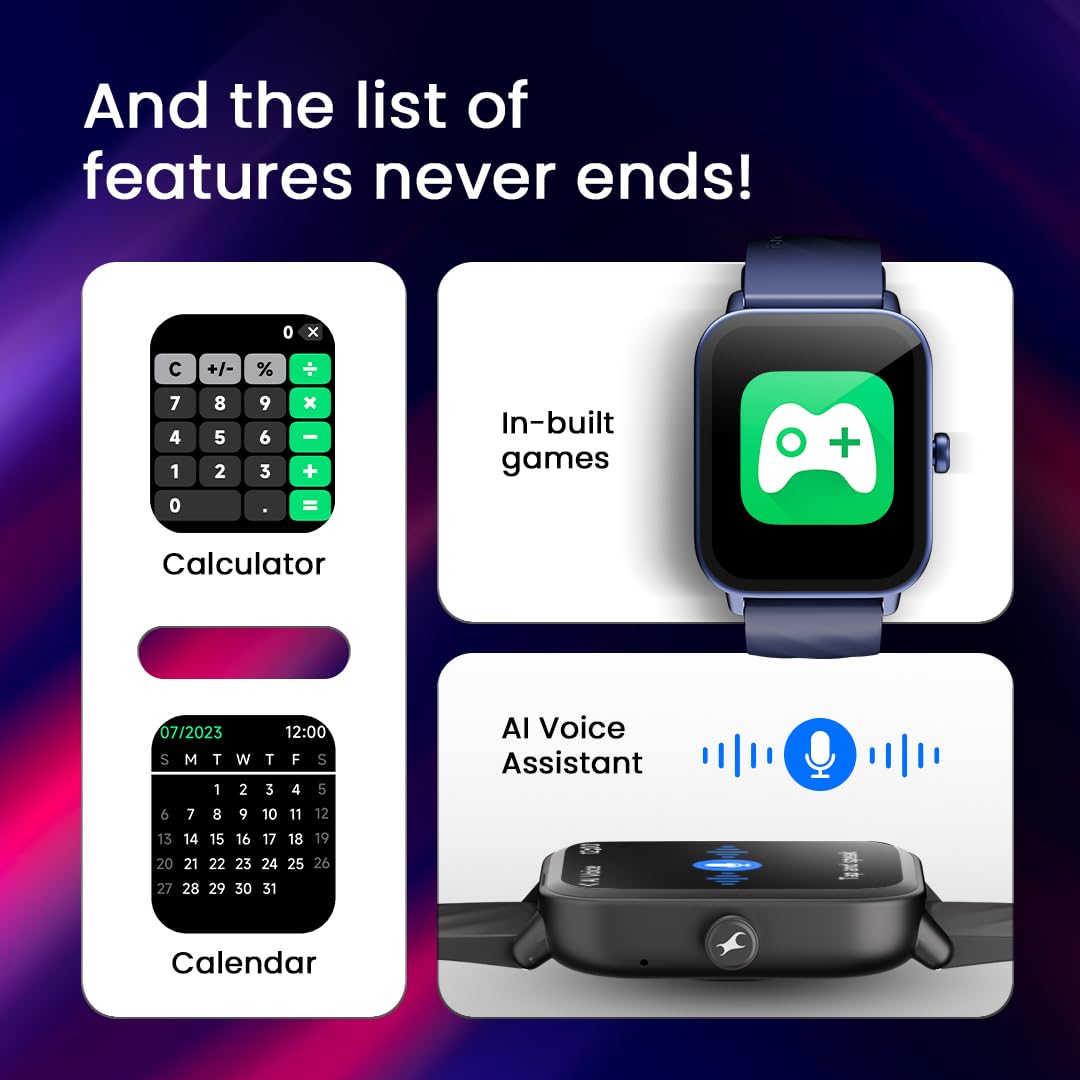
Image: The Fastrack Limitless Glide X Smart Watch displaying screens for a calculator, calendar, and an in-built games application.
3. Maintenance
3.1 Cleaning Your Smart Watch
- Wipe the watch screen and strap regularly with a soft, lint-free cloth.
- For stubborn dirt, slightly dampen the cloth with water. Avoid harsh chemicals or abrasive materials.
- Ensure the charging contacts are clean and dry before charging to prevent corrosion.
3.2 Water Resistance
The Fastrack Limitless Glide X is rated IP68 for water resistance, allowing it to withstand immersion in water up to 1.5 meters. It is suitable for daily use, including hand washing and light rain. Avoid prolonged immersion, hot water, or exposure to high-velocity water (e.g., showering, diving, or high-pressure washing) as this may compromise the seal.
3.3 Battery Care
- The watch features a Lithium Polymer battery with an average life of up to 5 days on a single charge.
- To prolong battery lifespan, avoid extreme temperatures and do not allow the battery to fully discharge frequently.
- Use only the provided magnetic charging cable.
4. Troubleshooting
4.1 Common Issues and Solutions
| Issue | Possible Solution |
|---|---|
| Watch not turning on | Ensure the watch is fully charged. Connect to the magnetic charger for at least 30 minutes. |
| Cannot pair with smartphone | Ensure Bluetooth is enabled on both devices. Restart both the watch and phone. Try unpairing and re-pairing through the Fastrack Reflex World App. |
| Inaccurate health data | Ensure the watch is worn snugly on your wrist, not too tight or too loose. Clean the sensor on the back of the watch. |
| Bluetooth calling issues | Verify the watch is connected to your phone via Bluetooth. Check phone's audio settings to ensure watch is selected for calls. |
| Short battery life | Reduce screen brightness, disable continuous heart rate monitoring if not needed, limit notifications, and ensure background app usage is optimized. |
If you encounter issues not listed here or if the suggested solutions do not resolve the problem, please contact customer support.
5. Specifications
| Feature | Detail |
|---|---|
| Model Name | Fastrack Glide X |
| Model Number | 38100PP08K |
| Display | 1.83 inches LCD, 240x286 resolution, 450 Nits Brightness |
| Connectivity | Bluetooth (Wireless Communication Standard) |
| Battery Type | Lithium Polymer |
| Battery Capacity | 280 mAh |
| Battery Life | Up to 5 days (average usage) |
| Water Resistance | IP68 (Water Resistant up to 1.5 Metres) |
| Sensors | Accelerometer, Optical Heart Rate Sensor |
| Compatible Devices | Smartphones (Android Devices, iOS Devices) |
| Band Material | Silicon |
| Case Material | Polycarbonate |
| Item Weight | 48 Grams |
| Box Contents | Watch, Magnetic Charging Cable, Quick Start Guide, Warranty Card |
6. Warranty Information
The Fastrack Limitless Glide X Smart Watch comes with a 1 Year Manufacturer Warranty from the date of purchase. This warranty covers manufacturing defects. Please retain your purchase receipt for warranty claims.
For detailed terms and conditions, refer to the warranty card included in the box or visit the official Fastrack website.
7. Customer Support
For any queries, technical assistance, or warranty claims, please contact Fastrack customer support:
- Customer Care: 1800-266-0123
- Email: customercare@titan.co.in
- Manufacturer/Importer: Titan Company Limited, 3 Sipcot Industries complex, Hosur- 635126
- App Support: Utilize the help section within the Fastrack Reflex World App for common questions and guides.
