
1. Safety Information
Please read all safety instructions carefully before using the ARROWMAX SDS ULTRA PLUS Mini Electric Drill Pen and Benchtop Press. Failure to follow these instructions may result in electric shock, fire, or serious injury.
- Eye Protection: Always wear appropriate eye protection (safety glasses or goggles) when operating the drill.
- Secure Workpiece: Ensure the workpiece is securely clamped or held in the benchtop press to prevent movement during drilling.
- Proper Ventilation: Work in a well-ventilated area, especially when drilling materials that may produce dust or fumes.
- Keep Clear: Keep hands, hair, and loose clothing away from rotating parts.
- Power Source: Use only the provided USB charging cable and a compatible power adapter (not included) for charging.
- Storage: Store the tool and accessories in a dry, secure place, out of reach of children.
- Material Suitability: This tool is designed for drilling soft to medium-hard materials such as plastic, wood, resin, and thin metals. Do not attempt to drill excessively hard materials.
- Avoid Overheating: If the drill becomes excessively hot, discontinue use and allow it to cool down.
2. Package Contents
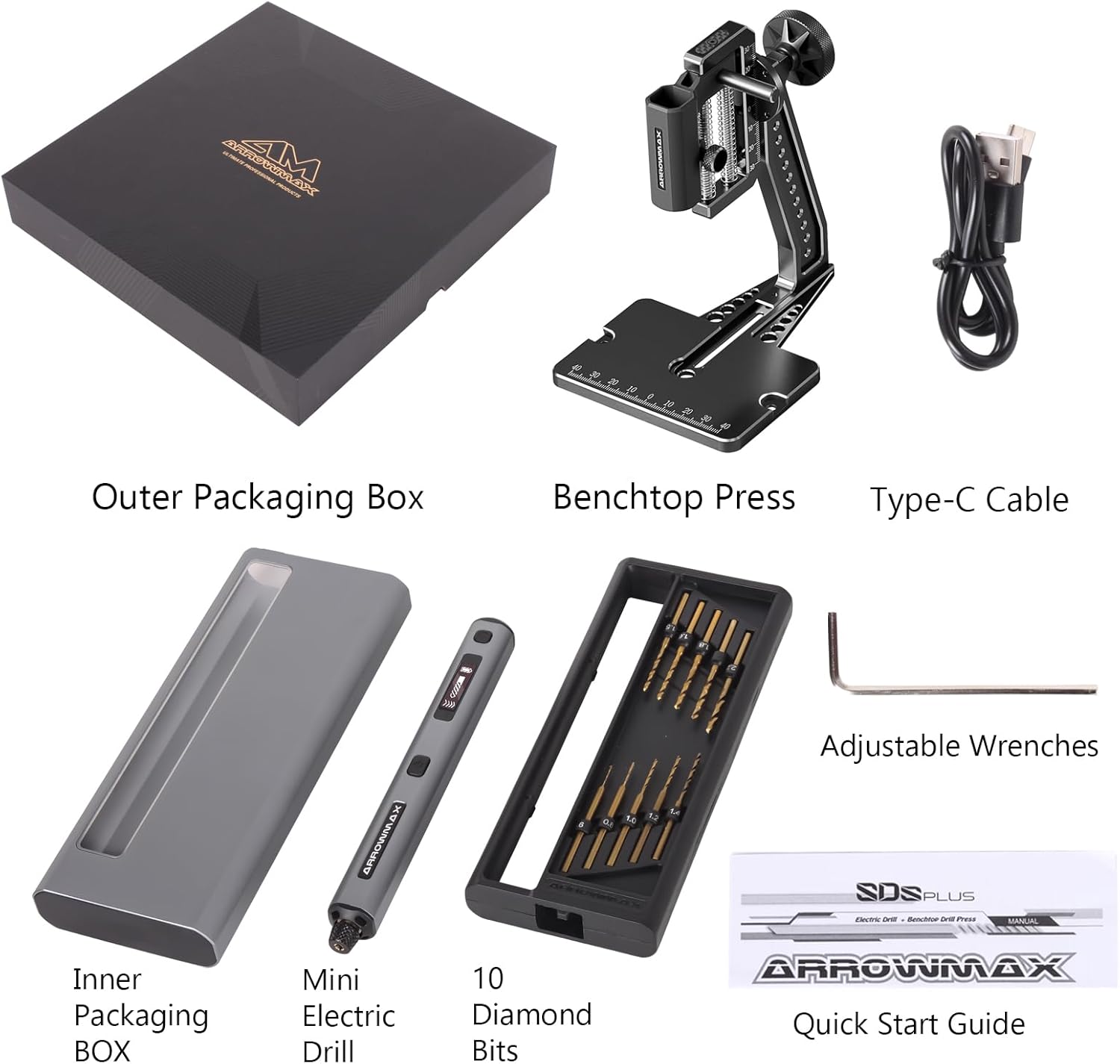
Verify that all items listed below are present in your package:
- 1 x ARROWMAX Mini Electric Drill Pen (SDS ULTRA PLUS)
- 1 x Benchtop Press
- 10 x Double-Sided Drill Bits (various sizes)
- 1 x USB Charging Cable (Type-C)
- 1 x Quick Start Guide (this manual)
- 1 x CNC Alloy Storage Box
- Adjustable Wrenches (for benchtop press assembly)
3. Product Overview
The ARROWMAX SDS ULTRA PLUS is a precision mini electric drill pen designed for detailed work, accompanied by a stable benchtop press for enhanced accuracy.
3.1 Mini Electric Drill Pen
- Power Button: Long press to turn on/off. Single press to select forward or reverse rotation after startup.
- Gear Adjustment Button: Single press to cycle through 5 speed settings.
- OLED Display: Shows current speed, battery status, and rotation direction.
- LED Lights: Four shadow-free LED lights illuminate the drilling area.
- Chuck: Holds drill bits securely.
- USB-C Port: For charging the internal 500mAh LiPo battery.
- Aluminium Alloy Body: Durable and lightweight construction.

3.2 Benchtop Press
The benchtop press provides stability and precise control for drilling operations.
- Adjustable Height: Allows for precise depth control.
- 360° Rotation: Enables drilling at various angles.
- CNC Aluminum Disc: Ensures accurate drilling angles.
- Measurement Markings: Integrated rulers for accurate positioning.

4. Setup
4.1 Installing Drill Bits
- Gently loosen the chuck by rotating it counter-clockwise.
- Insert the desired drill bit into the chuck. Ensure it is seated properly.
- Tighten the chuck by rotating it clockwise until the drill bit is firmly secured. Do not overtighten.
4.2 Assembling the Benchtop Press
The benchtop press requires minimal assembly. Use the provided adjustable wrenches to secure the components.
- Attach the drill holder arm to the base using the screw and handle.
- Secure the two screws at the bottom of the base to ensure stability.
- Insert the Mini Electric Drill Pen into the holder on the benchtop press.

5. Operation
5.1 Power On/Off
Long press the Power Button (located on the side of the drill pen) for approximately 2 seconds to turn the device on or off. The OLED display will illuminate upon activation.
5.2 Adjusting Speed
After powering on, press the Gear Adjustment Button (located below the OLED display) to cycle through the 5 available speed settings:
- Speed 1: 500 RPM
- Speed 2: 600 RPM
- Speed 3: 700 RPM
- Speed 4: 800 RPM
- Speed 5: 900 RPM
The current speed setting will be displayed on the OLED screen.

5.3 Changing Rotation Direction
After the drill pen is powered on, a single press of the Power Button will toggle between forward and reverse rotation. The OLED display will indicate the current direction.
5.4 Using the Benchtop Press
- Place your workpiece securely on the base of the benchtop press.
- Adjust the height of the drill pen holder to the desired drilling depth.
- If necessary, adjust the work angle using the 360° rotation feature for specialized tasks.
- Carefully lower the drill pen using the handle to begin drilling. Apply steady, even pressure.
5.5 Recommended Materials
The ARROWMAX SDS ULTRA PLUS is suitable for precision drilling in various materials, including:
- Plastic
- Wood
- Resin
- Shell
- Printed Circuit Boards (PCBs)
- Polymer Clay
- Keychain materials

6. Charging
The ARROWMAX SDS ULTRA PLUS is equipped with a 500mAh LiPo battery and charges via a USB-C port.
- Connect the provided USB-C cable to the charging port on the drill pen.
- Connect the other end of the USB-C cable to a compatible USB power source (e.g., wall adapter, power bank, computer USB port).
- The OLED display will show the charging status. A full charge typically takes approximately 3 hours.
- Disconnect the charging cable once the battery is fully charged.

7. Maintenance
- Cleaning: After each use, gently wipe the drill pen and benchtop press with a soft, dry cloth to remove dust and debris. Do not use harsh chemicals or abrasive cleaners.
- Drill Bits: Inspect drill bits regularly for wear or damage. Replace dull or bent bits to maintain drilling performance and safety.
- Storage: Store the drill pen, benchtop press, and drill bits in the provided CNC alloy storage box in a cool, dry place.
- Battery Care: For optimal battery life, avoid fully discharging the battery frequently. If storing for extended periods, charge the battery to approximately 50% every few months.
8. Troubleshooting
| Problem | Possible Cause | Solution |
|---|---|---|
| Drill pen does not turn on. | Battery is depleted. | Charge the drill pen using the USB-C cable. |
| Drill bit is not rotating or rotating slowly. | Chuck is loose; Battery is low; Incorrect speed setting; Overload. | Tighten the chuck; Charge the battery; Adjust to a higher speed; Reduce pressure on the workpiece. |
| Drill pen overheats. | Continuous heavy use; Blocked ventilation. | Allow the drill to cool down; Ensure ventilation holes are clear. |
| Drill bit slips in chuck. | Chuck not tightened sufficiently; Worn drill bit shank. | Ensure chuck is tightened firmly; Replace worn drill bit. |
9. Specifications
| Feature | Detail |
|---|---|
| Brand | ARROWMAX |
| Model | 230876 (SDS ULTRA PLUS) |
| Power Source | Battery Powered |
| Battery Type | 500mAh LiPo (Lithium Polymer) |
| Charging Port | USB-C |
| Rotational Speed | 5-Speed (500, 600, 700, 800, 900 RPM) |
| Maximum Torque | 0.23 Newton Meters (2.3 kgf.cm) |
| Special Features | OLED Display, 4x LED Lights, Keyless Mandrel |
| Material | Metal (Aluminium Alloy Body) |
| Product Dimensions (Approx.) | 10.75"L x 4.75"W x 2.03"H (Package) |
| Item Weight | 1.79 pounds |
| Drilling Capacity (Wood/Metal) | 0.25 Inches |
10. Warranty and Support
ARROWMAX products are manufactured to high-quality standards. For specific warranty information, please refer to the documentation included with your purchase or contact ARROWMAX customer support directly. Keep your purchase receipt as proof of purchase for any warranty claims.
For technical assistance or further inquiries, please visit the official ARROWMAX website or contact their customer service department.

