
1. Introduction
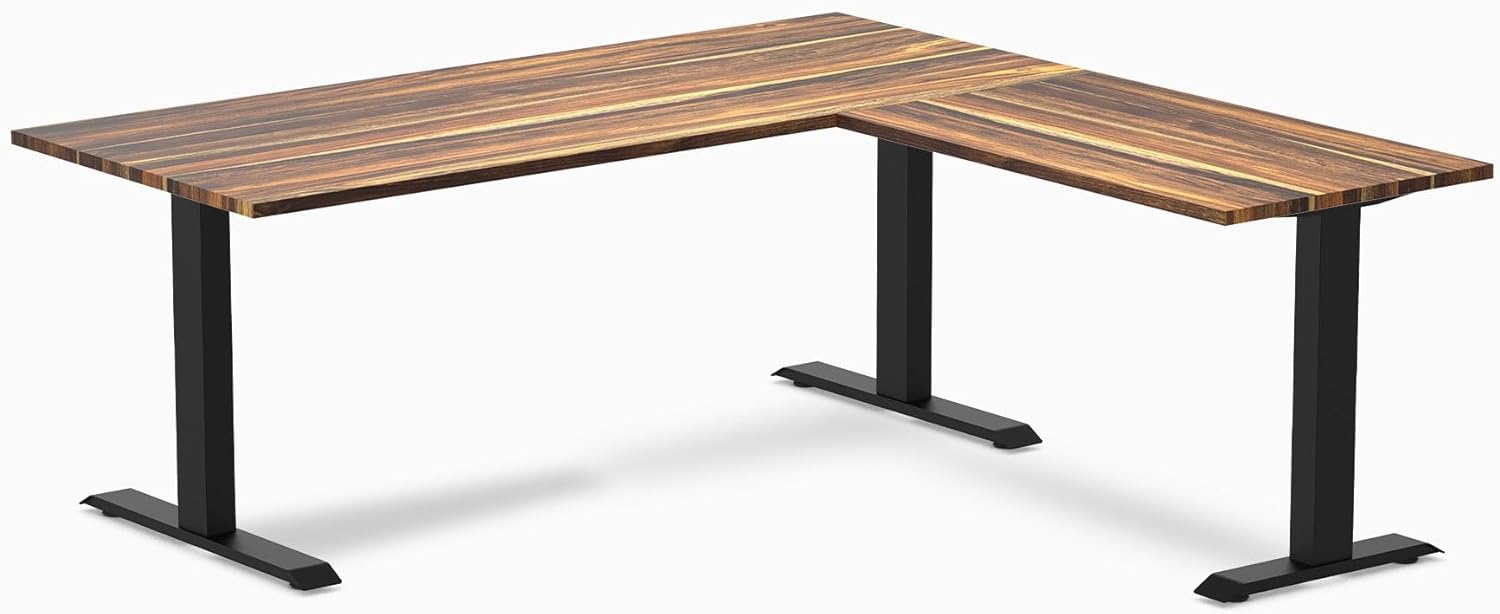
Thank you for choosing the Desky Zero Hardwood L-Shape Office Desk. This manual provides essential information for the safe assembly, operation, and maintenance of your new desk. Designed for durability and ergonomic comfort, this fixed-height desk features a solid hardwood top and a robust steel frame, offering a spacious and efficient workspace.
Please read these instructions carefully before beginning assembly and retain this manual for future reference.
2. Safety Information
- Two-Person Assembly: It is highly recommended that two or more people assemble this desk to prevent injury and ensure proper alignment of components.
- Weight Capacity: Do not exceed the maximum weight capacity of 440 lbs (200 kg) on the desktop. Distribute weight evenly.
- Stable Surface: Ensure the desk is placed on a flat, stable, and level surface to prevent wobbling or tipping.
- Component Check: Before assembly, verify all parts are present and undamaged. Do not use if any parts are missing or defective.
- Tool Use: Use appropriate tools as instructed. Do not overtighten screws, as this may damage the material.
- Children and Pets: Keep children and pets away from the assembly area. Small parts can be a choking hazard.
3. Package Contents
Please check the package to ensure all the following components are included:
- Desk Frame (Steel)
- Desk Top (Solid Hardwood - Teak)
- Fixed Desk Legs
- Hardware (Screws, Washers, etc.)
- Sticky Cable Ties
4. Setup and Assembly Instructions
This desk is designed for tool-free assembly, making the process straightforward. Follow these steps carefully:
- Unpack Components: Carefully remove all parts from the packaging and lay them out on a clean, soft surface to prevent scratches. Identify each component using the provided parts list.
- Assemble Desk Frame: Connect the main desk frame components. The L-shape design allows for a reversible return configuration, meaning you can install the shorter section on either the left or right side to suit your workspace layout. Ensure all connections are secure.
- Attach Fixed Legs: Secure the fixed desk legs to the assembled frame. Ensure they are firmly attached and stable.
- Place Desktop: Carefully place the solid hardwood desktop onto the assembled frame and legs. Align the pre-drilled holes on the desktop with the frame.
- Secure Desktop: Use the provided hardware (screws) to firmly attach the desktop to the frame. Do not overtighten.
- Cable Management: Utilize the integrated cable management features and sticky cable ties to organize your power and data cables, maintaining a clean and efficient workspace.

5. Operating Instructions
The Desky Zero L-Shape Office Desk is a fixed-height desk designed for optimal ergonomic posture. Its height is set at approximately 27.5 inches (70 cm) to promote comfort during extended work sessions.
- Ergonomic Positioning: Position your chair and monitor(s) to maintain a comfortable and ergonomic posture. Your feet should be flat on the floor, and your arms should form a 90-degree angle at the elbows when typing.
- Workspace Organization: Utilize the spacious L-shaped surface to arrange your equipment and materials efficiently. The design supports multiple monitors and provides ample room for various tasks.
6. Maintenance
Proper care will ensure the longevity and appearance of your Desky Zero desk.
- Desktop Care: The hardwood desktop features a clear polyurethane hard-wearing finish. Clean the surface with a soft, damp cloth. Avoid abrasive cleaners, harsh chemicals, or excessive moisture. Wipe spills immediately.
- Frame Care: The steel frame can be cleaned with a soft, dry, or slightly damp cloth. Avoid using harsh detergents or solvents.
- Regular Checks: Periodically check all screws and connections to ensure they remain tight. Retighten if necessary.
- Avoid Direct Sunlight: Prolonged exposure to direct sunlight can affect the wood finish.
7. Troubleshooting
| Problem | Possible Cause | Solution |
|---|---|---|
| Desk is wobbly or unstable. | Uneven floor surface; loose connections. | Ensure the desk is on a level surface. Check and tighten all screws and bolts. |
| Parts do not fit together during assembly. | Incorrect orientation of parts; manufacturing defect. | Review assembly steps and diagrams. If parts still do not fit, contact Desky customer support. |
| Scratches or damage to the desktop. | Impact or abrasive contact. | Use desk mats or coasters to protect the surface. For minor scratches, consult a wood care specialist. |
8. Specifications
| Feature | Detail |
|---|---|
| Brand | Desky |
| Model Name | Desky Zero Hardwood L-Shape Office Desk |
| Model Number | 9441055179074 |
| Shape | L-Shape |
| Product Dimensions | 72 x 30 x 70 x 24 inches (Overall L-shape) |
| Fixed Height | 27.5 inches (70 cm) |
| Top Material Type | Solid Hardwood (Teak) |
| Base Material | Alloy Steel |
| Color (Current Variant) | Teak / White |
| Finish Type | Clear Polyurethane Hard Wearing Finish |
| Maximum Weight Recommendation | 440 lbs (200 kg) |
| Assembly Required | Yes (Tool-Free) |
| Special Features | BIFMA Compliant, Ergonomically Suited, Leading Stability and Strength, Steel Frame Design, Tool Free Installation, Reversible Return Configuration, Integrated Cable Management |
9. Warranty and Support
Warranty: This Desky Zero Hardwood L-Shape Office Desk comes with a 5-year supplier warranty. Please retain your proof of purchase for any warranty claims.
Customer Support: For any questions, missing parts, or assistance with assembly or operation, please contact Desky customer support through the retailer where the product was purchased or visit the official Desky website for contact information.


