
Introduction
The PROHEAR EP01 Electronic Sound Suppression Hearing Protection Earbuds are designed to provide effective hearing protection in high-noise environments while allowing for situational awareness through sound amplification. These earbuds feature a Noise Reduction Rating (NRR) of 22dB and can amplify ambient sounds up to 4 times, making them suitable for activities such as shooting, hunting, and other loud industrial or recreational settings. The compact and rechargeable design ensures convenience and long-lasting performance.
Key Features
- Ultimate Hearing Protection: NRR 22dB for effective noise suppression in loud environments.
- 4X Sound Amplification: Enhance ambient sounds for improved situational awareness and communication.
- Versatile Modes: Manual volume control knob allows switching between noise-canceling and sound enhancement modes.
- Long-lasting Battery: Rechargeable case provides 3-4 full charges for the earbuds, offering up to 35 hours of use. Earbuds provide up to 10 hours on a single charge.
- Compact & Portable: Lightweight design (0.15 lbs for case, 0.02 lbs per earbud) for easy transport.
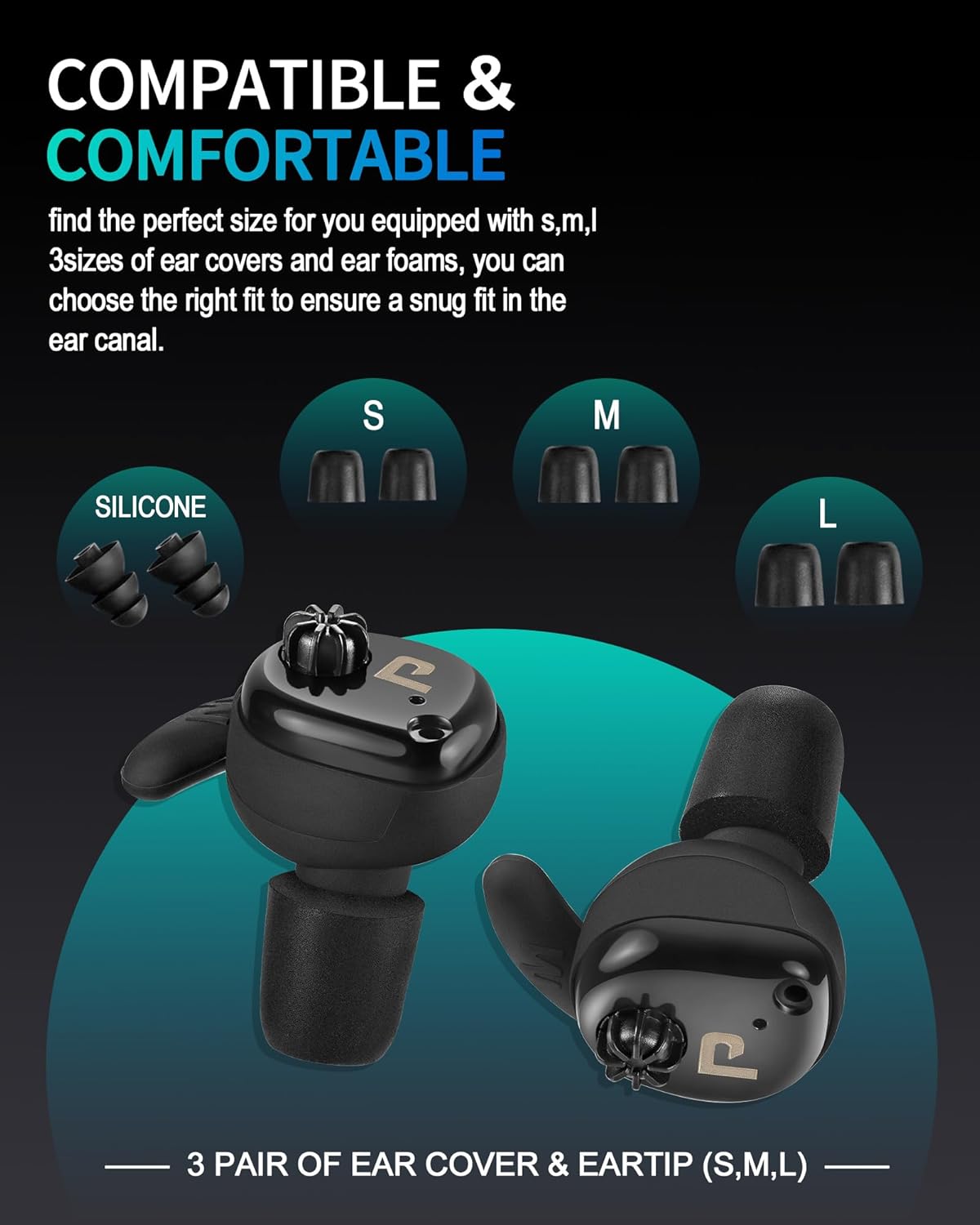
- Customizable Fit: Includes S, M, and L sizes of silicone covers and foam ear tips for personalized comfort and secure fit.
Package Contents
Please ensure all items are present upon unboxing:
- PROHEAR EP01 Electronic Earbuds (Left and Right)
- Rechargeable Charging Case
- USB Type-C Charging Cable
- Silicone Ear Covers (S, M, L sizes)
- Foam Ear Tips (S, M, L sizes)
- User Manual

Setup
1. Charging
Before first use, fully charge the earbuds and charging case.
- Connect the provided USB Type-C charging cable to the charging port on the case and to a suitable USB power source.
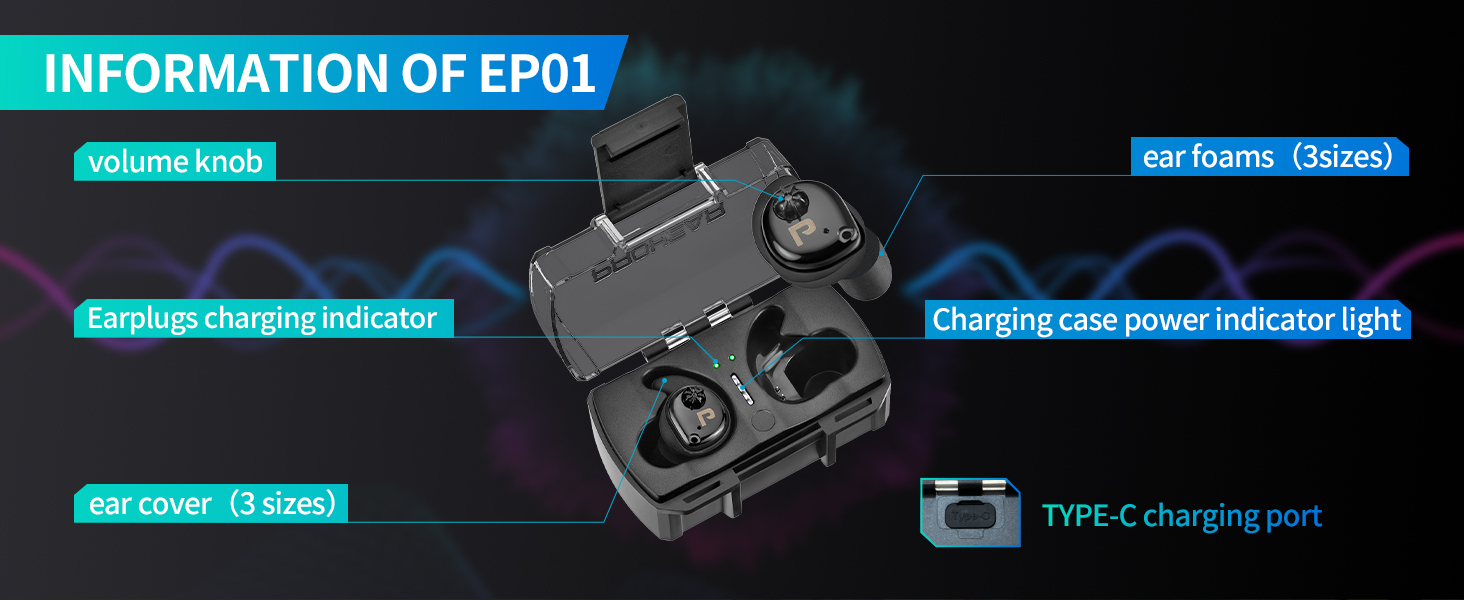
- The white indicator lights on the case will illuminate during charging. All four lights will be on when fully charged.
- Place the earbuds into the charging case. The green indicator light on the earbuds will be on during charging. If the green light does not light up, adjust the position of the earbuds until it does. The green light will turn off when the earbuds are fully charged.
- Charging time for the case is approximately 1.5-2 hours. A fully charged case can charge the earbuds 3-4 times.
- Note: Excessive self-discharge may occur if not used for a long time. Charge the earbuds and case occasionally to maintain battery life.
2. Wearing and Fit
Proper fit is crucial for optimal hearing protection and comfort.
- Select the appropriate size of silicone ear covers and foam ear tips (S, M, L) that provide a snug and comfortable fit in your ear canal.
- To install the ear tips, gently pull on the ear to ensure the earbuds can be well placed. Roll and pinch the foam ear tip, then insert the earbud into your ear. Rotate and adjust until comfortable and secure.
- Ensure the earbud is correctly aligned with the charging contacts when placing it in the case.

Operating Instructions
1. Power On/Off
The earbuds automatically power on when removed from the charging case and power off when placed back into the case.
2. Mode Adjustment and Volume Control
The PROHEAR EP01 earbuds feature a manual volume control knob on each earbud to adjust sound amplification and switch between modes.
- Sound Amplification Mode: Rotate the volume knob upward to amplify surrounding sounds. This mode enhances ambient noises for improved awareness.
- Noise Reduction Mode: Rotate the volume knob downward to decrease sound amplification and engage noise reduction. This mode helps suppress loud, harmful noises.

Maintenance
To ensure the longevity and optimal performance of your PROHEAR EP01 earbuds, follow these maintenance guidelines:
- Cleaning: Regularly clean the earbuds and charging case with a soft, dry cloth. Do not use harsh chemicals or abrasive materials.
- Ear Tips: Inspect ear tips for wear and tear. Replace them if they become damaged or lose their elasticity to maintain proper fit and noise reduction.
- Storage: Store the earbuds in their charging case when not in use to protect them and keep them charged. Store in a cool, dry place away from direct sunlight and extreme temperatures.
- Battery Care: Charge the earbuds and case regularly, even if not in frequent use, to prevent excessive self-discharge and prolong battery life.
Troubleshooting
If you encounter any issues with your PROHEAR EP01 earbuds, refer to the following common solutions:
- No Sound/Low Volume:
- Ensure earbuds are fully charged.
- Check the volume knob on each earbud and rotate it upward to increase amplification.
- Verify ear tips are properly seated in your ear for a good seal.
- Earbuds Not Charging:
- Ensure the charging case is charged.
- Make sure the earbuds are correctly placed in the charging case and the green indicator light is on. Adjust position if necessary.
- Check the Type-C charging cable and port for any damage or debris.
- Buzzing Sound:
- Adjust the position of the electronic earbuds in your ear to ensure a proper fit.
Specifications
| Feature | Detail |
|---|---|
| Model Number | Earplugs EP01 |
| Noise Reduction Rating (NRR) | 22dB |
| Sound Amplification | Up to 4X |
| Earbud Battery Life (Single Charge) | Up to 10 hours |
| Total Battery Life (with Charging Case) | Up to 35 hours |
| Charging Case Charging Time | Approx. 1.5 hours |
| Battery Type | 1 Lithium Ion battery (included) |
| Charging Port | USB Type-C |
| Earbud Weight | 0.02 lbs (each) |
| Charging Case Weight | 0.15 lbs |
| Fabric Type | 100% Plastic |
Warranty & Support
PROHEAR products are backed by a 1-year warranty. For any questions, concerns, or support needs, please contact our customer service team. We are committed to ensuring your satisfaction and will respond within 24 hours.
For further assistance, please refer to the contact information provided in your product packaging or visit the official PROHEAR website.
