
1. Introduction
Thank you for choosing the Dolce Gusto Genio i MD9747S Coffee Maker. This advanced IoT model offers a seamless coffee experience, allowing you to connect to your smartphone for personalized beverage preparation. With its dedicated app, you can precisely adjust extraction volume and temperature, and save your favorite recipes for consistent results with a single button press. This machine is ideal for individuals and families who enjoy exploring various coffee menus and brewing methods.
Please read this manual thoroughly before operating the appliance and keep it for future reference.
2. Important Safety Information
To ensure safe operation and prevent damage, always follow these basic safety precautions:
- Read all instructions before use.
- Do not immerse the appliance, power cord, or plug in water or other liquids.
- Keep the appliance out of reach of children.
- Do not operate the appliance with a damaged cord or plug.
- Place the appliance on a stable, flat, heat-resistant surface.
- Avoid contact with hot surfaces. Use handles or knobs.
- Unplug from outlet when not in use and before cleaning.
- Only use Dolce Gusto capsules with this machine.
3. Product Overview
Familiarize yourself with the components of your coffee maker:
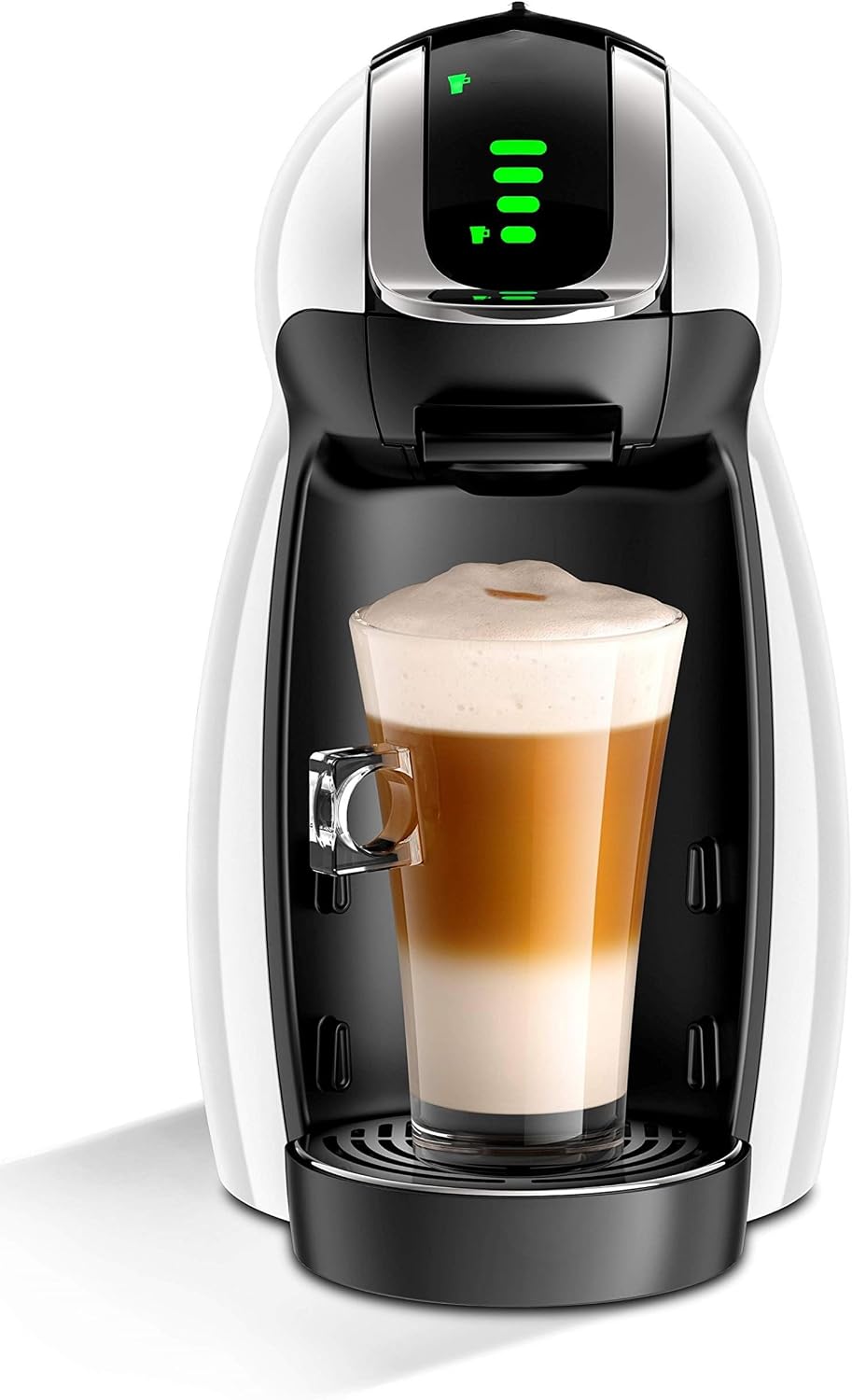
Figure 3.1: Front view of the Dolce Gusto Genio i MD9747S coffee maker, showing a latte in a glass cup on the drip tray. The machine is white and black with green indicator lights.
- Water Tank: Removable tank for fresh water.
- Capsule Holder: Tray for inserting coffee capsules.
- Brew Head: Where the capsule is pierced and water is injected.
- Control Panel: Buttons and indicators for operation.
- Drip Tray: Collects excess liquid and supports cups. Adjustable for different cup sizes.
- Power Button: To turn the machine on/off.
- Brew Lever/Button: To start and stop the brewing process.
4. Setup
4.1 Unpacking
- Carefully remove all packaging materials.
- Check that all components are present and undamaged.
- Keep packaging for future transport or recycling.
4.2 Initial Cleaning
- Wash the water tank, capsule holder, and drip tray with warm soapy water. Rinse thoroughly and dry.
- Wipe the exterior of the machine with a damp cloth.
4.3 Filling the Water Tank
- Remove the water tank from the back of the machine.
- Fill with fresh, potable water up to the MAX level indicator.
- Replace the water tank securely.
4.4 Power Connection and Priming
- Plug the power cord into a grounded electrical outlet.
- Press the power button. The indicator light will blink while heating up, then turn solid green when ready.
- Priming (First Use): Without a capsule, place a cup under the brew head. Move the brew lever to the hot water position (red) and let water flow until the tank is almost empty. Repeat for cold water (blue). This primes the pump and cleans the system.
5. Operating Instructions
5.1 Brewing a Beverage
- Ensure the machine is powered on and the water tank is filled.
- Lift the locking handle and pull out the capsule holder.
- Insert a Dolce Gusto capsule into the holder.
- Push the capsule holder back in and lower the locking handle until it clicks.
- Place an appropriate cup on the drip tray.
- Manual Brewing: Move the brew lever to the desired position (red for hot, blue for cold) and hold until the desired amount of beverage is dispensed. Then return the lever to the center.
- Automatic Brewing (with app): Use the dedicated smartphone app to select your desired recipe. The machine will automatically dispense the correct volume and temperature.

Figure 5.1: The Dolce Gusto Genio i MD9747S coffee maker demonstrating its Bluetooth connectivity with smartphones for app control, alongside an assortment of coffee and tea beverages it can prepare.
5.2 Using the Smartphone App (IoT Features)
- Download the official Dolce Gusto app from your device's app store.
- Follow the in-app instructions to pair your Genio i MD9747S machine via Bluetooth.
- Through the app, you can:
- Adjust extraction volume and water temperature.
- Save custom recipes for quick access.
- Schedule brewing times.
- Discover new recipes and beverage options.
5.3 After Brewing
- Lift the locking handle to release the used capsule into the capsule bin.
- Empty the capsule bin regularly.
6. Maintenance and Cleaning
6.1 Daily Cleaning
- Empty and rinse the drip tray and capsule holder after each use.
- Wipe the brew head and exterior with a soft, damp cloth.
6.2 Water Tank Cleaning
- Clean the water tank weekly with warm soapy water. Rinse thoroughly.
6.3 Descaling
Regular descaling is crucial for maintaining machine performance and beverage quality. The frequency depends on water hardness and usage. Refer to the Dolce Gusto website or app for specific descaling instructions and recommended descaling solutions.
- Use only descaling solutions recommended for Dolce Gusto machines.
- Follow the instructions provided with the descaling solution carefully.
- Rinse the machine thoroughly after descaling.
7. Troubleshooting
| Problem | Possible Cause | Solution |
|---|---|---|
| Machine does not turn on. | No power supply. | Check power cord connection and wall outlet. |
| No water flow. | Empty water tank; air in pump; machine needs descaling. | Fill water tank; prime the machine; descale the machine. |
| Coffee is cold or not hot enough. | Machine not preheated; descaling needed. | Wait for indicator light to turn solid green; descale the machine. |
| Leaking from machine. | Capsule not inserted correctly; drip tray full. | Ensure capsule is properly seated; empty drip tray. |
If the problem persists, please contact customer support.
8. Specifications

Figure 8.1: Side view of the Dolce Gusto Genio i MD9747S coffee maker with its dimensions labeled: 23.1 cm depth, 16.5 cm width, and 30 cm height.
| Feature | Detail |
|---|---|
| Model Number | MD9747S |
| Brand | Dolce Gusto (Manufacturer: Hoshizora no Mori) |
| Color | White |
| Product Dimensions (D x W x H) | 23.1 cm x 16.5 cm x 30 cm |
| Body Weight | 2.6 kg |
| Capacity | 600 milliliters |
| Operation Mode | Fully Automatic |
| Human Interface Input | Button |
| Special Feature | Keep Warm, IoT (Smartphone Connectivity) |
| Coffee Maker Type | Drip Coffee Machine (Capsule System) |
| Included Components | Japanese Instruction Manual (English version provided here) |
9. Warranty and Support
This product comes with a standard manufacturer's warranty. Please refer to the original packaging or the official Dolce Gusto website for detailed warranty terms and conditions specific to your region.
For technical support, troubleshooting assistance, or to inquire about replacement parts, please visit the official Dolce Gusto support website or contact their customer service hotline. Contact details can typically be found on the product packaging or the brand's official website.
Online Resources: www.dolce-gusto.com (This is a placeholder link; please refer to actual product documentation for correct links.)

