
Important Safety Information
Please read all instructions and safety warnings carefully before using this product. Failure to follow these instructions may result in electric shock, fire, or serious injury.
- Power Source: Always use with a compatible 5V 2A USB power source. Incompatible power sources may damage the device or pose a safety risk.
- Supervision: Do not leave the heating pad unattended while in use.
- Children and Pets: Keep away from children and pets. This product is not intended for use by or on animals.
- Damage: Do not use if the heating pad or USB cable is damaged. Inspect regularly for wear and tear.
- Folding/Crushing: Do not fold, crush, or excessively bend the heating pad while it is powered on, as this can damage the internal heating elements and create hot spots.
- Sleeping: Do not use while sleeping or in a state of unconsciousness.
- Medical Conditions: Consult a physician before use if you have any medical conditions, including but not limited to diabetes, circulatory problems, nerve damage, or sensitive skin.
- Skin Contact: Avoid direct contact with bare skin for prolonged periods, especially at higher heat settings, to prevent burns. Use over clothing.
- Moisture: Do not use in wet environments or allow the pad to become wet.
- Storage: Store in a cool, dry place when not in use.
- Emergency: In case of any safety concerns or malfunction, immediately unplug the device and contact customer support.
Product Overview
The Comfheat USB Heating Pad is designed to provide portable heat therapy for various body areas. Its compact size and USB power compatibility make it suitable for use at home, in the office, or while traveling.
Key Features:
- Dimensions: Approximately 16 inches x 12 inches (unfolded).
- Power Input: 5V 2A USB (non-rechargeable, requires continuous power connection).
- Heat Settings: 3 adjustable heat levels (High, Medium, Low).
- Auto Shut-Off: Automatic power-off after 45 minutes for safety and energy conservation.
- Material: Ultra-soft plush fabric for comfort.
- Portability: Lightweight and foldable design for easy transport.
- Overheat Protection: Built-in intelligent control chip to prevent overheating.

Image: A woman using the Comfheat USB Heating Pad outdoors, powered by a portable power bank, illustrating its travel-friendly design.
Setup Instructions
To begin using your Comfheat USB Heating Pad, follow these simple steps:
- Identify Power Source: Ensure you have a compatible 5V 2A USB power source. This can be a power bank, a USB wall adapter, or a car USB port. (Note: Power bank or USB adapter are not included with the heating pad.)
- Connect USB Cable: Locate the USB connector on the heating pad's cable. Plug this connector into your chosen 5V 2A USB power source.
- Power On: If using a wall adapter, plug the adapter into a power outlet. If using a power bank, ensure it is adequately charged and turned on. The heating pad requires continuous power to operate.

Image: A hand connecting the USB cable to the heating pad's integrated power button, demonstrating the initial setup.
Video: This video demonstrates how to connect the USB heating pad to both a wall adapter and a portable power bank for activation.
Operating Instructions
The Comfheat USB Heating Pad features a simple one-button control for power and heat settings.
- Turn On (High Heat): Once connected to a power source, press and hold the power button for approximately 3 seconds. The button will illuminate red, indicating the highest heat setting (130-140°F).
- Adjust to Medium Heat: Press the power button briefly again. The button will illuminate blue, indicating the medium heat setting (112-122°F).
- Adjust to Low Heat: Press the power button briefly a third time. The button will illuminate green, indicating the lowest heat setting (100-104°F).
- Turn Off: To turn off the heating pad, press and hold the power button again for approximately 3 seconds until the light turns off.
Automatic Shut-Off:
For your safety and to conserve energy, the heating pad is equipped with an automatic shut-off feature. It will automatically power off after approximately 45 minutes of continuous use. If you wish to continue using it, simply follow the "Turn On" steps again.

Image: Close-up of the power button illustrating the red (High), blue (Medium), and green (Low) light indicators for each heat setting.
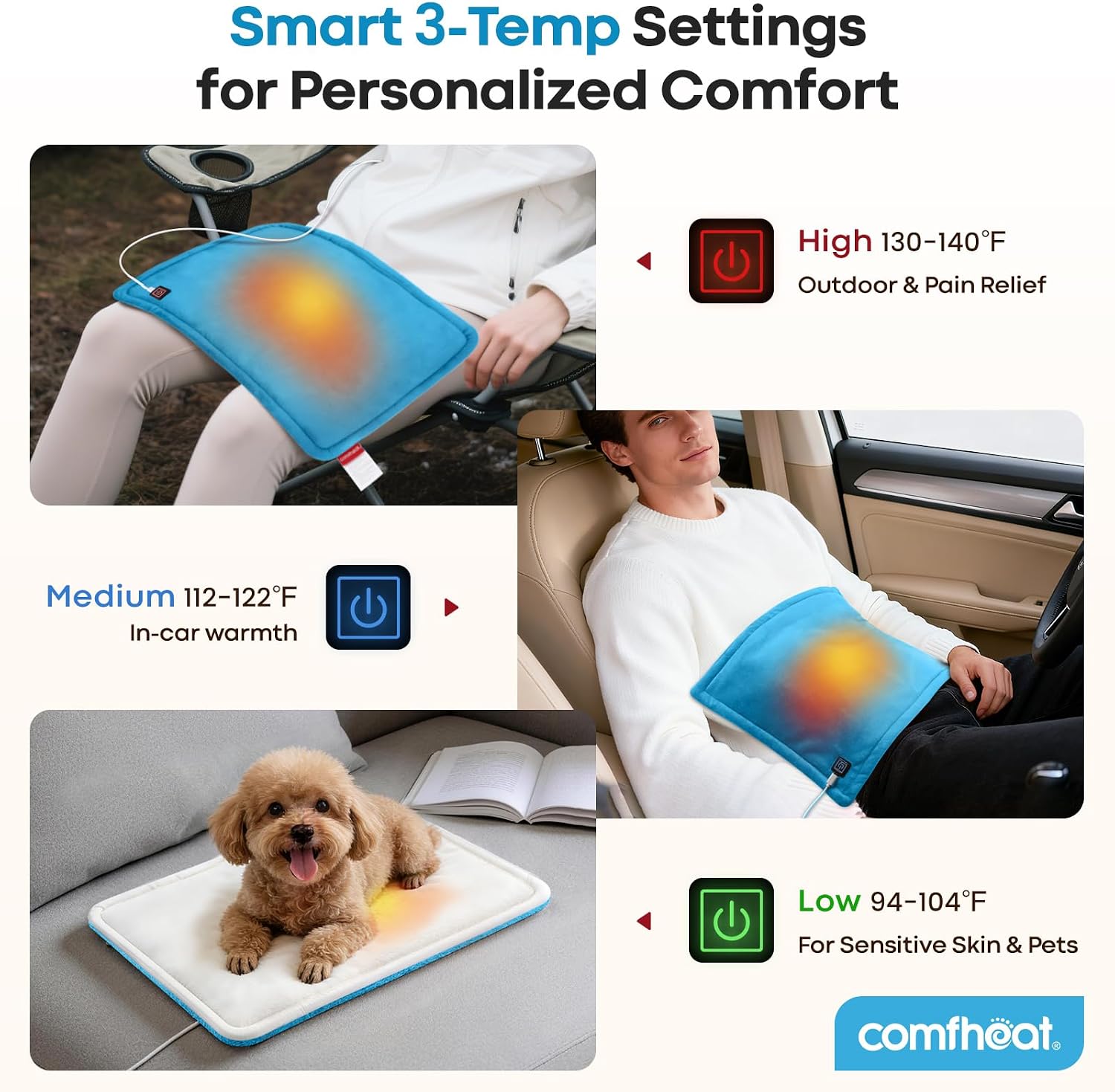
Image: A collage showing the heating pad being used in different settings, including on a lap while working, in a car, and on a couch, demonstrating its versatility for various applications.
Care and Maintenance
Proper care will extend the life of your Comfheat USB Heating Pad.
- Cleaning: Disconnect the heating pad from the power source before cleaning. Spot clean with a damp cloth and mild detergent. Do not submerge the pad in water or machine wash, as this can damage the electrical components.
- Drying: Allow the heating pad to air dry completely before reconnecting to a power source or storing. Do not use a dryer or apply direct heat.
- Storage: When not in use, store the heating pad in a cool, dry place. Avoid placing heavy objects on top of it.
- Inspection: Periodically inspect the heating pad and its cable for any signs of damage, such as fraying, cuts, or discoloration. If damage is found, discontinue use immediately.
Troubleshooting
If you encounter issues with your heating pad, refer to the following common problems and solutions:
| Problem | Possible Cause | Solution |
|---|---|---|
| Heating pad does not turn on or heat up. |
|
|
| Heating pad turns off unexpectedly before 45 minutes. |
|
|
| Pad is not warm enough. |
|
|
Product Specifications
| Model Number | 2.0880.125 |
| Brand | Comfheat |
| Dimensions (Unfolded) | 16 inches x 12 inches |
| Dimensions (Folded) | Approximately 6.7 inches x 4.7 inches |
| Power Input | 5V 2A USB |
| Voltage | 5 Volts |
| Wattage | 10 Watts |
| Heat Settings | 3 (High: 130-140°F, Medium: 112-122°F, Low: 100-104°F) |
| Auto Shut-Off | 45 minutes |
| Item Weight | 0.22 Kilograms (7.83 ounces) |
| Material | Plush Fabric |
| USB Cord Length | 5.9 feet |
| Additional Features | Automatic Shut Off, Lightweight, Overheat Protection |

Image: Visual representation of the heating pad's unfolded dimensions (16"x12") and its compact folded dimensions (6.7"x4.7"), highlighting its portability.
Warranty and Customer Support
Comfheat offers a free, no-hassle replacement process for any product issues.
If you encounter any problems or have questions regarding your Comfheat USB Heating Pad, please do not hesitate to contact our customer support team. We are committed to ensuring your satisfaction and will address your concerns within 12 hours.
For assistance, please refer to the contact information provided with your purchase or visit the official Comfheat website.