
EAYBLLY KG812-01
EAYBLLY Wireless Keyboard and Mouse Combo User Manual
Model: KG812-01
Introduction
Thank you for choosing the EAYBLLY Wireless Keyboard and Mouse Combo. This manual provides detailed instructions for setting up, operating, and maintaining your new device. Please read this manual thoroughly before use to ensure optimal performance and longevity of your product.
Product Overview
The EAYBLLY Wireless Keyboard and Mouse Combo is designed for comfort and efficiency, featuring an ergonomic design with a cushioned palm rest and wave-shaped keys. It offers seamless 2.4GHz wireless connectivity for a clutter-free workspace.

Key Features:
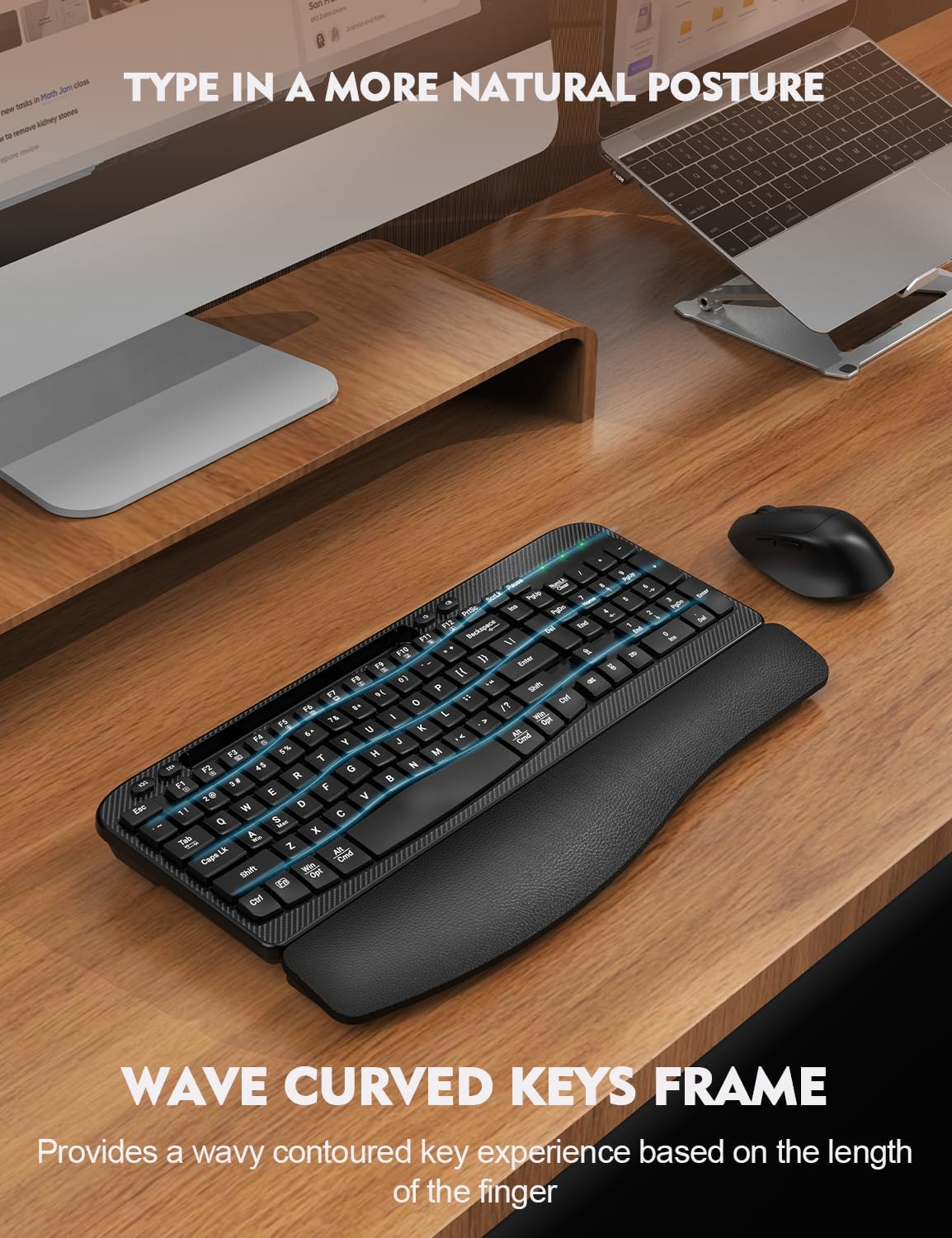
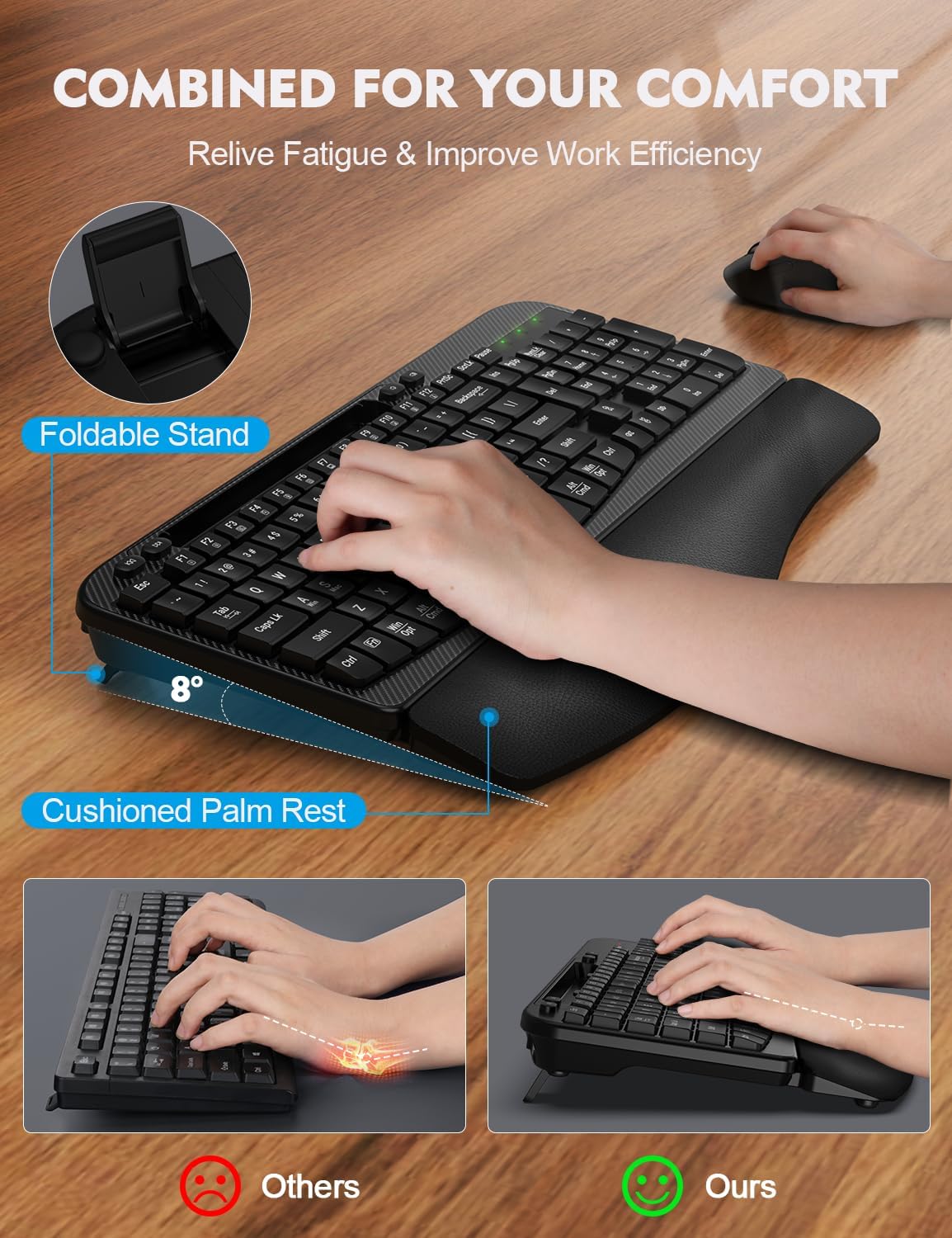
- Ergonomic Cushioned Palm Rest: Features a curved palm rest with soft memory foam and a resilient leather surface to reduce wrist bending and provide comfort during extended use.
- Wave-Shaped Keys Design: Keys are arranged in an arched, wave-like pattern to encourage a natural hand posture for comfortable and efficient typing.
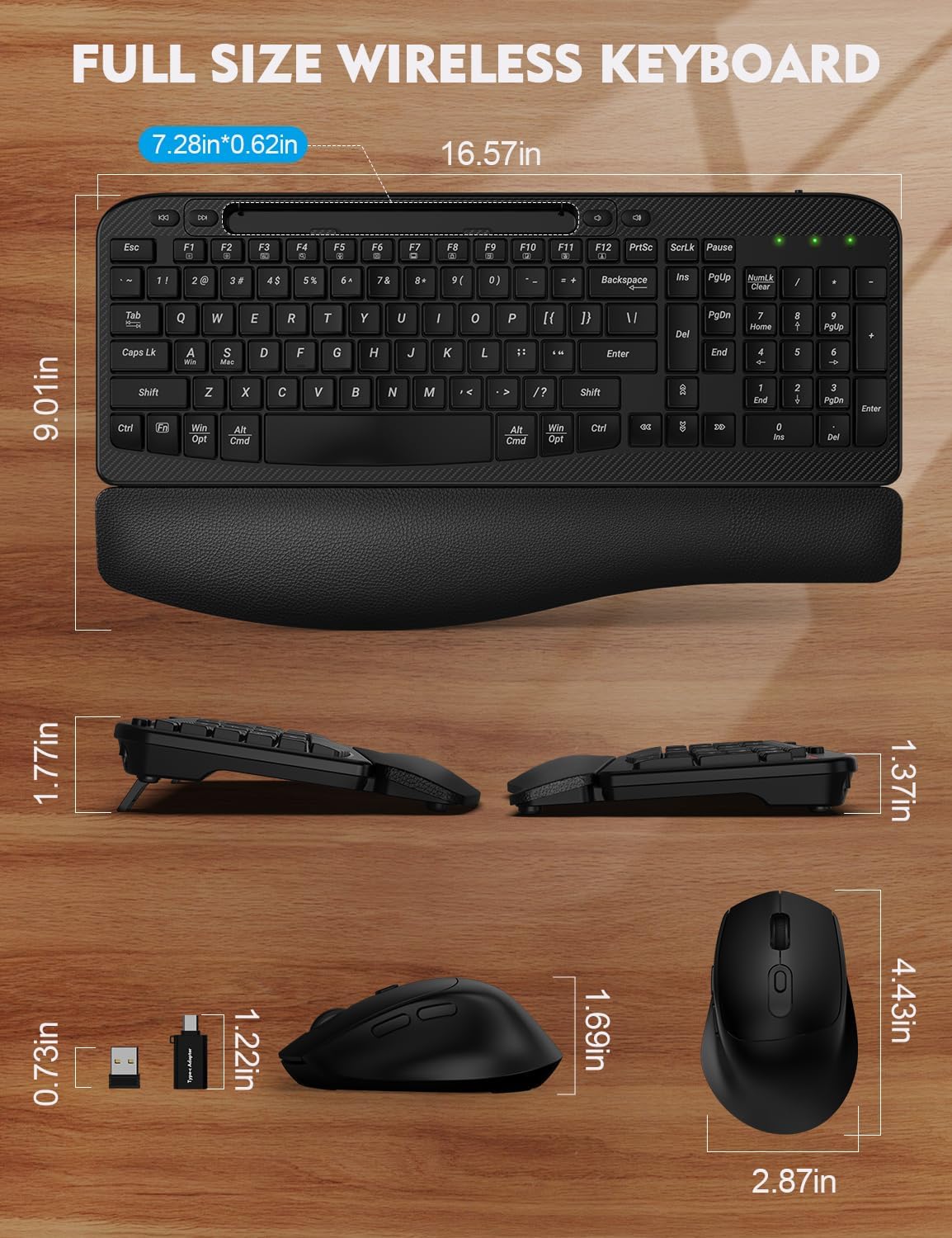
- Integrated Phone & Tablet Holder: A 7.28-inch slot allows for convenient placement of smartphones or tablets, aiding in multitasking.
- 2.4GHz Wireless Connectivity: Provides a stable and reliable connection up to 33 feet with a single USB receiver for both keyboard and mouse, ensuring no delays.
- Silent Wireless Mouse: The accompanying mouse offers quiet clicks and adjustable DPI settings (800/1200/1600) for sensitivity control.
- USB-C Compatibility: Includes an additional USB-C adapter for broad compatibility with various devices, including Mac and other USB-C enabled systems.
- Power Switches & Auto Sleep: Both devices have power switches and an automatic sleep mode after 10 minutes of inactivity to conserve battery life.
Setup Instructions
- Install Batteries:
Locate the battery compartments on the underside of both the keyboard and the mouse. Insert 2 AA batteries into the keyboard and 1 AA battery into the mouse, ensuring correct polarity. (Batteries not included).
- Connect USB Receiver:
The keyboard and mouse share a single USB receiver. Plug the USB receiver into an available USB-A port on your computer. If your computer only has USB-C ports, use the provided USB-C adapter.

The shared USB receiver and the included USB-C adapter for versatile connectivity. - Power On Devices:
Turn on the power switches located on the underside of both the keyboard and the mouse. The devices should automatically connect to your computer. No drivers are required for installation.
- Place Phone/Tablet (Optional):
Utilize the integrated 7.28-inch slot at the top of the keyboard to hold your smartphone or tablet for easy viewing and multitasking.

The built-in phone and tablet holder provides a convenient space for your devices.
Operating Instructions
Keyboard Usage:
- Typing Posture: The wave-shaped keys and cushioned palm rest are designed to support a natural hand and wrist position. Rest your palms comfortably on the palm rest while typing.
- Function Keys: Use the F1-F12 keys for various shortcuts. Some functions may require pressing the 'Fn' key simultaneously depending on your operating system.
- Compatibility: The keyboard is compatible with Windows, Mac OS, Linux, Android, and Chrome OS devices.
- Foldable Stand: Adjust the keyboard's tilt using the foldable stands on the underside for your preferred typing angle.
Mouse Usage:
- DPI Adjustment: The mouse features adjustable DPI settings (800/1200/1600). Press the DPI button located on the top of the mouse to cycle through sensitivity levels.
- Silent Clicks: The mouse is designed for quiet operation, minimizing click noise.
- Ergonomic Shape: The sculpted shape of the mouse is designed for a comfortable grip and natural hand position.

Maintenance
- Cleaning: Use a soft, dry cloth to clean the keyboard and mouse. For stubborn dirt, a slightly damp cloth can be used, but ensure no liquid enters the devices. Avoid harsh chemicals or abrasive cleaners.
- Battery Replacement: When the battery indicator light on the keyboard flashes or the mouse performance degrades, replace the batteries promptly. Always use new, good quality AA batteries.
- Storage: If not in use for an extended period, turn off both the keyboard and mouse using their respective power switches to conserve battery life. Store in a cool, dry place.
Troubleshooting
| Problem | Possible Solution |
|---|---|
| Keyboard/Mouse not responding |
|
| Lag or intermittent connection |
|
| Mouse cursor erratic or not moving |
|
Specifications
| Feature | Detail |
|---|---|
| Model Number | KG812-01 |
| Connectivity | 2.4GHz USB Wireless |
| Wireless Range | Up to 33 feet (10 meters) |
| Keyboard Dimensions | 16.57 x 9.01 x 1.37 inches (42.09 x 22.89 x 3.48 cm) |
| Item Weight | 2.08 pounds (0.94 kg) |
| Keyboard Battery | 2 x AA batteries (not included) |
| Mouse Battery | 1 x AA battery (not included) |
| Mouse DPI Settings | 800 / 1200 / 1600 DPI |
| Compatible Operating Systems | Windows, Mac OS, Linux, Android, Chrome OS |
| Manufacturer | EAYBLLY |
| Country of Origin | China |
Warranty and Support
EAYBLLY provides a 12-month warranty for this product from the date of purchase. This warranty covers manufacturing defects and workmanship. It does not cover damage caused by misuse, accident, unauthorized modification, or normal wear and tear.
For technical support, warranty claims, or any questions regarding your EAYBLLY Wireless Keyboard and Mouse Combo, please contact our customer service team. We are committed to providing prompt assistance.
- Customer Service: Refer to the contact information provided on the product packaging or the official EAYBLLY website.
- Response Time: Our customer service team aims to respond within 24 hours.
- Replacement Policy: We offer a 90-day replacement policy for eligible issues.
- Long-term Care: EAYBLLY is dedicated to providing lifetime care for its products.

Related documentsKG812-01


Ask a question about this manual
Ask about setup, troubleshooting, compatibility, parts, safety, or missing instructions. Manuals+ will review the question and use this page’s manual context to help answer it.