
1. Introduction
The ATOMSTACK A70 Max is a high-power laser engraving and cutting machine designed for precision and efficiency. Featuring a 70W laser output and an expansive 850 x 800 mm working area, this machine is suitable for a wide range of materials and applications. Its advanced dual-axis guide rail structure ensures stable and accurate operation, while the integrated control screen allows for convenient offline work.
1.1 Safety Information
Always prioritize safety when operating the laser engraving machine. Wear the provided protective goggles to shield your eyes from laser radiation. Ensure the work area is well-ventilated to dissipate fumes. Keep flammable materials away from the machine. Do not leave the machine unattended during operation. Read and understand all instructions before use.
2. Product Features
The ATOMSTACK A70 Max incorporates several key features for enhanced performance and user experience:
- Strong Cutting Power: The ATOMSTACK A70 Max laser cutter utilizes innovative second-generation CoS laser technology to create a smaller, more intense, and precise laser spot. It can cut 18mm acrylic, 12mm MDF boards, 30mm pine boards, and 0.3mm stainless steel sheets.
- Max Version Working Area: This professional blue light laser cutting and engraving machine features an ultra-large standard working area of 850 x 800 mm. The frame can accommodate materials up to 1045 x 900 mm. The machine's four support feet have fixed holes for secure attachment to a workbench, ensuring stable operation.
- New Motion Structure: To ensure fast and stable operation, the three axes of the ATOMSTACK A70 Max laser engraving machine utilize a new dual-axis rail structure with a low center of gravity. This design allows for stable, fast, and quiet movement, suitable for heavy engraving and cutting tasks. An accuracy of 0.01 mm can be maintained even at a high-speed operation of 400 mm/s.
- Standard High-Flow Air Assist: With a maximum high-flow air assist of 60 l/min, the machine ensures flawless cutting, prevents yellowing of the cut surface, and extends the laser's lifespan.
- Offline Work and Dual-Mode Focus Adjustment: The ATOMSTACK A70 Max laser cutting machine is equipped with an intelligent motherboard and a second-generation control screen, enabling offline operation without the need for computers or mobile phones. It also features manual and quick autofocus within 8 seconds.
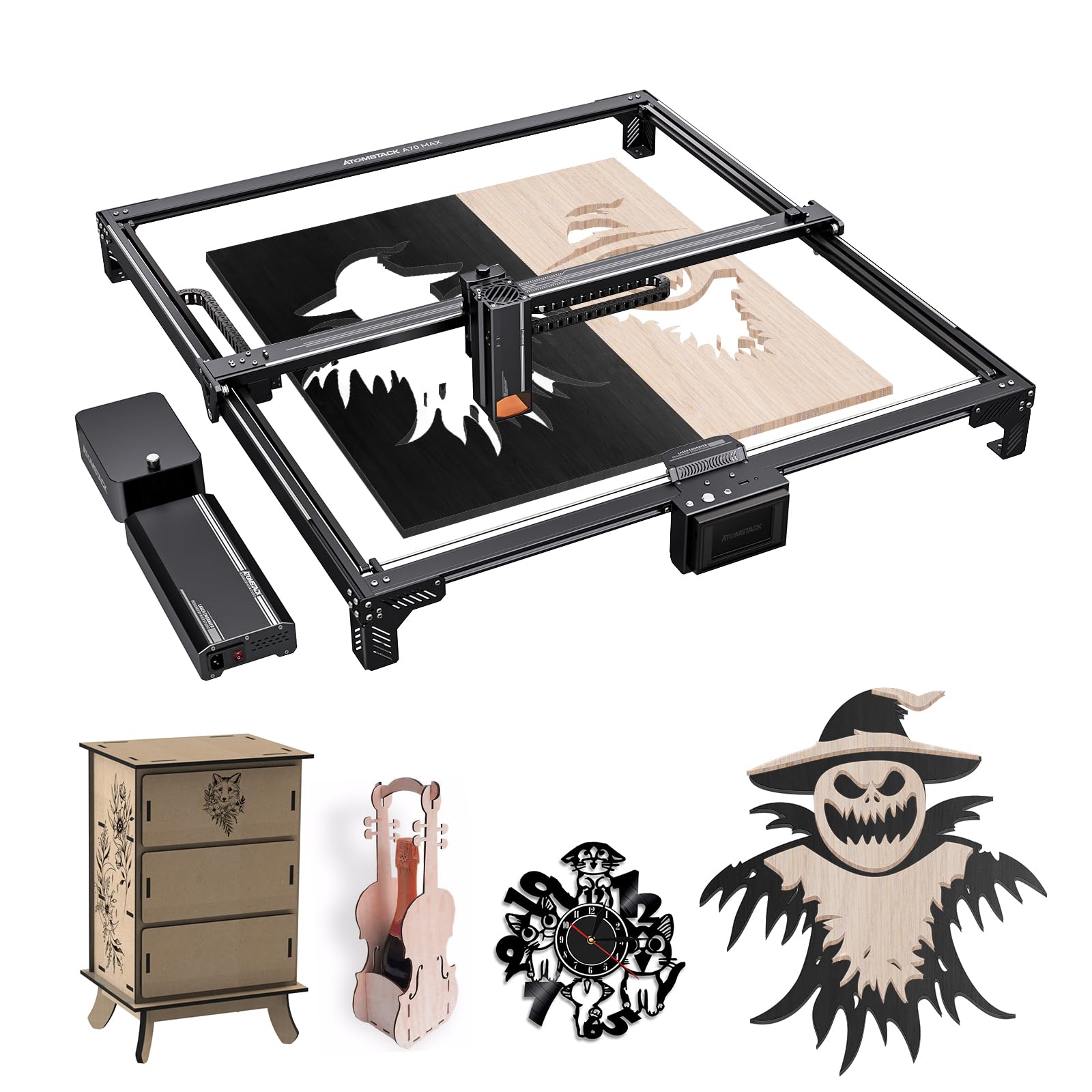
Figure 2.1: Illustration of the laser's longer beam waist for enhanced cutting power.
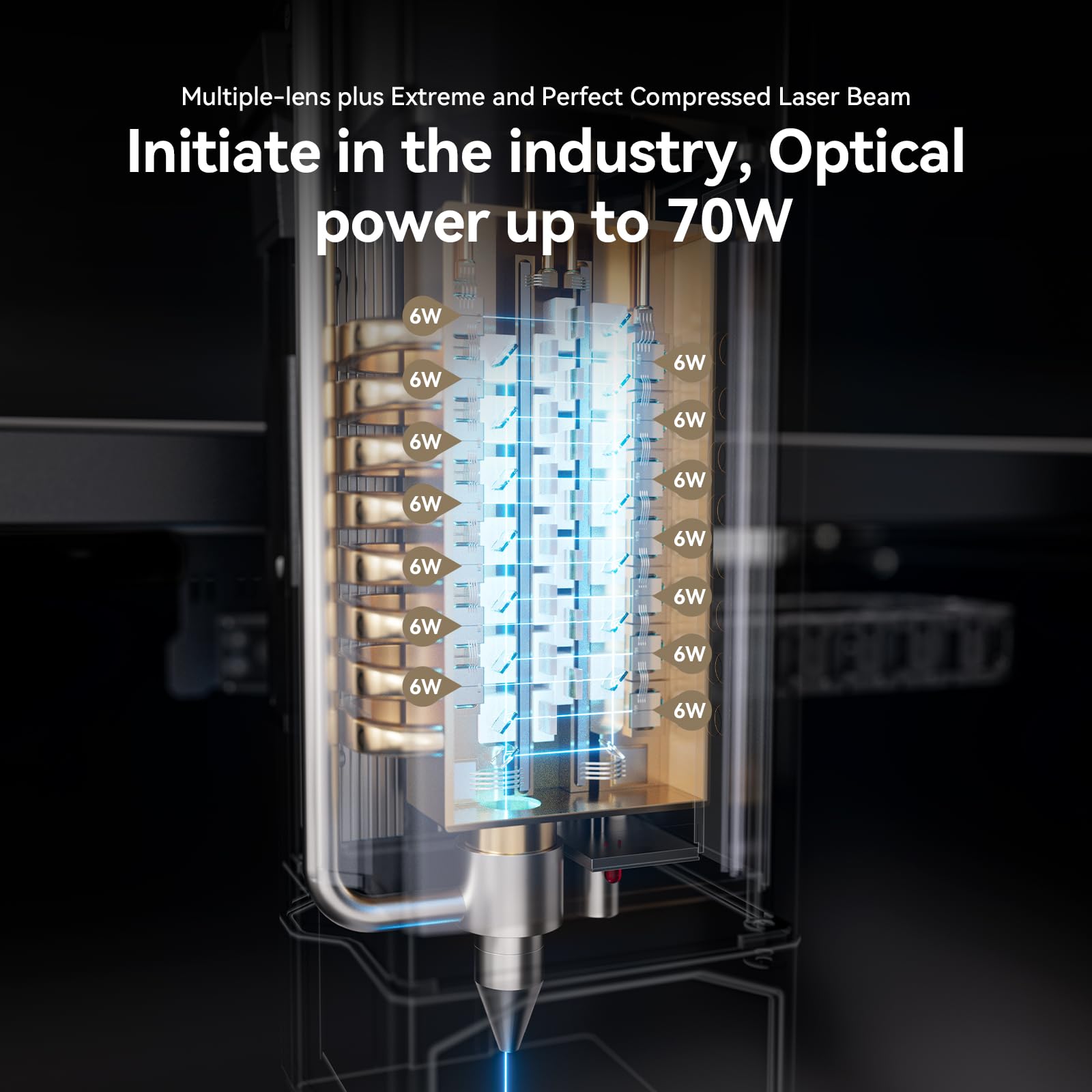
Figure 2.2: Detail of the multi-lens laser module, highlighting its 70W optical power.

Figure 2.3: Comparison of the A70 Pro and A70 Max, illustrating the A70 Max's extra-large 800x850mm working area.

Figure 2.4: Mechanical components showcasing the machine's 0.02mm accuracy.

Figure 2.5: The dual-axis guide rail component, central to the machine's strong, stable, and speedy motion.

Figure 2.6: Technical comparison of Second Generation CoS Packaged Laser technology.
3. Setup
3.1 Package Contents
Before assembly, verify that all components are present in the package:
- 1 x Upper support rod
- 1 x Lower component
- 1 x Left Y-axis sliding components
- 1 x Right Y-axis sliding components
- 1 x Lower support rod components
- 1 x Air pump
- 1 x Power supply
- 1 x Laser module
- 1 x Control screen
- 1 x Fixed focus film
- 1 x Goggles
- 1 x Power cable
3.2 Assembly Instructions
Assemble the machine frame by connecting the upper and lower support rods with the Y-axis sliding components. Ensure all connections are secure. Attach the four support feet to the frame and, if desired, fasten them to a stable workbench using the fixed holes for enhanced stability during operation. Install the laser module, air pump, and control screen according to the provided diagrams in the full manual.

Figure 3.1: The machine's stable frame structure and low center of gravity design for secure setup.
4. Operating Instructions
4.1 Software and Connectivity
The ATOMSTACK A70 Max supports popular operating software such as LaserGRBL and LightBurn. It offers multiple connection methods including Type C, mobile WLAN, and a 10.1 cm touchscreen for direct control. The machine is compatible with iOS, Android, Windows, and Mac operating systems.
4.2 Focus Adjustment
The machine features both autofocus and manual focus modes. For quick setup, utilize the autofocus function, which can achieve focus within 8 seconds. For specific material requirements or fine-tuning, manual focus adjustment is also available.
4.3 Engraving and Cutting Materials
The ATOMSTACK A70 Max is capable of engraving and cutting a wide array of materials:
- Engraving Materials: Wood, bamboo, cardboard, plastic, leather, PCB, aluminum oxide, galvanized and painted metal, 304 stainless steel, glass, ceramic, cotton fabric, stone plate.
- Cutting Materials: Thin steel plate, cardboard, non-woven fabric, wood plate, acrylic, thinner plastic plate, sponge.

Figure 4.1: Examples of diverse applications, including decorative paintings, wooden furniture, and wooden molds.
5. Maintenance
5.1 Air Assist System
The integrated air pump provides a steplessly adjustable airflow from 0-30 l/min, with a maximum high-flow air assist of 60 l/min. Regularly check and clean the air assist nozzle to ensure optimal performance. Proper air assist helps prevent yellowing of cut surfaces and extends the laser's lifespan.
5.2 Cleaning and Care
Keep the machine clean from dust and debris, especially the laser lens and guide rails. Use a soft, lint-free cloth for cleaning. Avoid using abrasive cleaners or solvents that could damage components. Periodically inspect all cables and connections for wear or damage.
6. Troubleshooting
If you encounter issues with your ATOMSTACK A70 Max, refer to the following general troubleshooting steps:
- No Power: Ensure the power cable is securely connected to both the machine and a working power outlet. Check the power supply unit for any indicator lights.
- Laser Not Firing: Verify that the laser module is correctly installed and connected. Check software settings to ensure the laser is enabled and power is set appropriately. Ensure safety interlocks are not triggered.
- Poor Engraving/Cutting Quality: Check the focus of the laser. Ensure the material is flat and properly secured. Adjust laser power and speed settings in your software. Clean the laser lens if necessary.
- Movement Issues: Inspect the guide rails for obstructions or debris. Ensure all belts are properly tensioned. Check motor connections.
For persistent issues, consult the comprehensive troubleshooting guide available on the manufacturer's website or contact customer support.
7. Specifications
Detailed technical specifications for the ATOMSTACK A70 Max Laser Engraving Machine:
| Specification | Value |
|---|---|
| Product Model | ATOMSTACK A70 Max |
| Input Power | 360 W |
| Output Power | 70–77 W Max |
| Max. Speed | 400 mm/s (24,000 mm/min) |
| Laser Wavelength | 455 ± 5 nm |
| Engraving Accuracy | 0.01 mm |
| Repeatability Accuracy | 0.1 mm |
| Spot Size | 0.15 x 0.15 mm |
| Engraving Size | 850 x 800 mm |
| Transfer Method | USB transfer |
| Focus Mode | Autofocus |
| Screen Control | 10.1 cm |
| Supported Connections | Type C, Mobile WLAN, Touchscreen |
| Support Systems | iOS, Android, Windows, Mac |
| Operating Software | LaserGRBL, LightBurn |
| Airflow | 0–30 l/min (Stepless adjustment) |
| Working Principle | Engraving/Cutting |
| Power Supply Input | 100–240 V AC, 50/60 Hz |
| Power Supply Output | 12 V 5 A |
| Quality Certifications | CE, FCC, RoHS, FDA, PSE |
| Manufacturer | ATOMSTACK |
| Part Number | A70 MAX - OMT |
| Power Source Type | AC |
| First Available Date | July 9, 2024 |
8. Warranty and Support
8.1 Return Policy
This product is subject to a 30-day return policy for refund or replacement, as per the seller's terms.
8.2 Customer Support
For technical assistance, warranty claims, or further inquiries, please contact the manufacturer or the seller directly. Refer to your purchase documentation for specific contact details.


