
1. Safety Information
Please read and understand this entire manual before attempting to assemble, operate, or install the product. Failure to follow these instructions could result in electric shock, fire, or serious personal injury.
- Ensure all electrical connections comply with local codes, ordinances, and the National Electrical Code (NEC).
- Consult a qualified electrician if you are unfamiliar with wiring methods.
- Turn off power at the circuit breaker before installation or servicing.
- Do not install the fan in a location where blades could strike objects or people.
- The mounting structure must be capable of supporting the fan's weight (approximately 18 lbs).
2. Package Contents
Verify that all components are present before beginning installation.
- Ceiling Fan Motor Assembly
- Fan Blades (8)
- Downrods (6", 12", 20")
- Mounting Bracket
- Remote Control with Wall Cradle
- Hardware Bags (screws, wire nuts, etc.)
- LED Light Kit
3. Setup and Installation
This section provides general guidance for installing your Fanbulous ceiling fan. Professional installation is recommended.
3.1 Choosing a Mounting Location
The fan is suitable for indoor and covered outdoor use (not exposed to direct rain). It is ideal for rooms up to 20ft x 20ft. Ensure there is at least 7 feet of clearance from the floor to the fan blades.
3.2 Downrod Selection
Select the appropriate downrod length for your ceiling height:
- 6-inch downrod: For ceilings up to 8 feet high.
- 12-inch downrod: Standard length for most installations.
- 20-inch downrod: For ceilings 10 feet or higher, or to enhance air circulation.
The fan can also be angle-mounted on sloped ceilings up to a maximum of 15 degrees.

Figure 1: Fan dimensions and downrod options for various ceiling types.
3.3 Blade Assembly
The fan blades feature two colors: a classic walnut finish on one side and a gray wood tone on the other. Choose the desired color before attaching the blades to the motor housing using the provided hardware.
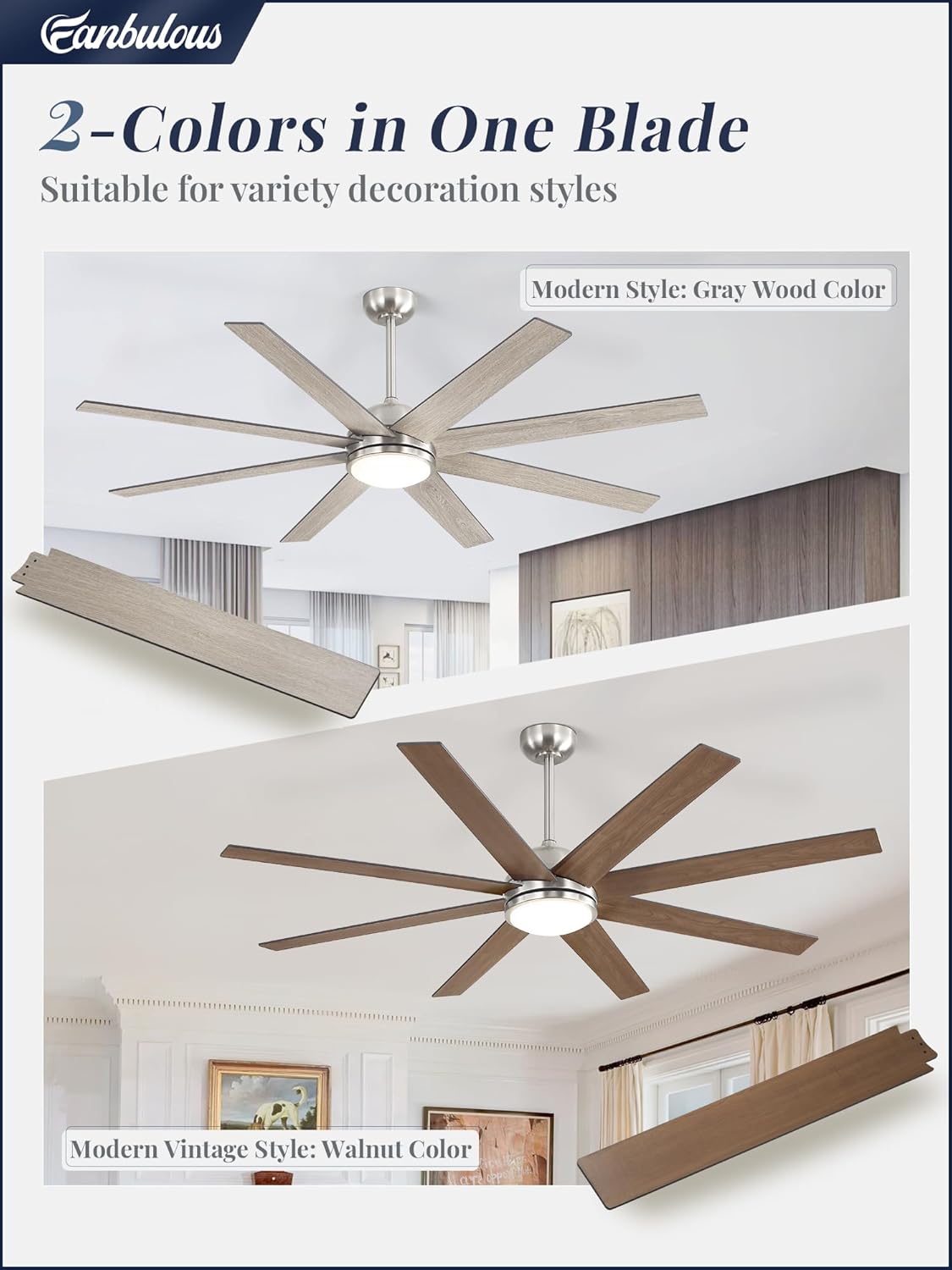
Figure 2: Reversible fan blades with gray wood and walnut finishes.
3.4 Wiring and Mounting
Follow the detailed wiring diagrams provided in the separate installation guide. Ensure all connections are secure and properly insulated. Mount the fan assembly to the ceiling junction box according to the instructions.
4. Operating Instructions
Your Fanbulous ceiling fan is controlled by the included remote control.
4.1 Remote Control Functions
The remote control allows you to manage all fan and light settings. It can be used as a handheld remote or mounted in the included wall cradle.

Figure 3: Remote control layout and functions.
- Power Button: Turns the fan and light on/off.
- Fan Speed (1-6): Adjusts the fan speed from low (1-2) to high (5-6).
- Light On/Off: Toggles the LED light.
- Color Temperature (CCT) Adjustment: Cycles through 3000K (warm white), 4500K (natural white), and 6500K (cool white).
- Reversible Mode: Changes the direction of blade rotation for summer (downward airflow) or winter (upward airflow) use.
- Timer Settings (1H/4H/8H): Sets the fan to turn off automatically after 1, 4, or 8 hours.
- Mute Button: Silences the remote control's beeping sounds.

Figure 4: Demonstrating 3-color temperature options.
4.2 Light Memory Function
The LED light features a memory function. If you turn off the light and wait approximately 10 seconds before turning it back on, it will recall your last selected color temperature setting.
4.3 Quiet Operation
The DC motor operates at low noise levels (below 35dB), ensuring a quiet environment.

Figure 5: Noise level comparison for quiet enjoyment.
4.4 Official Product Video
Video 1: An overview of the Fanbulous large ceiling fan, demonstrating its features and operation. Note: This video may feature a 72-inch model, but the functions are similar to the 65-inch model.
5. Maintenance
Regular maintenance ensures optimal performance and longevity of your ceiling fan.
- Cleaning: Periodically wipe the fan blades and motor housing with a soft, damp cloth. Do not use abrasive cleaners or solvents.
- Blade Tightness: Check blade screws annually to ensure they are secure. Loose blades can cause wobbling and noise.
- Light Cover: Clean the light cover gently with a soft cloth to maintain light output.
- No Lubrication Needed: The DC motor is permanently lubricated and does not require additional oiling.
6. Troubleshooting
Before contacting customer support, refer to the following common issues and solutions:
| Problem | Possible Cause | Solution |
|---|---|---|
| Fan does not start | No power to the fan; Loose wire connections; Remote control battery low or not paired. | Check circuit breaker; Ensure all wiring is secure; Replace remote battery or re-pair remote (refer to remote pairing instructions in the full manual). |
| Light does not work | Loose wire connection to light kit; LED driver failure; Remote control issue. | Check light kit wiring; Contact customer support if LED driver is suspected; Verify remote functionality. |
| Fan wobbles | Loose blade screws; Unbalanced blades; Loose mounting bracket. | Tighten all blade screws; Use a balancing kit (not included) if necessary; Ensure mounting bracket is securely fastened to the junction box. |
| Remote not responding | Low battery; Not paired with fan; Interference. | Replace remote battery; Re-pair remote with the fan (consult full manual for pairing steps); Ensure no strong interference sources are nearby. |
7. Specifications
| Feature | Detail |
|---|---|
| Brand | Fanbulous |
| Model Number | F-TY65SN-1D01 |
| Size | 65 Inch Diameter |
| Color | Brushed Nickel |
| Motor Type | Quiet Reversible DC Motor |
| Number of Blades | 8 |
| Light Type | Integrated LED |
| Color Temperature (CCT) | 3000K, 4500K, 6500K (Adjustable) |
| Light Brightness | 2000 Lumens |
| Wattage | 65 watts |
| Control Method | Remote Control |
| Number of Speeds | 6 |
| Indoor/Outdoor Usage | Covered Outdoor (not exposed to direct rain) |
| Product Dimensions (D x W x H) | 65"D x 65"W x 15.8"H |
| Item Weight | 18 Pounds |
8. Warranty and Support
8.1 Warranty Information
Fanbulous provides a 5-year warranty on the motor and a 2-year warranty on all other parts of this ceiling fan. This warranty covers defects in materials and workmanship under normal use.
8.2 Customer Support
If you encounter any problems with your product or have questions regarding installation, operation, or warranty claims, please contact Fanbulous customer service. Refer to the contact information provided with your purchase or on the official Fanbulous website for assistance.