
SMUG F02-40in-Ru
SMUG Computer Desk with Storage Drawers
Instruction Manual
Model: F02-40in-Ru | Brand: SMUG
1. Introduction
Thank you for choosing the SMUG Computer Desk with Storage Drawers. This modern and simple study writing table is designed to provide ample workspace and efficient storage solutions for your home or office. Its sturdy construction and thoughtful features make it an ideal addition to any small space, ensuring a clutter-free and organized desktop.
Key Features:
- Spacious 40x24 inch desktop crafted from waterproof, easy-to-clean particleboard.
- Two easy-to-assemble fabric drawers for convenient storage.
- Integrated shelf for additional storage space.
- Durable metal frame ensuring stability and long-lasting support.
- Multi-functional iron hook for headphones or bags.

Image: The SMUG Computer Desk with Storage Drawers, showcasing its spacious desktop and integrated storage in a modern home office environment.

Image: A full view of the SMUG Computer Desk, highlighting its ample surface area suitable for multiple monitors and office essentials.
2. Safety Warnings
- Keep all small parts and packaging materials away from children and pets to prevent choking hazards.
- Ensure all screws and fasteners are tightened securely before use. Periodically check and re-tighten as needed.
- Do not overtighten screws, as this may damage the product.
- Assemble the desk on a soft, clean surface to prevent scratches or damage.
- Do not stand or sit on the desk.
- Distribute weight evenly across the desktop and shelves to maintain stability.
- If any parts are missing or damaged, do not proceed with assembly. Contact customer service immediately.
3. Package Contents
Before beginning assembly, please verify that all components listed below are present and undamaged. Refer to the assembly video for visual identification of parts.
| Part | Description | Quantity |
|---|---|---|
| Desktop Board (A) | Main desktop surface | 1 |
| Splice Board (B) | Smaller desktop section | 1 |
| Left Leg Frame (C) | Main left leg structure | 1 |
| Drawer Left Frame (D) | Left frame for drawers | 1 |
| Fixed Frame (E) | Connecting frame | 1 |
| Inclined Reinforcement Tube (F) | Angled support tubes | 2 |
| Lower Panel (G) | Bottom shelf panel | 1 |
| Connector Tube (H) | Short connecting tubes | 4 |
| Drawer Right Frame (I) | Right frame for drawers | 1 |
| Drawer (J) | Fabric storage drawers | 2 |
| Rear Reinforcement Tube (K) | Rear support tube | 1 |
| Screws (1) | Various screws | 30 |
| Screws (2) | Specific screws | 3 |
| Hook (3) | Headphone/bag hook | 1 |
| Wrench (4) | Assembly tool | 1 |

Image: Detailed diagram of all included components and their respective quantities.
4. Setup and Assembly
Follow these steps carefully to assemble your SMUG Computer Desk. It is recommended to have a second person assist with certain steps for easier assembly.
Official Assembly Video:
Video: Official SMUG office home desk with drawers assembly video. This video provides a comprehensive visual guide for the entire assembly process.
Assembly Steps:
- Step 1: Assemble Left Leg Frame (C) and Fixed Frame (E)
Install the Fixed Frame (E) to the Left Leg Frame (C) using Screws (1)*2. Ensure the frames are oriented correctly as shown in the diagram/video.
- Step 2: Assemble Drawer Frames (D&I) with Connector Tubes (H)
Install Connector Tube (H)*4 to the Drawer Frames (D&I) using Screws (1)*8. Pay attention to the orientation of the connector tubes for proper drawer function.
- Step 3: Connect Fixed Frame (E) to Drawer Left Frame (D) and Install Rear Reinforcement Tube (K)
With Screws (1)*4, install the Fixed Frame (E) part to the Drawer Left Frame (D) part. Then, install the Rear Reinforcement Tube (K) to the bottom of the Left Leg Frame (C) and Drawer Left Frame (D) using appropriate screws. Note: Two Screws (1)*2 need to pass through the Inclined Reinforcement Tube (F)*2 before installation in Step 5.
- Step 4: Install Desktop Board (A)
Install the Desktop Board (A) to the assembled frame using Screws (1)*8. Carefully align the holes before tightening.
- Step 5: Install Inclined Reinforcement Tubes (F)
Install the Inclined Reinforcement Tube (F)*2 to the Left Leg Frame (C) and Drawer Left Frame (D). Ensure the screws are passed through the tubes as noted in Step 3.
- Step 6: Install Splice Board (B)
With Screws (1)*4, install the Splice Board (B) to the Connector Tube (H)*2. This completes the desktop surface.
- Step 7: Insert Drawers (J)
Assemble the two Drawers (J) by unfolding them and inserting the bottom panel. Then, put the assembled Drawers (J)*2 into the Drawer Frames (D&I).
- Step 8: Attach Headphone Hook (3)
Attach the Hook (3) to the Left Leg Frame (C) using Screw (2). This hook provides convenient storage for headphones or bags.
5. Operating Instructions
Using the Drawers:
The desk features two fabric drawers (J) for organized storage. Simply pull the ring handles to open and push to close. These drawers are ideal for documents, office supplies, and personal items, helping to keep your desktop clutter-free.
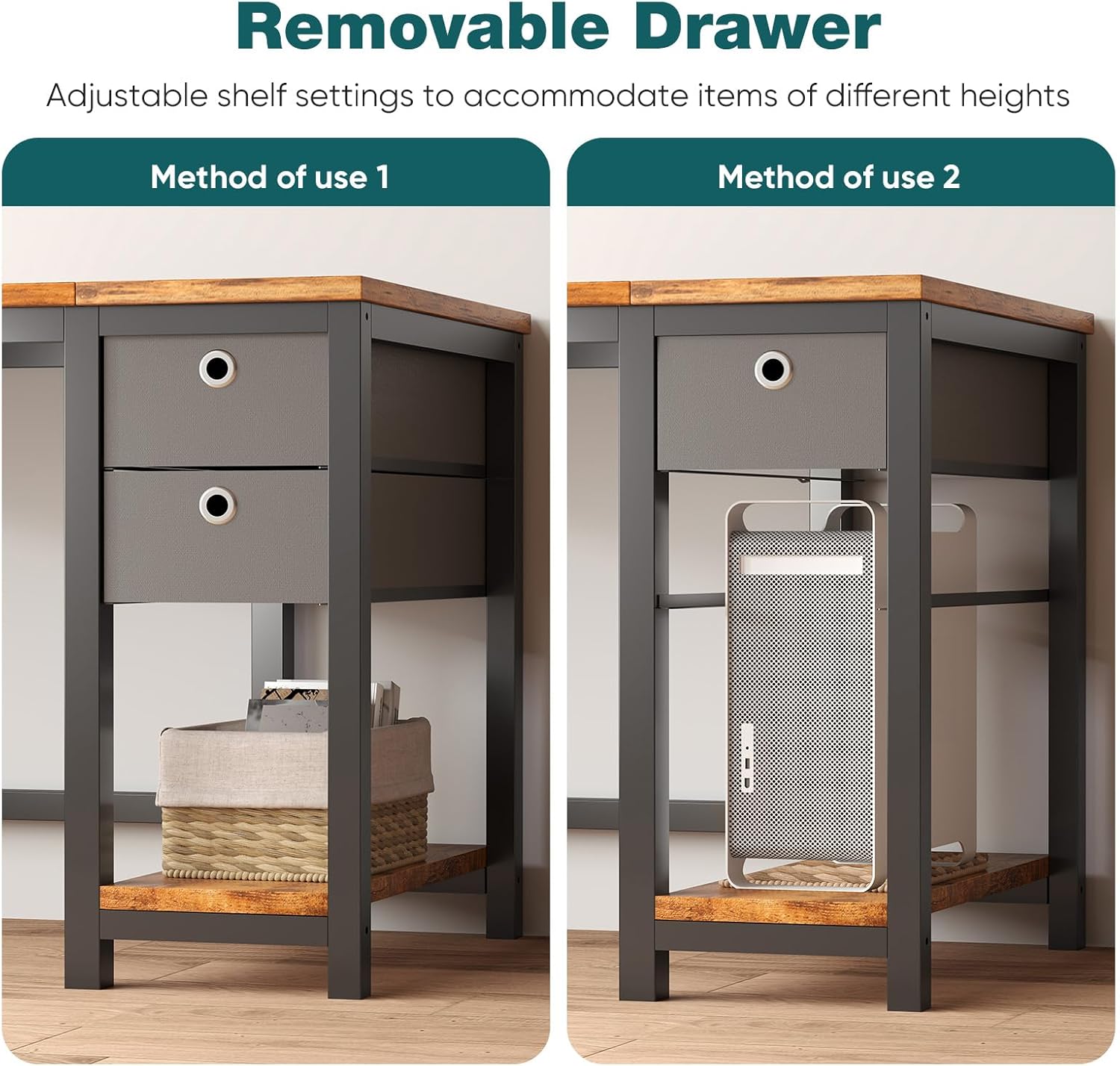
Image: The removable fabric drawers, demonstrating their flexibility for storage or removal to create open shelf space.

Image: An overhead view illustrating how the drawers provide ample storage for various items, contributing to a tidy workspace.
Utilizing the Headphone Hook:
The integrated iron hook on the left side of the desk provides a convenient spot to hang your headphones, backpack, or other accessories, keeping them easily accessible and off your workspace.
Video: This video demonstrates the compact design of the desk and highlights the utility of the headphone hook.
6. Maintenance and Care
Cleaning:
The desktop is made from waterproof and easy-to-clean particleboard. For daily cleaning, simply wipe the surface with a soft, damp cloth. Avoid using harsh chemicals or abrasive cleaners, as these may damage the finish.

Image: Close-up of the desk's premium desktop, emphasizing its easy-to-clean and water-resistant properties.
General Care:
- Avoid placing hot items directly on the desktop. Use coasters or protective pads.
- Keep the desk away from direct sunlight and extreme temperature changes to prevent warping or discoloration.
- Regularly check all connections and tighten screws if necessary to ensure stability.
7. Troubleshooting
Common Issues and Solutions:
- Desk is Wobbly:
Ensure all screws are fully tightened. Check that the desk is on a level surface. If not, adjust the floor levelers on the bottom of the legs if available, or place shims under the legs.
- Screws Do Not Fit/Align:
Double-check that you are using the correct screws for each step as indicated in the instructions and package contents. Sometimes, screws may appear too large for holes if the part is not perfectly aligned or if the internal threading is slightly off. Try re-aligning the parts and gently wiggling the screw while turning. If a screw still does not fit, verify you have the correct part and contact customer support for assistance.
- Drawers Do Not Slide Smoothly:
Ensure the fabric drawers are correctly assembled and the bottom panel is fully inserted. Check for any obstructions within the drawer frames. The fabric drawers are designed to be inserted and removed easily, not to slide on rails.
- Missing or Damaged Parts:
If you find any parts missing or damaged upon opening the package, please do not attempt to assemble the desk. Contact SMUG customer service immediately with your purchase details for replacement parts.
8. Specifications
| Attribute | Detail |
|---|---|
| Brand | SMUG |
| Model Number | F02-40in-Ru |
| Product Dimensions | 23.6"D x 39.3"W x 29.7"H |
| Color | Rust Brown |
| Style | Modern |
| Base Material | Metal |
| Top Material Type | Engineered Wood |
| Item Weight | 38.3 Pounds |
| Number of Drawers | 2 |
| Number of Shelves | 1 |
| Required Assembly | Yes |
| UPC | 722898005720 |
9. Warranty and Support
For any questions, concerns, or assistance with your SMUG Computer Desk, please contact our customer service team. While specific warranty details are not provided in this manual, SMUG is committed to ensuring customer satisfaction. Please retain your proof of purchase for any warranty claims or support inquiries.
You can visit the official SMUG store for more information: SMUG Store on Amazon
Ask a question about this manual
Ask about setup, troubleshooting, compatibility, parts, safety, or missing instructions. Manuals+ will review the question and use this page’s manual context to help answer it.