
1. Introduction
Thank you for purchasing the Shot Navi Laser Sniper nano GR+INFINITY GPS Rangefinder. This device combines the precision of a laser rangefinder with the comprehensive data of a GPS golf watch, designed to enhance your golf experience. This manual provides essential information for the safe and effective use of your device. Please read it thoroughly before use and keep it for future reference.
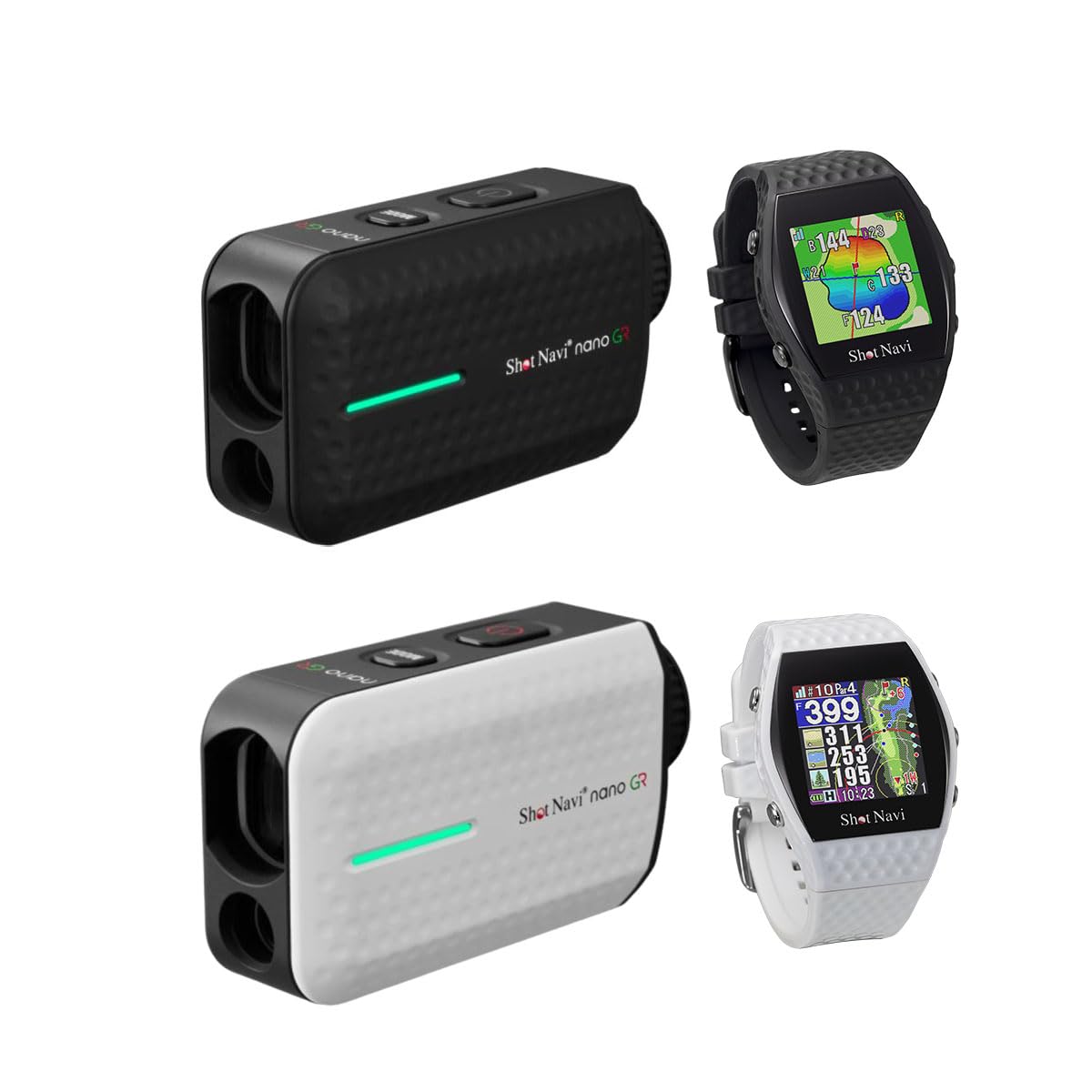
Figure 1: Overview of the Shot Navi Laser Sniper nano GR laser rangefinder (black and white) and the Shot Navi INFINITY GPS watch (black and white).
2. Product Features
2.1. Laser Rangefinder (Laser Sniper nano GR) Benefits
- Simple Operation: Distance measurement is achieved by simply pressing a button.
- High Measurement Accuracy: Provides precise remaining distance measurements, often more accurate than GPS for specific targets.
- Versatile Use: Capable of measuring distances to various targets such as pin flags, bunkers, and trees.
- Extended Battery Life: Allows for approximately 38,000 measurements on a single charge.

Figure 2: Illustration of the benefits of the laser rangefinder, including simple operation and high accuracy.
2.2. GPS Golf Watch (INFINITY) Benefits
- Effortless Distance Measurement: Easily measure distances without needing to retrieve a separate device, as it is worn on the wrist.
- Hole Layout Visualization: View the entire hole layout, which is particularly helpful for unfamiliar courses.
- Green Shape and Slope Information: Understand the green's contours and slopes to plan approach shots for easier putting.

Figure 3: Illustration of the benefits of the GPS golf watch, showing satellite connection and on-wrist display.
2.3. Combined Use Benefits
Utilizing both the GPS golf watch and the laser rangefinder offers a comprehensive approach to course management. The GPS provides overall course layout and general distances, while the laser offers pinpoint accuracy for specific targets, especially within 100 yards. This combination is highly effective for improving your golf score.

Figure 4: Example of using both the GPS watch for tee shots and the laser rangefinder for precise short-range measurements.
2.4. Design and Performance
- Ultra-Light and Compact: The Laser Sniper nano GR is credit card-sized and weighs only 110g, making it lighter than three golf balls (138g). This ensures excellent portability.
- Enhanced Visibility OLED Display: Features a Green & Red OLED display, offering three levels of brightness adjustment. This improves visibility in various conditions, including bad weather or strong sunlight where traditional black displays are difficult to see.
- Rapid Measurement Speed: Achieves measurement in approximately 0.2 seconds. This quick response reduces hand shake during measurement and contributes to faster play.

Figure 5: The Laser Sniper nano GR shown next to a credit card for size comparison and on a scale demonstrating its light weight.
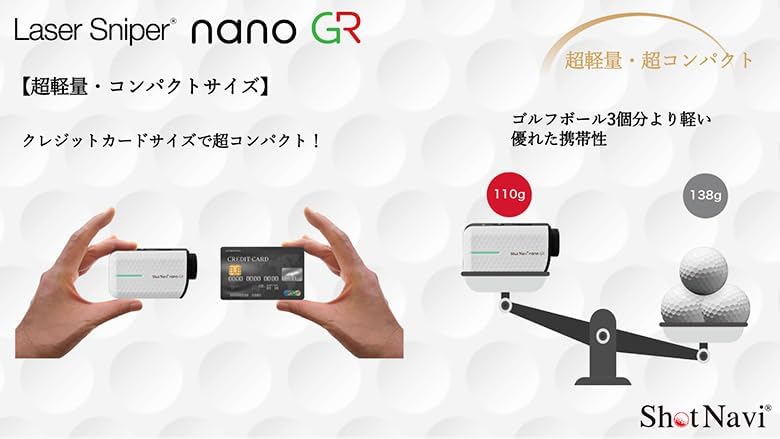
Figure 6: Comparison of display visibility in sunny and cloudy conditions, highlighting the Green & Red OLED.

Figure 7: Visual representation of the rapid 0.2-second measurement speed of the device.
3. Setup
3.1. Package Contents
Before proceeding, ensure all items are present in the package:
- Shot Navi Laser Sniper nano GR device
- Shot Navi INFINITY GPS watch
- Laser Pouch (for Laser Sniper nano GR)
- Charging cables (for both devices)
- User Manual (this document)
3.2. Charging the Device
Both the Laser Sniper nano GR and INFINITY GPS watch are equipped with Lithium Polymer batteries. Fully charge both devices before initial use.
- Connect the provided charging cable to the charging port on each device.
- Connect the other end of the cable to a USB power adapter (not included) or a computer's USB port.
- The charging indicator will illuminate. Charging typically takes approximately 3 hours for a full charge.
- Once fully charged, disconnect the charging cable.
3.3. Powering On/Off
- To Power On: Press and hold the power button (usually located on the top or side) for a few seconds until the display illuminates.
- To Power Off: Press and hold the power button again until the device powers down.
3.4. Initial Settings (Laser Sniper nano GR)
Upon first power-on, you may need to configure basic settings:
- Unit of Measurement: Select between yards (y) and meters (m) according to your preference. Refer to the device's on-screen menu for navigation.
- Display Brightness: Adjust the OLED display brightness (3 levels available) for optimal visibility in different lighting conditions.
4. Operating Instructions
4.1. Using the Laser Sniper nano GR
- Aiming: Look through the eyepiece and align the crosshairs with your target (e.g., flagstick, bunker).
- Measuring: Press the measurement button once. The device will quickly display the distance to the target.
- Pin Finder Function: For flagsticks, the device often has a "Pin Finder" or "Flag Lock" feature that vibrates or provides a distinct display when it locks onto the flag, ignoring background objects. Consult your device's specific button functions for activation.
- Slope Compensation: If your model includes slope compensation, it will display both the actual distance and the slope-adjusted distance.
4.2. Using the INFINITY GPS Watch
- Course Selection: Once powered on, the watch will automatically search for GPS signals and display nearby golf courses. Select your course from the list.
- Distance Display: The watch will display distances to the front, center, and back of the green. It may also show distances to hazards.
- Hole Layout: Navigate through the watch's menu to view graphical representations of the hole layout.
- Green View: Access the green view to see its shape and elevation changes, aiding in shot planning.
4.3. Optimal Combined Use
For best results, use the INFINITY GPS watch for overall course strategy, hole layout, and general distances, especially from the tee. Use the Laser Sniper nano GR for precise measurements to specific targets, particularly for approach shots and within 100 yards of the green, where exact distances are critical.
5. Maintenance
5.1. Cleaning
- Lenses: Gently wipe the lenses with a clean, soft microfiber cloth. Do not use abrasive materials or harsh chemicals.
- Body: Wipe the device body with a soft, damp cloth. Avoid excessive moisture.
5.2. Storage
- Store the devices in a cool, dry place away from direct sunlight and extreme temperatures.
- When not in use for extended periods, ensure the devices are fully charged before storage and periodically recharge them to maintain battery health.
- Use the provided laser pouch for the Laser Sniper nano GR to protect it from scratches and impacts.
5.3. Waterproof Rating
The Laser Sniper nano GR has an IPX4 equivalent waterproof rating, meaning it is splash-proof and can withstand light rain. It is not designed for submersion in water.
6. Troubleshooting
| Problem | Possible Cause | Solution |
|---|---|---|
| Device does not power on. | Low battery. | Charge the device for approximately 3 hours. |
| Inaccurate laser measurement. | Lens is dirty; target is too small or far; unstable grip. | Clean the lens. Ensure a steady hand. Aim at a larger target if possible. |
| GPS watch not finding courses. | Poor GPS signal; device not updated. | Move to an open area. Ensure the device has the latest course data (check manufacturer's website for updates). |
| Display is dim or hard to read. | Brightness setting is too low; strong ambient light. | Adjust the display brightness setting. |
7. Specifications
| Feature | Detail |
|---|---|
| Dimensions | 89 x 50 x 31 mm |
| Weight | 110g |
| Battery Type | Lithium Polymer Battery |
| Charging Time | Approx. 3 hours |
| Measurement Range | 10 - 1,093 yards (10 - 1,093 meters) |
| Measurement Error | ±1m |
| Magnification | 6x |
| Lens Diameter | 16mm |
| Waterproof Rating | IPX4 equivalent (splash-proof) |
| Laser Class | IEC60825-1 Class 1M Laser Product |
| Included Accessories | Laser Pouch |
8. Safety Information
The Shot Navi Laser Sniper nano GR is a Class 1M Laser Product according to IEC60825-1 standards. Please observe the following safety precautions:
- DO NOT stare into the laser beam directly or with optical instruments (e.g., binoculars, telescopes), as this may cause eye damage.
- DO NOT aim the laser at other people or animals.
- Keep the device out of reach of children.
- Use the device only as intended for golf distance measurement.
- Avoid disassembling or modifying the device, as this can expose you to laser radiation and void the warranty.
9. Warranty and Support
For warranty information, technical support, or service inquiries, please refer to the official Shot Navi website or contact their customer service department. Keep your proof of purchase for warranty claims.