
MELOKEA D060
MELOKEA Office Chair Instruction Manual
Model: D060
1. Safety Information
Please read all safety warnings and instructions carefully before assembling and using the MELOKEA Office Chair. Retain this manual for future reference.
- Maximum Weight Capacity: Do not exceed the maximum load capacity of 200 kg (440 lbs). Exceeding this limit may cause damage to the chair and lead to injury.
- Stability: Ensure the chair is stable during assembly and use. Avoid sudden movements or leaning excessively, especially when adjusting components.
- Adjustable Parts: Exercise caution when adjusting movable parts such as the 4D armrests and 2D headrest to prevent pinching or injury.
- Assembly: Follow all assembly instructions precisely. Ensure all screws and fasteners are securely tightened before use. Periodically check all connections for tightness.
- Children and Pets: Keep children and pets away from the chair during assembly. Do not allow children to play on or with the chair.
- Usage Environment: Use the chair on a flat, stable surface. Avoid using it on uneven ground or near heat sources.
2. Product Overview
The MELOKEA Office Chair Model D060 is an ergonomically designed chair built for comfort and support, featuring multiple adjustment options to suit various body types and preferences. It is certified to European standards EN12520 for home and EN1335 for professional office chairs.
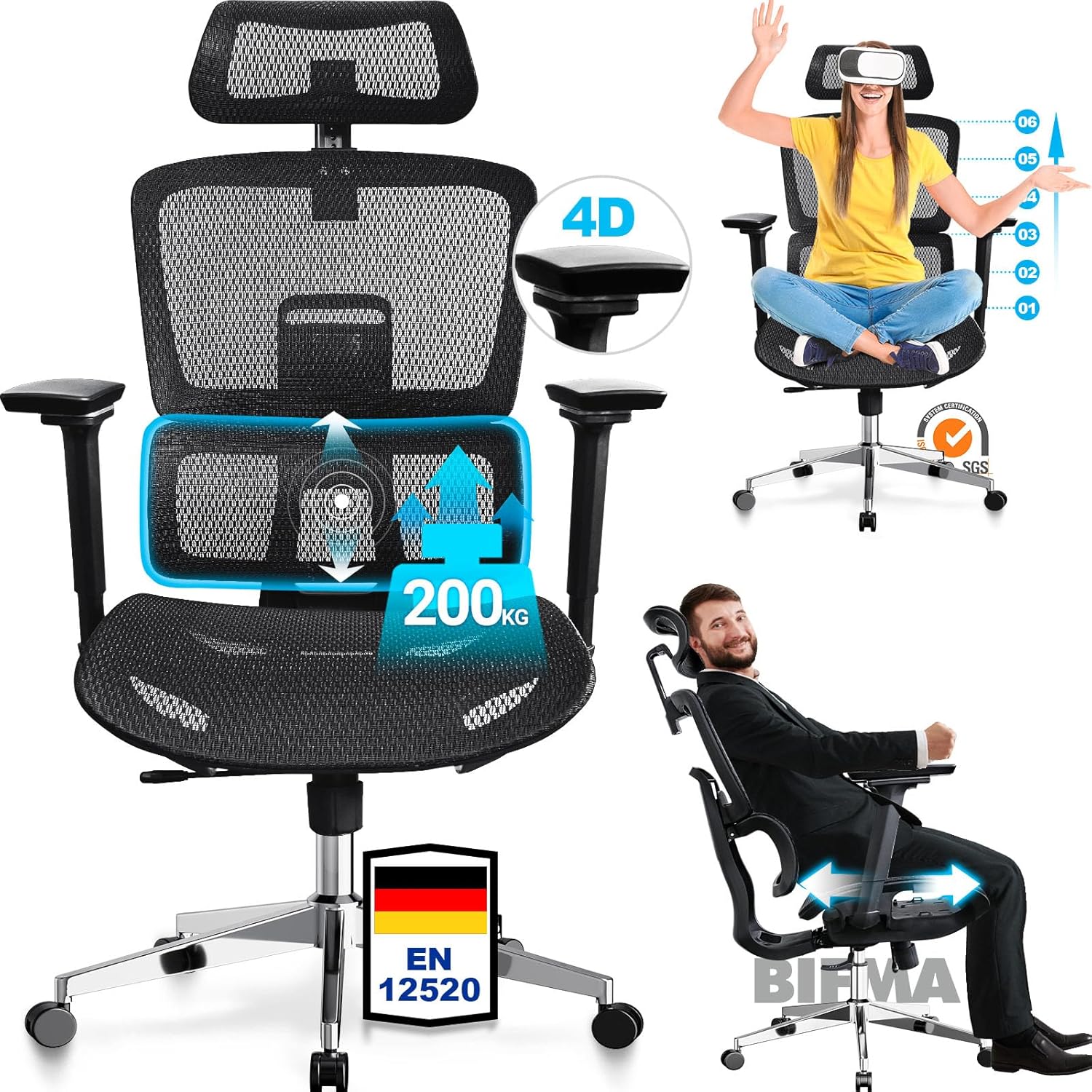
Image: Front view of the MELOKEA Office Chair highlighting 4D armrests, 200kg weight capacity, and EN 12520 certification. The image also shows a person using the chair with VR headset and another person demonstrating recline.
Key Features:
- Ergonomic Design: Engineered to provide optimal support for the back, neck, and head, promoting a healthy posture.
- High Weight Capacity: Supports users up to 200 kg (440 lbs).
- 4D Armrests: Fully adjustable armrests for personalized comfort.
- Adjustable Backrest: Multi-stage recline with locking positions.
- Adjustable Seat Depth: Allows for customization of seat depth to fit leg length.
- 2D Headrest: Adjustable headrest for neck support.
- Breathable Mesh: High-elastic mesh design for enhanced comfort and airflow, preventing heat buildup.
- Waterfall Seat Cushion: 56 cm deep seat cushion designed to distribute pressure evenly across hips, thighs, and knees.
3. Setup & Assembly
Assembly of the MELOKEA Office Chair typically involves attaching the base, gas lift, wheels, seat, backrest, armrests, and headrest. Please ensure all components are present before beginning assembly. Refer to the included assembly diagram for detailed steps.
General Assembly Steps (Consult provided diagram for specifics):
- Unpack Components: Carefully remove all parts from the packaging and lay them out on a clean, soft surface to prevent scratches.
- Attach Wheels to Base: Insert the five caster wheels into the holes on the star base until they click securely into place.
- Insert Gas Lift: Place the gas lift cylinder into the center hole of the star base.
- Attach Mechanism to Seat: Secure the control mechanism to the underside of the seat cushion using the provided screws. Ensure the front of the mechanism faces the front of the seat.
- Connect Seat to Gas Lift: Carefully place the assembled seat onto the gas lift cylinder, ensuring it is centered and stable.
- Attach Armrests: Secure the armrests to the seat using the designated screws.
- Attach Backrest: Connect the backrest to the seat assembly using the appropriate screws.
- Install Headrest: Slide the headrest into its designated slot at the top of the backrest.
- Final Check: Verify that all screws are tightened and all components are securely attached before using the chair.

Image: Diagram showing key dimensions of the MELOKEA Office Chair (e.g., seat width, backrest height, armrest height) and durability test results for seat, wheels, and gas spring.
4. Operating Instructions
The MELOKEA Office Chair offers 19 individual adjustment modes to optimize your comfort and posture. Familiarize yourself with these adjustments for the best ergonomic experience.
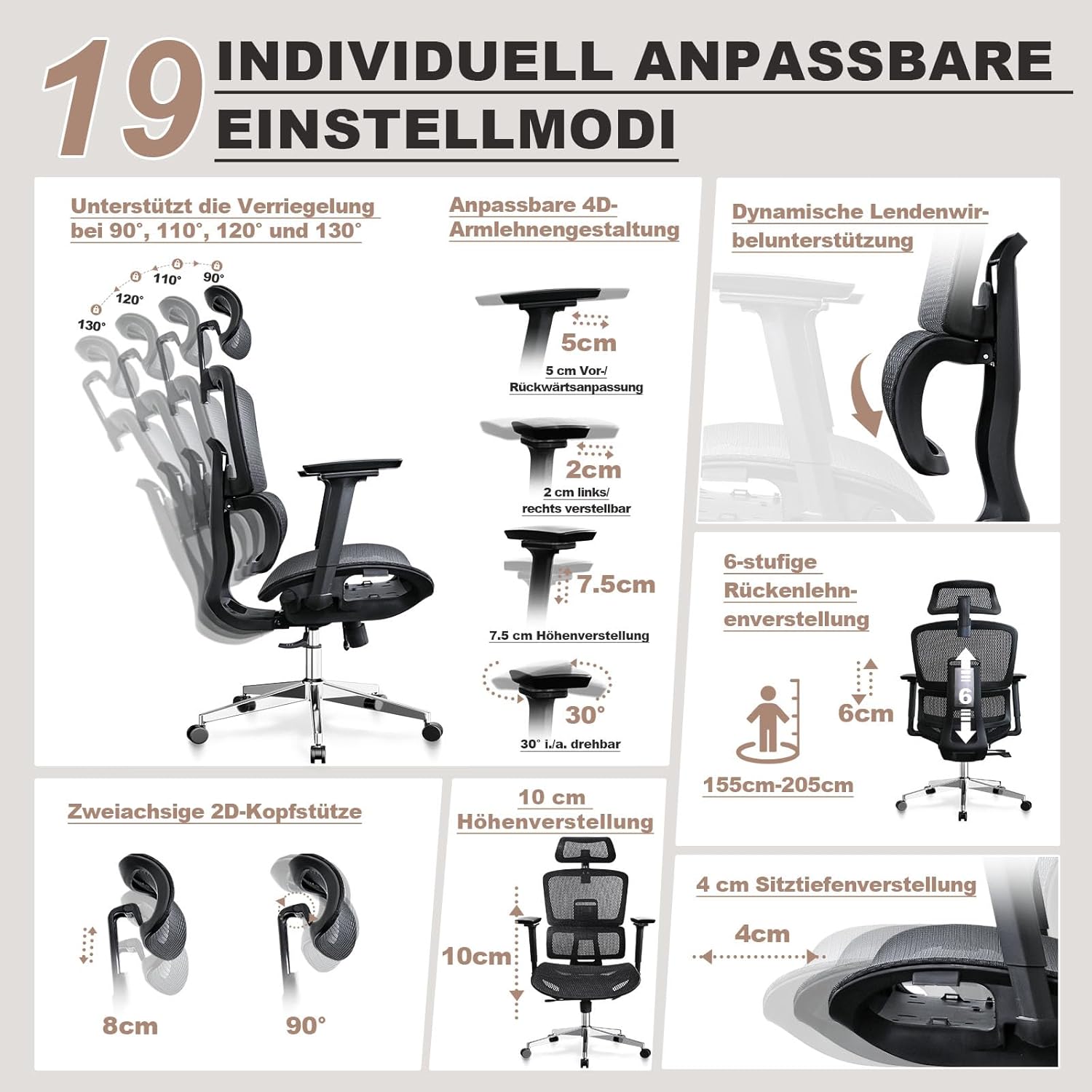
Image: Visual guide to the 19 individual adjustment modes, including recline angles (90°, 110°, 120°, 130°), 4D armrest adjustments (forward/backward, left/right, height, rotation), 6-stage backrest adjustment, 2D headrest adjustments (height, angle), and seat depth adjustment.
Adjusting Your Chair:
- Chair Height Adjustment: Locate the lever under the seat on the right side. Pull the lever up to raise the chair. To lower, sit on the chair and pull the lever up. Release the lever at the desired height.
- Backrest Recline & Lock: Use the lever on the left side under the seat to adjust the backrest angle. The chair supports locking at 90°, 110°, 120°, and 130° angles. Pull the lever out to recline, push it in to lock the position. When you pull the backrest to its highest position, it automatically returns to the starting position.
- 4D Armrest Adjustment:
- Height: Press the button on the side of the armrest and slide it up or down (7.5 cm adjustment range).
- Forward/Backward: Slide the armrest pad forward or backward (5 cm adjustment range).
- Left/Right: Slide the armrest pad left or right (2 cm adjustment range).
- Pivot: Rotate the armrest pad inward or outward (30° rotation).
- Seat Depth Adjustment: Locate the lever or button under the seat. Adjust the seat forward or backward by up to 4 cm to ensure proper thigh support and leg clearance.
- 2D Headrest Adjustment:
- Height: Slide the headrest up or down (10 cm adjustment range).
- Angle: Tilt the headrest forward or backward (90° tilt).
- Lumbar Support Adjustment: The chair features an adaptable lumbar support system. This system automatically adjusts to your lower back curve, providing continuous support.
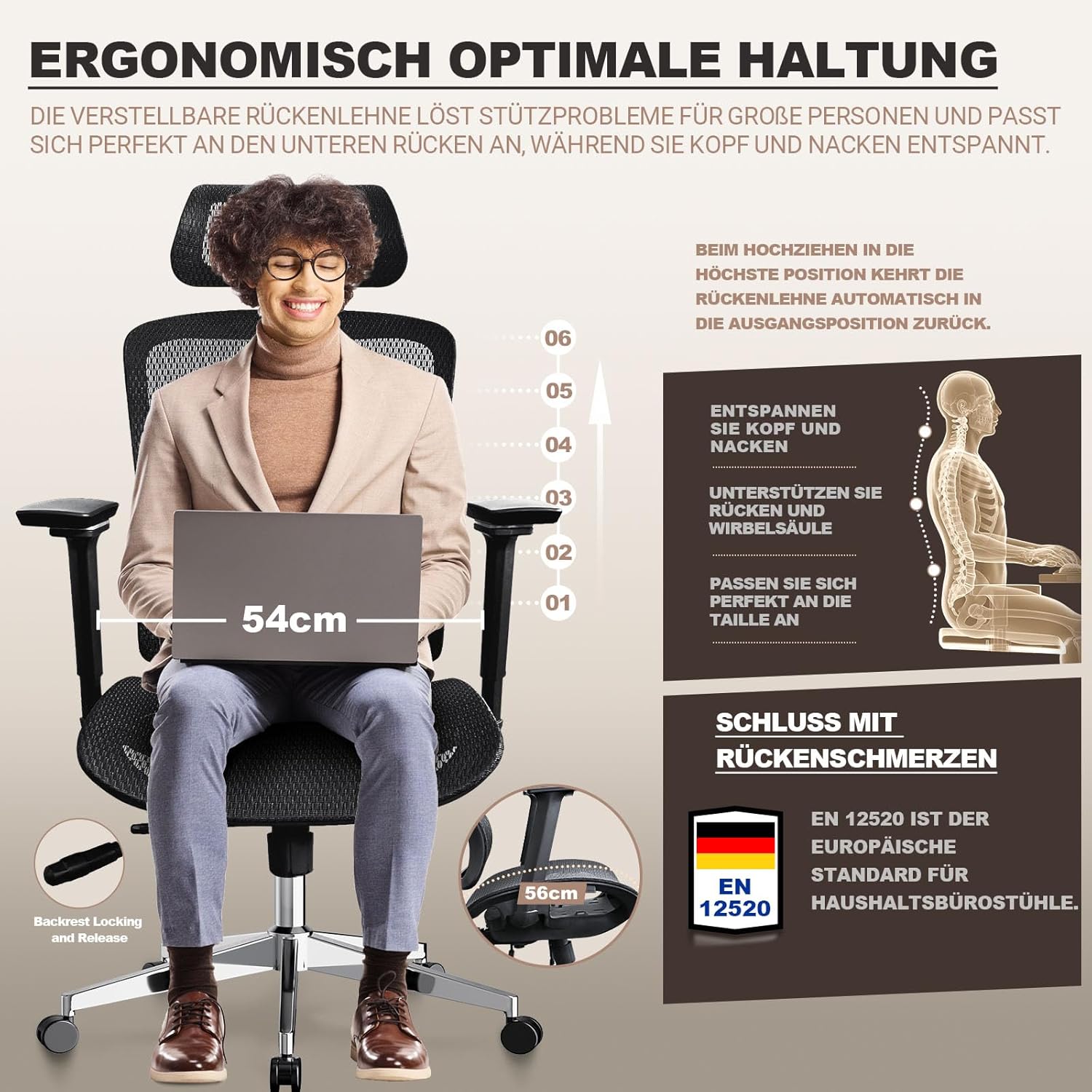
Image: Illustration demonstrating ergonomic posture with the MELOKEA Office Chair, showing how the adjustable backrest supports the spine and relaxes the head and neck. It also highlights the EN 12520 European standard.

Image: Close-up view of the adjustable lumbar support and the 4 cm seat depth adjustment, illustrating how these features provide comfort and pressure relief.
5. Maintenance
Proper maintenance will extend the life and performance of your MELOKEA Office Chair.
- Cleaning: Wipe the chair gently with a damp cloth. Avoid using harsh chemicals, abrasive cleaners, or solvents, as these can damage the mesh fabric or frame finish.
- Regular Inspection: Periodically check all screws and fasteners to ensure they are tight. Re-tighten if necessary to maintain stability and safety.
- Caster Wheels: Keep the caster wheels clean and free of debris (hair, dust, etc.) to ensure smooth movement.
- Avoid Overloading: Do not place excessive weight on the chair or use it for purposes other than its intended use as an office chair.
6. Troubleshooting
If you encounter any issues with your MELOKEA Office Chair, refer to the common problems and solutions below. If the problem persists, contact customer support.
| Problem | Possible Cause | Solution |
|---|---|---|
| Chair does not adjust height. | Gas lift malfunction or lever not engaged. | Ensure the height adjustment lever is fully engaged. If the issue persists, the gas lift may need replacement. Contact customer support. |
| Chair wobbles or feels unstable. | Loose screws or uneven assembly. | Check and tighten all assembly screws, especially those connecting the seat, backrest, and base. Ensure the chair is on a flat surface. |
| Caster wheels do not roll smoothly. | Debris caught in wheels or damaged casters. | Remove any hair or debris from the wheels. If wheels are damaged, they may need to be replaced. |
| Backrest does not recline or lock. | Recline mechanism jammed or lever not engaged. | Ensure the recline lever is fully engaged and not obstructed. Check for any foreign objects in the mechanism. |
| Armrests are loose or difficult to adjust. | Loose fasteners or internal mechanism issue. | Check the screws securing the armrests to the seat and tighten if loose. If the internal mechanism is faulty, contact support. |
7. Specifications
| Feature | Detail |
|---|---|
| Brand | MELOKEA |
| Model Number | D060 |
| Product Dimensions | 74 x 35 x 52 cm (approx. 29.1 x 13.8 x 20.5 inches) |
| Maximum Weight Recommendation | 200 Kilograms (440 lbs) |
| Special Features | Ergonomic, Height Adjustable, Headrest, 4D Armrests, Adjustable Seat Depth, Lumbar Support |
| Back Style | Full Back |
| Product Care Instructions | Wipe gently with a damp cloth |
| ASIN | B0D93Q57XD |
| First Available Date | November 4, 2024 |

Image: Side view of the MELOKEA Office Chair showing height adjustments (113cm-135cm), backrest height (92cm), and certifications like TÜV Rheinland, LGA Quality, and SGS. Also indicates 200kg capacity and PU wheels.
8. Warranty & Support
MELOKEA is committed to providing high-quality ergonomic chairs. For specific warranty details, please refer to the warranty card included with your product or visit the official MELOKEA website.
If you have any questions, require assistance with assembly, or need to report a defect, please contact MELOKEA customer support through the following channels:
- Online Support: Visit the MELOKEA brand store on Amazon or the official MELOKEA website for FAQs and contact forms.
- Email Support: Refer to your purchase documentation for the customer service email address.
Please have your model number (D060) and purchase date ready when contacting support.
Related documentsD060


Ask a question about this manual
Ask about setup, troubleshooting, compatibility, parts, safety, or missing instructions. Manuals+ will review the question and use this page’s manual context to help answer it.