
ASHATA ASHATAy0t14q67gv
ASHATA Compact Car Camcorder for Motorcycle/Bike
Model: ASHATAy0t14q67gv
Introduction
The ASHATA Compact Car Camcorder is a versatile 1080P camera designed for motorcycles, bicycles, and other outdoor sports. Featuring a 120-degree wide-angle lens and a built-in high-capacity lithium battery, it offers up to 12 hours of recording durability. Its robust design allows for various mounting options, making it ideal for capturing your rides and adventures.

Image: The ASHATA Bike Dash Camera, showcasing its key features: WiFi Interconnection, Built-in Lithium Battery, and 12-hour endurance.
Safety Information
Please read all safety instructions carefully before using the product. Keep this manual for future reference.
- Dispose of packaging materials properly after use to avoid choking hazards.
- Do not expose the device to extreme temperatures or direct sunlight for prolonged periods.
- Ensure the device is securely mounted before operation to prevent accidental detachment.

Image: A warning symbol emphasizing the importance of proper disposal of packaging materials to prevent choking hazards.
Package Contents
Verify that all items listed below are included in your package:
- 1 x ASHATA Car Camera
- 3 x Mounting Accessories
- 1 x Charging Cable (USB)
- 1 x Instruction Manual
Note: TF card is NOT included and must be purchased separately.
Setup
1. Charging the Device
Before first use, fully charge the camera. Connect the provided USB charging cable to the camera's USB interface and a power source (e.g., USB wall adapter, computer USB port). The built-in 1500mAh lithium battery provides approximately 12 hours of continuous operation when fully charged.

Image: The camera's built-in lithium battery, providing long durability.
2. Inserting a TF Card
Locate the TF card slot on the camera. Insert a compatible TF card (up to 128GB, not included) with the contacts facing down until it clicks into place. Ensure the card is properly formatted before use (refer to the operating section for formatting instructions via the app).
3. Mounting the Camera
The camera comes with a fixed base and accessories suitable for various applications, including bicycles, motorcycles, and helmets. Choose the appropriate accessory for your desired mounting location.
- Attach the fixed base to the camera.
- Secure the base to your bicycle handlebars, motorcycle frame, or helmet using the provided accessories.
- Adjust the camera angle as needed. The fixed base allows for rotation, which is particularly useful for adjusting headlight direction during night rides for improved safety.
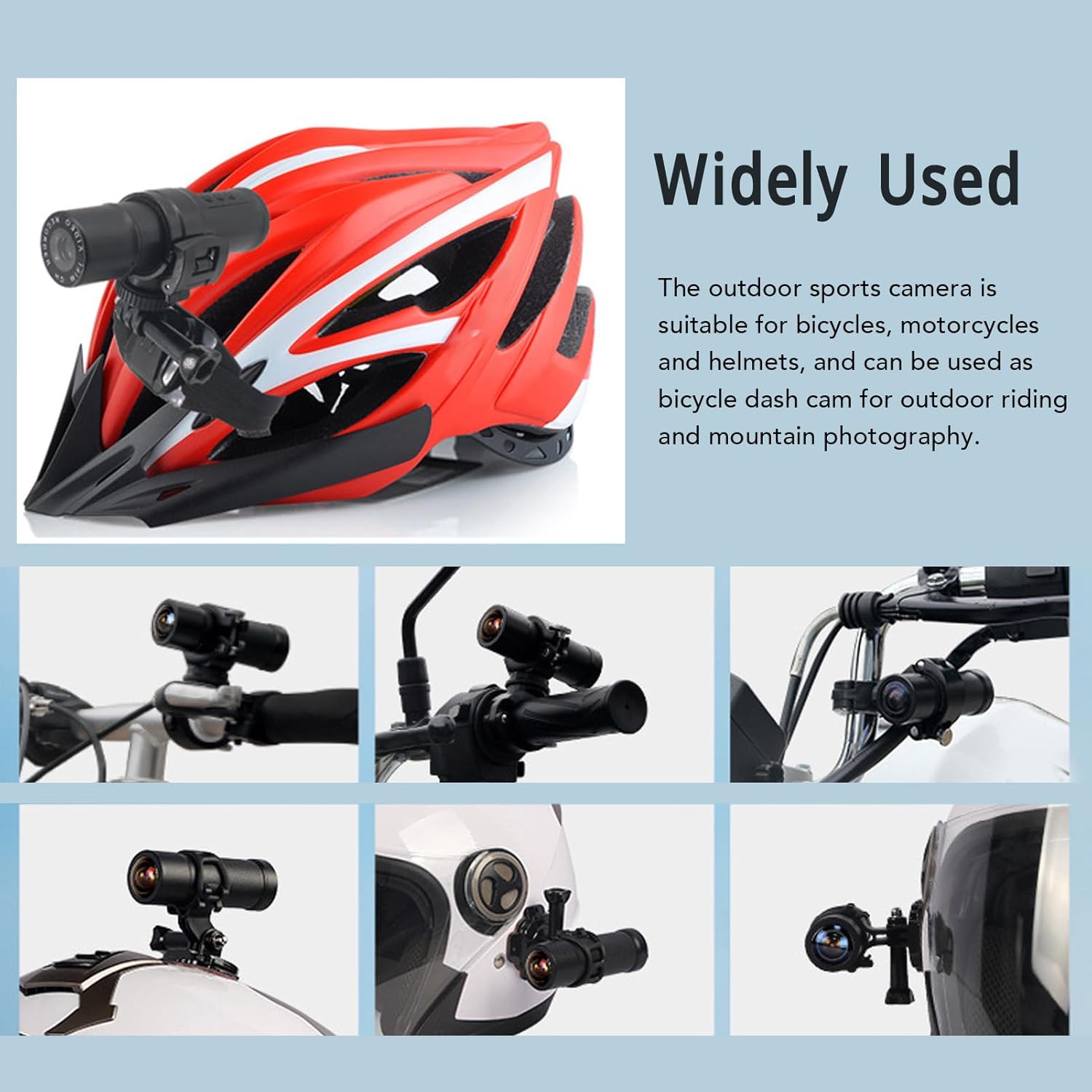
Image: Examples of the camera mounted on a helmet, bicycle, and motorcycle, demonstrating its wide range of uses.
Operating Instructions
1. Powering On/Off
Press and hold the power button (usually marked with a power symbol) for a few seconds to turn the camera on or off. An indicator light will confirm the power status.
2. Recording Video
Once powered on, the camera typically begins recording automatically. It supports cyclic recording with adjustable durations of 1, 3, or 5 minutes. This feature ensures that older files are overwritten when the TF card is full, preventing recording interruptions.
The camera supports charging during recording, allowing for extended use without interruption.
3. Wi-Fi Interconnection and App Usage
The camera features Wi-Fi connectivity, allowing you to connect it to your smartphone via a dedicated app. This enables real-time viewing of footage, playback, and easy management of settings.
- Download the official ASHATA camera app from your smartphone's app store.
- Turn on the camera's Wi-Fi (refer to camera buttons or app for specific instructions).
- On your smartphone, go to Wi-Fi settings and connect to the camera's Wi-Fi network (SSID and password usually found on the camera or in the manual).
- Open the ASHATA app. You should now be able to see a live feed from the camera, access recorded videos, and adjust settings like recording cycle, resolution, and more.

Image: The camera's Wi-Fi interconnection feature, allowing real-time viewing and control via a smartphone app.
4. Wide Angle Viewing
The camera captures footage with a 120-degree wide-angle lens, providing a broad field of view to capture more of your surroundings. This is particularly beneficial for recording dynamic outdoor activities.

Image: A visual representation of the camera's 120-degree wide-angle capability.
Maintenance
- Cleaning: Use a soft, dry cloth to clean the camera body. For the lens, use a specialized lens cleaning cloth and solution to avoid scratches.
- Storage: When not in use for extended periods, store the camera in a cool, dry place away from direct sunlight and extreme temperatures. Ensure the battery is partially charged (around 50%) before storage to prolong its lifespan.
- Firmware Updates: Periodically check the ASHATA website or app for any available firmware updates to ensure optimal performance and new features.
Troubleshooting
| Problem | Possible Cause | Solution |
|---|---|---|
| Camera does not power on. | Low battery; faulty charging cable/adapter. | Charge the camera fully. Try a different charging cable or power source. |
| Cannot connect to Wi-Fi. | Wi-Fi not enabled on camera; incorrect password; app issues. | Ensure camera Wi-Fi is on. Double-check Wi-Fi password. Restart camera and phone. Reinstall app if necessary. |
| Recording stops unexpectedly. | TF card full; TF card error; low battery. | Format or replace TF card. Ensure cyclic recording is enabled. Charge the camera. |
| Poor video quality. | Dirty lens; low light conditions; incorrect resolution settings. | Clean the lens. Ensure adequate lighting. Check resolution settings in the app (should be 1080p for best quality). |
Specifications
| Feature | Detail |
|---|---|
| Item Type | Dash Cam |
| Material | ABS |
| Built-in Battery | 1500mAh Lithium Battery |
| Resolution Ratio | 1080p |
| Recording Cycle | 1 / 3 / 5 minutes |
| Light Source Frequency | 50HZ / 60HZ |
| TF Card Support | Maximum 128GB (not included) |
| Wide Angle | 120 Degrees |
| Battery Life | Approx. 12 hours |
| Product Dimensions | 14 x 10 x 8 cm; 267 g |
| Model Name | ASHATAy0t14q67gv |
Warranty and Support
For warranty information and technical support, please refer to the official ASHATA website or contact their customer service. Keep your purchase receipt as proof of purchase for any warranty claims.
Manufacturer: ASHATA
Ask a question about this manual
Ask about setup, troubleshooting, compatibility, parts, safety, or missing instructions. Manuals+ will review the question and use this page’s manual context to help answer it.