
XinFuture XFUS#HCT-379
XinFuture 4-Outlet Sprinkler Timer User Manual
Model: XFUS#HCT-379
1. Introduction
Thank you for choosing the XinFuture 4-Outlet Sprinkler Timer. This programmable garden hose timer is designed to simplify your watering routine, offering independent control over four separate watering zones. This manual provides detailed instructions for installation, operation, maintenance, and troubleshooting to ensure optimal performance and longevity of your device. Please read this manual carefully before use and keep it for future reference.
2. Product Overview
2.1 Key Features
- 4 Independent Watering Zones: Program separate schedules for each of the four outlets.
- Multiple Operating Modes: Auto, Manual, and Rain Delay modes for flexible watering control.
- Easy Programming: User-friendly interface with a large LCD screen for clear display of watering information.
- Durable Construction: Heavy-duty weatherproof shell with IPX5 waterproof rating for outdoor use.
- Leak Prevention: Includes a filter to prevent clogging, a seal ring for the battery cover, and washers to ensure tight connections.
- Child Lock: Feature to prevent unintended changes to settings.
2.2 Components
Familiarize yourself with the main components of your XinFuture 4-Outlet Sprinkler Timer:

Figure 2.1: XinFuture 4-Outlet Sprinkler Timer with included O-ring and Teflon tape.
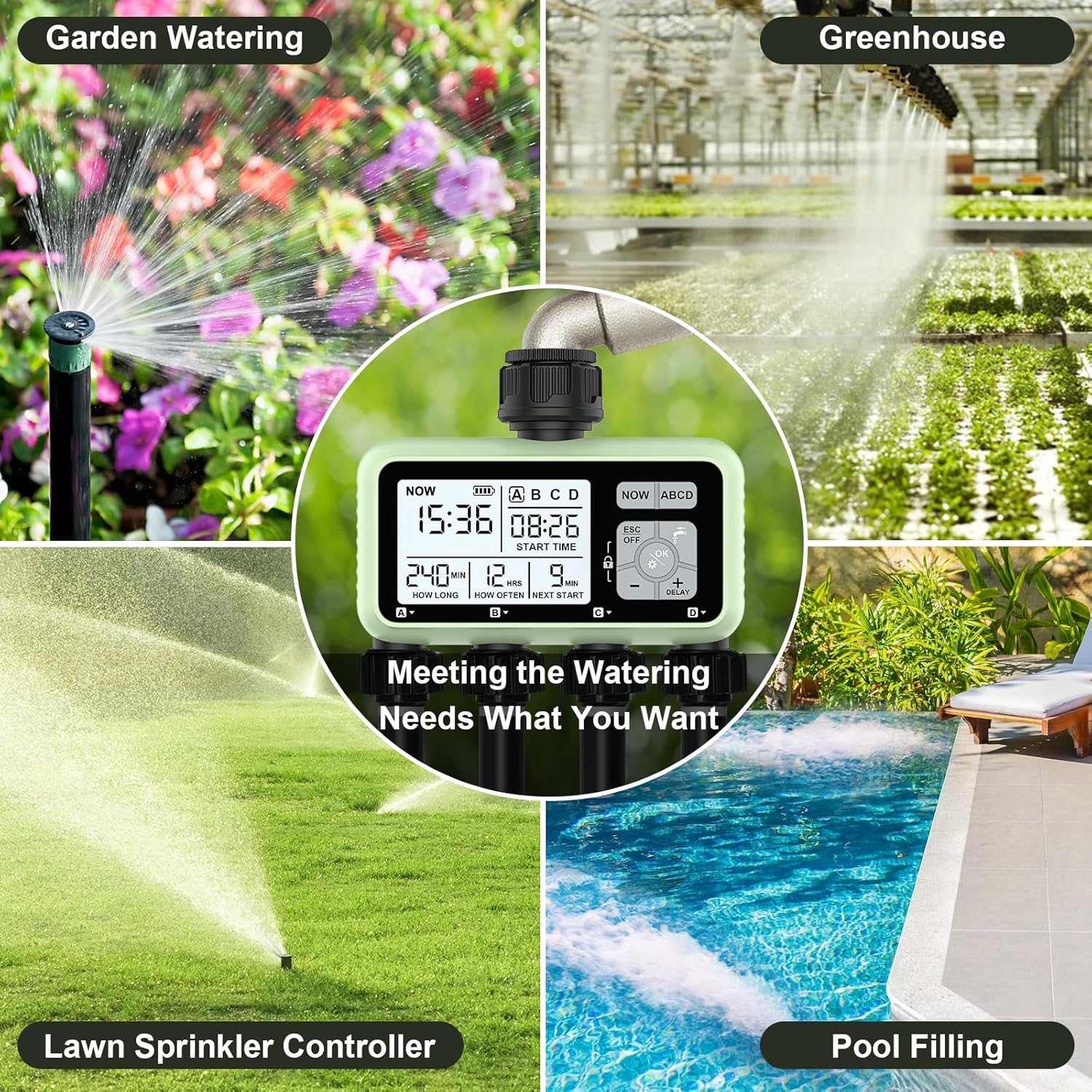
Figure 2.2: Close-up of the timer's LCD display showing current time, start time, irrigation duration, irrigation frequency, and duration to next irrigation. The control buttons are also visible.

Figure 2.3: Illustration of the weather-resistant design, highlighting the 360-degree rotatable inlet for easy connection, the clear key panel for simple setup, and the sealed battery cover to prevent moisture intrusion.
3. Setup
3.1 Battery Installation
The timer requires two (2) 1.5V 'AA' alkaline batteries (not included). Ensure correct polarity when inserting. The battery compartment features a secure sealing mechanism for enhanced protection against moisture.
Video 3.1: Demonstrates the process of installing batteries and setting up the initial time on the XinFuture 4-Outlet Sprinkler Timer.
3.2 Connecting the Timer
- Ensure the faucet is turned off.
- Attach the timer to your outdoor faucet. The inlet connects to your water output and is compatible with a 3/4" hose thread.
- If there is leaking from the inlet side, use the included O-ring that fits inside where the mesh filter is.
- Use the provided Teflon tape on the spigot threads to ensure a good fit and prevent leaks.
- Connect your hoses to the four independent outlets (Zone A, B, C, D) at the bottom of the timer.

Figure 3.1: The 4-outlet timer connected to a faucet, demonstrating its ability to manage four separate watering zones simultaneously.
4. Operating the Timer
The XinFuture 4-Outlet Sprinkler Timer offers Auto, Manual, and Rain Delay modes to suit various watering needs. Each zone can be programmed independently.
4.1 Programming Watering Schedules (Auto Mode)
The programming steps are generally as follows:
- Set Current Time: Press the 'NOW' button. Use the +/- buttons to adjust the hour and minute, then press 'OK' to confirm.
- Select Zone: Press the 'ABCD' button repeatedly to switch between Zone A, B, C, or D.
- Set Start Time: With the desired zone selected, press the 'ABCD' button again to enter the start time setting. Use +/- to adjust the hour and minute, then 'OK' to confirm.
- Set How Long (Duration): The display will automatically move to 'HOW LONG'. Use +/- to set the watering duration in minutes or seconds, then 'OK' to confirm.
- Set How Often (Frequency): The display will move to 'HOW OFTEN'. Use +/- to set the watering frequency in hours or days, then 'OK' to confirm.
Video 4.1: A comprehensive guide on how to program the XinFuture 4-Outlet Watering Timer, including setting current time, start times, watering duration, and frequency for each zone.
4.2 Manual Watering
To manually water without interrupting the set program:
- Press the water droplet icon button (usually labeled 'OK' or 'Manual').
- Use the +/- buttons to set the desired manual watering duration (e.g., 10 minutes).
- Press 'OK' to start manual watering.
- To stop manual watering, press the 'ESC/OFF' button.
Video 4.2: Demonstrates how to manually open and close the valves on the sprinkler timer. Note: This video also shows a potential leakage issue, which is addressed in the Troubleshooting section.
4.3 Rain Delay
The rain delay feature allows you to postpone the next watering cycle for a period of 1-7 days. This is useful to conserve water during rainy periods.
- Press the '+ DELAY' button.
- Use the +/- buttons to select the desired delay duration (e.g., 24 hours, 48 hours).
- Press 'OK' to confirm the rain delay. The timer will automatically resume the set program after the delay period.
- To cancel a rain delay, press and hold the '+ DELAY' button for 3 seconds.
4.4 Child Lock
To prevent unintended changes to your settings, you can lock the device:
- To lock: Press and hold the 'OK' and '-' buttons simultaneously for 3 seconds. A lock icon will appear on the display. All zones will be locked at once.
- To unlock: Press and hold the 'OK' and '-' buttons simultaneously for 3 seconds again. The lock icon will disappear.
5. Maintenance
- Cleaning: Clean the casing regularly with a soft cloth moistened with soapy water. Avoid using harsh solvents or chemicals as they may damage the synthetic components. Do not submerge the product in water.
- Filter Maintenance: The water inlet includes a filter to prevent clogging. Check and clean this filter regularly by rinsing it under running fresh water. Reinsert the filter securely after cleaning.
- Battery Care: Replace batteries annually or when the low battery indicator appears on the display. When storing the device for extended periods (e.g., during winter), remove the batteries and store the timer in a dry, indoor place to prevent damage from freezing temperatures or battery leakage.
- Leak Prevention: Always ensure the O-ring and Teflon tape are properly installed at connection points to prevent leaks. Replace them if they show signs of wear.
6. Troubleshooting
| Problem | Possible Cause | Solution |
|---|---|---|
| LCD does not display anything. | Batteries are not installed correctly, are dead, or power is exhausted. | Check battery polarity. Replace with new 1.5V 'AA' alkaline batteries. |
| Water does not come out at pre-set time. | Program not set up for the zone, faucet is off, or low battery. | Verify program settings for the specific zone. Ensure faucet is fully open. Replace batteries if low battery indicator is on. |
| Water inlet/outlet leaks. | Loose connection, missing O-ring, worn washer, or damaged threads. | Ensure connections are tight. Install O-ring and use Teflon tape on threads. Check and replace washers if worn. |
| Valve stuck open or not closing properly. | Debris in valve or internal mechanism issue. | Cycle the manual mode a few times to clear potential debris. If issue persists, contact support. |
7. Specifications
- Model No.: XFUS#HCT-379
- Item Size: 142 x 74 x 164 mm
- Net Weight: 670 ± 10 g (approx. 1.48 pounds)
- Water Inlet: 3/4" - 1" Internal Thread
- Water Outlet: 3/4" External Thread
- Power Supply: 2 x 1.5V 'AA' Alkaline Batteries
- Water Duration: 1 - 59 seconds / 1 - 360 minutes
- Working Pressure: 0.05 - 0.8 Mpa (0.5 - 8 bar)
- Working Temperature: 3 - 45°C
- Flow Rate (at approx 4 bar): ≥ 30 l/min
- Water Medium: Clean Fresh Tap-Water
- Water Frequency: 1 - 23 hours / 1 - 15 days
- Material: Plastic
- Color: Green
8. Warranty
In case of device performance failures, a 1-year warranty after sale is included. The following circumstances are excluded from this guarantee:
- Repairs or alterations made or attempted by unauthorized persons.
- Normal wear and tear.
- Device abuse, misuse, or improper maintenance.
- Use of non-original spare parts.
The dealers' remedies shall be limited to repair or replacement of nonconforming units or parts.
9. Support
For any questions, technical assistance, or warranty claims, please contact XinFuture customer service through the platform where you purchased the product. Please have your model number (XFUS#HCT-379) and purchase details ready for faster service.
Ask a question about this manual
Ask about setup, troubleshooting, compatibility, parts, safety, or missing instructions. Manuals+ will review the question and use this page’s manual context to help answer it.