
1. Introduction
Thank you for choosing the Riksion Walking Pad Electric Treadmill. This manual provides essential information for the safe and effective use of your new fitness equipment. Please read this manual thoroughly before operation and retain it for future reference.
2. Important Safety Instructions
- Always place the walking pad on a flat, stable surface.
- Ensure there is adequate clear space (at least 1 meter) around the walking pad during use.
- This walking pad is designed for adult use. Keep children and pets away from the equipment during operation.
- Consult a physician before starting any new exercise program, especially if you have pre-existing medical conditions.
- Wear appropriate athletic footwear during use.
- The maximum user weight capacity for this device is 120.2 kg (265 lbs). Do not exceed this limit.
- Do not use the walking pad if it is damaged or malfunctioning. Contact customer support for assistance.
- Unplug the walking pad from the power outlet when not in use or before cleaning.
3. Package Contents
Your Riksion Walking Pad Electric Treadmill comes fully assembled. Please check the package for the following items:
- Riksion Walking Pad Electric Treadmill (fully assembled)
- Remote Control
- Power Cord
- User Manual

Image: The Riksion Walking Pad Electric Treadmill as it appears in its shipping box, indicating its compact packaging.
4. Setup
The Riksion Walking Pad is designed for immediate use with no assembly required.
- Unpack: Carefully remove the walking pad from its packaging.
- Placement: Place the walking pad on a firm, level surface in your desired exercise area. Ensure there is sufficient space around the unit for safe operation.
- Power Connection: Plug the power cord into the walking pad and then into a standard electrical outlet.
5. Operating Instructions
5.1. LED Display and Remote Control
The walking pad features an integrated LED display and is controlled via a wireless remote. The display shows key workout metrics.

Image: Close-up view of the walking pad's LED display showing speed, time, distance, and calories, alongside the remote control for operation.
5.2. Starting and Stopping
- To Start: Press the 'Start' button on the remote control. The walking pad will begin at a low speed.
- To Stop: Press the 'Stop' button on the remote control. The walking pad will gradually slow down and come to a complete stop.
5.3. Adjusting Speed
- Use the '+' and '-' buttons on the remote control to increase or decrease the walking speed.
- The speed range is from 1 km/h to 6 km/h. Adjust the speed to a comfortable and safe level for your workout.
5.4. Monitoring Your Workout
The LED display provides real-time feedback on your workout:
- Time: Duration of your exercise session.
- Speed: Current walking speed.
- Distance: Total distance covered during the session.
- Calories: Estimated calories burned.
6. Features
6.1. Compact and Portable Design
The Riksion Walking Pad is designed for space-saving convenience. Its ultra-thin profile allows for easy storage under furniture like sofas or beds. Integrated transport wheels enable effortless relocation.
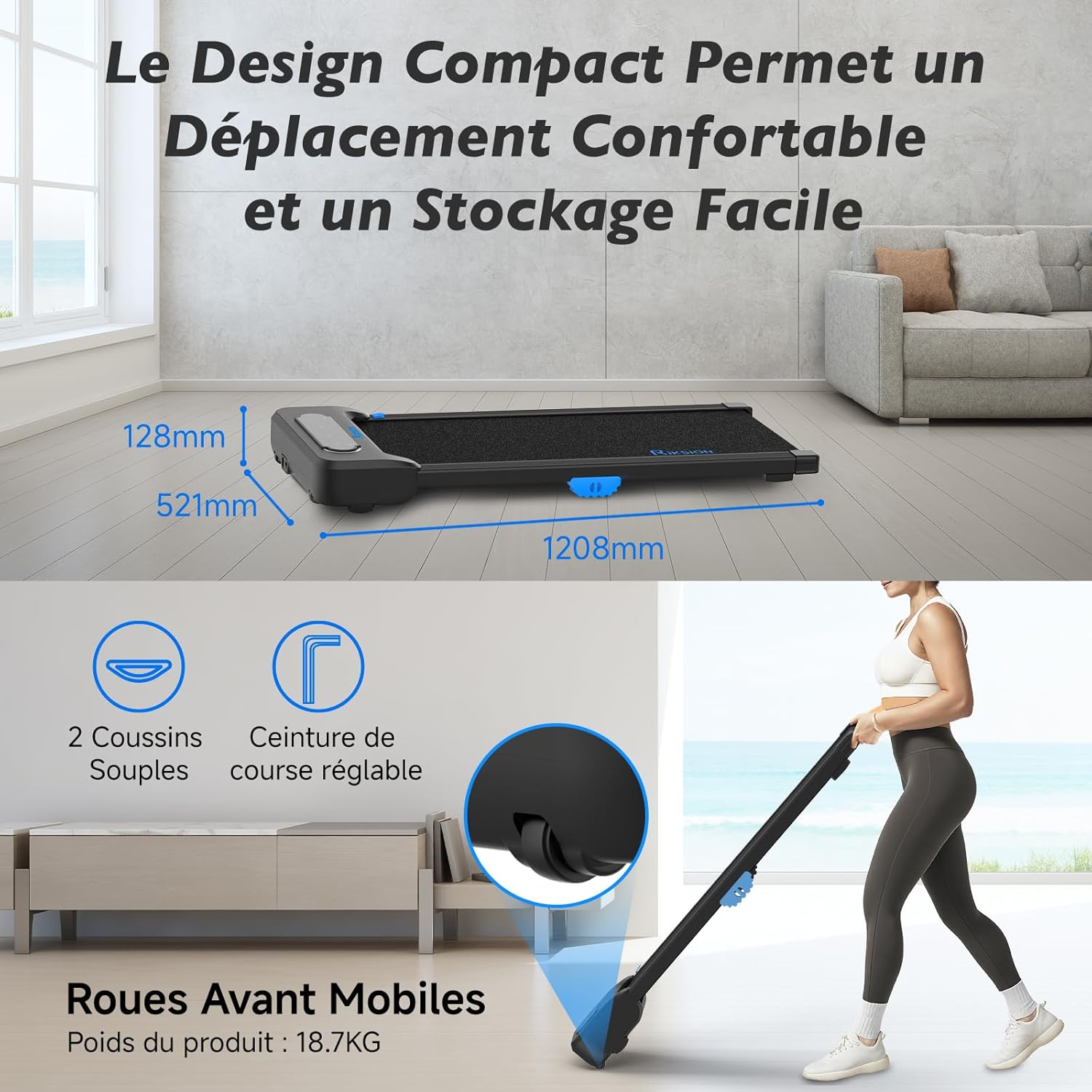
Image: Illustration of the walking pad's compact dimensions (1208mm length, 521mm width, 128mm height) and the front mobile wheels for easy movement.
6.2. Advanced Shock Absorption System
Equipped with a 5-layer running belt and two soft cushions, the dual-layer shock absorption system protects your knees and joints during exercise, providing a comfortable walking experience.

Image: Visual representation of the walking pad's shock absorption technology, highlighting the protection for knees and joints, and an exploded view of the 5-layer running belt construction.
6.3. Silent and Powerful Motor
The walking pad features a silent and powerful 2 HP motor, allowing for quiet operation suitable for home or office environments without disturbing others. It supports speeds from 1 to 6 km/h and a maximum user weight of 120.2 kg.

Image: An internal diagram illustrating the powerful and quiet motor, along with icons indicating the 1-6 km/h speed range, 2 HP motor power, and 120 kg / 265 lbs weight capacity.
6.4. Wide Walking Surface
The 400mm wide running belt provides ample space for comfortable walking or jogging, ensuring a natural stride.

Image: A person using the walking pad, illustrating its use for both active work and exercise, with an overlay showing the 400mm belt width and 1000mm walking length.
7. Maintenance
Regular maintenance ensures the longevity and optimal performance of your walking pad.
- Cleaning: Wipe down the walking pad with a damp cloth after each use to remove sweat and dust. Do not use abrasive cleaners.
- Belt Lubrication: Periodically check the running belt for proper lubrication. Refer to the specific instructions for your model regarding lubrication frequency and type of lubricant.
- Storage: When not in use, store the walking pad in a dry, cool place, away from direct sunlight and moisture. Utilize its compact design for convenient storage.
- Inspection: Regularly inspect all parts for wear and tear. Tighten any loose screws or bolts.
8. Troubleshooting
If you encounter any issues with your Riksion Walking Pad, please refer to the following common troubleshooting steps:
- Walking Pad Not Turning On:
- Ensure the power cord is securely plugged into both the walking pad and a working electrical outlet.
- Check if the power switch on the walking pad (if present) is in the 'ON' position.
- Verify the power outlet is functional by plugging in another device.
- Remote Control Not Responding:
- Check and replace the batteries in the remote control.
- Ensure there are no obstructions between the remote control and the walking pad's receiver.
- Running Belt Slipping or Sticking:
- The belt may require lubrication. Refer to the maintenance section.
- The belt tension may need adjustment. Consult customer support if you suspect this is the issue.
- Unusual Noises:
- Stop the walking pad immediately.
- Inspect for any foreign objects caught in the belt or motor area.
- If the noise persists, discontinue use and contact customer support.
If these steps do not resolve the issue, please contact Riksion customer support for further assistance.
9. Specifications
| Feature | Specification |
|---|---|
| Brand | Riksion |
| Model | JF-H-40J-4 |
| Color | Black |
| Product Dimensions (L x W x H) | 120.8P x 52.1l x 12.8H centimeters |
| Material | Alloy Steel |
| Maximum Speed | 6 Kilometers per hour |
| Special Features | Shock Absorbing, With Wheels, Compact Design, Portable |
| Target Audience | Adult |
| Maximum Power | 2 Horsepower |
| Assembly Required | No |
| Display Type | LED |
| Running Belt Width | 400mm |
| Maximum User Weight | 120.2 kg (265 lbs) |
10. Warranty and Support
For warranty information or technical support, please refer to the documentation included with your purchase or contact Riksion customer service directly. Ensure you have your product model number (JF-H-40J-4) and purchase details available when seeking support.